A smartwatch can do more than count steps; it can help you stay ahead of your day. You can filter notifications, check calendars, capture tasks, and use voice commands without breaking your flow. The right features save time and reduce distractions, but not every option fits every routine. If you want your watch to work like a real productivity tool, the details matter.
Which Smartwatch Features Help You Work Faster?
Several smartwatch features can speed up your workday by putting key actions on your wrist.
You can check your schedule, accept invites, and update tasks without opening your phone, which keeps you moving with your team. Calendar integration helps you catch meetings fast, while app shortcuts let you launch the tools you use most in a tap. If you’re tracking goals, workflow analytics can show where your time goes and help you adjust. Voice assistant tools also save time when you need to create reminders or events on the fly. Navigation, timers, and quick note features keep you focused during busy stretches.
With these options, you stay organized, connected, and part of a smoother workflow.
Manage Notifications Without Constant Phone Checks
Your smartwatch can help you manage notifications without constantly pulling out your phone. You can use notification filtering to keep important alerts visible while muting noise from less urgent apps.
That means you stay informed without getting pulled away from your work, meeting, or workout. With quick vibration cues, you’ll know when something needs your attention, and you can glance, respond, or dismiss it in seconds.
This kind of distraction control helps you protect your focus and feel more in sync with your day. Set priority apps, silence nonessential alerts, and check updates only when they matter.
Use Calendar and Reminders to Stay on Track
Your smartwatch can sync your calendar and alert you to upcoming events, so you’ll catch changes without pulling out your phone.
You can create reminders in seconds by voice or tap, which makes it easy to stay on top of tasks while you’re busy.
It also helps you prioritize events and notifications, so you can focus on what matters most.
Calendar Sync Alerts
Use calendar sync alerts to keep work, classes, and family plans aligned across devices. With event notification filters, you’ll only get the alerts that matter most, so your wrist stays useful instead of noisy.
When your day shifts, your watch helps you stay in step with your team and your people. You can review, edit, or clear events quickly, which keeps your schedule current and your mind clear.
That small rhythm of updates helps you feel prepared, included, and in control.
Quick Reminder Setup
Set up quick reminders on your watch so you can capture tasks before they slip away. With speedy alert creation, you can add a grocery run, call, or deadline in seconds without opening your phone. Use instant reminder shortcuts to save repeat actions, so you stay organized with less effort.
Your watch can pull in calendar items and turn them into timely prompts, helping you keep your day moving. If plans shift, update reminders right from your wrist and stay in sync with your routine. You’ll feel more in control because everything lives where you can see it fast. That simple habit helps you stay connected, supported, and ready for what’s next.
Event Priority Management
When you juggle a busy schedule, use your watch’s calendar and reminders to sort what needs attention first. Open your calendar, scan each event, and rank meetings, deadlines, and personal plans by urgency.
Event filtering helps you hide low-value items, so you can focus on what truly matters. Use alert triage to decide which notifications need action now, which can wait, and which you can dismiss.
If a meeting changes, update it from your wrist and keep your group in sync. Set location-based reminders for trips, errands, or appointments, so you don’t miss a step.
With quick glances and taps, you stay organized, feel in control, and move through your day like you belong there.
Track Tasks and To-Dos From Your Wrist
Your smartwatch can help you track tasks and to-dos without pulling out your phone. You can check task lists, mark progress, and keep daily priorities visible while you move through your day. That steady access helps you stay in sync with your team and your goals.
| Action | Benefit | When to Use |
|---|---|---|
| View tasks | Stay organized | Morning check-in |
| Mark complete | Build momentum | After each finish |
| Reorder items | Focus fast | Plans change |
| Review reminders | Avoid misses | Before meetings |
A quick wrist glance keeps you informed and confident. You don’t need to search through apps or lose track of what matters. Instead, you stay connected, on pace, and ready to handle the next step with less effort.
Use Smartwatch Voice Commands for Faster Actions
You can use voice commands to reply to messages quickly without stopping what you’re doing.
You can also create tasks, reminders, and calendar entries hands-free when you’re on the move.
With voice control, you’ll open apps and find features faster, which saves time throughout the day.
Quick Voice Replies
- Pick saved phrases for common replies like “Running late” or “I’ll call you back.”
- Edit a voice draft on the watch before sending it, keeping your tone clear.
- Use short replies to confirm plans, share updates, or keep conversations active.
This approach saves time, reduces distractions, and helps you stay present.
When you answer quickly, you fit in naturally and keep communication effortless.
Hands-Free Task Creation
Quick voice replies keep conversations moving, and the same hands-free approach works for getting tasks done fast. You can say a reminder, create a calendar event, or jot a task before the moment slips away.
With voice dictation, your watch turns spoken ideas into clear entries, so you don’t have to stop what you’re doing. Use it when you’re commuting, carrying bags, or moving between meetings.
You can also capture hands free notes to save quick ideas, follow-up items, and shopping lists in seconds. This keeps your workflow smooth and helps you stay connected to your routine.
When you rely on voice commands, you’ll feel more in sync with your day and your team. It’s a simple way to act quickly and stay organized.
Faster App Navigation
Smartwatch voice commands can speed up app navigation by letting you open tools, start actions, and switch tasks without digging through menus. You stay in control, and your watch feels like part of your rhythm, not another hurdle. Pair voice input with gesture shortcuts to move faster when your hands are busy or you’re on the go.
- Say an app name to jump straight to it, boosting app drawer efficiency.
- Use commands like “start timer” or “open calendar” to skip taps.
- Combine brief swipes with voice prompts to keep your flow smooth.
This approach helps you act quickly, stay organized, and feel connected to a productive routine. When navigation gets simpler, your watch supports your pace instead of slowing you down.
Use Health Tracking to Avoid Burnout
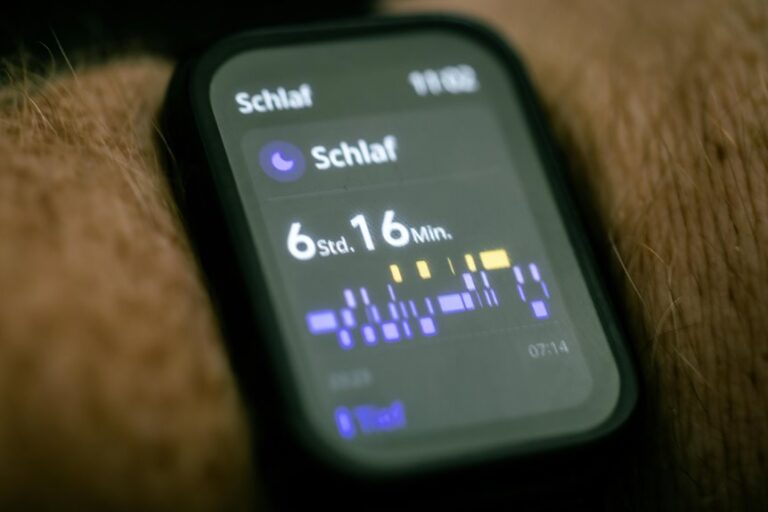
When your schedule starts to pile up, your smartwatch can help you spot burnout before it hits by tracking sleep, activity, and heart rate trends. You’ll notice burnout warning signs like shorter sleep, low energy, and a racing pulse after ordinary tasks. Use those clues to adjust your day early. Build recovery habit planning around what your watch shows, not guesswork.
| Signal | Action |
|---|---|
| Poor sleep | Go to bed earlier |
| High stress | Take a short break |
| Low activity | Walk between tasks |
| Elevated heart rate | Ease your pace |
Check trends each week so you can protect your focus and keep up with your team without pushing past your limits.
Automate Everyday Actions With Smartwatch Shortcuts
Set up smartwatch shortcuts to handle routine tasks faster, so you can act without pulling out your phone. You’ll build custom shortcuts that fit how your day flows, and automated routines will keep small jobs moving while you stay present with your team. Use them to reduce taps, save time, and feel in control.
- Open maps, timers, or reminders with one wrist tap.
- Trigger silent modes, notifications, or messages when meetings start.
- Start voice commands to add tasks or note ideas hands-free.
When you rely on shortcuts, you join a smoother rhythm that many productive users already use. You’re not chasing your watch; it’s helping you stay organized. Keep each action simple, repeatable, and easy to trust.
Choose Features Based on Your Daily Workflow
Now that you’ve streamlined routine actions with shortcuts, the next step is picking smartwatch features that match how you actually work.
Start with workflow matching: if your day runs on meetings, choose calendar integration, reminders, and quick invite responses. If you’re always moving, voice assistant tools help you set tasks, send texts, and capture ideas hands-free. If staying connected matters most, prioritize call, text, and email alerts you can triage fast.
For focus, use timers, Do Not Disturb, and location-based reminders to cut distractions. For commuting or fieldwork, navigation and quick notes save time. Strong feature prioritization helps you buy what you’ll use, not what sounds impressive. Choose the tools that fit your team, your pace, and your rhythm.
Frequently Asked Questions
How Long Does Smartwatch Battery Last During Heavy Productivity Use?
You can expect about one to two days of runtime under heavy productivity use, and sometimes less. Battery drain depends on factors such as GPS usage, frequency of notifications, and call activity. Extend runtime by lowering screen brightness, reducing always-on display time, limiting background app refresh, and silencing nonessential alerts.
Which Smartwatches Work Best With iPhone and Android?
Apple Watch pairs most seamlessly with iPhone. For Android, Samsung Galaxy Watch and Google Pixel Watch offer the widest compatibility, and many Garmin models also work well with Android phones. Apple provides the deepest iPhone integration, while Samsung and Google deliver the broadest Android feature support.
Can Smartwatches Support Third-Party Productivity Apps?
Yes. Many smartwatches let you install third party productivity apps so your watch can handle tasks, calendars, notes and reminders. Check app store availability, whether the watch syncs with your phone and cloud services, and if the companion apps support the specific productivity tools you rely on.
Are Smartwatch Payment Features Secure for Daily Use?
You can use smartwatch payments safely if you enable tap to pay protections and wallet token encryption. Use a strong passcode, enable wrist detection, and set instant notifications to spot any suspicious activity.
How Accurate Are Smartwatch Sleep and Fitness Sensors?
You can expect reasonably accurate sleep stage estimates and dependable heart rate tracking for general daily patterns, but wrist sensors often fail to detect short awakenings and very high intensity exercise. Wear the watch snugly and cross-check its readings with how you feel.