
Alls In One Computer setups make sense when you want a tidy desk, a simpler cable layout, and a screen that does not crowd the room. You get a practical middle ground for home office work, school tasks, streaming, and everyday browsing without building a tower-and-monitor setup from scratch.
The mix below leans on different screen sizes, memory levels, and processor tiers, so you can match the machine to your space and workload. Some picks suit a compact desk in a bedroom or apartment, while others feel better for family use, light multitasking, or a more comfortable all-day setup.
Quick Shortlist For Faster Comparison
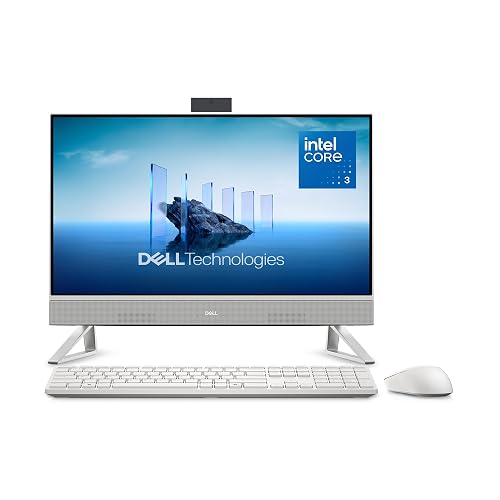
Dell 23.8″ All-in-One Desktop, FHD, Intel Core 3 100U

HP 2025 22″ FHD All-in-One Desktop Computer

Lenovo IdeaCentre All-in-One Desktop Computer, 8GB RAM 512GB SSD

24″ All-in-One Desktop PC with Windows 11
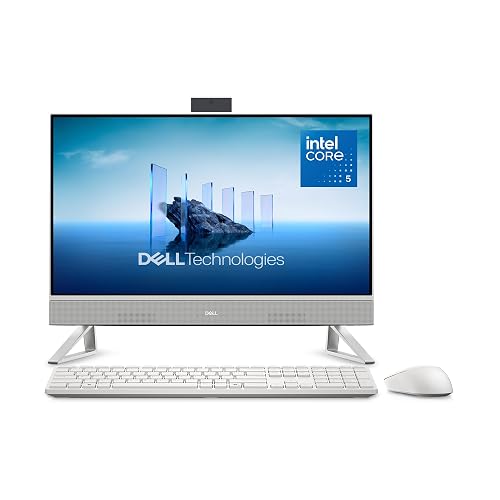
Dell 23.8″ All-in-One Desktop, FHD, Intel Core 5 120U

Dell 27″ All-in-One Desktop, FHD, Intel Core 5 120U
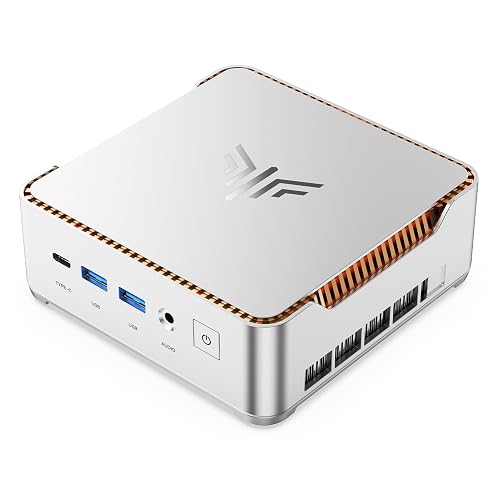
KAMRUI Hyper H2 Mini PC, Core i5-14500HX, 16GB RAM, 512GB SSD

Lenovo IdeaCentre 24 All-in-One Desktop Computer Intel 16GB 512GB SSD AIO
More Details On Our Top Picks
Dell keeps this one in the practical lane, with a 23.8-inch Full HD panel, 8GB of memory, and a 512GB solid-state drive, which means everyday work feels orderly rather than cramped. The Core 3 100U suits browsing, documents, and school tasks, and the bundled keyboard and mouse save you from piecing together extras right away.
The trade-off shows up in heavier multitasking, where 8GB RAM can feel tighter than the 16GB options farther down the list, especially beside the Dell 23.8-inch Core 5 model. For a home office corner or a family desk that just needs to stay neat, this feels like a sensible starting point.
What We Like
- 23.8-inch Full HD screen gives you a comfortable middle ground for work and streaming.
- 512GB SSD should feel quick for boot-ups and basic app opening.
- The included keyboard and mouse make setup simpler out of the box.
- Wi-Fi 6E and Bluetooth support modern wireless gear with less fuss.
Things To Consider
- 8GB memory is fine for light use, though tabs and apps can crowd it faster than 16GB setups.
- The 23.8-inch size is compact, yet it gives you less room than the 27-inch Dell later in the lineup.
- Dolby Atmos speakers sound useful on paper, but dedicated speakers still make sense for richer audio.
Feature Snapshot
Who It Suits Best
Home users who want a tidy all-in-one for documents, browsing, and light entertainment will get the most from this Dell.
Where A Sibling Pick Shines
Dell 23.8″ All-in-One Desktop, FHD, Intel Core 5 120U makes more sense for you if you keep more tabs open and want extra memory headroom.
HP keeps the footprint modest at 22 inches, so this one works neatly on a small desk, a dorm setup, or a corner that already has a lamp and notebooks. The 13th Gen quad-core processor, 8GB of DDR5 memory, and 128GB of storage point toward everyday web use more than heavy workloads.
DDR5 is newer memory, which helps with responsiveness in light multitasking, but the storage ceiling is the real constraint here. That makes this HP a clean fit for basics, yet the Lenovo and Dell 23.8-inch models give you more room to grow.
Highlights
- 22-inch size leaves more desk room for papers, a lamp, or speakers.
- DDR5 memory brings a more current platform feel than older DDR4-based systems.
- HDMI and Type-C ports make it easier to connect an extra display or newer accessories.
- The included HD webcam suits video calls for school or remote check-ins.
Points To Note
- 128GB storage fills faster than the 512GB options in this roundup.
- The 22-inch panel is tidy, but it gives you less workspace than the 23.8-inch and 27-inch picks.
- For large photo libraries or lots of local files, you may want a roomier option.
Core Details
Built With In Mind
Space-conscious users who mostly live in a browser, email, and cloud apps will appreciate this HP’s tidy footprint.
Look Elsewhere When
Lenovo IdeaCentre All-in-One Desktop Computer, 8GB RAM 512GB SSD is a better fit for you if you want more storage without moving up to a larger chassis.
This Lenovo lands in a comfortable middle spot, with a 24-inch anti-glare IPS display that should feel easier on the eyes during long stretches of work. IPS, or in-plane switching, usually means steadier viewing angles, and that matters when the desk gets shared or you shift around during the day.
The 8GB memory and 512GB SSD keep it aligned with everyday use, but the larger screen gives it a calmer presence than the HP 22-inch unit. For home offices, homework stations, or family rooms, that extra inch and a bit of screen space can feel more useful than another minor spec boost.
Best Bits
- 24-inch display gives you a little more breathing room for windows and tabs.
- Anti-glare finish helps cut reflections from lamps or daylight.
- 512GB SSD provides a more comfortable storage cushion than the 128GB HP.
- Wi-Fi 6 and Bluetooth 5.2 support current wireless accessories and networks.
Softer Spots
- 8GB RAM is still a modest ceiling for heavier multitasking.
- The all-in-one shape looks tidy, but upgrading internals is usually less flexible than with a tower setup.
Details At A Glance
Whose Shelf It Belongs On
Households that want a larger screen for daily routines without jumping to a bulky desktop tower should feel right at home here.
Skip It When
Dell 23.8″ All-in-One Desktop, FHD, Intel Core 5 120U suits you better if you want noticeably stronger multitasking headroom.
Core Innovations keeps this one plain and straightforward, which can be exactly what you want in a no-drama desk setup. The 24-inch format gives you usable screen space without pushing into the larger footprint of the 27-inch Dell, so it stays friendly to smaller rooms.
The honest read is that this pick works best for routine tasks rather than demanding workloads. That makes it a decent match for email, school portals, streaming, and light office work, especially where simplicity matters more than feature density.
Upsides
- 24-inch display hits a comfortable middle size for common desk tasks.
- All-in-one design keeps cables and clutter down.
- Windows 11 gives you a familiar desktop environment right away.
Areas To Watch
- Source details are sparse, so you should expect a more basic feature set.
- It may suit lighter use better than heavier multitasking or creative work.
- Because the listing is minimal, setup expectations should stay realistic.
Quick Facts
Made For
People who want a straightforward all-in-one for basic home or school use should feel comfortable with this Core Innovations model.
Another Choice May Suit
Lenovo IdeaCentre 24 All-in-One Desktop Computer Intel 16GB 512GB SSD AIO is a better fit for you if you want clearer feature detail and a more complete everyday spec sheet.
This Dell keeps the same neat 23.8-inch footprint as the earlier model, but the Core 5 chip and 16GB of DDR5 memory move it into a more comfortable multitasking zone. DDR5, the newer memory standard, matters here because it helps the system stay steadier when you juggle browser tabs, office files, and video calls.
Compared with the Core 3 version, this one feels better suited to a workday that stretches beyond simple browsing. You still get the tidy desktop look, plus a stronger buffer for busy households, light content creation, or anyone who leaves several apps open at once.
Reasons To Buy
- 16GB memory gives you more breathing room than the 8GB picks above.
- 512GB SSD leaves a sensible amount of room for apps and files.
- Dolby Atmos speakers should help with clearer everyday audio playback.
- The included keyboard and mouse keep the setup path simple.
Small Caveats
- The screen size stays at 23.8 inches, so you do not get more display area than the lower-cost Dell.
- It still sits in the all-in-one format, so expansion flexibility stays more limited than a tower.
Feature Card
The Right Fit
Anyone who wants a cleaner all-in-one with enough power for a busier work-and-home routine should put this Dell near the top.
Swap It Out When
Lenovo IdeaCentre All-in-One Desktop Computer, 8GB RAM 512GB SSD makes more sense for you if your workload stays lighter and you want a broader display for the money.
The 27-inch screen changes the feel of the desk right away, and that extra space matters more than it sounds. In a long work session, larger text blocks and side-by-side windows can feel easier to manage, especially if your workspace doubles as a family hub.
It shares the Core 5 processor and 16GB DDR5 memory with the previous Dell, so the main upgrade here is room to breathe rather than a different speed class. For people who spend hours in spreadsheets, school portals, or browser-heavy tasks, that bigger display is the point.
Bright Spots
- 27-inch panel gives you the most expansive viewing area in this roundup.
- 16GB DDR5 supports smoother multitasking than the 8GB machines.
- 512GB SSD gives you respectable room for local storage.
- Wi-Fi 6E and Bluetooth keep modern wireless connections covered.
Worth Noting
- The larger chassis asks for more desk depth than the 22-inch and 23.8-inch models.
- Built-in Bluetooth and keyboard support are useful, but cable management still deserves a little planning.
At A Glance
Best Suited To
Desk-bound users who want a larger built-in display for work, study, or media should feel especially comfortable with this Dell.
Reach For A Different Pick When
Dell 23.8″ All-in-One Desktop, FHD, Intel Core 5 120U is the better fit for you if desk space matters more than screen size.
This KAMRUI is not an all-in-one in the usual sense, but it fills a similar role for you if you already have a monitor and want a compact desktop with more flexibility. The Core i5-14500HX, 16GB of RAM, and PCIe 4.0 SSD give it a stronger workstation flavor than the basic all-in-one options above.
Triple 4K display support stands out for people who keep many windows open or like a multi-screen desk setup. Compared with the Dell and Lenovo all-in-one picks, this one asks you to assemble the display side yourself, yet that also means more freedom in how the station looks and feels.
Standout Traits
- High-core-count processor suits heavier office work and busier multitasking.
- Triple 4K display support gives you a lot of screen arrangement flexibility.
- Compact mini PC format keeps the footprint off your desk surface.
- USB-C, HDMI, DP, and Ethernet cover a wide mix of connections.
Trade Offs
- You still need a separate monitor, so the setup is less self-contained than the other picks.
- Mini PCs can mean extra cable planning behind the desk.
- The stronger hardware makes more sense for an existing workstation than a first-time all-in-one setup.
Core Details
Perfect Match For
Office users, hobbyists, and multi-monitor setups should find this mini PC especially appealing.
Another Choice May Suit
Dell 27″ All-in-One Desktop, FHD, Intel Core 5 120U is better for you if you want the screen and computer combined in one simpler package.
Lenovo aims this one at practical daily use, and the 24-inch all-in-one format makes that clear from the start. The 16GB memory and 512GB SSD give it more headroom than the 8GB Lenovo above, so it feels better suited to people who keep several apps open while handling work, study, or streaming.
Because the screen is built into the machine, you get a clean setup without much desk clutter, which is handy in shared rooms or family spaces. The space-saving design is the draw here, and the larger memory pool helps it stay comfortable as the day gets busier.
What We Like
- 16GB RAM gives you a more comfortable multitasking cushion.
- 512GB SSD offers useful room for documents, photos, and common apps.
- Wi-Fi 6 supports modern home networking gear.
- The 24-inch all-in-one layout keeps the desk clean and simple.
Minor Gripes
- The display is not as large as the 27-inch Dell, so side-by-side work feels a bit tighter.
- All-in-one designs are tidy, yet they usually leave less room for internal upgrades later.
Spec Overview
Who Should Grab It
Households, students, and home office users who want a tidy desktop with extra memory should feel good about this Lenovo.
Skip It When
Dell 27″ All-in-One Desktop, FHD, Intel Core 5 120U is the better fit for you if a larger screen matters more than a slimmer desk footprint.
How To Choose The Right Alls In One Computer
Screen Size Sets The Rhythm
Start with the display, because that choice changes how the machine feels every day. A 22-inch model saves space, a 23.8-inch or 24-inch model gives you a more relaxed work area, and a 27-inch screen works better for long spreadsheet sessions, split windows, and family use. Smaller rooms benefit from compact footprints, but a larger panel often feels less cramped during full workdays.
Resolution matters too, though the listings here are mostly Full HD, which is still a sensible baseline for schoolwork, streaming, and browsing. Anti-glare panels help in bright rooms because they cut the mirror-like effect from lamps and windows. IPS panels usually offer steadier viewing angles, which helps in shared spaces where you do not always sit dead center.
Memory And Storage Shape Daily Smoothness
RAM, short for random access memory, controls how comfortably the computer handles open apps and browser tabs. Eight gigabytes works for lighter use, but 16GB gives you more breathing room for multitasking, especially on a home office desk that never quite stays clear. The Dell Core 5 and Lenovo 24 models show how much nicer that extra headroom can feel.
Storage affects how many files, apps, and media items you can keep locally. A 512GB SSD, meaning a solid-state drive, usually feels more comfortable than 128GB for everyday life because it leaves room to grow without forcing constant cleanup. SSDs also tend to make startup and opening apps feel quicker than older hard drives.
Ports, Wireless, And Setup Style
Think about how your desk already works. HDMI and Type-C can help with displays or newer accessories, Wi-Fi 6 and Wi-Fi 6E make sense for modern routers, and Bluetooth is useful for keyboards, mice, and headsets. The KAMRUI mini PC stands apart here because it lets you build a custom station around a separate monitor.
All-in-ones win on simplicity, while mini PCs win on flexibility. A self-contained machine suits a shared room, a bedroom desk, or a family spot where you want fewer cables. A separate box plus monitor suits a more custom workstation, especially when you already know your screen preference.
What To Weigh Before You Commit
Wrong Turns To Avoid
Many shoppers focus only on the screen size and miss the memory or storage limits. That can backfire fast, especially with 8GB and 128GB combinations that feel fine at first but leave less room once documents, tabs, and photos stack up.
Another common miss is treating all-in-ones like they upgrade as easily as a tower. Most of the tidy designs here are built for simplicity, so you should choose a spec level that already suits your routine rather than planning to fix it later.
What The Higher Tier Buys
Spending more usually gets you a stronger processor, more memory, and a better display experience. In this roundup, the Dell Core 5 models and the Lenovo 24-inch 16GB pick show how extra RAM and larger screens improve comfort across a long day.
The upgrade makes sense for heavier multitaskers, shared family stations, or anyone who keeps a machine for a while and wants more breathing room from the start. For light browsing and school portals, the lower-tier picks can still make sense without the added cost of extra horsepower.
Frequently Asked Questions
Are All-in-One Desktops Good For Small Desks?
Yes, they usually are, because the computer and screen share one footprint. That leaves more room for a notebook, lamp, or keyboard tray.
How Much Memory Should You Aim For?
8GB is fine for lighter use like browsing and documents. 16GB feels better for multitasking, family use, and busier workdays.
Is A 512GB SSD Better Than 128GB Storage?
For most people, yes, because it leaves more room for apps, photos, and files. It also helps reduce the need for constant cleanup.
Do Bigger Screens Always Mean A Better Choice?
Not always, because a larger screen also takes up more desk depth. A 27-inch model helps with split windows, but a 23.8-inch or 24-inch model often fits more homes.
Why Choose A Mini PC Instead Of An All-in-One?
A mini PC gives you more freedom to pick your own monitor and desk layout. It suits you best when you already have a screen and want a compact computer box.
Closing Thoughts
The right Alls In One Computer depends on how much space you have and how hard you plan to push it each day. For lighter routines, the HP and basic Core Innovations pick keep things simple. For a more comfortable daily setup, the Dell Core 5 models and Lenovo 24-inch options give you better breathing room. Match the screen, memory, and storage to your routine, and the desk usually feels calmer right away.
