
Alls In One Computers can simplify a crowded desk fast, especially for home offices, family spaces, and front-room setups that need a tidy footprint. You get the screen and core hardware in one piece, which cuts down on cable clutter and usually makes setup far less fussy than a tower-and-monitor pair.
The real challenge is choosing the right balance of screen size, memory, storage, and ports. Some picks here are better for everyday browsing and video calls, while others are tuned for more demanding multitasking or a room that doubles as a work zone.
The Shortlist At A Glance
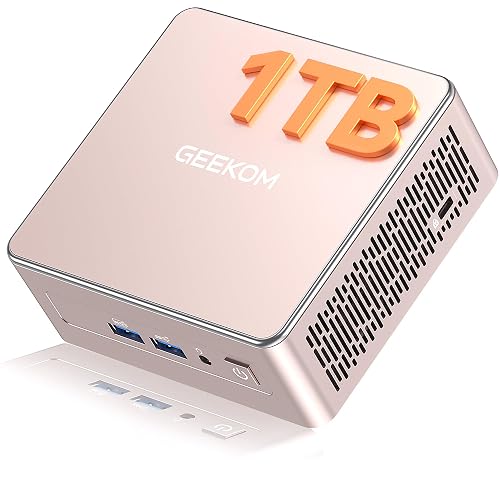
GEEKOM A5 Mini PC, Ryzen 5 7430U, 16GB RAM, 1TB SSD

HP 2025 22″ FHD All-in-One Desktop Computer

Lenovo IdeaCentre All-in-One Desktop Computer, 8GB RAM 512GB SSD
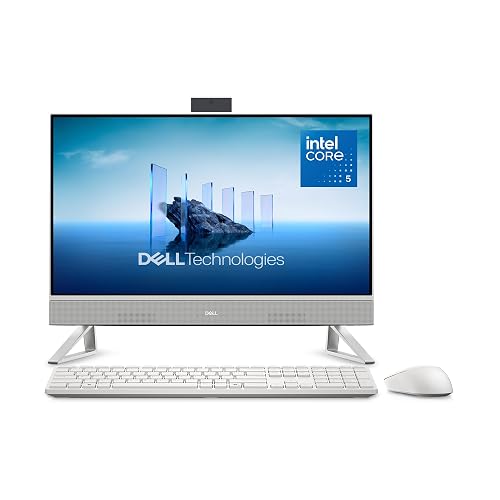
Dell 23.8″ All-in-One Desktop, Core 5 120U, 16GB DDR5

Dell 27″ All-in-One Desktop, Core 5 120U, 16GB DDR5
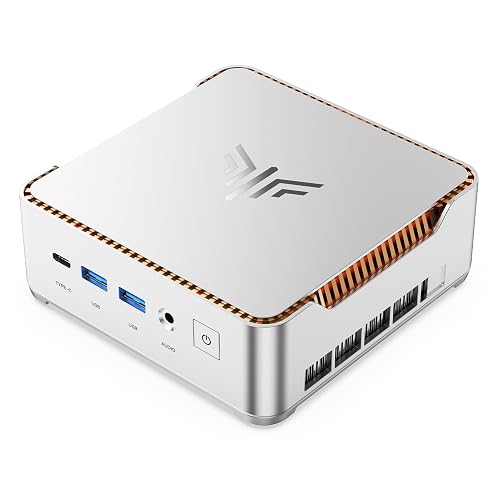
KAMRUI Hyper H2 Mini PC, Core i5-14500HX, 16GB RAM, 512GB SSD
Lenovo IdeaCentre 24″ FHD All-in-One Desktop, 16GB RAM 512GB SSD
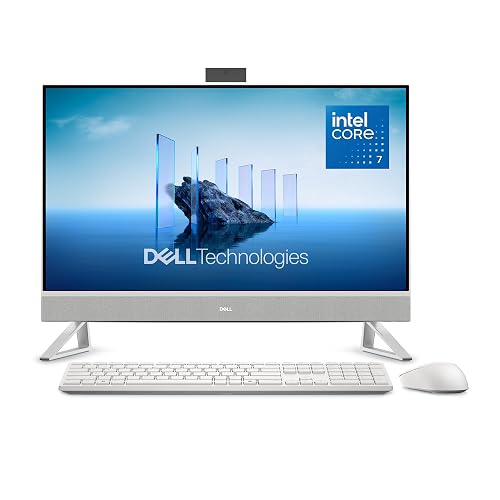
Dell 27″ All-in-One Desktop, Core 7 150U, 1TB SSD
More Details On Our Top Picks
The small-box layout is the whole point here, and it suits a desk that needs to stay open for papers, a keyboard, or a second display. A Ryzen 5 7430U chip, 16GB of memory, and a 1TB NVMe PCIe 4.0 SSD give you a strong starting point for everyday office work, media streaming, and a local file library.
Because the memory is upgradable, you have a clearer path for future growth than many compact mini PCs offer. The trade-off is obvious too, a separate monitor and peripherals are still part of the setup, so this works best for someone who already owns those pieces or wants to choose them separately.
What We Like
- The tiny footprint helps keep a desk uncluttered.
- 1TB of fast SSD storage gives you room for apps, documents, and media without feeling cramped.
- Upgradable memory matters for long-term use, especially in a home office that may grow beyond basic browsing.
- Six USB ports make it easier to leave a printer, drive, webcam, and other gear connected.
- The 8K output support is useful for advanced display setups, even though most everyday desks won’t need that much resolution.
Things To Consider
- You still need a monitor, keyboard, and mouse, so this is not a single-box desktop in the classic sense.
- Anyone who wants an all-in-one silhouette may prefer a true integrated desktop instead.
- The value here depends on whether you will actually use the extra ports and upgrade path.
Feature Snapshot
Who Should Grab It
You should look at this mini PC for a tidy home office, a student desk, or a living-room work nook where space matters more than an integrated screen.
Another Choice May Suit
The Dell 23.8″ All-in-One Desktop, Core 5 120U, 16GB DDR5 is a better fit for someone who wants the screen and computer in one body.
A 22-inch all-in-one keeps the footprint modest, which suits a kitchen counter, spare room, or a starter office setup. The 13th Gen Intel quad-core CPU, 8GB of DDR5 memory, and 128GB of storage point this HP toward everyday browsing, email, video calls, and light document work.
That smaller storage figure is the main trade-off, so cloud storage or an external drive may become part of the routine. Compared with the GEEKOM A5, you gain the simple integrated screen format, but you give up the mini PC’s room to grow.
Highlights
- The 22-inch screen keeps the unit compact on smaller desks.
- DDR5 memory is a nice touch for basic multitasking and general responsiveness.
- HDMI and Type-C help the machine fit more easily into mixed-accessory setups.
- Wi-Fi and the built-in HD webcam support remote classes and calls without extra hardware.
- Windows 11 Pro adds a more work-friendly software base than entry-level home editions.
Worth Noting
- 128GB of storage fills quickly once you add photos, apps, and updates.
- 8GB of memory is fine for basics, though heavy multitasking can feel tight.
- The smaller panel is easier to place, but it offers less room for side-by-side windows than the larger Lenovo and Dell 27-inch options.
Core Details
Who It Suits Best
It suits someone who wants a compact all-in-one for email, video calls, schoolwork, or a small home office.
Where Another Pick Suits Better
The Lenovo IdeaCentre 24″ FHD All-in-One Desktop, 16GB RAM 512GB SSD fits better for anyone who wants a larger screen and more storage room.
The 24-inch anti-glare IPS panel is the first big difference here, and it changes the feel of the whole desk. IPS, or in-plane switching, generally means wider viewing angles, so a shared setup in a family room or office corner stays easier to read from the side.
Eight gigabytes of memory and 512GB of storage make this Lenovo a sensible middle ground for everyday use. Compared with the HP 22-inch model, you get a roomier screen and a better fit for split windows, though you still stay in the practical, not power-user, lane.
Upsides
- The 24-inch display gives you more room for email, spreadsheets, and browser tabs.
- Anti-glare treatment helps cut reflections in bright rooms.
- 512GB of storage is much easier to live with than a tiny entry-level drive.
- Wi-Fi 6 and Bluetooth 5.2 support a cleaner wireless desk setup.
- It feels well matched to home use where you want one screen for work, study, and streaming.
Points To Note
- 8GB of memory is adequate, but tab-heavy work can crowd it.
- The 4-core processor is suited to routine chores more than demanding creative work.
- A 24-inch body needs a little more desk depth than the 22-inch HP.
Feature Rundown
Built With In Mind
It fits a household desk, student setup, or casual work station where screen size matters more than raw speed.
Swap It Out When
The Dell 23.8″ All-in-One Desktop, Core 5 120U, 16GB DDR5 is the smarter choice for anyone who wants more memory headroom out of the box.
This Dell lands in a sweet spot for people who want a straightforward home machine with fewer compromises than the smallest models. The 23.8-inch Full HD panel, Core 5 120U processor, 16GB of DDR5 memory, and 512GB SSD create a setup that feels ready for office docs, web apps, and family use.
Dolby Atmos speakers are a useful touch for streaming or video calls, though they won’t replace a dedicated sound system. Compared with the Lenovo 24-inch model, the extra memory helps more with multitasking than the screen size alone.
Bright Spots
- 16GB of DDR5 gives you more breathing room for multitasking than the 8GB options.
- The 23.8-inch Full HD screen stays compact while still feeling usable for long sessions.
- Included keyboard and mouse make setup simpler.
- Wi-Fi 6E helps the machine fit into newer home networks more smoothly.
- Dolby Atmos speakers add convenience for calls and casual media use.
Small Caveats
- The Intel Graphics listed here are fine for normal use, not for serious graphics work.
- The included accessories reduce setup friction, though some desk layouts may still call for a more comfortable keyboard later.
- Owners who prefer a very large display may want the 27-inch Dell instead.
Technical Sheet
Who Will Love This
You should look at this for a family desk, a general home office, or anyone who wants a neat all-in-one with a sensible mix of size and memory.
A Better Fit Elsewhere
The Dell 27″ All-in-One Desktop, Core 5 120U, 16GB DDR5 suits you better if a larger screen matters more than a compact footprint.
The larger 27-inch screen is the main attraction, and it changes how comfortable this Dell feels for long stretches of email, document work, or media. A bigger panel usually makes side-by-side windows easier to manage, so the extra size matters in a real home office, not just on a spec sheet.
With 16GB of DDR5, 512GB of storage, Wi-Fi 6E, Bluetooth, and included keyboard and mouse, it feels ready to settle into a desk without much fuss. The trade-off is simple, it asks for more space, so small desks may be happier with the 23.8-inch Dell or the Lenovo 24-inch model.
Reasons To Buy
- The 27-inch Full HD display gives you a roomier workspace for multitasking.
- 16GB of DDR5 memory supports heavier daily use more comfortably.
- Wi-Fi 6E is useful for households with newer networking gear.
- Bluetooth and bundled accessories make the initial setup less awkward.
Areas To Watch
- The larger size can crowd compact desks.
- It stays in the same general performance lane as the smaller Dell Core 5 model, so the extra value comes mostly from screen size.
- People who want a touch more CPU headroom may lean toward the Dell 27″ Core 7 version.
Details At A Glance
The Right Fit
You should pick this for a larger desk, shared family use, or a home office where the screen size matters more than compact proportions.
Where A Sibling Pick Shines
The Dell 23.8″ All-in-One Desktop, Core 5 120U, 16GB DDR5 works better for tighter spaces and lighter footprints.
This KAMRUI mini PC is the heavy mover in the group, and the 14-core, 20-thread Core i5-14500HX explains why. More cores and threads matter when you stack work apps, browser tabs, and background tasks, especially in a small office that doesn’t shut down at 5 p.m.
Triple 4K display support, HDMI, DisplayPort, USB-C, and Ethernet give you a very flexible desk layout. The honest read is that this is stronger than the mini GEEKOM for raw workload muscle, but it still needs your own monitor and peripherals.
Standout Traits
- The Core i5-14500HX is built for heavier multitasking than the lighter office chips in several other picks here.
- PCIe 4.0 SSD support helps storage feel responsive.
- Triple 4K output support is handy for multi-monitor work setups.
- Ethernet gives you a wired network path, which some desks still rely on for steadier connections.
Areas To Watch
- You need to supply the display and desktop accessories yourself.
- The power here makes most sense for work-heavy use, not for someone who only checks email now and then.
- A compact unit like this can hide a lot of capability, but cable management still matters once you attach multiple screens.
Core Details
Whose Shelf It Belongs On
It belongs with power users, office admins, and home workers who juggle several windows and external displays.
Another Choice May Suit
The GEEKOM A5 Mini PC, Ryzen 5 7430U, 16GB RAM, 1TB SSD suits a lighter desk better if you want simpler, lower-key everyday use.
This Lenovo keeps the formula straightforward, but the 16GB memory figure shifts it a step above the lighter everyday machines. Combined with 512GB of SSD storage, it gives you a more comfortable baseline for shared household use, schoolwork, and regular web-based work.
The Intel 4-core processor and Intel Graphics keep expectations grounded, and that’s fine for most routine desks. Compared with the 8GB Lenovo IdeaCentre above, this version is easier to recommend for multitaskers who prefer fewer slowdowns when several apps stay open.
Best Bits
- 16GB of memory makes daily multitasking feel less cramped.
- 512GB of storage gives you decent room for files and apps.
- Wi-Fi 6 and Bluetooth 5.2 keep wireless connections current enough for modern setups.
- The 24-inch display is a comfortable size for home-office work without taking over the room.
Worth Noting
- The 4-core processor is not aimed at demanding creative workloads.
- It still sits in the everyday-use category, so buyers seeking more muscle should look at the KAMRUI mini PC or the Dell Core 7 model.
- Its blue finish may stand out more than you want in a formal office.
Feature Card
Perfect Match For
It suits households and home offices that want a balanced desktop with a bit more memory than the entry-level all-in-one crowd.
Look Elsewhere When
The Dell 27″ All-in-One Desktop, Core 5 120U, 16GB DDR5 is the better call for anyone who wants a larger screen to anchor the desk.
This is the more spacious Dell for someone who wants a bigger screen and a more generous storage cushion in one package. The Core 7 150U, 16GB of memory, and 1TB PCIe NVMe SSD make the machine feel better suited to a busier home desk that keeps documents, photos, and software around for the long haul.
It also ships with Wi-Fi 6E, Bluetooth, keyboard and mouse, plus McAfee+ Premium and a 15-month mail-in service note in the listing. The trade-off is simple, some of those extras are software or support additions rather than raw hardware, so the value leans on how much you appreciate a fuller bundle.
Reasons To Buy
- The Core 7 chip gives you a stronger step up from the Core 5 model.
- 1TB of SSD storage is the most generous local storage in this list.
- The 27-inch display suits split-screen work and media use nicely.
- Included keyboard and mouse reduce the number of extra pieces you need to gather.
- Wi-Fi 6E and Bluetooth fit a modern wireless setup well.
Honest Caveats
- The larger body needs more desk room than the 23.8-inch version.
- Some of the bundle value comes from software and service items, so the appeal is strongest for people who want a more complete package.
- For lighter everyday use, the Dell Core 5 27-inch model may already be enough.
Core Details
Right Fit
You should choose this for a larger desk, a home office that stores plenty of files locally, or a setup that benefits from a more complete out-of-box bundle.
Skip It When
The Dell 23.8″ All-in-One Desktop, Core 5 120U, 16GB DDR5 is the better match for you if desk space matters more than extra screen size and storage.
How To Choose The Right Alls In One Computers
Match The Screen To The Space
A 22-inch all-in-one fits a compact desk, a kitchen corner, or a spare room that already feels busy. A 24-inch screen gives you more room for split windows, which helps a lot with spreadsheets, class work, and long email sessions. A 27-inch model feels calmer for multitasking, but it also asks more from your desk depth and your wall space.
Treat Memory And Storage As Different Jobs
Memory, or RAM, affects how many apps stay open without bogging down. Storage holds your files, apps, and photos, so a 128GB drive is fine for very light use while 512GB or 1TB gives you room to breathe. For busy households, 16GB of RAM and at least 512GB of storage usually feels far less cramped than entry-level figures.
Ports, Wireless, And Setup Matter More Than They Seem
HDMI, USB-C, USB ports, Wi-Fi 6, Wi-Fi 6E, and Bluetooth shape how easily the machine fits into your life. A desk with a printer, webcam, headset, and external drive can run into friction fast when port counts are thin. In a small home office, those small conveniences often matter as much as the processor name.
Pick The Form Factor That Matches Your Routine
A mini PC like the GEEKOM A5 or KAMRUI Hyper H2 keeps the desk flexible, especially around multi-monitor work. An all-in-one gives you a tidier single-body setup, which is easier for shared spaces and quicker first-time setup. Your best match depends on whether you want maximum desk simplicity or more freedom to choose every separate part.
A Quick Reality Check
Mistakes Worth Dodging
Shoppers often focus on screen size alone and forget that 8GB of RAM or a tiny SSD can make a machine feel cramped faster than expected. Another common miss is overlooking the included accessories and ports, which matter a lot in a home office with several devices. Storage matters too, because photos, updates, and local files add up sooner than most people expect.
The Upgrade Payoff
Higher-tier models usually cost more because of the bigger display, stronger processor, more memory, and larger SSD. You also tend to get better networking, more complete accessory bundles, or a software package that saves you from buying pieces later. That extra spend makes the most sense for a desk you use every day, especially one that handles work, family use, and media in the same spot.
Frequently Asked Questions
Are Alls In One Computers good for small desks?
Yes, many of them are easier to place than a separate tower and monitor setup. A 22-inch or 23.8-inch model usually suits smaller spaces best.
How much RAM do you need for everyday use?
8GB works for light browsing, email, and video calls. 16GB feels smoother once several apps and tabs stay open at the same time.
Is 128GB of storage enough?
It can work for basic use, especially with cloud storage. Most home office setups feel more relaxed with 512GB or more.
Do all-in-ones have enough ports?
Some do, but the count varies a lot. A mini PC with several USB ports can be easier to expand around a desk with many accessories.
Which size is better, 24-inch or 27-inch?
A 24-inch model is easier to fit into a normal home office. A 27-inch model gives you more room for side-by-side windows and longer sessions.
Closing Thoughts
Your best match here depends on how much desk space you have and how hard you plan to push the machine. For a tidy home office, the GEEKOM A5 and the Dell 23.8-inch model stand out for different reasons, while the KAMRUI Hyper H2 is the clear step up for heavier work. The larger Dell 27-inch models make sense when screen space and storage matter more than a compact footprint. Choose the one that fits your daily routine, not just the spec sheet.
