
All-in-one desktops make sense when you want a tidy setup without giving up a full-size screen. That matters for home offices, family rooms, dorm desks, and kitchen counters where a tower would just add clutter. The eight picks here focus on screen size, memory, storage, ports, and everyday comfort, so you can match the machine to your routine instead of guessing.
You’ll notice a split between compact 22-inch models, roomier 24-inch choices, and a 27-inch option for users who want more screen space. A mini PC also joins the list for shoppers who prefer a separate display. The trade-offs are simple: smaller systems save space, while stronger memory and larger panels usually bring a calmer workday.
The Shortlist At A Glance
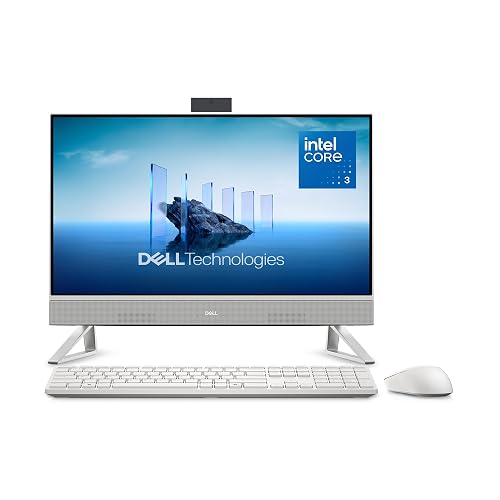
Dell 23.8″ All-in-One Desktop, FHD, Intel Core 3 100U, Windows 11 Home

HP 2025 22″ FHD All-in-One Desktop Computer

Lenovo IdeaCentre All-in-One Desktop Computer, 8GB RAM 512GB SSD

24″ All-in-One Desktop PC with Windows 11
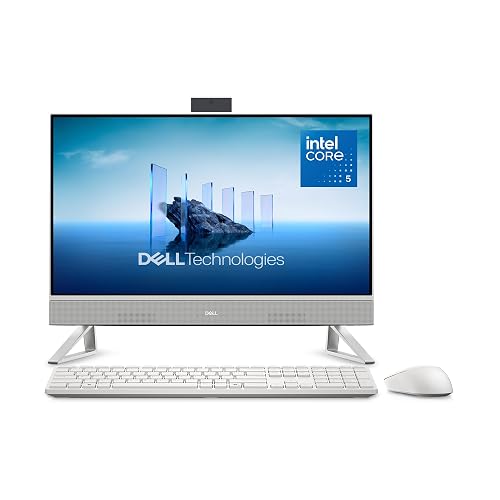
Dell 23.8″ All-in-One Desktop, FHD, Intel Core 5 120U, Windows 11 Home

GMKtec Mini PC Ryzen 5 3500U 16GB RAM 512 SSD Office Home Business Computer

Dell 27″ All-in-One Desktop, FHD, Intel Core 5 120U, Windows 11 Home
Lenovo IdeaCentre 24″ FHD All-in-One Desktop, 16GB RAM 512GB SSD
More Details On Our Top Picks
The 23.8-inch panel gives you enough room for email, spreadsheets, and video calls without taking over the desk. The Core 3 100U and 8GB of memory point this Dell toward everyday work, light multitasking, and family use, while the 512GB solid-state drive, or SSD, helps the system feel quick during startup and file access.
You also get Wi-Fi 6E, Bluetooth, a keyboard, a mouse, and Dolby Atmos speakers, so the box covers a lot of setup basics in one shot. The honest read is that this fits best as a calm home machine, not a heavy workstation, and that’s fine for most households.
What We Like
- 23.8-inch screen size gives you comfortable space for side-by-side documents without needing a giant desk.
- 512GB SSD storage helps the computer wake up and open common apps with less waiting around.
- Wi-Fi 6E and Bluetooth cover modern wireless connections for home networking and accessories.
- Keyboard and mouse are included, so you can get started with less extra shopping.
Points To Note
- 8GB of memory is workable for everyday tasks, though heavier browser tab use will feel tighter.
- The Core 3 processor suits light-to-moderate workloads more than demanding creative work.
- All-in-one designs keep things neat, but moving the whole unit is less convenient than shifting a separate tower.
Feature Snapshot
Who It Suits Best
Home users who want a neat all-in-one for everyday browsing, schoolwork, and streaming will get the most from this setup.
A Better Fit Elsewhere
Dell 23.8″ All-in-One Desktop, FHD, Intel Core 5 120U, Windows 11 Home suits you better when you want the same footprint with more memory for busier multitasking.
A 22-inch all-in-one keeps the footprint modest, and that matters on smaller desks, kitchen nooks, or shared spaces. HP pairs it with 8GB of DDR5 memory, which is newer-style memory built for quicker data handling than older DDR4 systems, plus a 13th Gen Intel quad-core chip for routine work and school tasks.
The 128GB storage is the real trade-off here, so this model suits people who live mostly in cloud apps or stream instead of storing lots of large files locally. In a compact home office, though, the HDMI, Type-C, Wi-Fi, HD webcam, and Windows 11 Pro make it a sensible little setup.
Highlights
- 22-inch screen and small footprint suit tight desks and multipurpose rooms.
- DDR5 memory gives the system a more current foundation for everyday response.
- HDMI and Type-C broaden how you connect a monitor, dock, or accessory.
- Windows 11 Pro helps on work-focused desktops that need broader management features.
Small Caveats
- 128GB storage fills faster than larger solid-state drives, especially with media files and downloads.
- The 22-inch display is comfortable for basics, though side-by-side windows feel tighter than on 24-inch models like the Lenovo IdeaCentre.
- Cleaning around a compact stand and rear ports can take a little care in cramped spaces.
Details At A Glance
Right Fit For
Small-space shoppers who want a tidy desktop for email, calls, and web work will get the most out of this HP.
Another Choice May Suit
Lenovo IdeaCentre 24″ FHD All-in-One Desktop, 16GB RAM 512GB SSD suits you better when you want a larger screen and more storage breathing room.
The Lenovo IdeaCentre leans into comfort first, starting with a 24-inch FHD IPS screen that uses an anti-glare finish to cut reflections from lamps and windows. IPS, or in-plane switching, is a display panel type known for steadier color and wider viewing angles than basic panels, which helps when more than one person glances at the screen.
With 8GB of RAM, 512GB of storage, Wi-Fi 6, and Bluetooth 5.2, it covers the modern basics without feeling stripped down. Compared with the HP 22-inch model, this one gives you more display room, and that extra space is useful for spreadsheets, school projects, and casual creative work.
What We Like
- 24-inch FHD panel gives you more breathing room for multitasking than smaller 22-inch choices.
- Anti-glare treatment helps in bright rooms with mixed lighting.
- Wi-Fi 6 and Bluetooth 5.2 support current wireless accessories and networks.
- 512GB storage is a comfortable middle ground for documents, apps, and family files.
- The display style works well for kitchens, family rooms, and shared desks.
Trade Offs
- 8GB memory is enough for basics, though heavy multitasking still benefits from more headroom.
- The all-in-one format keeps the desk tidy, but upgrades are less flexible than with a separate tower.
Core Details
Whose Shelf It Belongs On
You’ll like this most as a family desktop or a steady home office machine with a screen that feels easy on the eyes.
Where A Sibling Pick Shines
Dell 23.8″ All-in-One Desktop, FHD, Intel Core 5 120U, Windows 11 Home is the better call when you want a quicker-feeling processor and more memory for busier days.
Some desks need a straightforward computer, and this Core Innovations model keeps the pitch simple with a 24-inch all-in-one format and Windows 11. That larger screen size helps in home offices and common rooms, where you might juggle a browser, a video call, and a document without feeling boxed in.
Because the listing keeps the details lean, you can think of this as a no-fuss option for basic computing rather than a spec-heavy machine. The trade-off is obvious, but not a bad one, especially for someone who values simplicity over extra features.
Bright Spots
- 24-inch screen gives you a more natural workspace than very small desktops.
- Windows 11 keeps the software side familiar for most households.
- The stripped-back design suits people who want less to set up and manage.
Areas To Watch
- Missing detailed hardware specs make it harder to judge performance headroom from the listing alone.
- Shoppers who like more connectivity detail may prefer the Dell or Lenovo options with fuller feature lists.
- Simple systems are easy to place, but they can leave less room for future needs.
Quick Facts
The Right Fit
Basic home users and first-time desktop shoppers who want a simple all-in-one layout can keep this one on the short list.
Skip It When
Lenovo IdeaCentre All-in-One Desktop Computer, 8GB RAM 512GB SSD is a better match when you want more listed hardware detail and a clearer picture of daily performance.
This Dell keeps the same 23.8-inch size as the first pick, but the Core 5 120U and 16GB of DDR5 memory push it into a better comfort zone for busier home offices. DDR5 memory is the newer memory class here, and the extra capacity gives you more room for browser tabs, calls, and documents at the same time.
The 512GB SSD, Wi-Fi 6E, Bluetooth, keyboard, mouse, and Dolby Atmos speakers round out a well-balanced package. For people who want a dependable all-in-one that feels less cramped than 8GB models, this is a sensible step up.
Reasons To Buy
- 16GB DDR5 memory gives you more breathing room for multitasking.
- The Core 5 processor is a better fit for busier everyday workloads than the Core 3 system in the earlier Dell.
- Wi-Fi 6E helps modern homes with crowded wireless networks.
- Keyboard and mouse are included, so setup stays simple.
- Dolby Atmos speakers add a nicer listening experience for video and music.
Minor Gripes
- The screen size stays at 23.8 inches, so you do not gain more display room than the first Dell.
- All-in-one units are still less serviceable than separate desktop towers.
- Keep dusting simple around the base and rear cabling so the clean look stays tidy.
Feature Card
Made For
Home office users who want a quieter-feeling step up in memory and responsiveness will appreciate this Dell most.
Another Choice May Suit
Dell 27″ All-in-One Desktop, FHD, Intel Core 5 120U, Windows 11 Home fits better for you when the bigger screen matters more than staying at a mid-size footprint.
This GMKtec goes a different direction from the all-in-one desktops, since it’s a mini PC that depends on your own monitor. That makes it a strong fit for people who already have a display they like, or for desks where a small box under or behind the screen is easier to live with than a built-in panel.
The Ryzen 5 3500U, 16GB of RAM, 512GB SSD, 2.5GbE LAN, HDMI 2.1, USB-C, DisplayPort, Wi-Fi, and Bluetooth give it a dense feature set. The trade-off is obvious: you supply the screen, keyboard, and mouse, but in return you get more placement freedom than any integrated desktop in this list.
Plus Points
- Small chassis saves desk space and leaves room for your own monitor choice.
- 16GB RAM and a 512GB SSD create a practical base for office work.
- Triple-display support helps people who like multiple screens for research or trading-style layouts.
- 2.5GbE LAN gives wired networking a stronger ceiling than standard gigabit hardware.
- USB-C, HDMI 2.1, and DisplayPort cover a wide range of display setups.
Worth Noting
- You need to budget for your own monitor and peripherals.
- Mini PC ownership means cable management matters more than with an all-in-one.
- The setup suits hands-on desktop builders more than set-it-and-forget-it shoppers.
Technical Sheet
Built With In Mind
Desk tinkerers and multi-monitor users who want a compact computer box will get the most from this GMKtec.
Look Elsewhere When
Dell 23.8″ All-in-One Desktop, FHD, Intel Core 5 120U, Windows 11 Home is the easier fit when you want the screen, computer, speakers, and input devices in one piece.
The 27-inch panel is the big draw here, and for split-screen work, it makes a real difference. You can keep reference material on one side and your working document on the other, which is handy in a home office, homework zone, or kitchen command center.
Dell also gives this model 16GB of DDR5 memory, a Core 5 120U processor, 512GB of SSD storage, Wi-Fi 6E, Bluetooth, and the usual keyboard and mouse bundle. Compared with the 23.8-inch Dell, the larger display is the main reason to step up, while the internal specs keep it from feeling like a screen-only upgrade.
Standout Traits
- 27-inch screen gives you the broadest workspace in the roundup.
- 16GB DDR5 memory supports busier days with more windows open.
- Wi-Fi 6E helps in homes where several devices share the network.
- Keyboard and mouse are included, which keeps the setup straightforward.
- The larger panel is useful for shared viewing, not just solo work.
Areas To Watch
- The larger footprint needs more desk depth than the 22-inch HP or 23.8-inch Dell.
- Big-screen all-in-ones can be heavier to reposition during cleaning or rearranging.
- People who only do light web browsing may not need this much screen.
Feature Rundown
Best Suited To
You’ll appreciate this most as a main household desktop where a larger screen makes work and entertainment easier to share.
Reach For A Different Pick When
Lenovo IdeaCentre All-in-One Desktop Computer, 8GB RAM 512GB SSD suits you better when you want a mid-size screen that takes less desk space.
This Lenovo feels more spacious than the earlier 8GB IdeaCentre because the memory climbs to 16GB, and that extra cushion matters for multitasking households. The 24-inch FHD display keeps the sweet spot between desk size and viewing comfort, while Wi-Fi 6 and Bluetooth 5.2 cover current wireless needs.
For a family room or shared office, that mix is easy to live with. It won’t feel flashy, and that’s part of the appeal, because steady memory and a mid-size screen usually make daily use simpler than a spec sheet packed with extras.
Best Bits
- 16GB RAM gives you more space for browsers, calls, and office apps at once.
- 24-inch display hits a comfortable middle ground for most desks.
- Wi-Fi 6 and Bluetooth 5.2 keep the wireless side current.
- Lenovo’s all-in-one layout is clean and easy to place in shared spaces.
Softer Spots
- The processor is listed as a 4-core chip, so heavier creative work still belongs on stronger systems.
- The design stays simple, which helps daily use but leaves less room for expansion.
- Cleaning around the rear of an all-in-one takes a little planning because everything sits in one frame.
Core Details
Who Will Love This
Families and home-office users who want a balanced desktop with more memory than the usual entry-level model will feel at home here.
Swap It Out When
Dell 27″ All-in-One Desktop, FHD, Intel Core 5 120U, Windows 11 Home suits you better if your desk has room for a larger display and you want more screen to work across.
How To Choose The Right Alls In One Desktop Computers
Screen Size And Desk Space
Screen size sets the tone for the whole machine. A 22-inch model fits a smaller desk or a shared kitchen corner, while 24 inches gives you a more relaxed workspace for documents and two windows side by side.
A 27-inch all-in-one feels closer to a small command center, especially for spreadsheets, photo sorting, or dual-window work. The catch is simple, more screen usually asks for more desk depth, so measure the space before you fall for the larger panel.
Memory, Storage, And Speed
RAM, short for random access memory, affects how well the desktop juggles open apps. 8GB is fine for browsing, video calls, and schoolwork, while 16GB gives you a better cushion for busy tab stacks and heavier office use.
Storage matters in a different way, because a 128GB drive fills much faster than a 512GB SSD. SSD means solid-state drive, a storage type that loads faster than old-style hard drives, so you feel the difference in startup time and everyday responsiveness.
Ports, Camera, And Wireless Fit
Ports decide how painless the setup feels. HDMI, Type-C, USB-C, and Bluetooth are useful because they make room for monitors, accessories, and simple cable swaps without a mess.
For work calls, an HD webcam is worth noticing, and Wi-Fi 6 or Wi-Fi 6E helps in homes with several connected devices. People who move between a home office and family space usually appreciate a desktop that connects cleanly and stays out of the way.
All-In-One Versus Mini PC
An all-in-one keeps the screen and computer in a single body, which makes the desk look calmer. A mini PC like the GMKtec gives you more control over the monitor and placement, but you need to supply the display and accessories yourself.
That choice comes down to how much you value simplicity versus flexibility. For most households, the all-in-one wins on ease, while the mini PC suits someone building a more custom workspace.
What To Weigh Before You Click
Mistakes Worth Dodging
Shoppers often focus on screen size and skip the memory and storage details. That can leave you with a nice-looking desktop that feels cramped after a few months of everyday use.
Another common miss is overlooking the physical footprint, especially on shallow desks. A larger panel is pleasant, but the stand still needs room to breathe.
The Upgrade Payoff
Higher-tier all-in-ones usually cost more because the processor, memory, display, and speakers are a better match for fuller days. Extra RAM and a stronger chip can make a desktop feel calmer under load, which matters in a home office or shared family setup.
You also tend to get nicer screens, better wireless support, and more complete accessory bundles. That upgrade makes sense when the computer will be used for work most days, not just the occasional browser session.
Frequently Asked Questions
What size all-in-one works best for a small desk?
A 22-inch or 23.8-inch model usually fits best in tight spaces. You still get a usable screen without turning the desk into a crowded shelf.
Is 8GB of memory enough for everyday use?
Yes, 8GB works for browsing, streaming, email, and school tasks. Heavy multitaskers will feel better with 16GB.
Do all-in-one desktops handle video calls well?
Models with an HD webcam and Wi-Fi support are well suited to calls. The camera and network connection matter more than flashy extras here.
Should you choose a 512GB SSD or a smaller drive?
A 512GB SSD gives you more breathing room for apps, documents, and photos. Smaller drives fit basic use, but they fill up sooner.
Is a mini PC better than an all-in-one?
A mini PC fits people who want a separate monitor and more flexibility in how the desk is arranged. An all-in-one is easier when you want a cleaner, simpler setup.
Closing Thoughts
The right all-in-one depends on how much desk space you have and how busy your day feels on screen. Small models keep things tidy, mid-size picks balance comfort and footprint, and the 27-inch Dell gives you the most room to spread out. For a simple home setup, that’s often enough. For a busier workspace, the memory and screen upgrades are worth paying attention to, and the best fit is usually the one that makes daily use feel calm.
