
Clean cable routing matters more than people expect, especially in a desktop that gets upgraded piece by piece. You may be swapping an old hard drive, adding an SSD, or wiring an optical drive in a case that feels tight around the edges. The right SATA lead or adapter keeps the build tidy, reduces awkward bends, and makes future changes less annoying.
This roundup focuses on a mix of straight, angled, braided, splitter, and adapter styles, so you can match the cable to the space you actually have. A short run in a compact tower asks for something different than a storage-heavy workstation, and that’s where the details start to matter.
Quick Look At The Shortlist
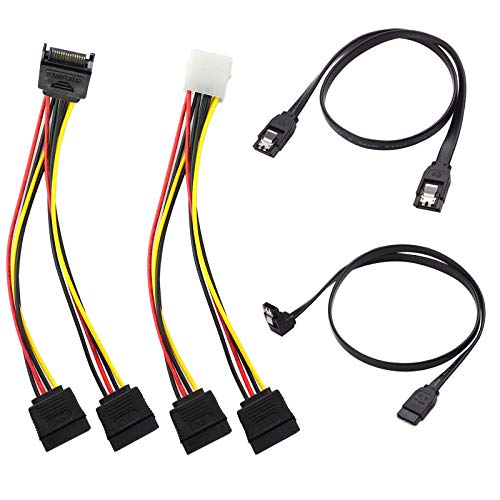
4 Pack SATA III Data & 15Pin Splitter Cable SSD HDD Optical Drives

BolAAzuL 2-Pack SATA Cable III Straight & Right Angle 18 Inch

SATA Cable III for SSD HDD Data 3 PCS 15 Inch

ELECTOP SATA III Cable 20 Inch 5 Pack

SATA-III Cable 4Pcs/Set 3.3FT
Mini ATX 6-Pin to SATA 15-Pin Conversion Adapter Cable
mini ATX 6PIN to SATA 15 PIN Adapter Extension Cable Pack of 2

SATA Cable III 3 Pack 24 Inch
More Details On Our Top Picks
This kit is built around power splitting, so it makes sense for desktop upgrades where one supply lead needs to feed more than one drive. The mix of straight and 90-degree cords gives you a little routing flexibility, which helps in cramped cases that already feel crowded by data leads and front-panel wiring.
Compared with the single-run cables later in this list, this one is less about elegance and more about solving a connection problem cleanly. You may find it especially useful in older towers, storage-heavy rigs, or any setup with SSDs, HDDs, and optical drives sharing the same case.
What We Like
- Splitter layout helps you handle multiple drive power needs from one area.
- Both straight and angled cords make cable routing easier around drive cages.
- The 4-pack format gives you some flexibility for future storage changes.
- Useful for mixed drive setups, especially in older desktops with limited spare leads.
Points To Note
- Splitters add another connection point, so tidy routing matters more here.
- It’s more functional than sleek, which is fair for this kind of accessory.
- Best results usually come in systems that already have room for extra cabling.
Feature Snapshot
Who It Suits Best
Home desktop upgraders who need to share power across several storage devices will get the most from this kit.
Where A Sibling Pick Shines
BolAAzuL 2-Pack SATA Cable III Straight & Right Angle 18 Inch suits you better when you only need clean data runs instead of splitter hardware.
After the splitter kit, this one feels much more straightforward, because it’s a pure data cable pair with a locking latch. That latch is the small but useful detail here, since it helps the connection stay seated in a case that gets bumped during cleaning or drive swaps.
The 18-inch length gives you enough reach for many mid-tower layouts without leaving piles of extra slack. Straight and right-angle ends let you choose the cleaner path around trays and fan cages, which is handy in builds where the drive bays sit awkwardly close to the motherboard edge.
Highlights
- Locking latch design helps the connector stay firmly in place.
- Straight and right-angle ends make cable direction easier to match.
- 18-inch reach works well in many standard tower cases.
- Two-pack format covers a small SSD plus HDD setup nicely.
Small Caveats
- The pair format is enough for modest builds, but not for larger storage stacks.
- Black-only styling keeps it simple, though that won’t matter in closed cases.
- Longer or shorter needs may push you toward another option in this roundup.
At A Glance
Made For
Desktop builders who want two dependable SATA data cables for everyday storage work will appreciate this set.
Swap It Out When
ELECTOP SATA III Cable 20 Inch 5 Pack suits you better when you need more cables and a braided finish for a fuller build.
The color coding is the first thing you notice, and that is genuinely useful in a busy build. Black, red, and blue make it easier to trace which cable goes where, which saves time later when you’re adding a second drive or checking a loose connection.
Each cable measures 15 inches, so this set makes sense in compact and mid-size towers where the SATA ports sit fairly close to the drives. Compared with the BolAAzuL pair, this one gives you an extra cable and a more visual way to organize a small storage stack.
Bright Spots
- Three different colors help you track connections without guessing.
- The 3-pack format supports a few drives at once.
- 15-inch length suits many standard desktop layouts.
- Straight and angled ends give you routing flexibility around drive trays.
- Helpful for maintenance, since colored leads are easier to identify later.
Areas To Watch
- The color variety is practical, but closed cases won’t show much of it.
- Fifteen inches can feel short in larger towers with distant drive bays.
- The set is focused on basic data routing, not extra hardware like splitters or adapters.
Core Details
Best Suited To
Shoppers who like a tidy, color-coded storage setup in a compact desktop will get the most value from this set.
Look Elsewhere When
BolAAzuL 2-Pack SATA Cable III Straight & Right Angle 18 Inch is the calmer choice for longer reach and a simpler two-cable setup.
The nylon braided jacket sets this one apart right away, and that matters in cases where cables get moved, bent, or brushed aside during upgrades. Braiding adds a bit of structure, so the cable tends to feel less flimsy than a plain PVC lead, though the trade-off is a touch less limpness when you want an ultra-soft bend.
Five cables in a 20-inch length is a strong fit for builders who expect several storage devices or repeated hardware changes. Compared with the shorter sets above, this one gives you more reach and a more durable-feeling bundle, which is handy in workstations and parts-heavy desktops.
Upsides
- Nylon braided outer layer adds a more substantial feel.
- The 5-pack covers larger storage plans well.
- 20-inch length gives extra breathing room inside bigger cases.
- Locking latch design helps each connection stay seated.
- Good fit for people who like a neat, organized interior.
Room For Improvement
- Braided cables can be a little stiffer than plain leads.
- The extra length is handy, though it can add slack in smaller towers.
- Five cables are more than some basic builds need.
Details At A Glance
The Right Fit
People building a storage-heavy desktop and wanting a stronger-feeling cable bundle should look here first.
Another Choice May Suit
Mbiydeg SATA Cable III for SSD HDD Data 3 PCS 15 Inch makes more sense for smaller builds that want color coding over bulk quantity.
This set leans into reach, and that is the point. At 3.3 feet, it works well for cases where the drive position is less convenient, especially in taller towers or server-style layouts that need a little extra slack to avoid tight corners.
Compared with the ELECTOP pack, it focuses more on straightforward flexible routing than on a braided exterior. That makes it a sensible match for clean installs where you care more about cable length and a simple 7-pin run than about decorative styling.
Best Bits
- 3.3-foot length gives you generous reach for awkward layouts.
- Flexible construction suits builds that need gentler routing paths.
- Four cables in the set help with multi-drive installs.
- Works across HDD, SSD, and optical drive setups.
Oft-Noted Limits
- The longer run can leave extra slack in compact cases.
- It’s a plain cable set, so styling stays simple.
- Best value shows up in systems that can use the extra reach.
Feature Rundown
Who Should Grab It
Shoppers with larger towers or server-style cases who need longer SATA data runs will appreciate this set most.
Reach For A Different Pick
BolAAzuL 2-Pack SATA Cable III Straight & Right Angle 18 Inch suits smaller desktops better, especially where extra cable length would just add clutter.
This adapter is purpose-built rather than general-purpose, so it makes the most sense in the specific mini ATX cases listed by the seller. The dual-length layout, 45 cm plus 15 cm, gives you a little more freedom when you need to reach a SATA power point without crowding the interior.
Compared with the earlier straight SATA data cables, this one is about power conversion and case compatibility, not simple drive-to-board linking. That makes it a strong fit for builders working inside a supported enclosure, though it’s clearly not the right tool for a standard desktop with ordinary power routing.
Reasons To Buy
- Converts a mini ATX 6-pin connection into SATA power support.
- Useful for expanding storage in compatible compact cases.
- The two-length arrangement helps with internal routing.
- Works for HDD, SSD, and optical drive expansion in supported systems.
Softer Spots
- Compatibility is specific, so the case match matters a lot here.
- It’s an adapter cable, not a universal SATA lead.
- Best suited to planned builds, not broad everyday use.
Feature Card
Whose Shelf It Belongs On
Owners of the listed mini ATX cases who need SATA power expansion are the natural match for this cable.
A Better Fit Elsewhere
SATA Cable III 3 Pack 24 Inch is the better everyday option for standard desktops that only need ordinary SATA data runs.
This pack stays focused on short extension work, and that keeps it easy to understand. At 16 inches, each cable gives you enough room to adjust an internal run without turning the case into a nest of unnecessary slack.
Compared with the previous ELFJMZP adapter, this one is the smaller, simpler cousin for people who need a pair of compact extension cables rather than a longer conversion layout. That makes it a sensible pick for mechanical drives, SSDs, and DVD or CD-ROM setups in tighter machines.
Standout Traits
- Two-cable pack handles a pair of small extension needs neatly.
- 16-inch length is easy to fit into compact interiors.
- Supports mechanical HDDs, SSDs, and optical drives.
- Useful when you want a modest, tidy connection path.
Minor Gripes
- The shorter length is great in small cases, less so in larger towers.
- Adapter use is specific, so it’s not the broadest choice here.
- Two pieces cover a narrow need rather than a full storage overhaul.
Quick Facts
Built With In Mind
Compact systems that need a short SATA extension pair are the best match for this cable pack.
Skip It When
ELFJMZP Mini ATX 6-Pin to SATA 15-Pin Conversion Adapter Cable is the more fitting choice when you need a longer, case-specific conversion path.
This three-pack is the easy default for a lot of desktop builds, because 24 inches gives you room without forcing ugly tension across the case. The locking latch adds a bit of reassurance during maintenance, which is handy in systems that get opened more than once a year.
Compared with the shorter Mbiydeg set, this one is the calmer choice for larger interiors where a longer run keeps the layout cleaner. It’s plain, practical, and well suited to people who want a straightforward SATA cable set without extra hardware or case-specific quirks.
Best Bits
- 24-inch length gives comfortable reach in many standard towers.
- The 3-pack covers multiple drive connections neatly.
- Locking latch helps the connection stay put over time.
- Simple black finish blends easily into most desktop interiors.
Worth Noting
- The longer length can be more than you need in very small cases.
- It stays focused on basic data cabling, so no extras are built in.
- Simple styling means function leads the way here.
Core Details
The Right Fit
Standard desktop owners who want a simple three-cable set with enough length for flexible routing will feel at home with this pick.
Where Shoppers Go Wrong
Mbiydeg SATA Cable III for SSD HDD Data 3 PCS 15 Inch works better in compact builds where a 24-inch cable would leave too much slack.
How To Choose The Right Hdd Sata Cables
Match Length To Case Layout
SATA cables look simple, but the length matters more than many people expect. A 15-inch lead can feel neat in a compact build, while 20 to 24 inches gives you more room in a mid-tower or a case with drive bays set farther from the motherboard. The trade-off is obvious, too much slack can create clutter, so the cleanest choice is the shortest cable that still reaches comfortably.
That’s why the 18-inch BolAAzuL cable and the 24-inch Hididi pack land in different use cases. Shorter cables tend to keep airflow and cable management easier, while longer ones save you from awkward tension around drive cages.
Pick The Right Connector Shape
Straight ends work well in open layouts, but right-angle ends help in tight spots near side panels, drive trays, or fan mounts. A locking latch, meaning the connector clicks into place more firmly, matters in systems that get moved, cleaned, or opened often. It does not change speed, but it can make the connection feel steadier over time.
Angle choice is one of those small details that changes the whole install experience. BolAAzuL gives you straight and right-angle options, while the Mbiydeg set adds color coding, which helps when you want to trace each line later.
Separate Data Cables From Power Adapters
Some items in this roundup are pure SATA data cables, while others are power splitters or mini ATX adapters. That difference matters because data cables link the drive to the motherboard, and power adapters handle how the drive gets power from the system. Mixing those up leads to the wrong purchase, even when the product title looks close.
For standard SSD and HDD installs, the simple data cables are enough. For compact case-specific builds, the ELFJMZP and mini ATX adapter options solve a different problem entirely.
Think About Maintenance And Expansion
People who swap drives often benefit from cables that are easy to identify, easy to unplug, and easy to route again. Braided jackets, locking latches, and color sets help here, though each one adds a different kind of trade-off, from a slightly stiffer feel to a more basic appearance.
When a build may grow later, a spare pack is handy. The ELECTOP five-pack and the OIKWAN four-pack give you more headroom than a two-cable set, which is useful in storage-heavy desktops or systems that get reworked over time.
What To Weigh Before You Decide
Common Shopping Slip Ups
One common miss is buying a data cable when you actually need a power adapter, or the other way around. Another is choosing a length that looks neat on the product page but leaves you short inside the case.
Connector angle gets overlooked too. A right-angle end can save space near a side panel, while a straight end is often easier in open bays.
The Upgrade Payoff
Higher-tier options in this category usually cost more because of added pieces, longer lengths, braid or latch hardware, or a more specific adapter layout. That extra material and design work can be worth it in cramped builds, storage-heavy systems, or machines you open often.
You may not need that upgrade for a basic SSD swap. Still, the added reach, firmer connector fit, or cleaner routing can pay off fast in a build that sees regular changes.
Frequently Asked Questions
What Makes SATA Data Cables Different From Splitters?
SATA data cables link a drive to the motherboard, while splitters handle power sharing. The two serve different jobs, so the right choice depends on whether you need data or power.
Does A Locking Latch Matter In Everyday Use?
A locking latch helps the connector stay seated more firmly. That can be useful in systems you move, clean, or open for upgrades.
Is A Longer Cable Always Better?
Longer cables help in larger cases or awkward layouts. In smaller towers, though, extra length can turn into clutter.
Should You Choose Straight Or Right-Angle Ends?
Right-angle ends help in tight spaces near panels or trays. Straight ends are often simpler when the cable path is open and direct.
Do Adapter Cables Work Like Standard SATA Leads?
No, adapter cables solve a different connection problem, usually tied to power or case compatibility. Standard SATA leads are for the data link between the drive and the board.
Final Thoughts
You get the best result here by matching the cable to the case, not by chasing the longest or busiest-looking option. A compact build wants shorter, cleaner leads, while a larger tower can make good use of 20- or 24-inch runs, a locking latch, or a braid that stands up better to repeated handling. The splitters and mini ATX adapters matter only in the setups that actually need them, which is why the right fit beats a broad assumption every time. Choose for the machine you have now, and the install goes smoother from the start.
