
You’re probably dealing with one of three jobs: tightening up a TV corner, linking older gear to newer gear, or cleaning up a wall run so it looks intentional. The picks below focus on real setup needs, not flashy extras, so you can match the cable or adapter to the room, the source device, and the display you actually use.
Quick Look At The Shortlist
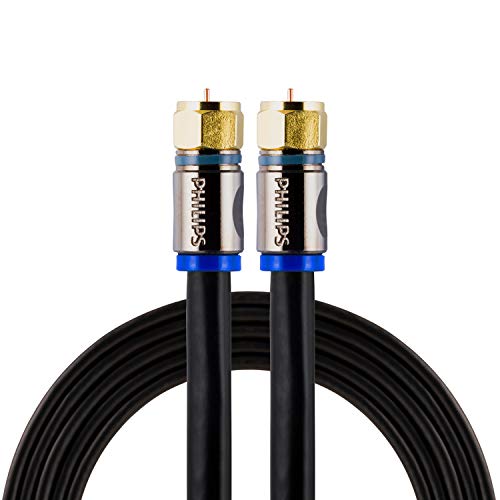
PHILIPS RG6 Quad Shield Coaxial Cable 6 ft.

HDMI RF Modulator Coax Converter VHF Adapter

Cable Matters HDMI Wall Plate with Coax Outlet
Coax to HDMI Adapter BNC to HDMI Converter
Coax to HDMI Adapter BNC to HDMI Converter

Portkeys 8K HDMI Cable High-Speed HDMI Ultra Thin 10-Core Coaxial Cable

kurtmark HDMI to RF Modulator with 1.2M HDMI Cable

HDMI to RF Modulator with HDMI and RG6 Coaxial Cable
More Details On Our Top Picks
This PHILIPS cable suits a tidy TV corner where you want a short, dependable run instead of extra slack. RG6 means the cable uses a common heavier-duty coax format, and the quad shield build adds extra layers around the center conductor to help keep interference down in busy homes.
The 6-foot length helps with cabinet-to-wall runs, antenna hookups, and set-top boxes that sit close to the display. The trade-off is simple, short reach, so a room with awkward placement may need a longer cable from the start.
Strong Points
- Quad shielding gives you a more guarded path for the signal in cluttered rooms.
- The 6-foot length keeps loops and excess cable from crowding a TV stand.
- F-type ends suit common antenna, cable box, DVR, and satellite connections.
- Its in-wall rating makes it a cleaner fit for routed installs behind furniture or through a wall path.
Points To Note
- The short length can feel restrictive in larger rooms or awkward layouts.
- You’ll want to plan routing carefully, since a short coax run leaves little room for repositioning.
Feature Rundown
Who It Suits Best
Homes with a close-by wall jack, antenna feed, or DVR stack get the most out of this compact coax cable.
A Better Fit Elsewhere
Cable Matters HDMI Wall Plate with Coax Outlet makes more sense for a finished room where you want the connection built into the wall.
This AoeSpy unit aims at a very specific problem, getting HDMI sources onto older coax-only televisions. RF modulator means it turns the digital HDMI signal into an analog radio-frequency output, so an older TV can receive it through coax instead of direct HDMI.
The remote-access image controls, including zoom, brightness, contrast, chroma, and vertical position, help you fine-tune the picture on a set that may not have modern display controls. The honest read is that the output quality follows the RF path, so the picture is less crisp than a direct HDMI link.
What We Like
- Lets modern game consoles and streamers connect to older coax-based televisions.
- Remote controls for image position and tone give you more room to adapt the display.
- The VHF output path can help spread the same source to rooms farther from the player.
- Works as a bridge for mixed-age setups where one screen still relies on RF input.
Room For Improvement
- RF output is inherently softer than a direct HDMI connection, so sharpness drops.
- It does not suit ATSC use, so digital broadcast expectations can lead to frustration.
- Setup needs the right order of connections, which makes first-time installation a little fussy.
Technical Sheet
Who It Suits Best
You get the most value here in a house with a classic TV that still depends on coax input, or in a multi-room setup that needs one source sent farther away.
Skip It When
Cable Matters HDMI Wall Plate with Coax Outlet is the cleaner choice for a room that already has in-wall wiring and a newer display at the end of the run.
For a finished room, this wall plate gives you a much neater endpoint than a loose cable hanging from the wall. It combines HDMI passthrough with a coax outlet, so a single-gang opening can handle both a modern source path and a traditional coax feed.
That matters in bedrooms, media spaces, or basements where you want the faceplate to look intentional rather than improvised. The trade-off is installation work, since a wall plate is only useful once the wall opening and cable routing are already in place.
Upsides
- Combines HDMI and coax access in one wall-mounted spot.
- Helps a room look cleaner by hiding the cable terminations.
- Supports common high-resolution passthrough up to 4Kx2K, which suits modern displays in a fixed install.
- Includes coax pass-through for RG6 cable paths, useful for TV service or antenna lines.
Areas To Watch
- Works best in a planned install, not in a temporary setup.
- The faceplate solves cable access, not cable length, so you still need the right run behind the wall.
Feature Snapshot
Built With In Mind
This suits homeowners or installers who want the connection point to disappear into the room instead of sitting in plain view.
Another Choice May Suit
PHILIPS RG6 Quad Shield Coaxial Cable 6 ft. is the better match for a simple short run where the wall is already finished and you only need the cable itself.
This Meekwds adapter is aimed at older analog camera feeds, not general TV coax. BNC means a bayonet-style coax connector used on many security cameras and recorders, and that detail matters because this unit is built for CVBS analog video rather than RF antenna or cable input.
For a CCTV monitor, projector, or spare HDMI screen, it gives you a direct path from older surveillance gear to a modern display. The catch is compatibility, so the source has to be the right kind of analog camera or DVR output before the adapter earns its keep.
Reasons To Buy
- Helps older surveillance feeds reach an HDMI display without changing the whole camera setup.
- Works with CVBS analog sources, which suits many legacy security systems.
- Supports 720p and 1080p output paths, useful for basic monitor viewing.
- Fits CCTV rooms where a spare TV or monitor is already nearby.
Softer Spots
- It does not work with RF antenna or cable TV signals.
- Digital cameras and AHD, TVI, or CVI systems are outside its intended use.
- Connection order matters, so setup takes a careful first pass.
Core Details
Right Fit For
You’ll like this most in a security setup where the camera side is already analog and the display side has moved on to HDMI.
Where A Sibling Pick Shines
YUANLY Coax to Hdmi Adapter suits the same kind of surveillance job, and some setups will simply come down to which version you can wire in more comfortably.
YUANLY’s adapter sits in the same lane as the previous security-focused pick, but it leans more toward simple conversion than extra display tuning. That makes it easy to understand in a small DVR room, especially where you want the camera feed on a monitor and don’t need a lot of menu diving.
It still depends on a true CVBS analog source and a BNC connection, so the fit is narrow by design. The practical upside is that a spare HDMI display can become useful again instead of sitting idle next to old surveillance gear.
Plus Points
- Converts older camera or DVR output into HDMI for a modern display.
- Useful in small security closets where simple signal path matters more than extra controls.
- Can breathe new life into a spare HDTV used for monitoring.
- Stays focused on one job, which can make setup feel less cluttered.
Small Caveats
- It is still limited to CVBS analog sources, so newer camera formats are out.
- The coax side needs the right BNC hookup, which means checking the recorder and camera side first.
Details At A Glance
Whose Shelf It Belongs On
Small business owners and home security users who still depend on analog camera wiring get the most from this kind of converter.
Look Elsewhere When
Meekwds Coax to HDMI Adapter is the closer match for someone who wants the same surveillance bridge with a slightly different setup profile.
Portkeys takes a more technical route than the shorter PHILIPS coax cable, because this one is built as an ultra-thin HDMI cable with a coaxial structure inside. The 19-pin full mapping matters because HDMI uses those pins to carry video, audio, and control signals end to end, while grounded isolation and layered shielding help keep the line tidy in tight gear spaces.
The 2.4 mm diameter and the included straight plus right-angle connectors make this feel aimed at camera monitors, compact desks, and rigging where bend radius matters. A shorter 0.3 m length keeps the run neat, though it also means you need the source and display very close together.
Highlights
- Ultra-thin build makes routing easier around cramped camera or monitor mounts.
- Full 19-pin mapping supports the standard HDMI signal path from end to end.
- Dual connector styles help in cramped corners where one direction fits better than the other.
- The coaxial core and layered shielding are aimed at cleaner signal handling in busy setups.
Worth Noting
- The 0.3 m length only suits very close devices.
- Its specialty design is more at home on rigs and monitors than in a living-room TV run.
Feature Card
The Right Fit
Camera operators and desk users with short HDMI hops get the most out of this low-profile cable.
Swap It Out When
PHILIPS RG6 Quad Shield Coaxial Cable 6 ft. makes more sense for a standard TV coax run where length and F-type connectors matter more than rig-friendly geometry.
This kurtmark modulator keeps the setup plain and direct, which is useful in a living room where you want HDMI gear to feed an older television without a long learning curve. The included 1.2 m HDMI lead and power adapter lower the number of separate parts you need to source, and that usually makes first setup feel less scattered.
CH3 and CH4 output support gives you flexibility with older TVs, and the NTSC output keeps it aimed at standard analog television use. The trade-off is still the same as any RF path, the picture is built for compatibility first, not modern HDMI sharpness.
Best Bits
- Includes an HDMI cable and power adapter, which reduces the number of extra pieces to gather.
- Simple plug-and-play style suits casual setups better than gear-heavy signal chains.
- CH3 and CH4 support gives older sets a familiar channel option.
- Works for game consoles and other HDMI sources that need coax output.
Trade Offs
- RF output will not match the clarity of a direct HDMI display path.
- You still need an older TV that can accept the RF style signal.
Feature Rundown
Who Should Grab It
You’ll appreciate this most in a simple family room setup where the goal is to keep an older TV useful without extra accessories.
Reach For A Different Pick When
HDMI RF Modulator Coax Converter VHF Adapter is the more flexible fit for a setup that needs extra picture adjustments from the remote.
This kurtmark bundle adds an RG6 coaxial cable to the conversion package, which makes the box feel more complete for older-TV hookups. RG6 is a common heavier coax type, and including it helps you get from source to set without hunting for a matching lead right away.
The same NTSC and CH3 or CH4 style output approach keeps the focus on legacy television use, so it is a practical bridge rather than a modern media hub. The addition of the coax cable is the main reason it feels like an upgrade over the simpler RF modulators earlier in the list.
Positives
- Includes both the HDMI side and an RG6 coax cable for a more complete hookup.
- Suited to older televisions that still rely on coax-style inputs.
- Helps you reduce separate cable shopping for a basic conversion job.
- The bundled approach is handy in spare rooms or guest rooms where convenience matters.
Minor Gripes
- Like any RF converter, the picture is not meant to match a straight HDMI link.
- It only makes sense for legacy TV use, so modern displays do not need this kind of bridge.
Core Details
Built For
This is a good match for you if you want a bundled conversion kit for an older TV in a spare room or garage setup.
A Better Fit Elsewhere
Portkeys 8K HDMI Cable High-Speed HDMI Ultra Thin is the better choice for close-range camera or monitor work where a direct HDMI connection matters more than RF conversion.
How To Choose The Right Hdmi And Coax Cables
Match The Signal Path First
Start with the signal you actually need to move. HDMI carries digital audio and video together, while coax often handles RF TV signals, antenna feeds, or security camera lines, so the connector type and converter type have to match the source before anything else.
That’s why a TV antenna setup, a coax wall run, and a camera-to-monitor link all call for different products. A clean match saves time and avoids the common trap of buying the right shape with the wrong signal purpose.
Length, Placement, And Room Layout
Cable length matters more than people expect. A 6-foot coax lead works neatly behind a stand, while a 0.3-meter HDMI cable fits a tight camera rig, and a wall plate makes sense only once the wall route is already planned.
Measure the real path, not the straight-line distance on paper. Leave just enough slack to avoid strain, because a stretched cable or a crowded bend often causes more frustration than the connector style itself.
Watch The Role Of Converters
Converters sit between two different worlds, and that makes their job very specific. HDMI to RF modulators help older TVs accept modern sources, while coax to HDMI adapters do the opposite for analog security gear and legacy video feeds.
Those products are not interchangeable, and that’s the point. Pick the one that fits the age of your display, the format of your source, and the kind of picture quality you can realistically expect.
Pay Attention To Build Details
Shielding, connector fit, and cable thickness all shape how well a setup lives in the real world. Quad shielding, RG6 construction, and grounded coaxial designs help in busier homes or tighter installs, while slimmer HDMI cables help around cramped ports and monitor arms.
Maintenance stays simple, but routing should still be deliberate. Keep the ends clean, avoid sharp kinks, and choose a cable or converter that suits the room instead of forcing a neat-looking part into the wrong job.
Things Worth Knowing First
Common Shopping Slip Ups
Many people focus on the connector and skip the signal format. A BNC security feed, an RF TV input, and an HDMI source each live in a different lane, so the right-shaped plug still fails when the signal type is off.
Another common miss is length. A cable that looks fine in a cart can feel awkward once furniture, wall depth, and port placement enter the picture.
What The Higher Tier Buys
More expensive options usually bring better shielding, tighter connector design, or extra controls on the converter side. In practical terms, that can mean cleaner routing in a cramped desk setup or a little more flexibility when you’re feeding an older TV from a modern source.
Paying up makes sense when the setup is permanent, the room is busy, or the gear sits close together and needs a slimmer, more precise fit. For a casual spare-room hookup, a simpler cable or adapter often does the job well enough.
Frequently Asked Questions
What’s the difference between HDMI and coax?
HDMI carries digital audio and video in one cable. Coax is often used for antenna, cable, RF TV, or security camera signals.
Can a coax cable replace an HDMI cable?
No, not directly. You need a converter or modulator when the source and display use different signal types.
Which pick works for an older TV with coax input?
The HDMI RF modulator options fit that use case. They convert HDMI sources into a signal older televisions can accept through coax.
Which option suits a clean wall install?
Cable Matters HDMI Wall Plate with Coax Outlet fits that role well. It gives you a tidy connection point instead of loose cables hanging outside the wall.
Which choice is better for a security camera monitor?
The coax to HDMI adapters fit that job more closely. They turn analog BNC camera or DVR output into HDMI for a modern screen.
Closing Thoughts
The right cable or adapter depends less on the headline and more on the path your signal needs to take. A short RG6 coax line, a wall plate, a camera converter, or an RF modulator each solves a different problem, and the good fit usually becomes obvious once you match source, display, and room layout. That’s the real value here, less guesswork and fewer wrong turns. Choose the piece that fits your setup as it exists now, and the rest gets easier fast.
