
You need the right cable when file transfers, docking, charging, and external storage all happen from the same desk. The wrong one turns a quick task into a snaggy mess, especially with laptops, tablets, hubs, and portable SSDs that depend on the cable doing more than one job.
This roundup keeps the focus on real use cases, like a commuter packing one compact lead, a home workstation running a dock, or a creator moving large projects between devices. You’ll see where short cables help, where longer ones make life easier, and where higher data rates are worth the extra spend.
Quick Look At The Shortlist
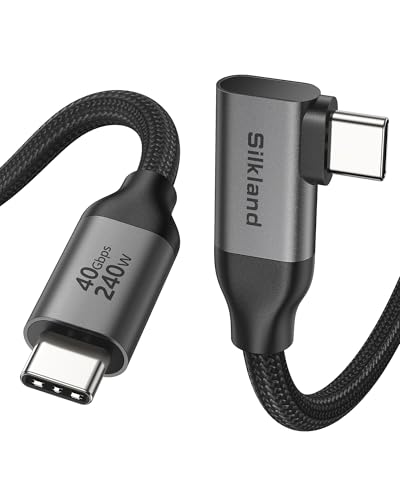
Silkland Right Angle USB 4 Cable 40Gbps (3.3FT) 240W 8K@60Hz

USB C Data Cable 3ft, 10Gbps USB A to USBC High Speed Data Transfer Cord

Anker Prime Thunderbolt 5 Cable 1.7ft USB-C to USB-C 240W Charging

Silkland USB-IF Certified USB4 for Thunderbolt 5 Cable 5FT

Acer USB4 Cable 40Gbps 8K@60Hz Thunderbolt 4/3 Cable 3.3FT
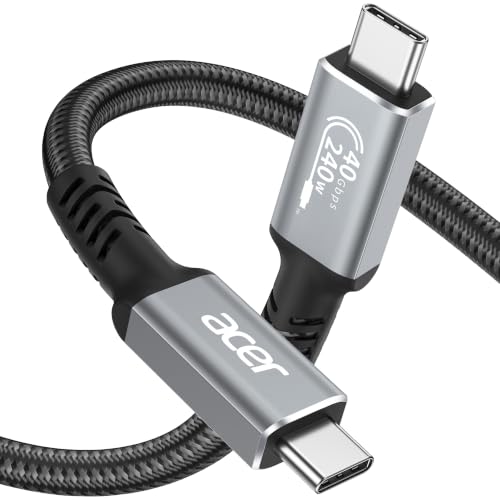
Acer USB4 Cable 40Gbps 8K@60Hz Thunderbolt 4/3 Cable 2.3FT

Silkland 40Gbps USB 4 for Thunderbolt 4 Cable 4FT 240W PD3.1

Anker USB C Cable 40 Gbps USB 4 Data Cable Thunderbolt 4/3 3.3ft
More Details On Our Top Picks
The right-angle head makes this Silkland cable feel built for crowded desks, laptop stands, and tight dock layouts. Its 3.3-foot length keeps excess slack under control, while the 40Gbps USB4 spec, 240W power delivery, and 8K at 60Hz video support give it a wide job range without making the cable itself feel complicated.
That mix suits you best when your MacBook, SSD, or hub sits close to the edge of a desk and straight plugs get in the way. The trade-off is simple, short cables can feel restrictive in a living room or studio setup, so this is a neat fit for compact spaces rather than a room-spanning layout.
Strong Points
- Right-angle connector helps ease strain around cramped ports.
- 3.3-foot length suits tidy desks and short device runs.
- 40Gbps throughput fits fast transfers with modern USB4 gear.
- 240W support broadens use with power-hungry laptops.
- 8K at 60Hz video support covers high-resolution display setups.
Things To Consider
- Short reach can feel limiting away from the desk.
- Right-angle shape works better in some port layouts than others.
- That feature-rich spec set makes sense only with compatible hardware.
Feature Snapshot
Who It Suits Best
You’ll appreciate this most on a compact workstation with a MacBook, dock, or portable SSD sitting close by.
A Better Fit Elsewhere
Silkland 40Gbps USB 4 for Thunderbolt 4 Cable 4FT suits you better when you want more reach without moving up to the heavier Thunderbolt 5 tier.
This IRMZ cable takes a more straightforward path than the USB4 and Thunderbolt options above. You get a USB-A to USB-C connection, a 3-foot reach, and a 10Gbps ceiling that makes sense for laptops, accessories, and older desktops that still rely on USB-A.
The nylon-braided jacket should suit daily bag carry better than a slick, slippery lead, and the 3A charging support adds everyday usefulness. The honest read is that it fits a broader pool of basic gear than the higher-end picks, but it won’t match their display or bandwidth headroom.
What We Like
- USB-A to USB-C design keeps older ports in play.
- 10Gbps transfer speed covers routine file moves well.
- Nylon braid gives the cable a sturdier daily feel.
- 3-foot length works neatly from desk to device.
- 3A charging adds handy power support for phones and accessories.
Room For Improvement
- USB-A fit means it skips newer all-USB-C setups.
- It lacks the display and bandwidth reach of USB4 models.
- White finishes can show grime sooner in a work bag.
Details At A Glance
Made For
You’ll get the most from this in a mixed-port home office or travel kit that still depends on USB-A.
Where A Sibling Pick Shines
Silkland Right Angle USB 4 Cable 40Gbps (3.3FT) 240W 8K@60Hz makes more sense for you when your gear is newer and you need USB4 speed plus display support.
Thunderbolt 5 is the headline here, and the rest of the spec sheet follows that lead with little fuss. At 1.7 feet, this cable is built for close-range use, so it works best beside a dock, laptop stand, or capture setup where you want speed without cable loops piling up.
The 80Gbps transfer rating and up to 120Gbps bandwidth ceiling give it a serious ceiling for heavy file work and advanced displays, while 240W charging support keeps it versatile. You may find the short length a little strict on a deep desk, but that same compactness is exactly why it feels so controlled around compact gear.
Highlights
- Thunderbolt 5 support raises the ceiling for demanding setups.
- 80Gbps data rating suits large transfers and fast peripherals.
- Up to 120Gbps bandwidth helps advanced display use.
- 240W charging support keeps it flexible for laptops.
- 1.7-foot length stays tidy near docks and stands.
Points To Note
- The very short length limits placement options.
- It makes the most sense with newer Thunderbolt gear.
- That high-end capability may exceed what casual setups need.
Core Details
Whose Shelf It Belongs On
You’ll like this most if your desk is built around a Thunderbolt 5 laptop, dock, or pro-grade storage stack.
Look Elsewhere When
Silkland 40Gbps USB 4 for Thunderbolt 4 Cable 4FT is the steadier choice for a more forgiving length and a lower-pressure setup.
This Silkland cable stretches farther than the short Anker Prime lead, and that extra length changes how it fits a desk. At 5 feet, it gives you more freedom between a tower, dock, or laptop stand, while still keeping the same 80Gbps class of USB4 performance and 240W charging support.
It also adds USB-IF certification, which signals tighter spec compliance than many no-name leads, though it doesn’t remove the need to match it with proper hardware. The upside is obvious for a desk with awkward spacing, and the trade-off is a bit more cable to manage in a bag or drawer.
Upsides
- 5-foot reach gives you placement flexibility.
- 80Gbps speed suits high-bandwidth work.
- 240W charging broadens use across laptops and accessories.
- USB-IF certification adds confidence in spec alignment.
- 8K at 120Hz and 4K at 540Hz support wide display setups.
Areas To Watch
- The longer cable can add desk clutter.
- Advanced display support only matters with matching equipment.
- Longer leads usually need a little more storage discipline.
Feature Card
The Right Fit
You’ll value this most in a desktop setup where the port sits farther away than a 3-foot cable can comfortably reach.
Skip It When
Anker Prime Thunderbolt 5 Cable 1.7ft USB-C to USB-C 240W Charging makes more sense for ultra-tight setups that need far less slack.
This Acer cable lands in a very familiar sweet spot, short enough for tidy use but not so short that it feels cramped. At 3.3 feet, it works well beside a laptop, a portable SSD, or a dock that stays close to the machine, and the braided jacket should suit everyday handling in a backpack or drawer.
The 40Gbps USB4 rating, 240W charging support, and 8K at 60Hz video spec give it a well-rounded profile rather than a flashy one. That balance makes it a sensible middle ground for you, especially if you want modern performance without moving all the way up to Thunderbolt 5 pricing territory.
Best Bits
- 3.3-foot length works in compact and mid-size setups.
- 40Gbps speed covers modern transfer needs.
- 240W charging support broadens laptop compatibility.
- 8K at 60Hz display support adds useful flexibility.
- Braided build feels more reassuring for daily use.
Softer Spots
- It does not add the higher ceiling of Thunderbolt 5.
- Shorter reach can feel limiting across larger desks.
- The value here depends on USB4-compatible devices.
Quick Facts
Best Suited To
You’ll like this most if you want a compact USB4 cable for a desk setup that stays close to the computer.
Swap It Out When
Silkland USB-IF Certified USB4 for Thunderbolt 5 Cable 5FT is the stronger fit for a workspace that needs extra reach and more display headroom.
The same Acer formula appears here in a shorter 2.3-foot version, and that changes the use case quite a bit. This is the cleaner pick for a stacked desktop, a travel kit, or a dock sitting right beside your laptop, where too much cable just gets in the way.
Like the 3.3-foot sibling, it keeps the 40Gbps USB4 spec, 240W charging support, and 8K at 60Hz video capability. The trade-off is obvious, and honestly fair, because the shorter length asks you to place devices close together, which works beautifully on a neat desk and less well in a spread-out room.
Positives
- 2.3-foot length keeps desktop clutter down.
- 40Gbps speed remains strong for modern devices.
- 240W charging helps with powerful USB-C laptops.
- 8K at 60Hz support keeps display flexibility intact.
Minor Gripes
- Very short reach limits placement freedom.
- It suits near-touching devices more than wider setups.
- Short cables can be less forgiving in mixed spaces.
At A Glance
Who Will Love This
You’ll enjoy this most if your devices sit tightly grouped and you want to reduce visible cable slack.
Reach For A Different Pick When
Acer USB4 Cable 40Gbps 8K@60Hz Thunderbolt 4/3 Cable 3.3FT gives you the same family of features with a little more breathing room.
This Silkland cable lands at a comfortable middle length, and that matters more than it sounds like on paper. Four feet gives you room to route around a monitor arm or dock without turning the desk into a loose coil of cable, while the 40Gbps USB4 spec and 240W PD3.1 support keep it useful for serious laptop and storage setups.
The 8K and dual 4K video support adds another layer of flexibility, especially for mixed display environments. The catch is that it still sits in the USB4 tier rather than the Thunderbolt 5 tier, so it makes the most sense for you when balance matters more than chasing the highest ceiling.
Reasons To Buy
- 4-foot length works well in many desk layouts.
- 40Gbps speed supports fast storage and device transfers.
- 240W PD3.1 support broadens charging use.
- 8K and dual 4K video support cover multiple display needs.
- Braided construction should hold up well in daily handling.
Worth Noting
- It does not move into Thunderbolt 5 territory.
- Longer cable runs can take a little planning at the desk.
- High-end display support still depends on matching hardware.
Core Details
Built With In Mind
You’ll get the most from this in a mixed-use home office where one cable needs to do a little of everything.
Another Choice May Suit
Anker Prime Thunderbolt 5 Cable 1.7ft USB-C to USB-C 240W Charging fits better for advanced users who want the newest platform and shorter cable runs.
This Anker cable keeps the formula straightforward, which can be exactly what you want in a mixed laptop-and-dock setup. The 3.3-foot length sits in a practical middle zone, the 40Gbps USB4 rate covers serious transfers, and the 8K display support gives it enough range for modern desk gear.
It also includes 240W charging support, so it does more than move files from point A to point B. One thing worth considering is that the feature set only shines fully with compatible hardware, but for a common USB-C workstation, this is a tidy, dependable route without extra fuss.
Bright Spots
- 3.3-foot length works well in everyday desk setups.
- 40Gbps speed keeps transfers moving quickly.
- 240W charging support adds useful power flexibility.
- 8K HD display support widens its use case.
- Anker’s cable design should suit regular handling.
Small Caveats
- It is still dependent on matching USB4 or Thunderbolt gear.
- Shorter length may feel tight on deeper desks.
- Feature overlap with nearby picks makes the use case specific.
Feature Rundown
Perfect Match For
You’ll like this most if you want a familiar, middle-length USB4 cable for a laptop, hub, or dock.
Where A Sibling Pick Shines
Silkland Right Angle USB 4 Cable 40Gbps (3.3FT) 240W 8K@60Hz is the better fit for tighter port access and a right-angle plug.
How To Choose The Right High Speed Data Transfer Cables
Match The Cable To The Port
Connector type comes first because the cable has to fit the gear you already own. USB-A to USB-C models suit older computers and accessories, while USB-C to USB-C and USB4 cables fit newer laptops, docks, and external storage.
That difference matters in daily use, especially in mixed households or small offices where not every device has the same port layout. A high-speed cable still underperforms when the port side is wrong, so checking the connector before anything else saves a lot of frustration.
Understand Speed, Bandwidth, And Real Use
Data rate tells you how fast files can move, while bandwidth describes how much data the cable can carry at once for tasks such as displays and peripherals. In plain terms, a 10Gbps cable is fine for routine transfers, but 40Gbps and above make more sense for external SSDs, docks, and heavier creative work.
That gap matters most when your desk setup starts stacking duties, since one cable may need to handle storage, charging, and video output together. A Thunderbolt 5 lead goes further than a basic USB-A cable, but most people do not need that ceiling for ordinary syncing or phone transfer jobs.
Choose Length With Your Desk In Mind
Short cables reduce clutter and feel cleaner around a laptop stand, travel bag, or dock parked right beside the machine. Longer leads add placement freedom, which helps when the port sits behind a monitor or across a deeper desk.
The trade-off shows up in storage and portability, because a longer cable is easier to drape but harder to pack neatly. For daily commuting or a desk that changes often, a middle length such as 3 to 4 feet tends to be the least fussy compromise.
Check Power And Display Needs Together
Power delivery, often shortened to PD, tells you how much charging capacity the cable is built to support. A 240W rating is useful for powerful laptops, but it only helps when the charger and device also support that level.
Display support matters just as much for people who use a monitor through the same cable. 8K, 4K, or dual-display support can save you from needing a separate display lead, though the final result still depends on the dock, computer, and monitor working together.
A Quick Reality Check
Common Shopping Slip Ups
One common miss is focusing only on transfer speed and forgetting the connector type. Another is choosing a cable that is too short for the desk, which leaves the setup awkward and can pull on nearby ports.
You also want to check whether your devices actually support the speed tier you’re paying for. A fast cable can still behave like an ordinary one beside older hardware, so it helps to match the cable to the device chain instead of the label alone.
What The Higher Tier Buys
More expensive cables usually pay for tighter spec support, higher bandwidth, and better compatibility across modern laptops, docks, and displays. Braided jackets, certified design notes, and stronger connectors can also add to the bill.
The upgrade makes sense when your setup handles large media files, multiple monitors, or a power-hungry laptop from the same lead. For simpler phone charging or casual data moves, a midrange option often covers the job without extra complexity.
Frequently Asked Questions
What speed should a high-speed data cable have?
For everyday transfers, 10Gbps handles a lot of common tasks well. For docks, external SSDs, and heavier setups, 40Gbps or Thunderbolt-class cables make more sense.
Does cable length affect performance?
Length affects convenience first, but it also changes how tidy or portable the setup feels. Shorter cables work better beside a dock, while longer ones help across deeper desks.
Can one cable handle charging and data?
Yes, many USB-C and USB4 cables are built for both jobs. The key is matching the cable’s power rating and data tier to your charger and device.
Why do some cables cost more than others?
Higher-tier cables often support faster speeds, stronger power delivery, and broader display use. Better materials and more exact compliance also tend to push the price up.
Is Thunderbolt always necessary?
No, and for many simple setups it’s more cable than you need. Thunderbolt makes sense when you rely on docks, advanced storage, or high-end displays.
Final Thoughts
The right cable depends on the job your desk asks it to do, not just the label printed on the jacket. A short right-angle lead works well in a tight workspace, while a longer USB4 option makes more sense when your ports sit farther away. If your setup leans toward storage, docking, or fast charging, the higher-spec picks earn their place. For simpler daily use, the straightforward USB-A option still makes a lot of sense.
