
Internal USB headers solve a very practical problem, especially for anyone adding front-panel ports, RGB controllers, card readers, or compact accessories inside a desktop tower. The right pick keeps cables short, connections tidy, and the case easier to work on later. The wrong one turns a simple upgrade into a tangle of extra slack and incompatible plugs. You’ll see that difference clearly in the picks below.
Quick Look At Our Top Picks

Corsair Internal 4-Port USB 2.0 Hub
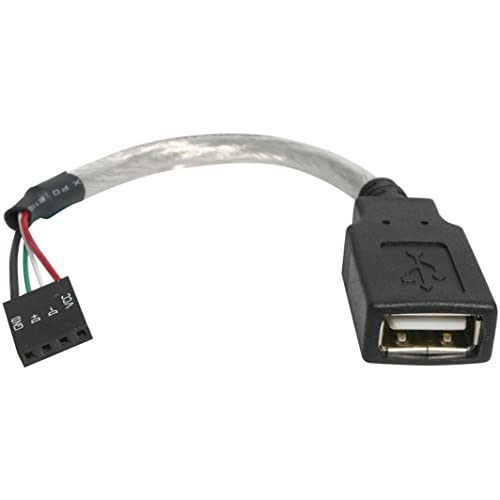
StarTech 6in USB 2.0 Header to USB-A Cable

Duttek USB Header to USB Cable 2-Pack

daier 9-Pin USB Motherboard Male Header Cable

OwlTree Motherboard 9 Pin USB 2.0 Splitter 2-Pack

SinLoon 9pin USB 2.0 Dual 2-Port Header Adapter

GELRHONR 2PCS USB 2.0 9Pin Female to Dual 9-Pin Male Cable
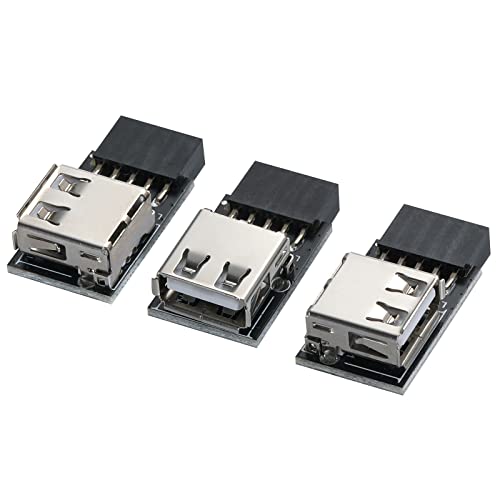
MZHOU USB 2.0 9Pin/10Pin Front Panel Header Adapter
More Details On Our Top Picks
A magnetic internal hub like this makes sense in a case that keeps growing, especially with a front-panel card reader, controller, or small accessory stack. You get four 9-pin USB 2.0 ports in one place, so cable routing stays less chaotic than a loose chain of adapters. The trade-off is simple, it’s still a USB 2.0 hub, so it suits accessories more than high-bandwidth gear.
For a tidy gaming tower or a builder who hates messy wiring, that magnetic mounting style is the real convenience. It’s also the kind of part you appreciate later, because a clean install is easier to service when you reopen the case for a graphics card or cooler swap. In most mid-tower builds, that can feel like a small mercy.
Strong Points
- Four internal ports keep several accessories connected without extra splitter clutter.
- Magnetic placement helps the hub stay put inside a steel case.
- USB 2.0 support fits low-demand devices that do not need fast throughput.
- Useful for neat cable routing in builds that already feel crowded.
Things To Consider
- USB 2.0 limits make it a poor match for data-heavy peripherals.
- Magnetic mounting depends on a case surface that can hold it well.
Key Specs
Who It Suits Best
Desktop builders who want a cleaner internal layout and several USB 2.0 connections in one place will get the most from this hub.
Where A Sibling Pick Shines
MZHOU USB 2.0 9Pin/10Pin Front Panel Header Adapter is the better fit for mixed-header systems that need a simple front-panel bridge instead of a multi-port hub.
This short adapter cable is made for a very specific job, turning a motherboard header into a USB-A female connection at the front of the install path. That matters in custom cases, small bench rigs, and older gear that still needs a standard USB-A plug point. You may find the six-inch length a little tight in large towers, but it keeps things neat where the path is short.
Compared with Corsair’s multi-port hub, this one is much more direct and less about expansion. It suits the builder who wants one clean conversion instead of several internal ports. The honest read is that it’s the kind of part you buy for a specific wiring problem, not for broad flexibility.
Upsides
- USB-A female output gives a familiar connection point for compatible devices.
- Short six-inch length helps reduce loose cable slack.
- Simple layout keeps the install easy to understand.
- Good match for front-panel or bench-style connection needs.
Points To Note
- The short reach can feel restrictive in larger cases.
- It solves one job well, but it does not add extra ports.
Feature Snapshot
Built With In Mind
You’ll get the most from this cable in a compact desktop, test bench, or repair setup where a short, direct header conversion is enough.
Look Elsewhere When
Corsair Internal 4-Port USB 2.0 Hub suits multi-device builds much better, especially when you need more than one internal connection point.
Two cables in one package change the math for a small shop bench or a hobbyist who keeps reworking the same machine. The Type-A female end gives you a standard mating point, while the 9-pin female header side keeps it aligned with common motherboard USB 2.0 headers. The 0.1-meter length is very short, so the payoff is neat internal routing rather than long reach.
Compared with StarTech’s single-cable approach, this bundle is less about a one-off fix and more about having a spare on hand. That makes it useful for repetitive builds, quick replacements, or anyone wiring up similar cases over time. You may want a longer option in tall towers, but for close quarters it stays easy to manage.
Best Bits
- Two-cable pack gives you a spare or a second build piece.
- Short format helps reduce clutter inside tight chassis spaces.
- Female Type-A end suits standard peripheral-style connections.
- Handy for repeat installs where consistency matters.
Room For Improvement
- Very short length limits placement in larger towers.
- The small form makes cable management useful, but not forgiving.
- Works best for simple routing rather than complex runs.
Details At A Glance
Whose Shelf It Belongs On
You’ll appreciate this bundle most during repeat desktop work, small electronics builds, or any setup that benefits from short, standardized internal cabling.
A Better Fit Elsewhere
GELRHONR 2PCS USB 2.0 9Pin Female to Dual 9-Pin Male Cable suits builders who want braided leads and a dual-male extension style instead of a short adapter pair.
A 7.8-inch cable like this makes sense in compact cases where the header and device sit close together. The male-to-male layout is straightforward, and that simplicity matters more than flashy extras in a cramped build. You may find it less useful in roomy towers, but for short internal runs it keeps the path clean.
Unlike the Duttek two-pack, this one feels tailored to a single physical run rather than a spare-heavy toolbox approach. It’s a good fit for builders who want one direct connection and no extra slack to hide. In a small chassis, that can be the difference between a tidy panel and a knot of leftover wire.
Bright Spots
- Short 7.8-inch length suits tight internal layouts.
- Direct male-to-male routing keeps the connection path simple.
- Good for cases where extra cable slack would become messy.
- Works well in low-spare, space-conscious builds.
Areas To Watch
- The short reach leaves little room for oversized chassis layouts.
- It’s a single-purpose cable, so versatility stays limited.
Core Details
Right Fit For
Compact desktop builders and anyone trying to keep a close header run neat will get the most from this cable.
Another Choice May Suit
StarTech 6in USB 2.0 Header to USB-A Cable is the cleaner match for anyone who needs a female USB-A connection instead of a male-ended lead.
This splitter leans into expansion, and that’s where it earns its place. You get a 2-pack, braided black sleeving, and a dual 9-pin layout that makes more sense for internal systems with several USB 2.0 attachments. It feels more ambitious than the simpler StarTech or daier cables, though the extra branching also means more planning during installation.
For a builder who adds accessory boards, lighting controllers, or front-panel add-ons over time, that extra structure helps. Braided sleeving usually makes the cable feel a little more substantial in the hand and easier to guide around sharp edges. The catch is that splitters invite clutter faster than a single run, so neat routing still matters.
Reasons To Buy
- 2-pack format gives you room for more than one build.
- Dual-header branching supports broader internal expansion.
- Braided black finish is easier to route cleanly around the case.
- Useful for setups that keep gaining small add-on devices.
Softer Spots
- Splitter-style layouts take more thought during cable planning.
- More branching means more chances to create internal clutter.
Feature Rundown
Who Will Love This
You’ll like this most in a case that keeps evolving, especially when accessory boards and add-on parts keep appearing.
Skip It When
MZHOU USB 2.0 9Pin/10Pin Front Panel Header Adapter is a cleaner choice for a simpler front-panel connection with less branching to manage.
The dual-layer layout is the part that stands out here, because it suggests a more deliberate fit for cramped internal spaces. That matters in a build where headers, power leads, and storage cables already crowd the board. Compared with OwlTree’s braided splitter, this option feels more focused on structure than on extra cable dressing.
For most cases that need two ports without a lot of added bulk, this kind of adapter makes sense. The layered shape can help you organize a stubborn area around the motherboard, although it does ask for more careful placement. It’s a solid step up for builders who are already past the simplest cable jobs.
Standout Traits
- Dual-layer design can help in packed motherboard areas.
- Two-port layout gives you more internal connection options.
- Better suited to organized, deliberate cable planning.
- Useful where space around the headers is already tight.
Minor Gripes
- The layered form may take extra thought during installation.
- It’s aimed at a specific fit, so it is less universal than simpler leads.
At A Glance
Made For
You’ll get the most from this adapter in a dense PC build where the motherboard area needs a carefully layered internal connection.
Swap It Out When
Corsair Internal 4-Port USB 2.0 Hub is the better fit for users who want broader expansion instead of a more compact two-port layout.
Braided sleeving and a 2-piece bundle make this feel like the kind of internal cable you reach for more than once. The female-to-dual-male arrangement fits internal motherboard work where you want a neat splitter-style extension with a little more physical structure. It’s not the shortest or simplest option in this list, but it may suit an everyday tower better than a bare-bones lead.
Compared with SinLoon’s layered layout, this GELRHONR set leans into familiar routing and a more traditional cable feel. That can make installation easier for someone who has already handled a few desktop builds. One small caveat, braided cable can still need careful bending so it doesn’t push back against tight side panels.
Plus Points
- Two cables in the set support repeat builds or backups.
- Nylon braid adds a more controlled feel during routing.
- Dual-male extension style fits common internal splitter needs.
- Works well for routine desktop projects.
Small Caveats
- Braided cable still needs room to bend cleanly.
- The layout is more specialized than a simple adapter lead.
Technical Sheet
Who Should Grab It
Builders who want a familiar splitter-style cable with a braided finish will get the clearest fit from this set.
Reach For A Different Pick When
StarTech 6in USB 2.0 Header to USB-A Cable is the simpler choice when your setup needs a single USB-A female connection instead of a braided extension pair.
This adapter stands out because it addresses both 9-pin and 10-pin front-panel header styles, which is useful in mixed or older desktop cases. That wider fit gives you a little breathing room during a build, especially when the motherboard layout does not match a tidy modern diagram. It’s the sort of part that quietly solves a compatibility headache.
Compared with the more specialized StarTech and daier cables, this one feels broader in purpose. You may find it the most forgiving choice when you’re wiring a front panel and the exact header layout isn’t immediately obvious. For mixed systems or upgrade work, that flexibility matters more than fancy extras.
What We Like
- Supports both 9-pin and 10-pin front-panel header styles.
- Useful for mixed motherboard layouts and older systems.
- Simple adapter design keeps the install easy to follow.
- Good match for front-panel USB conversion tasks.
Worth Noting
- Its main strength is fit flexibility, not multi-port expansion.
- Specific use case means it’s less useful for broader internal branching.
Spec Overview
Built With In Mind
You’ll get the most from this adapter in a mixed-header desktop or a front-panel retrofit where compatibility matters more than expansion.
Where A Sibling Pick Shines
Corsair Internal 4-Port USB 2.0 Hub is the stronger option when your build needs multiple internal connections rather than one adaptable front-panel bridge.
How To Choose The Right Internal Usb Headers
Match The Header To The Job
USB 2.0 internal parts vary a lot in shape, and that shape decides how painless the install feels. A hub, splitter, or adapter each solves a different problem, so the first move is matching the part to the device chain inside your case. Front-panel ports, controller boards, and tiny accessory leads all ask for different layouts.
Cable length matters just as much. Short leads like the daier 7.8-inch cable suit compact builds, while a hub such as the Corsair unit helps when several devices need one organized landing spot.
Check Case Space Before You Choose
A roomy tower gives you more room for braided splitters and layered adapters, but small cases punish extra slack fast. That’s where low-profile parts earn their keep, because they cut down on bends that can crowd the side panel or block airflow paths. A magnetic hub can also help keep things settled in a steel chassis.
Think about where your cable will actually run, not just where it connects. A direct header bridge can be easier than a splitter when the motherboard tray already feels busy.
Pick For Expansion Or Simplicity
Expansion-minded builders usually want a hub or splitter, because that gives several devices a home from one header. Simplicity-minded builders often do better with a single conversion cable, especially for one front-panel port or one accessory board. The trade-off is obvious, more branching means more planning.
For a first desktop upgrade, a simple adapter like the StarTech or MZHOU option is easier to live with. For repeated builds or dense internal layouts, the Corsair hub or OwlTree splitter gives you more room to grow.
A Quick Reality Check Before You Decide
Common Shopping Slip Ups
A lot of trouble starts with the wrong connector count, not the wrong brand. A 9-pin header cable won’t help much in a setup that needs a 10-pin front-panel bridge, and the reverse is true too.
Another easy miss is cable length. Short cables look neat on paper, but they can feel awkward in a larger mid-tower.
What The Higher Tier Buys
More expensive options tend to add better cable dressing, broader port layouts, or more careful physical design. That matters in a cramped build where the cable path is already crowded and every bend feels like a negotiation.
Paying up makes sense when your case holds several internal devices, or when you want a part that stays easier to route and service later. For a single connection, basic usually does enough.
Frequently Asked Questions
What does an internal USB header do?
It links internal devices, such as front-panel USB ports or accessory boards, to the motherboard. That keeps the connection inside the case instead of running outside it.
Do you need a hub or just a cable?
A hub helps when several devices need one header. A cable or adapter works better for a single connection with a clear path.
Why do some cables use 9-pin and others mention 10-pin?
A 10-pin front-panel layout often uses one blocked position or a keyed arrangement, while 9-pin USB 2.0 headers are the common internal format. The detail matters because the wrong fit stops the connection from seating properly.
Are braided cables better?
Braided sleeving mainly helps with routing and feel, not performance. It’s useful in visible or crowded builds, though plain cables can be easier to bend in very tight spaces.
Which option is easiest for a beginner?
A simple adapter like the MZHOU or StarTech pick is usually the least stressful. You get fewer branches, fewer parts to place, and a clearer path from header to device.
Closing Thoughts
The right internal USB header part depends on how busy your case already is. A compact adapter makes sense for one clean connection, while a hub or splitter fits a build that keeps adding small accessories. You do not need the most complex option to get a tidy result, you need the one that matches your case layout and the number of devices you actually plan to connect. Choose for the setup in front of you, and the rest tends to fall into place.
