
Big computer cases solve a simple problem, they give you room to build without turning every cable route into a wrestling match. That matters for gaming rigs with thick radiators, storage-heavy NAS setups, and dual-system towers that need space to breathe.
This roundup focuses on cases that reward a plan, not just a parts list. You get roomy interiors, stronger cooling headroom, and layouts that make upgrades easier for a long stretch of ownership.
Quick Look At The Shortlist

HYXN H2 (2026) ATX PC Case, 8 PWM ARGB Fans
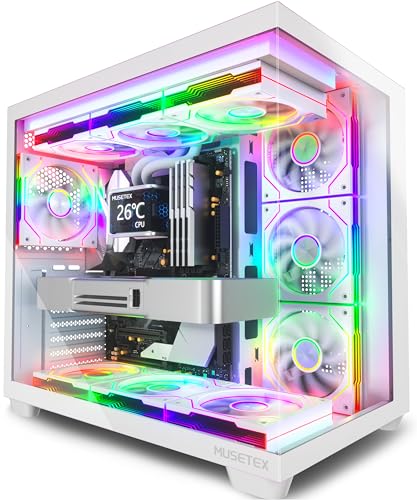
MUSETEX Y6 PC Case, 7 Infinity Mirror PWM ARGB Fans, White

DARKROCK EC2 ATX Mid Tower PC Case, Type-C Ready

DARKROCK Classico Storage Master ATX NAS Case

MUSETEX Y6 PC Case, 7 Infinity Mirror PWM ARGB Fans, Black
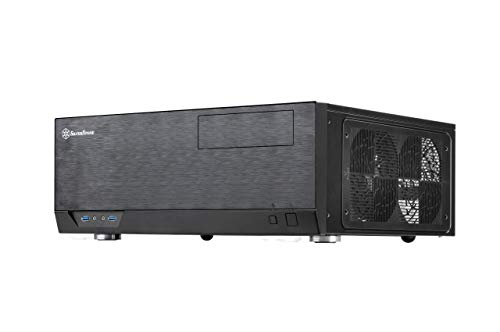
SilverStone Grandia Series Aluminum HTPC Case GD09B

RUIX OV303 ATX Mid-Tower PC Case, 4 Prism ARGB Fans
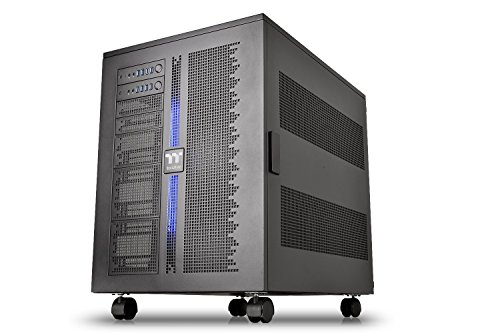
Thermaltake Core W200 Dual System Capable Super Tower
More Details On Our Top Picks
HYXN leans hard into cooling, with six 140mm and two 120mm PWM ARGB fans already in place. That kind of setup suits a busy gaming desk, since you spend less time sourcing matching fans and more time sorting the build plan.
The dual-chamber layout helps keep the cable side from crowding the main parts, which makes large builds feel less cramped. The trade-off is simple, this is the kind of case that rewards a substantial build more than a minimal one, and the 420mm radiator support points the same way.
Strong Points
- Eight pre-installed fans give you a strong cooling starting point without filling every spare mount later.
- The dual-chamber design separates cables and power gear from the main display area, so the interior can feel cleaner.
- 420mm radiator support gives serious liquid-cooling room for custom loops or large AIO setups.
- The Type-C 3.2 front connection helps keep newer accessories convenient on a gaming desk.
- The black RGB finish fits a showpiece build without pushing the look too far.
Things To Consider
- The large layout makes the case more at home beside a full-size desk than under a tight shelf.
- All that fan hardware adds cleanup and cable planning, so a patient build day helps.
- Smaller parts lists can leave the interior feeling bigger than necessary.
Feature Snapshot
Who It Suits Best
You’re the right match for a high-airflow gaming build that needs room for big cooling hardware and a tidy cable side.
Where A Sibling Pick Shines
MUSETEX Y6 PC Case, 7 Infinity Mirror PWM ARGB Fans suits you better for a more visual, glass-forward presentation.
MUSETEX takes a more display-first route than the HYXN case above, and the 270-degree tempered-glass view makes that obvious right away. It suits a desk where the tower stays visible, especially for a white-themed build that leans into lighting and symmetry.
The seven pre-installed PWM ARGB fans do a lot of the presentation work for you, so the case feels ready for a polished gaming setup out of the gate. The honest trade-off is that glass-heavy towers tend to ask for more fingertip cleanup, which matters in a room where the side panel stays in view.
Bright Spots
- The 270-degree tempered-glass view gives your hardware a broad, open display.
- Seven pre-installed fans reduce the need to source a full matching set later.
- PWM fan control helps the cooling setup respond more sensibly to changing workloads.
- The white finish works well in bright rooms or coordinated desk setups.
- Type-C support keeps front-panel connectivity aligned with newer gear.
Small Caveats
- Glass panels show dust and fingerprints sooner than a plain steel shell.
- The visual focus can matter more than absolute simplicity, so it suits a show build better than a plain office tower.
- A larger lighting layout can take extra time to route and tidy.
At A Glance
Made For
You’re the best match here for a display-focused gaming build where lighting, clean lines, and a white finish matter as much as raw space.
Another Choice May Suit
RUIX OV303 ATX Mid-Tower PC Case suits you better for a simpler airflow-first build with fewer visual distractions.
DARKROCK’s EC2 lands in the middle of the group in a useful way, with a plain ATX mid-tower shape that still leaves room for modern parts. Compared with the HYXN and MUSETEX options, it keeps the fan story simpler, which suits a build that values easier setup over a long list of pre-installed lighting extras.
The tempered-glass side panel and Type-C readiness keep it current for a gaming desk, while support for up to eight 120mm fans and a 360mm radiator gives you room to scale cooling later. The trade-off is obvious enough, the included single fan is a starter point rather than a full cooling package.
Upsides
- Up to eight 120mm fans gives you plenty of cooling expansion room.
- 360mm radiator support makes it practical for larger liquid-cooling hardware.
- The tempered-glass side panel lets you show off a finished build without overcomplicating the case.
- Type-C readiness lines up well with newer motherboard and accessory setups.
- Support for later-generation graphics cards gives the interior a more future-minded fit.
Areas To Watch
- Only one fan comes pre-installed, so the cooling layout still needs more parts to feel complete.
- A build with many drives or extra lighting can take more planning than a fuller kit case.
- The glass panel asks for regular dusting to stay clear.
Core Details
Right Fit For
You’re a good match here for a mainstream gaming build where you want expansion room, modern ports, and an easy-to-read interior.
Look Elsewhere When
Thermaltake Core W200 Dual System Capable Super Tower suits you better for a two-system or extreme custom cooling project.
This DARKROCK shifts away from gaming flair and into storage-first territory, which is exactly why it stands apart from the previous three. Ten 3.5-inch drive bays and three 2.5-inch positions make it far more useful for a home NAS or media server than a showpiece tower.
The four included 120mm fans and support for top or front 360mm radiators add cooling flexibility for a case that may spend its life holding a lot of drives. The catch is simple, a storage-heavy chassis takes patience during installation, and vertical GPU mounting is only relevant for very specific builds.
Best Bits
- Ten 3.5-inch bays give you serious room for hard-drive storage.
- Three 2.5-inch mounts help round out SSD placement.
- The four pre-installed fans help support a larger storage load.
- Top and front 360mm radiator support gives you cooling flexibility.
- USB 3.0 readiness keeps front access straightforward for a server-style setup.
Worth Noting
- The layout is specialized, so it makes less sense for a simple gaming tower.
- Drive-heavy builds need more cabling, which can lengthen assembly time.
- Vertical GPU mounting only matters for certain display-oriented setups.
- The storage focus can leave some gaming buyers with more space than they need.
Details At A Glance
Built With In Mind
You’re the better match here for a NAS builder, home lab setup, or media server project that needs a lot of drive bays in one enclosure.
Where Shoppers Go Wrong
MUSETEX Y6 PC Case, 7 Infinity Mirror PWM ARGB Fans is the easier fit for someone who wants a showcase gaming tower instead of a storage cabinet.
The black Y6 keeps the same seven-fan and 270-degree glass recipe as the white version, but the darker finish changes the mood right away. It feels a little easier to blend into a darker room or under-desk setup, while still giving you the wide viewing angle that makes a gaming rig feel presentable.
In most setups, this version makes sense for someone who wants the display-first look without the brighter visual signature of the white model. The downside tracks closely with the white case, since glass and lighting both invite more cleaning and more care during cable routing.
Plus Points
- The dark finish blends well with black components and subdued rooms.
- Seven pre-installed PWM ARGB fans save a lot of matching effort.
- The broad tempered-glass view keeps the build visible from the desk side.
- Type-C support helps the front panel stay current.
- The lighting layout works well for a showcase gaming tower.
Points To Note
- The glass-heavy design needs routine wiping to stay sharp-looking.
- Lighting and fan cabling can take time to organize neatly.
- The style focus matters more here than plain utilitarian simplicity.
Feature Rundown
Whose Shelf It Belongs On
You’re the right match if you want a dark, showcase-style ATX build with strong built-in lighting and a visible interior.
Skip It When
SilverStone Grandia Series Aluminum HTPC Case GD09B suits a living-room media setup much better than a flashy gaming tower.
SilverStone takes a completely different path from the tower cases above, since this is an HTPC chassis meant to sit in a living room or media cabinet. The aluminum exterior gives it a cleaner, more furniture-like presence, which matters more here than flashy glass or fan counts.
It supports ATX and SSI-CEB, so the case is aimed at full-size components without losing its low-profile home-theater shape. That shape brings a trade-off, though, because you gain a nicer footprint for AV spaces while giving up the vertical breathing room that makes the earlier gaming towers easier to work in.
What We Like
- The aluminum body feels better suited to a media shelf than a glowing gaming tower.
- ATX and SSI-CEB support keep the case compatible with larger board formats.
- The low-profile HTPC design sits more naturally in entertainment furniture.
- The black finish stays understated beside receivers and consoles.
Minor Gripes
- The horizontal shape can feel tighter to work in than a tall mid tower.
- It makes less sense for buyers who want room for a dense fan wall.
- A living-room chassis can be less forgiving of messy cabling in front of the case.
Technical Sheet
Perfect Match For
You’re the right fit for a home theater PC, media cabinet build, or a quiet-looking system that belongs near a screen.
Swap It Out When
HYXN H2 (2026) ATX PC Case, 8 PWM ARGB Fans is the better route for a gaming desk that needs far more fan capacity and vertical working room.
RUIX gives you a straightforward high-airflow mid-tower without the busier hardware count of the HYXN or MUSETEX cases. Four pre-installed Prism ARGB PWM fans and front USB 3.0 plus Type-C ports make it feel practical for a first gaming build or a clean mid-range upgrade.
That simpler layout can be a strength, especially for someone who wants a roomy case without paying for a giant fan wall or broad glass showcase. The main compromise is that the lighting setup is more restrained, so it speaks to function before spectacle.
Reasons To Buy
- Four pre-installed fans give you a workable cooling start.
- PWM support lets the fans respond more intelligently to load.
- USB 3.0 and Type-C front ports keep the panel useful day to day.
- The black high-airflow design suits a practical gaming setup.
- It offers a large-case feel without jumping into a giant tower.
Room For Improvement
- The lighting package is lighter than the eight- and seven-fan cases earlier in the list.
- A simpler visual setup may feel plain to someone chasing a show build.
- Extra fan additions could still be needed for a very hot parts list.
Feature Card
The Right Fit
You’re a strong match for a practical gaming build where airflow, front ports, and a cleaner hardware list matter more than a flashy presentation.
Where A Sibling Pick Shines
MUSETEX Y6 PC Case, 7 Infinity Mirror PWM ARGB Fans suits you better if you want more lighting drama and a broader glass display.
The Core W200 sits in its own class, because dual-system capability and a fully modular, dismantle-able design put it far beyond a normal gaming tower. That makes it a serious choice for a workshop-grade build, a content lab, or a custom water-cooling project that needs more room than a mid-tower can give.
Stackable super-tower construction gives you enormous layout freedom, but it also means the case rewards careful planning and a willingness to handle a very large chassis. The upside is obvious, you can build with room to spare, and the trade-off is just as obvious, this is not the kind of enclosure that disappears under a desk.
Highlights
- Dual-system capability opens the door to two complete builds in one chassis.
- The fully modular, dismantle-able structure gives you more assembly flexibility.
- XL-ATX support fits extremely large board layouts.
- Extreme water-cooling focus makes it appealing for elaborate loop planning.
- The stackable form factor gives advanced builders room to expand.
Honest Caveats
- The footprint is enormous, so placement takes real forethought.
- This level of chassis makes sense only for a specialized build plan.
- Assembly can be more demanding than with a standard ATX mid tower.
- Storage, transport, and cable routing all take more care with a case this large.
Core Details
Whose Shelf It Belongs On
You’re the right fit for an advanced builder, a dual-system workstation plan, or a custom cooling project that needs a huge enclosure.
Not Your Match When
DARKROCK EC2 ATX Mid Tower PC Case, Type-C Ready makes more sense for a regular gaming setup that still needs generous space without the super-tower commitment.
How To Choose The Right Biggest Computer Cases
Start With Your Largest Part List
Your biggest parts decide the case before style does. Measure radiator length, graphics card clearance, and drive needs together, because a roomy tower still feels cramped when one oversized part blocks the rest.
Builders running thick liquid coolers or long graphics cards benefit from extra depth more than extra height. A case that can physically fit the parts still needs sane cable paths and sensible airflow.
Match The Layout To The Job
A gaming tower, a storage server, and a home theater PC ask for different things. Front glass and fan walls suit a desk-facing rig, while a low-profile chassis belongs closer to a TV stand or media cabinet.
Dual-chamber designs help clean up cables, but storage-heavy chassis need patience and planning. The right layout saves you from having to work around the case later.
Look At Cooling As A System
More fans are helpful, but fan count alone does not tell the full story. PWM control, radiator support, and intake-to-exhaust balance matter just as much, especially in a large enclosure that can trap warm pockets if airflow is careless.
For high-power gaming builds, cases with room for 360mm or larger radiators give you more options. For drive-heavy systems, the cooling story matters because storage hardware can crowd the interior and warm the chassis over time.
Plan For Living With It
Cleaning, dusting, and cable access matter after the first build day ends. Glass panels show fingerprints, modular towers can be harder to carry, and storage cases often demand more cable management than a simple mid tower.
Choose the shape that fits your room, not just the parts list. That keeps the case pleasant to own long after the excitement of the first assembly wears off.
A Quick Reality Check
Mistakes Worth Dodging
Many shoppers fixate on fan count and forget drive support, PSU space, or front-panel ports. Another common miss is buying a giant tower for a modest parts list, which leaves you with empty volume and extra dusting.
Check the mounting plan before the look. A clean exterior helps, but the internal layout decides whether the build feels easy or fussy.
What The Higher Tier Buys
More expensive cases usually spend the money on larger steel sections, better modularity, thicker glass, and more thoughtful internal routing. That extra structure helps during assembly and often makes the case feel steadier on a desk or shelf.
Premium models also tend to accommodate bigger cooling hardware and more complex layouts. You feel that difference most in advanced builds, where a cramped chassis would slow every next upgrade.
Frequently Asked Questions
What Makes A Computer Case “Big”?
In this category, big usually means more internal room for long graphics cards, large radiators, drive cages, or dual-system layouts. It also means more physical presence on the floor or desk.
Do Larger Cases Run Cooler?
Not automatically, but larger cases often give airflow more room to move. Cooling still depends on fan placement, intake design, and how crowded the interior gets.
Are Big Cases Harder To Build In?
They can be easier for first-time assembly because there is more hand room around parts. Storage-heavy or modular designs can still take patience because the extra room also adds more routing choices.
Which Case Type Fits A Gaming Rig Best?
An airflow-focused mid tower with radiator room works well for most gaming setups. A display-focused glass model suits you more when the build will sit in plain view.
What Should You Measure Before Ordering?
Check graphics card length, radiator size, motherboard format, and how many drives you plan to mount. Then make sure the case shape fits the room where it will live.
Closing Thoughts
Big computer cases make sense when your build needs space to breathe, room to grow, or a cleaner way to manage a lot of hardware. HYXN and RUIX suit airflow-first gaming rigs, MUSETEX favors a display-heavy setup, and DARKROCK’s storage model serves a very different kind of build. SilverStone brings a calmer living-room look, while Thermaltake is for serious, oversized plans. Match the case to your parts, your room, and how much future tinkering you want, and the right pick becomes much easier to spot.
