
Black-and-white case styling can look sharp without feeling loud, but the real question is fit. You want the right mix of airflow, radiator room, cable space, and panel access, especially after a long workday when you’d rather build once and leave it alone.
This roundup focuses on case shapes that suit compact gaming rigs, showcase builds, and larger upgrade paths. You’ll see where a panoramic glass shell helps, where a dual-chamber layout earns its keep, and where a simpler tower makes more sense for everyday use.
Quick Look At The Shortlist
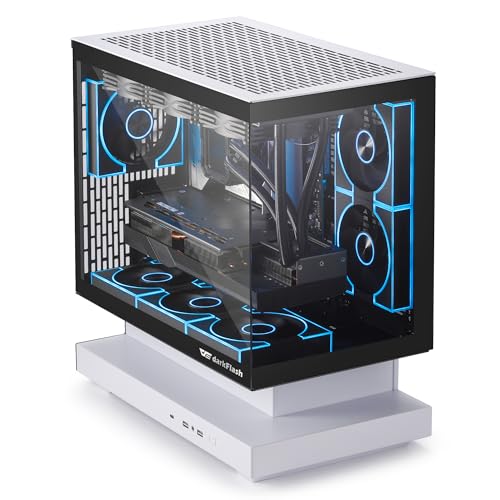
darkFlash FLOATRON F1 2025 Micro-ATX PC Case

Okinos Aqua 3 Micro ATX Case Black

Hyte Y70 Gaming PC Case Black White

Geometric Future M5 Tempered Glass Mid Tower GEO-M5F-BY

ASUS TUF Gaming GT502 White ATX Full Tower PC Case

darkFlash Full-Tower ATX Gaming PC Case DY470 White

Cooler Master Elite 301 Lite White Micro-ATX PC Case

APNX V1 Dual-Chamber ATX Mid-Tower Airflow PC Case Black White
More Details On Our Top Picks
The FLOATRON F1 leans into display-first styling, with a 270-degree panoramic shell that makes a small build feel more open. You also get back-connect support, which suits tidy cable routing on compatible boards, and that matters in a compact case where clutter shows fast.
The trade-off is simple: this kind of layout rewards careful component planning more than casual drop-in assembly. For a Micro-ATX gaming setup with ARGB fans and front-facing glass, it gives you the clean look many desk setups want without moving into a bigger tower.
Strong Points
- 270-degree glass presentation keeps the build visible from more angles.
- Back-connect support helps keep cable runs out of sight on supported boards.
- Three included ARGB PWM fans suit a starter gaming setup with less extra shopping.
- Type-C on the front panel is useful for modern accessories and external drives.
- Support for a 360mm AIO opens the door to stronger cooling in a compact shell.
Things To Consider
- Micro-ATX sizing leaves less spare room than the mid-tower options later in this list.
- Back-connect layouts depend on compatible hardware, so planning matters before assembly.
- The floating-glass style asks for regular dust care to keep the look crisp.
Feature Snapshot
Who It Suits Best
You get the most from this case when you want a compact showcase rig with visible lighting and a tidy interior.
A Better Fit Elsewhere
The APNX V1 suits you better for a roomier dual-chamber layout, especially when you want more flexibility around airflow and cable routing.
The Aqua 3 keeps things simple in a way that helps first-time builders, with three preinstalled 120mm ARGB fans and tempered glass on the front and side. That setup gives you visible lighting right away, and it also saves you from planning a separate fan purchase before the system is running.
Compared with the FLOATRON F1, this one feels more straightforward and less dependent on a special motherboard layout. You still get a Type-C port up front, so the case stays current without pushing you into a flashy chassis that takes up more desk space than needed.
What We Like
- Three included 120mm ARGB fans make the starting setup feel complete.
- Front and side glass create a clear view of the interior lighting.
- Type-C on the case front is handy for modern peripherals.
- Micro-ATX sizing works well for desks that cannot give up much space.
Areas To Watch
- Micro-ATX builds leave less expansion space than the larger ATX towers in this roundup.
- Glass panels call for a little more cleaning to stay clear.
- Three-pin fan wiring is straightforward, but it does not offer the same control style as more advanced fan setups.
Core Details
Who Will Love This
You should look here for a compact gaming build that needs a clean starting point without a pile of add-on parts.
Where A Sibling Pick Shines
The Cooler Master Elite 301 Lite suits you better for a plainer airflow-first build, especially when you want a simpler front end and less glass to maintain.
The Y70 is built for a showpiece desk setup, with panoramic glass, dual-chamber construction, and room for up to 10 fans. That dual-chamber layout separates the main hardware from the cable side, which usually makes the interior look calmer and leaves more room to work.
The included PCIe 4.0 riser cable matters too, because a vertical GPU presentation can turn into a clean focal point instead of a crowded bay. For custom-loop plans or a high-end air-cooled build, this case gives you more stage space than the compact Micro-ATX picks before it.
Highlights
- Panoramic glass gives the build a wide display angle.
- Dual-chamber design helps separate cabling from the main hardware area.
- Room for 10 fans supports aggressive airflow planning.
- Included PCIe 4.0 riser cable helps with vertical graphics card mounting.
- Cable management space is well suited to polished showcase builds.
Worth Noting
- The size asks for more desk or floor space than a compact tower.
- Glass-heavy designs need regular dusting to keep the view clean.
- Extra room can also mean more time planning parts and routing.
Technical Sheet
Whose Shelf It Belongs On
You get the most value from this case when your build is meant to be seen, not just stored under a desk.
Not Your Match When
The APNX V1 makes more sense for you when you want a similarly modern look but prefer a slightly more airflow-focused mid-tower layout.
The M5 feels built for a larger, more serious system, starting with 1.2mm steel and a tempered-glass side that gives you strength without turning the case into a dark box. The toolless panels are a real convenience point during upgrades, especially for anyone who swaps fans or storage often.
Five preinstalled 140mm ARGB PWM fans bring a lot of the cooling work in from day one, and the case supports both 420mm and 360mm radiators. Compared with the Y70, this one gives you a more hardware-forward path for big cooling parts and a sturdier-feeling shell, though the black-and-yellow trim is more particular in style.
Upsides
- 1.2mm steel gives the frame a more solid feel than lighter shells.
- Toolless panels make access easier during routine changes.
- Five preinstalled 140mm ARGB PWM fans help with immediate airflow.
- Support for 420mm and 360mm radiators keeps cooling options broad.
- Type-C on the front panel fits modern desktop habits.
Small Caveats
- The black and yellow styling is distinctive, which not every setup wants.
- Large-case dimensions take more room than the compact Micro-ATX choices.
- Lots of included fans can mean more cable sorting during the first build.
Details At A Glance
Built With In Mind
You should look at this case for a larger gaming system that needs strong cooling support and frequent access.
Another Choice May Suit
The ASUS TUF Gaming GT502 White works better for you when you want a cleaner white shell and a more modular mid-tower layout.
The GT502 takes a modular approach, which is handy for a builder who likes to work in stages instead of wrestling everything at once. Its dual-chamber layout splits the hardware zone from the cable side, and the tool-free panel design helps during upgrades or regular cleaning.
Compared with Geometric Future’s M5, this one feels cleaner and more neutral in color, so it may suit a white-themed room more naturally. You also get two-way GPU mounting compatibility and support for 360mm and 280mm radiators, which makes it flexible for serious ATX builds without drifting into showpiece-only territory.
Reasons To Buy
- Dual-chamber structure helps organize the interior around the main build.
- Tool-free panels make maintenance and part swaps less fussy.
- Two-way GPU mounting compatibility gives you more layout options.
- Support for 360mm and 280mm radiators keeps cooling planning flexible.
- The white finish fits a cleaner desk or room theme.
Room For Improvement
- Full-tower sizing asks for more space than the mid-tower cases here.
- Modular layouts reward planning, so the first assembly may take more thought.
- The broad chassis can feel like more case than a modest office build needs.
Core Details
Right Fit
You’ll appreciate this case most in a roomy ATX build where layout flexibility matters as much as appearance.
Swap It Out When
The Cooler Master Elite 301 Lite is a better call for a smaller, simpler build that does not need a full-tower footprint.
The DY470 is for the builder who wants a lot of routing freedom, since it supports back-plug motherboards and vertical GPU mounting in a dual-chamber shell. That mix helps keep the center of the case visually open, which suits glass-heavy builds where the interior is part of the design.
It also supports two 360mm radiators and is listed as RTX 40 compatible, so the case lines up well with a high-output system that needs room to breathe. Compared with the GT502, this darkFlash option leans harder into showcase presentation and GPU display, though the white version can gather visible dust faster than a matte dark shell.
Best Bits
- Back-plug motherboard support helps hide cables on compatible boards.
- Vertical GPU mounting turns the graphics card into part of the display.
- Dual-chamber layout helps keep the build area tidy.
- Two 360mm radiator slots give you broad cooling room.
- Panoramic glass suits a polished, visible interior.
Points To Note
- Vertical GPU layouts depend on the parts you pair with it.
- Glass surfaces and a white finish both need regular upkeep to stay crisp.
- The full-tower footprint is better for a large setup than a compact desk rig.
At A Glance
Perfect Match For
You get the best fit here for a large white showcase build with a strong graphics card and a lot of cooling hardware.
Look Elsewhere When
The Okinos Aqua 3 makes more sense for a smaller Micro-ATX setup that needs a simpler starting point.
The Elite 301 Lite takes a quieter route, with a minimalist white exterior, tempered glass, and intake grill work that points the design toward airflow rather than spectacle. That makes it a sensible match for a straightforward gaming or work machine, especially when you want the case to blend in instead of becoming the room’s centerpiece.
You also get a 120mm PWM fan, which is useful as a starter cooling piece, and the listed GPU room stretches to 365mm. Compared with the more glass-heavy Hyte Y70, this Cooler Master case keeps the focus on function first, though serious custom-loop builders may outgrow it sooner.
Bright Spots
- Minimalist styling fits clean desks and restrained setups.
- Airflow-focused intake grill supports everyday thermal planning.
- 365mm GPU room gives many modern graphics cards enough space.
- 280mm AIO support broadens cooling choices for a compact tower.
- Type-C adds a modern front-panel connection point.
Minor Gripes
- Single included fan means some builds will need more cooling planning.
- Micro-ATX sizing leaves less internal headroom than larger towers.
- The design is restrained, so it may feel plain beside more display-heavy cases.
Feature Rundown
Who Should Grab It
You should choose this case for a simple white Micro-ATX build that leans toward practicality and easy placement.
Reach For A Different Pick When
The darkFlash FLOATRON F1 fits you better if you want more of a panoramic display look with stronger lighting emphasis.
The V1 sits in a nice middle ground, with panoramic glass, a dual-chamber layout, and 10 fan slots that give you plenty of room to tune airflow. The angled intake bracket for two 16cm fans is the detail that stands out, because it suggests a case built to feed air in a more deliberate way.
That makes it a strong match for a clean ATX gaming build that still needs practical routing space. Compared with the GT502 and the darkFlash DY470, it feels a little more air-focused than show-heavy, so it may suit you better when cooling and cable order matter as much as the windowed look.
Standout Traits
- Dual-chamber layout gives the interior a cleaner, more workable split.
- Panoramic glass keeps the build visible from the outside.
- 10 fan slots make cooling planning more flexible.
- 360mm radiator support works well for many mid-tower upgrades.
- GPU mount and cable management features support neat assembly.
Honest Caveats
- The many layout options can take some planning before assembly starts.
- Glass panels need routine care to keep fingerprints in check.
- The bigger interior is useful, but it still takes more space than a compact build.
Feature Card
The Right Fit
You get the best match here when you want a clean ATX build with a strong balance of airflow planning and visual presentation.
Skip It When
The Cooler Master Elite 301 Lite is the easier call for a smaller setup that does not need this much interior room.
How To Choose The Right Black And White Pc Cases
Match The Case Size To The Board You Own
Micro-ATX cases like the darkFlash FLOATRON F1, Okinos Aqua 3, and Cooler Master Elite 301 Lite keep the footprint smaller, which helps on tighter desks or in a bedroom setup. ATX mid-towers and full towers such as the Hyte Y70, ASUS TUF GT502, and APNX V1 give you more room for larger graphics cards, extra drives, and cleaner cable routes.
That size choice also affects build comfort. Larger cases are easier to work in, but they ask for more space and usually need a bit more planning around where they sit.
Cooling Layout Matters More Than The Color
Black-and-white styling sets the mood, but airflow decides how comfortable the system feels in daily use. Look at the number and size of fan mounts, radiator support, and whether the case includes fans from the start, because those details shape your actual setup more than the finish on the outside.
A case with three included fans can suit a simple gaming build right away, while a model that supports 360mm or 420mm radiators makes more sense for hotter hardware or long upgrade plans. The trade-off usually lands in noise, space, or assembly time.
Think About Cable Routing And Panel Access
Dual-chamber cases and back-connect support help hide cables, which makes a glass-heavy build look cleaner from the side. That matters most for showcase desks, where a messy rear chamber can show up fast through panoramic panels.
Tool-free panels help too, especially for anyone who swaps hardware often or cleans dust filters on a routine basis. A simpler shell may be less dramatic, but it can save time every month.
Choose Finish And Shape For Real Use, Not Just Photos
White panels look crisp, yet they usually show dust and fingerprints sooner than darker surfaces. Panoramic glass delivers a clean view of the hardware, though it also asks for more regular wiping than a plain steel front.
For a shared room, office corner, or media desk, a restrained tower can feel easier to live with. For a gaming setup built around lighting and visible parts, a glass-forward case earns its space more naturally.
Things Worth Knowing First
Common Shopping Slip Ups
One common mistake is choosing the look before the hardware plan. A compact case can look perfect in photos, then feel cramped once a large graphics card or radiator enters the picture.
Another is ignoring front-panel convenience. A Type-C port, tool-free access, or included fans can save you from extra purchases and repeated disassembly.
The Upgrade Payoff
Higher-tier cases usually cost more because you’re paying for thicker steel, more panel work, extra fan support, and layouts that make cable handling easier. In this category, those details matter most in larger builds, where time spent routing wires or checking clearances adds up quickly.
The upgrade makes the most sense for showcase systems, high-wattage components, or anyone who expects to rebuild later. A simpler tower still works fine for basic use, but premium layouts usually pay you back in easier assembly and better long-term flexibility.
Frequently Asked Questions
Do black and white cases run hotter than plain black cases?
Color alone does not decide cooling. Fan layout, mesh, radiator support, and interior space matter far more.
Is a dual-chamber case harder to build in?
It can take more planning the first time, especially around cable runs. The payoff is a cleaner main chamber and easier visual order.
Should you choose Micro-ATX or ATX?
Micro-ATX suits smaller desks and simpler systems. ATX gives you more space for larger parts and easier hand movement during assembly.
Are glass panels a bad idea for everyday use?
Not at all, but they do ask for more cleaning than solid panels. Fingerprints and dust show up sooner on glass and light finishes.
Do included fans make a case automatically better?
Included fans help a lot because they reduce the number of extra parts you need. The real question is whether their placement and size match your cooling plan.
Closing Thoughts
The right black-and-white PC case should suit your parts, your desk space, and the amount of maintenance you’re willing to handle. A compact Micro-ATX case feels neat and manageable, while a larger dual-chamber tower gives you more room to build with patience. For a clean everyday rig, the simpler cases make sense. For a showpiece with serious cooling, the bigger frames earn their place without much fuss.
