
Water-cooling cases ask a lot from a chassis: room for radiators, clean cable routing, sensible airflow, and enough clearance that the rest of your parts do not feel crowded. You also want a case that fits your desk, your GPU, and the way you build, whether that means a simple single-loop setup or a more ambitious showcase tower. The eight picks below focus on that real mix of fit, cooling support, and everyday ownership comfort.
Quick Look At The Shortlist

FOIFKIN F1 PC Case 6 PWM ARGB Fan

Lian Li V100-ATX Mid-Tower PC Case Black V100RX

KEDIERS PC CASE ATX 5 Fans Pre-Installed K4(MAX)

darkFlash ATX Mid-Tower PC Case 4 PWM ARGB Fans DS900

RUIX OV303 ATX Mid-Tower PC Case 4 x 120mm Prism ARGB PWM Fans
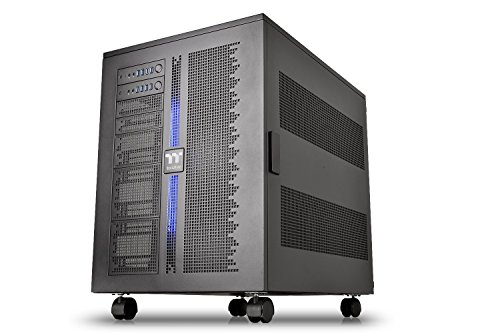
Thermaltake Core W200 Dual System Capable Extreme Water Cooling XL-ATX

PC CASE 9 PWM ARGB Fans Mid-Tower Gaming PC Case K9

JONSBO X400 Gray ATX PC Case Back-Connect Desktop Case Gray
More Details On Our Top Picks
The FOIFKIN F1 leans practical first, with six pre-installed PWM fans giving you a head start on case airflow. PWM means the fans can adjust speed based on demand, so a setup like this suits a gaming tower that needs quieter desktop use and stronger cooling under load.
That 360mm radiator support matters more than the glossy ARGB lighting, because it leaves room for a large front or top cooling loop without turning the interior into a squeeze. You may find it especially helpful for a first ATX build, where fewer add-ons usually mean less guesswork and less cable clutter.
Strong Points
- Six included fans save you from building airflow piece by piece.
- 360mm radiator support gives you room for a larger liquid cooler.
- USB Type-C on the front panel suits newer accessories and storage gear.
- ATX mid-tower sizing fits a broad range of mainstream gaming parts.
- The black finish stays visually calm beside brighter lighting or a cleaner desk setup.
Things To Consider
- Six fans mean extra cables to route neatly during installation.
- The look is more utility-first than boutique, so style chasers may want something flashier.
- Dust care still matters, especially in a room with carpet or pets.
Feature Snapshot
Who It Suits Best
First-time ATX builders and everyday gaming setups get the most out of the F1’s ready-to-go cooling layout.
Another Choice May Suit
RUIX OV303 ATX Mid-Tower PC Case 4 x 120mm Prism ARGB PWM Fans suits you better when airflow focus matters more than matching a larger fan count.
The V100 pushes harder on presentation than the FOIFKIN, which makes sense for a case with a display platform, tempered glass, and an LED strip. For a desk-facing build, that mix gives your GPU, cooling hardware, and lighting room to be part of the setup instead of hiding behind a solid panel.
Four pre-installed 120mm ARGB PWM fans still keep the practical side in view, so you are not starting from zero on airflow. The trade-off is simple: you get a more curated visual identity, but less fan count than the FOIFKIN F1 or ANSAITE K9.
What We Like
- Tempered glass helps showcase internal parts cleanly.
- The display platform adds a small but useful stage for hardware or decor.
- ARGB PWM fans give you both lighting and speed control.
- LED strip detail ties the front side together visually.
Worth Noting
- Glass surfaces need more regular dusting to keep the look sharp.
- Four fans are solid, though more modest than the larger-fan-count cases here.
- The design focus may matter less in a tucked-away under-desk build.
Core Details
Made For
Style-conscious builders who want a cleaner showcase case for a visible desk setup will get the most from the V100.
Where A Sibling Pick Shines
ANSAITE K9 works better for builders who want more fan density and a panoramic glass look in the same general size class.
The K4(MAX) stands out because it pairs five pre-installed fans with dual tempered glass, so it feels built for builders who want cooling headroom and a full-view presentation at the same time. That combination suits a gaming system that lives on a shelf or desk, where side visibility matters almost as much as thermals.
Its 420mm radiator support is the biggest cooling number in this group, and that extra space can matter for large loops or roomy front-mounted hardware. The honest read is that more glass and more cooling potential can bring more cable tidying and fingerprint upkeep, so it fits someone comfortable with a bit of housekeeping.
Upsides
- 420mm radiator support gives you unusually broad cooling room.
- Five included fans reduce early upgrade pressure.
- Dual tempered glass creates a wraparound showcase feel.
- Type-C support helps with newer peripherals and storage gear.
- The layout suits larger gaming hardware without feeling cramped.
Points To Note
- Glass panels ask for more cleaning than a simpler steel-sided case.
- The extra visual focus may not suit a hidden office tower.
- Large cooling hardware can take a little longer to plan around during assembly.
Details At A Glance
Best Suited To
Enthusiast gaming builds and users planning a large radiator loop will appreciate the K4(MAX) most.
Look Elsewhere When
FOIFKIN F1 PC Case 6 PWM ARGB Fan makes more sense for a simpler first build that values a ready-made fan layout over a bigger glass showcase.
The DS900 sits in a comfortable middle ground, which is often where a lot of water-cooling builds land in real homes. You get four pre-installed PWM ARGB fans, a Type-C port, and dual tempered glass, then 360mm radiator support adds the cooling flexibility that keeps the case useful beyond a basic air setup.
Compared with the KEDIERS K4(MAX), this one asks a little less of your build budget and layout planning while still giving you the visual appeal many desk setups want. For most mid-range gaming rigs, that balance is enough without pushing into oversized territory.
Bright Spots
- 360mm radiator support fits common liquid-cooling goals.
- Four PWM ARGB fans supply a solid airflow base.
- Type-C on the front panel is handy for newer gear.
- Dual tempered glass gives the build a cleaner showcase look.
Areas To Watch
- Four fans are useful, though less abundant than several other picks here.
- Glass and lighting both benefit from regular dust care.
- The design leans visual, so a muted office setup may not be its natural home.
Quick Facts
The Right Fit
Mid-range gaming builds and water-cooling newcomers who want a balanced, good-looking chassis should feel at home here.
Where Shoppers Go Wrong
Lian Li V100-ATX Mid-Tower PC Case Black V100RX suits you better when the front showcase and display platform matter more than a straightforward balance of features.
The OV303 is built around a straightforward airflow story, and that often works better than flashy extras in a busy gaming room. Four 120mm Prism ARGB PWM fans, USB 3.0, and Type-C give you the kind of everyday front-panel convenience that makes the case easier to live with once the build is finished.
Compared with the darkFlash DS900, it reads a little more utility-driven and a little less focused on visual layering. That can be a plus for someone who wants a cooling-friendly shell without adding much fuss, especially in a setup that gets used daily rather than shown off every hour.
Highlights
- Airflow-oriented design suits gaming parts that run warm.
- USB 3.0 and Type-C cover common desktop connections.
- PWM fan control helps the system stay calmer at lighter loads.
- Four fans give you a decent starting point without overcomplicating the build.
Softer Spots
- The listing does not give as much visual detail as some of the glass-heavy picks.
- Four fans are helpful, though serious cooling-focused builds may want more headroom.
- Plain finishes usually need less cleaning, but they also feel less showpiece-like.
Feature Rundown
Who Should Grab It
Daily gaming builds and straightforward air-to-liquid upgrade plans fit the OV303 especially well.
Skip It When
Lian Li V100-ATX Mid-Tower PC Case Black V100RX is the better match for a more display-focused desk build with stronger visual staging.
The Core W200 is in a different category from the mid-towers above, because it is built for very large, highly modular systems rather than ordinary desktop builds. Its stackable, dismantlable design and dual-system support make sense for a workstation-style setup where hardware density, cooling room, and service access all matter at once.
The trade-off is plain: this is a huge chassis, so it only makes sense for a room with space to spare and a build plan that truly needs it. For power users, though, the breadth can feel like a deep workbench, giving you room to organize two systems without the cramped feeling smaller cases sometimes bring.
Best Bits
- Dual-system capability suits advanced work and specialty builds.
- The modular, dismantlable structure helps with custom layouts.
- XL-ATX support opens the door to larger boards and expansive hardware plans.
- Stackable design gives you unusual flexibility for a super tower.
Minor Gripes
- The size will overwhelm a small desk area.
- Build planning can take longer because of the scale and modular approach.
- Cleaning and cable management can feel more involved simply because there is so much space to cover.
Core Details
Whose Shelf It Belongs On
Advanced workstation builders and enthusiasts planning dual systems will get the most from the Core W200.
Reach For A Different Pick When
darkFlash DS900 is the better match for a normal gaming desk where 360mm support and a smaller footprint matter more than massive scale.
The K9 pushes cooling harder than anything else in this roundup on a pure fan-count basis, which makes it a strong match for heat-heavy gaming parts. Nine pre-installed PWM ARGB fans, panoramic tempered glass, and Type-C front I/O give it the feel of a showpiece that still takes thermal load seriously.
Its radiator support for both 420mm and 360mm setups is a real advantage for someone planning around larger liquid-cooling hardware. The catch is that more fans and more glass mean more cleaning and more build coordination, though that trade-off often feels fair in a full-size gaming showcase.
Standout Traits
- Nine pre-installed fans create a strong cooling baseline.
- Support for 420mm and 360mm radiators gives you flexible liquid-cooling paths.
- Panoramic tempered glass makes the interior easy to show off.
- Type-C support keeps the front panel current with modern gear.
Room For Improvement
- Nine fans increase cable routing work during assembly.
- Large glass surfaces need more frequent cleaning to stay presentable.
- The visual style fits a gaming room better than a plain office corner.
At A Glance
Who Will Love This
Heat-heavy gaming builds and showcase systems that need serious fan coverage are the sweet spot for the K9.
Swap It Out When
FOIFKIN F1 PC Case 6 PWM ARGB Fan is the safer fit for a simpler first build that values fewer moving parts and easier cable work.
The X400 takes a different path from the glass-heavy cases above by centering back-connect layout and guided cooling support. Back-connect routing moves many cables behind the motherboard side, which can leave the visible chamber cleaner and make a carefully built system feel more polished on the desk.
It also supports SP 360 AIO cooling on two sides, along with GPU clearance listed at 427mm, so it clearly targets builders who want room for sizable parts. One thing worth considering is that this kind of case suits a thoughtful assembly process, because the payoff comes from planning the interior well before you tighten the last screw.
Positives
- Back-connect layout helps the visible side stay neat.
- Two-sided SP 360 AIO support broadens cooling options.
- 427mm GPU clearance gives room for large graphics cards.
- The gray finish brings a calmer, more modern desk look.
Points To Note
- Back-connect layouts reward careful planning during installation.
- The tuning is more about clean structure than flashy lighting.
- Builders who like quick swaps may prefer a simpler mid-tower.
Feature Card
Built With In Mind
Clean-looking performance builds and cable-conscious desktop setups are the best match for the X400.
Another Choice May Suit
darkFlash DS900 is a easier path for builders who want straightforward 360mm support and a more familiar mid-tower layout.
How To Choose The Right Computer Cases For Water Cooling
Start With Radiator Clearance
Radiator support is the first number to check, because it tells you what kind of liquid loop the case can physically hold. A 360mm case works well for many mainstream gaming builds, while 420mm support opens the door to larger cooling hardware and more headroom for hotter parts.
Clearance also affects the rest of the build. A roomy radiator bay can still feel cramped once you add a thick fan stack, tall memory, or a long graphics card.
Look Past The Glass
Tempered glass and panoramic side panels change the whole feel of a case, but they should not be the only reason you choose one. A glass-heavy shell can look great on a desk, yet it also makes cable work, dusting, and fingerprint care more noticeable.
Steel-sided or back-connect designs often suit users who want a tidier interior more than a display piece. That cleaner look can be especially useful in a workroom, where the system needs to stay presentable without constant polishing.
Match The Fan Count To Your Real Use
Pre-installed fans save setup time and can make a new build feel finished sooner. More fans do not always mean a better fit, though, because fan count, PWM control, and case layout all need to work together rather than fight each other.
Daily gaming systems benefit from a steady airflow base, while more specialized water-cooling rigs may care more about radiator placement and room around the tubes. The right case feels easy to live with after the build, not just impressive on the first day.
Think About Cable Routing And Front I/O
Front ports matter more than they sound, especially Type-C and USB 3.0 when you plug in storage, headsets, or charging cables often. Front I/O, short for input and output, is just the case’s front-panel connection area, and a well-placed one makes the setup feel less fussy.
Back-connect layouts add another layer, since they move much of the wiring behind the board tray. That can make the visible side cleaner, but it also rewards patience during assembly and good planning before you start mounting parts.
Things Worth Knowing First
Common Shopping Slip Ups
Many shoppers start with appearance and only later check whether the case actually supports the radiator size they need. That usually leads to awkward compromises, so match the cooling plan first and the styling second.
Another common miss is forgetting cable space around thick fans and long cards. A roomy spec sheet can still turn tight once you add the power supply, tubing, and front-panel leads.
What The Higher Tier Buys
Higher-tier cases usually pay for more metal, more room, and more careful internal design. In this category, that often means thicker glass, larger radiator support, modular panels, or a back-connect structure that keeps the build cleaner.
The upgrade makes sense for builders who plan to keep the same chassis through several hardware changes. For a temporary or low-drama build, a simpler mid-tower often feels easier to live with.
Frequently Asked Questions
What radiator size works for most water-cooling cases?
360mm support covers a lot of mainstream liquid-cooling setups and fits many gaming builds comfortably. Bigger cases like the KEDIERS K4(MAX) and ANSAITE K9 add more headroom with 420mm support.
Do more pre-installed fans always mean better cooling?
More fans help start airflow sooner, but layout and control matter just as much. A well-placed four-fan case can be a smarter fit than a crowded chassis with a messier interior.
Is tempered glass worth choosing for a cooling build?
Tempered glass is useful when you want to show lighting and hardware clearly. It also asks for more dust care, so a hidden office tower may be better served by a simpler panel style.
What does back-connect layout change?
It moves much of the wiring behind the motherboard side, which cleans up the visible chamber. That makes the X400 appealing for tidy builds, though assembly usually takes more planning.
Which case suits a first liquid-cooling build?
FOIFKIN F1 PC Case 6 PWM ARGB Fan and darkFlash ATX Mid-Tower PC Case DS900 both keep the learning curve calmer. You get familiar ATX sizing, solid fan support, and radiator room without jumping into oversized territory.
Final Thoughts
The right water-cooling case depends less on flash and more on fit, airflow, and how much room your parts really need. FOIFKIN and darkFlash make sense for straightforward gaming builds, while KEDIERS, ANSAITE, and Thermaltake serve bigger ambitions with more space or more cooling support. JONSBO stands apart for clean cable routing, and Lian Li brings more display personality. Choose the one that matches your radiator plan and the kind of desk you want to look at every day.
