
Choosing a tower case is less about looks alone and more about how your parts live day to day. You want room for a GPU, sensible cable routing, and airflow that keeps a gaming rig from turning into a space heater after a long session. The cases here lean into different strengths, from glass-heavy showpieces to airflow-first layouts with plenty of fan support.
That mix matters because your desk space, cooling goals, and upgrade plans shape the right pick. A compact room build wants different handling than a large setup with a 360mm radiator and multiple fans. You’ll see those trade-offs clearly below.
The Shortlist At A Glance

HYXN H2 (2026) Dual-Chamber ATX Case
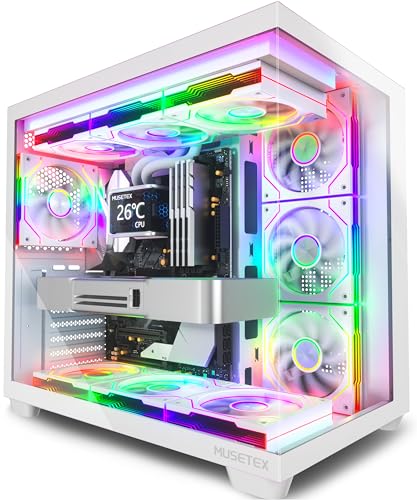
MUSETEX Y6 White PC Case

FOIFKIN F1 ATX Mid-Tower PC Case

DARKROCK EC2 ATX Mid Tower Case

MOROVOL 621 ATX Gaming Case

KEDIERS K4(MAX) ATX Case


RUIX OV303 ATX Mid-Tower Case
More Details On Our Top Picks
HYXN leans into serious cooling, with eight pre-installed PWM fans and a dual-chamber layout that separates hardware from cable clutter. That split makes the interior feel easier to manage in a busy gaming setup, especially when your build runs hot or uses a larger graphics card.
The 420mm radiator support gives you room for a large liquid-cooling loop, while the Type-C 3.2 front connection suits newer peripherals. The trade-off is plain enough, the case is built for space and airflow first, so it makes less sense in a cramped desk nook.
What We Like
- Eight fans already installed, so your airflow plan starts with a strong baseline.
- Dual-chamber construction helps keep cables and power gear out of the main display area.
- 420mm radiator support leaves room for large cooling hardware.
- Type-C 3.2 front access suits newer accessories and fast data connections.
- The 6x140mm plus 2x120mm fan mix can help move air quietly at lower speeds in a typical gaming room.
Points To Note
- Dual-chamber designs usually reward careful planning, so first-time assembly can take a little patience.
- The large footprint suits open desks more than tight shelves.
- Too many fans can add cable work, which means a cleaner finish depends on your routing discipline.
Feature Rundown
Who It Suits Best
PC builders who want a high-airflow showcase case with room for serious cooling will get the most from this layout.
Where A Sibling Pick Shines
FOIFKIN F1 PC Case suits you better for a simpler build that still wants strong airflow without the bigger dual-chamber footprint.
MUSETEX goes hard on presentation, and the 270-degree tempered-glass view makes that obvious the moment you place it on a desk. Seven pre-installed PWM ARGB fans round out the look, so your lighting story is already built in rather than tacked on later.
In a white build, this case suits a clean room setup or a streaming corner where the side and front panels matter as much as cooling. Compared with HYXN’s more engineering-heavy dual-chamber layout, this one feels more like a display cabinet for your parts, which is great until you need extra room for storage or a more hidden cable run.
Reasons To Buy
- The 270-degree glass view gives your build a wide showcase angle.
- Seven pre-installed fans reduce the amount of add-on shopping for basic airflow.
- PWM control can help keep fan behavior more balanced during lighter desktop work.
- The white finish pairs well with bright-themed parts and pale desk setups.
Room For Improvement
- Large glass areas need regular dusting to stay looking sharp.
- The visual-first layout may not suit someone who wants a more understated tower.
- Depending on your desk depth, a wide-view case can feel visually dominant.
Core Details
Built With In Mind
Style-focused builders who want their graphics card, cooler, and lighting to stay visible will appreciate this one most.
A Better Fit Elsewhere
DARKROCK EC2 ATX Mid Tower Case suits you better if you care more about broad hardware support than a glass-heavy showpiece.
FOIFKIN lands in a nice middle ground, with six pre-installed PWM ARGB fans and support for a 360mm radiator. That combination suits a typical gaming tower that needs good airflow without jumping all the way to the more aggressive fan count of HYXN.
The black finish keeps the look straightforward, which helps in a home office or a shared room where you want the system to work hard without stealing attention. The honest read is that this style is easier to live with than a full-glass showcase, though it gives up some visual drama.
Highlights
- Six installed fans give you a solid airflow base for a mid-range gaming build.
- 360mm radiator support covers a useful range of cooling setups.
- Type-C front access helps keep the front panel current with newer gear.
- The black finish fits easily into most desks and room styles.
Small Caveats
- You still need to plan cable routing carefully, even in a straightforward mid-tower.
- Compared with MUSETEX Y6, the visual impact is more restrained.
- The fan setup is strong, but it still asks you to manage dust like any airflow-first case.
Technical Sheet
The Right Fit
Mid-range gaming systems and first-time builders who want a straightforward black tower with meaningful cooling headroom will be comfortable here.
Another Choice May Suit
RUIX OV303 ATX Mid-Tower Case is a better match for you if you want four included fans and a simpler airflow-first value setup.
DARKROCK feels built for people planning a stronger graphics card path, since the listing calls out support for 50 Series cards and a 360mm radiator. The tempered-glass side panel keeps the hardware visible, while Type-C readiness makes the front I/O feel current without leaning into excess.
Only one pre-installed fan comes included, so this is less of a ready-made cooling bundle and more of a foundation for a custom airflow plan. Compared with FOIFKIN F1, you get a more future-facing shell, but you’ll need to add more fans yourself to get the full cooling story.
Upsides
- Support for 50 Series graphics cards gives the case a longer planning horizon.
- 360mm radiator support works well for larger cooling hardware.
- Tempered glass side panel keeps the build visible.
- Type-C readiness helps keep the front panel current.
Areas To Watch
- Only one fan comes installed, so most gaming builds will need more cooling parts.
- You may spend extra time planning airflow compared with fan-heavy cases like HYXN or MUSETEX Y6.
- Glass panels tend to show fingerprints and dust more readily.
Details At A Glance
Whose Shelf It Belongs On
Builders who expect to upgrade parts over time and want a case that can keep pace with larger hardware will get the most from this shell.
Look Elsewhere When
HYXN H2 (2026) Dual-Chamber ATX Case suits you better when you want multiple fans already installed and less add-on cooling work.
MOROVOL keeps the formula simple and practical, with four pre-installed RGB fans, a diamond-shaped mesh front, and a tempered-glass side panel. That mesh front matters more than it sounds, because airflow-friendly fronts usually make a gaming tower easier to keep comfortable during longer sessions.
The USB 3.0 front connection gives the case a useful everyday touch, and the overall layout fits well in a starter build or a clean budget tower. It is less dramatic than MUSETEX Y6, but it also asks less from your desk space and your wallet plan.
Bright Spots
- Four included RGB fans give the case a ready-to-use foundation.
- The mesh front helps intake air more directly than a solid decorative panel.
- Tempered glass lets your components stay visible.
- USB 3.0 on the front panel suits routine storage and accessory use.
Softer Spots
- Four fans are useful, though heavy GPU builds may want more airflow headroom.
- The styling is cleaner than flashy, which won't suit every gaming desk.
- Mesh fronts can collect dust, so regular wiping becomes part of ownership.
Quick Facts
Made For
Starter gaming builds and practical desktops in a mid-tower shell will fit this case well.
Reach For A Different Pick When
KEDIERS K4(MAX) ATX Case suits you better if you want a more glass-heavy look with five installed fans.
KEDIERS leans hard into presentation with full-view dual tempered glass, so your internals stay visible from more than one side. Five pre-installed fans and 420mm radiator support add enough cooling credibility to keep the case from being purely decorative, which is a good balance for a living-room gaming setup or a desk-facing PC.
Compared with MOROVOL 621, this case feels more premium in its visual presentation and more ambitious in how it treats the hardware. The trade-off is the usual one for glass-heavy towers, you will want to keep fingerprints, dust, and cable visibility in check.
Standout Traits
- Dual tempered-glass panels give you an open view of the build.
- Five pre-installed fans create a useful cooling starting point.
- 420mm radiator support adds room for larger cooling gear.
- Type-C front access helps modernize the front panel.
Worth Noting
- Glass on multiple sides asks for more regular cleaning.
- The showcase look can make cable neatness matter even more.
- A style-first tower may not suit someone who prefers a muted case.
Spec Overview
Best Suited To
Style-forward gaming rigs and showcase builds that still need sensible cooling support will feel right at home here.
Swap It Out When
MOROVOL 621 ATX Gaming Case suits you better if you want a simpler, more budget-minded airflow setup.
The black Y6 keeps the same visual language as the white version, but it shifts the mood toward a darker desk setup. Seven pre-installed PWM ARGB fans and the 270-degree glass layout still make it a showcase-first case, so the difference is really about how you want that showpiece to blend into the room.
Compared with HYXN, this one is less about a dual-chamber utility story and more about an eye-catching tower that suits black peripherals and dimmer setups. The honest read is that it works best where looks matter as much as airflow, not in a corner where nobody sees the case.
Positives
- The black finish fits darker gaming rooms and understated desk setups.
- Seven pre-installed fans give you a strong cooling starting point.
- The 270-degree glass view showcases the build from multiple angles.
- PWM fan control helps keep the acoustics more manageable during lighter use.
Minor Gripes
- Glass-heavy styling means dusting becomes part of routine upkeep.
- The display focus can feel excessive in a plain office setup.
- Compared with FOIFKIN F1, this one leans more toward presentation than restraint.
At A Glance
Who Will Love This
Dark-themed gaming setups and desk displays that want a strong visual presence will appreciate this case most.
Consider Something Else When
FOIFKIN F1 ATX Mid-Tower PC Case suits you better if you want a simpler black tower with fewer visual flourishes.
RUIX keeps the pitch straightforward, four pre-installed 120mm Prism ARGB PWM fans, USB 3.0, and Type-C ports in a high-airflow tower. That makes it an easy fit for a gaming setup that wants practical cooling without chasing a more elaborate glass showcase.
It sits closer to MOROVOL than to the flashier MUSETEX cases, and that’s a plus for many desks. The trade-off is obvious too, you’re getting a cleaner functional package rather than the biggest visual statement in the group.
Standout Traits
- Four included PWM fans give you a practical airflow base.
- USB 3.0 and Type-C ports cover common front-panel needs.
- High-airflow intent suits gaming systems that run for long stretches.
- The black finish keeps the case easy to blend into a room.
Honest Caveats
- The visual presentation is more restrained than the glass-heavy options here.
- Four fans are useful, though larger heat loads may call for more planning.
- As with most airflow cases, dust control stays part of ownership.
Core Details
Perfect Match For
Everyday gaming towers that need a tidy, functional case with a sensible front panel and ready airflow will fit here neatly.
Where Shoppers Go Wrong
MUSETEX Y6 White PC Case suits you better if you want a more dramatic glass-forward display piece.
How To Choose The Right Computer Gaming Tower Cases
Cooling First, Looks Second
Airflow drives how comfortable a gaming tower feels after a long evening session. Fan count, fan size, mesh fronts, and radiator support all matter, because a stronger cooling path helps your parts stay easier to live with under load.
A case with seven or eight fans is not automatically better than a simpler one, though. In a smaller room, quieter PWM control and cleaner routing can matter more than raw fan quantity, so the right choice depends on how much heat your build actually makes.
Size And Internal Layout
Mid-tower cases usually hit the sweet spot for most gaming desktops, but internal layout still separates a comfortable build from a frustrating one. Dual-chamber designs hide cables and power gear well, while single-chamber cases can feel simpler for first-time assembly.
GPU length, radiator size, and drive space shape the fit more than the label on the box. A case like DARKROCK EC2 makes sense for a larger upgrade path, while a more compact airflow shell can suit a desk that leaves less room to spare.
Panels, Ports, And Daily Use
Tempered glass looks sharp, though it shows fingerprints and dust more easily than plain steel or mesh. That makes glass-heavy towers a better match for showpiece desks, streaming corners, or rooms where the PC sits in view rather than tucked away.
Front USB 3.0 and Type-C connections also matter more than people expect, since they decide how quickly you plug in drives, headsets, and other everyday gear. A sensible front panel can save you from reaching behind the tower over and over.
What To Weigh Before You Choose
Mistakes Worth Dodging
One common slip is chasing looks without checking cooling support. A glass-heavy case can look excellent, but your build still needs intake and exhaust paths that match the heat from your GPU and CPU.
Another is ignoring the case footprint. A tower that seems fine online can crowd a desk, block a side panel, or leave you with awkward cable bends once it sits next to your monitor.
The Upgrade Payoff
Higher-tier cases usually cost more because they bundle more fans, thicker glass, broader radiator support, and cleaner internal layouts. You also pay for convenience, since a case with better front I/O and smarter airflow often needs less extra shopping after it arrives.
That upgrade makes the most sense for builders using larger graphics cards, liquid cooling, or a desk-facing setup that needs to look polished. For a basic starter rig, a simpler airflow case can leave you with the same gaming result and less complexity.
Frequently Asked Questions
What size motherboard fits these gaming tower cases?
These picks are ATX mid-tower cases, so they center on standard ATX builds. That size also tends to give you enough room for gaming hardware without moving into a full tower.
Do more pre-installed fans always mean better cooling?
More fans can help move air, but the layout matters just as much as the count. A mesh front and sensible exhaust path often matter more than a number by itself.
Are tempered-glass side panels hard to maintain?
They usually need more wiping than steel or mesh because fingerprints and dust show faster. A microfiber cloth and a steady cleaning habit make the finish easier to keep neat.
Why does Type-C matter on a tower case?
Type-C helps keep the front panel current for newer accessories and faster connections. That matters most on desks where you plug in drives, phones, or modern peripherals often.
Which case suits a first-time gaming build best?
FOIFKIN F1 ATX Mid-Tower PC Case is a sensible starting point because it balances fan count, radiator support, and a straightforward black design. MOROVOL 621 ATX Gaming Case is another easy choice for a simpler budget-minded setup.
Final Thoughts
Your best computer gaming tower case depends on how visible you want the build to be, how hot your parts run, and how much room you have on the desk. HYXN and DARKROCK lean toward serious cooling and expansion, while MUSETEX and KEDIERS make more sense for showpiece setups. For a cleaner, easier path, FOIFKIN, MOROVOL, and RUIX keep the decision practical. Choose the case that matches your space first, and the rest of the build gets a lot easier.
