
A good PC case does more than hold parts. It shapes airflow, keeps cable chaos under control, and decides how easy your next upgrade feels when you’re building after work or swapping hardware on a weekend. The eight picks below lean into different priorities, from glass-heavy show pieces to mesh-first cases that make cooling simpler in a warm room. You’ll also see where each one gives ground, because no case fits every desk, GPU, or build style.
Quick Look At The Shortlist

FOIFKIN F1 PC Case 6 PWM ARGB Fan

FOIFKIN F600 PC Case 7 PWM ARGB Fan

DARKROCK EC2 ATX Mid Tower Gaming Computer PC Case
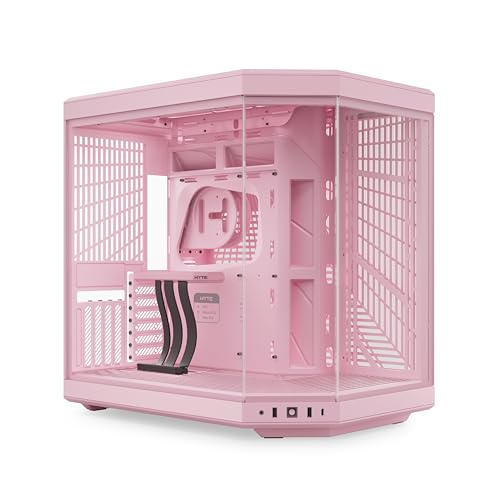
HYTE Y70 Modern Aesthetic Gaming PC Case

Lian Li V100 ATX Mid-Tower PC Case Black V100RX

MOROVOL PC Case Pre-Install 4 RGB Fans 621

darkFlash ATX Mid-Tower PC Case DS900

Lian Li LANCOOL 217 ATX Mid-Tower PC Case LAN217X
More Details On Our Top Picks
The F1 starts with a very practical setup, six PWM ARGB fans already in place, so your first build feels less like a scavenger hunt for cooling parts. PWM means the fans can adjust speed automatically, which matters in a gaming room or a dorm desk where heat builds up fast.
Compared with the glassier options later in this list, this one leans more toward straightforward function than showroom drama. The Type-C front connection and 360mm radiator support make it a sensible mid-tower choice for mainstream gaming parts, and the black finish keeps maintenance simple because it does not shout for attention every time dust shows up.
Strong Points
- Six included fans reduce the extra shopping most new builds need.
- PWM control helps the case respond better to changing heat levels.
- Type-C support makes front-panel connectivity more current for modern desks.
- 360mm radiator support opens the door to larger cooling setups.
- Black styling keeps the look restrained and easier to match with parts.
Things To Consider
- Preinstalled fans can be enough for many rigs, but custom airflow tuning may take more effort.
- ARGB lighting is useful for style, though it adds another cable layer to sort out.
- Mid-tower space still asks for careful component planning around longer hardware.
Feature Rundown
Who It Suits Best
First-time builders and mainstream gamers who want fewer parts to source separately fit this case well.
Where A Sibling Pick Shines
FOIFKIN F600 PC Case 7 PWM ARGB Fan suits you better if you want a more dramatic glass-forward display and a dual-chamber layout.
The F600 is built for a showcase desk, with 270-degree panoramic glass that gives your hardware far more visibility than the more restrained F1. A dual-chamber design separates the power supply and drives from the main hardware area, which usually makes cable routing feel less cramped and helps the inside look cleaner.
That layout suits builders who care about appearance as much as temperature management, especially in rooms where the PC sits beside the monitor instead of under the desk. The trade-off is simple, more glass means you’ll notice fingerprints and interior dust sooner, so a microfiber cloth becomes part of the routine.
What We Like
- Wide glass coverage gives the build a display-case feel.
- Seven preinstalled PWM ARGB fans offer a strong cooling base.
- Dual-chamber layout helps keep cable routing out of sight.
- Type-C support suits newer front-panel accessory needs.
- Hardware visibility makes custom lighting and neat cabling easier to appreciate.
Points To Note
- Glass-heavy styling asks for more cleaning than a plain mesh case.
- The layout rewards organized builders, so rushed installs may feel fiddly.
- Visual focus can be a mixed fit for a hidden-under-desk setup.
Core Details
Who Should Grab It
Showpiece builders who want tidy interiors and a wide-glass presentation will get the most from this case.
Swap It Out When
FOIFKIN F1 PC Case 6 PWM ARGB Fan makes more sense for a simpler setup that favors practical airflow over panoramic styling.
The EC2 looks like a case made for parts you expect to keep around for a while, especially larger graphics cards. The product page calls out support for modern high-end GPUs and up to 8 x 120mm fans, so the frame is clearly aiming at builders who want room to grow without jumping to a huge chassis.
Compared with the FOIFKIN options, this one is less about built-in lighting spectacle and more about plain expansion room. That makes it a sensible fit for a desk that doubles as a gaming station and a work machine, because the tempered-glass side panel still gives you a clean look without making the whole design feel loud.
Upsides
- Large GPU support helps newer gaming builds feel less cramped.
- Room for up to eight 120mm fans gives you flexible airflow planning.
- 360mm radiator support suits hotter components or liquid-cooling setups.
- Tempered-glass side panel keeps the case visually clean.
Areas To Watch
- The single included fan means you may need to add more cooling yourself.
- Airflow planning matters more here because the case invites larger hardware.
- Glass side panels generally ask for a little more care during cleaning and moving.
Details At A Glance
Best Suited To
Upgraders who want a roomy ATX shell for a bigger graphics card and future cooling changes should look here.
A Better Fit Elsewhere
darkFlash DS900 suits you better if you want a more complete fan package from the start and a similar mid-tower format.
The Y70 is the most style-forward case in this group, and the strawberry-pink finish sets the tone before you even think about parts. Its dual-chamber ATX layout and included PCIe 4.0 riser cable point to a more ambitious build path, especially for anyone who likes a vertically showcased graphics card.
That extra polish comes with the usual premium-case trade-off, more thought goes into the layout and the build process. For a living-room setup or a desk that doubles as a display piece, though, the result can feel polished in a way the more utilitarian FOIFKIN and MOROVOL cases simply do not.
Bright Spots
- Panoramic glass creates a dramatic, open view of the build.
- Dual-chamber structure helps separate power hardware from the main display area.
- Included PCIe 4.0 riser cable supports vertical GPU presentation.
- Ten-fan capacity gives you plenty of room for airflow planning.
Minor Gripes
- Premium styling usually asks for a more patient build process.
- Glass-heavy construction means fingerprints and dust become more visible.
- Strawberry-pink styling will not suit every room or component color scheme.
Spec Overview
Whose Shelf It Belongs On
Style-first builders who want a statement case with serious layout flexibility will feel right at home here.
Look Elsewhere When
Lian Li LANCOOL 217 ATX Mid-Tower PC Case LAN217X suits a calmer, more natural-looking desk better if you prefer wood accents and a less vivid colorway.
The V100 is built for a desk that wants a lot of visual motion without needing extra accessory hunting. Four 120mm ARGB PWM fans, an LED RGB strip, tempered glass, and a display platform make it feel ready to light up a room from the first assembly pass.
Compared with the HYTE Y70, this case is less luxury-showpiece and more feature-packed mid-tower with a friendlier visual entry point. That balance suits game rooms, streaming corners, and shared spaces where you want a lively look but not a towering chassis taking over the whole setup.
Positives
- Four pre-installed ARGB PWM fans give you a solid starting point.
- LED strip lighting adds another layer of visual interest.
- Tempered glass helps show off the components you choose.
- The display platform gives the case a more curated interior feel.
- Black finish makes it easier to pair with most desk setups.
Small Caveats
- Lighting-heavy styling may feel busy in a very plain workspace.
- Glass and LEDs tend to show dust and smudges faster than mesh.
- Owners who want a very muted look may find the presentation a little busy.
Technical Sheet
Right Fit For
RGB-focused builders who want a visually complete case without moving into ultra-premium territory fit this one well.
Another Choice May Suit
MOROVOL PC Case Pre-Install 4 RGB Fans 621 makes more sense if your priority is a simpler mesh-front airflow look with less visual layering.
MOROVOL takes the direct route, mesh front, four RGB fans, and a tempered-glass side panel. That combination makes sense for a gaming desk that needs steady intake airflow without losing the visible hardware look that many mid-tower cases chase.
Compared with the Lian Li V100, this one feels less styled and more workmanlike, which is exactly the appeal for many budget builds. The diamond-shaped front pattern can gather dust in normal room use, so a quick clean is part of the routine, but the upside is that the case stays easier to live with than many flashier glass-heavy designs.
Highlights
- Diamond-shaped mesh front supports stronger intake airflow.
- Four pre-installed RGB fans reduce the need for extras.
- Tempered-glass side panel keeps the build visible.
- USB 3.0 front connectivity suits everyday desktop use.
Softer Spots
- Mesh fronts tend to need regular dusting in open rooms.
- The styling is practical, but not especially refined.
- Builders chasing a luxury finish may want something more polished.
Feature Card
The Right Fit
Practical-minded builders who want airflow first and extra lighting already included will like this case most.
Reach For A Different Pick When
FOIFKIN F600 PC Case 7 PWM ARGB Fan fits you better if you want a more dramatic dual-chamber layout with broader glass coverage.
DS900 sits in the middle of the field in a useful way, not too plain, not too showy. Four PWM ARGB fans, dual tempered glass, Type-C, and 360mm radiator support give it the sort of spec mix that works for a broad set of gaming setups.
That makes it a comfortable middle ground beside the FOIFKIN F1 and Lian Li V100. You get enough visual flair for a visible desk, but the case still feels like a tool first, especially for someone who wants a reliable chassis without committing to a glass palace or a mesh-only box.
Reasons To Buy
- Four pre-installed PWM ARGB fans give you immediate cooling support.
- Dual tempered glass offers a clean view from more than one side.
- Type-C support suits newer peripherals and front-panel habits.
- 360mm radiator support keeps liquid-cooling options open.
Points To Watch
- Glass on both sides can mean a bit more cleaning.
- Middle-of-the-road styling may feel less distinct than the bolder cases above.
- Builders after a very minimal look may prefer the MOROVOL mesh-front option.
Quick Facts
Built With In Mind
General-purpose gaming rigs and mixed-use desktops fit this case well, especially where you want a fair balance of style and function.
Where A Sibling Pick Shines
HYTE Y70 Modern Aesthetic Gaming PC Case suits you better if your desk build is meant to feel more like a display piece than a standard tower.
The LANCOOL 217 stands apart because it mixes black walnut wood panels with five PWM fans, which gives you a calmer and more furniture-like look than the rest of this list. Back-connect readiness and flexible PSU mounting also point to a modern internal layout, the kind that helps a build feel tidy before you even tighten the last screw.
For a home office, studio corner, or living-room setup, that combination lands well. Compared with the HYTE Y70, it feels less like a display case and more like a refined machine that can sit in plain sight without turning the room into a light show.
Best Bits
- Genuine wood panels give the case a warmer, more natural finish.
- Five PWM fans provide strong built-in airflow.
- Back-connect readiness supports a cleaner internal presentation.
- Flexible PSU mounting can simplify component planning.
- The mix of 170mm, 120mm, and 140mm fans suggests serious airflow thinking.
Room For Improvement
- Wood styling will not match every color scheme or desk surface.
- The look is more restrained, so lighting-focused setups may prefer the Lian Li V100.
- Natural materials usually reward a little more care during cleaning and placement.
Core Details
Who Will Love This
Builders who want a premium-looking mid-tower that feels calm, tidy, and room-friendly will appreciate this one most.
Not Your Match When
darkFlash DS900 suits you better if you want a more conventional glass-and-ARGB setup without the wood accent style.
How To Choose The Right Cooling Cases For Pc
Airflow First, Looks Second
Start with the way air moves through the chassis. Mesh fronts, higher fan counts, and room for a 360mm radiator usually matter more than flashy side panels when your room runs warm or your GPU works hard.
Glass-heavy cases can still cool well, but they need a more thoughtful fan layout. That’s why a case like the MOROVOL or darkFlash DS900 makes sense for practical cooling, while the HYTE Y70 leans harder into presentation.
Match The Case To Your Hardware
Large graphics cards, front-mounted radiators, and tall air coolers all eat space fast. An ATX mid-tower should feel roomy enough that cable bends are gentle and airflow paths stay open, not packed like a carry-on bag.
The DARKROCK EC2 and LANCOOL 217 are good examples of cases that leave some breathing room for growth. Your build goes smoother when the case has a little slack around the parts you plan to keep for a few years.
Decide How Much Assembly Work You Want
Preinstalled fans save time and reduce the number of parts you need to source separately. That matters for a first build, a dorm setup, or a late-night upgrade where you just want the system finished before the weekend ends.
Some cases also make cable management easier through a dual-chamber layout or back-connect support. Those design choices are not just neat on paper, they lower the chance that your finished build looks messy once the side panel goes on.
What To Weigh Before You Commit
Common Shopping Slip Ups
Shoppers often focus on glass, RGB, or wood accents before checking fan support and radiator space. That usually leads to a case that looks right but feels tight once the graphics card and cables are in place.
Front-panel connections matter too. A Type-C port helps modern setups feel current, but it should not replace a real look at component clearance and the number of fans already included.
Where The Extra Money Goes
Higher-tier cases usually spend more on structure, finish, and layout flexibility. Dual-chamber routing, riser cables, better fan packages, and premium panel materials all add to the cost.
That upgrade makes sense for a visible desktop build, a custom loop plan, or a machine you expect to rework later. A simpler gaming tower does not always need that extra spend, and a cleaner mid-range case can be the smarter fit.
Frequently Asked Questions
What Does PWM Mean In A PC Case Fan Setup?
PWM stands for pulse width modulation, which lets the fan speed adjust more precisely. That helps the system stay quieter at light loads and more active when heat rises.
Do More Fans Always Mean Better Cooling?
More fans can help, but the airflow path has to make sense. A case with poor intake or blocked exhaust can waste that extra hardware.
Is Tempered Glass Harder To Live With?
Tempered glass gives you a cleaner view of the build and a more polished finish. It also tends to show dust and fingerprints sooner than mesh or solid steel.
Why Choose A Dual-Chamber Case?
A dual-chamber layout separates the main components from the power supply and cable area. That often makes the interior easier to keep tidy and can improve the overall look of the build.
Who Should Pick A Mesh-Front Case?
Mesh-front cases suit builds that run warm or sit in rooms with limited cooling. They also fit people who want the case to stay more understated than a full glass setup.
Closing Thoughts
The right Cooling Cases For Pc choice comes down to what sits in your room every day, not just what looks good in a photo. A mesh-heavy pick like MOROVOL or darkFlash DS900 keeps airflow straightforward, while the HYTE Y70 and Lian Li LANCOOL 217 lean into stronger design identity. For most setups, the smartest case is the one that fits your parts cleanly, handles heat without drama, and still feels pleasant to live with long after the build is done. That calm fit matters more than any single flashy feature.
