
Big cases make sense when your parts list is long, your cooling plan is serious, or you just want room to work without scraping knuckles on every corner. This roundup focuses on Cpu Case Full Towers that suit high-airflow builds, extra storage, dual-chamber layouts, and showcase setups with glass or wood front panels. You’ll also see a few mid-tower options here, since some roomy cases still fit that broad use case better than a towering chassis.
The right pick depends on how much hardware you want to pack in, how much noise you can live with, and whether you care more about looks, fan count, or storage space. The notes below turn each spec into a practical ownership call, so you can match the case to your desk, your room, and your build plan.
Quick Look At The Shortlist

MUSETEX Y6 PC Case 4 Non-LED Fans
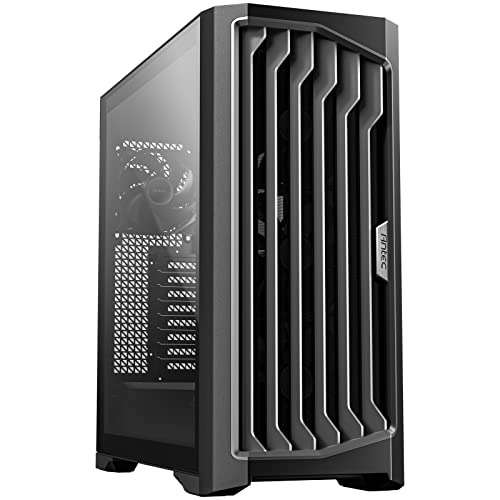
Antec Performance 1 FT Full Tower E-ATX PC Case 3 Fans

Antec C8 Full-Tower E-ATX PC Case Dual-Chamber Black

CORSAIR 3500X RS ARGB Panoramic Mid-Tower PC Case

Antec Flux Pro Full-Tower E-ATX PC Case 6 PWM Fans

DARKROCK Classico Storage Master ATX NAS Computer Case

Antec C8 Wood Full-Tower E-ATX PC Case Wooden Front Panel

Gaming PC Case 7 PWM ARGB Fans H4
More Details On Our Top Picks
The Y6 leans into visibility first, with its 270-degree tempered-glass layout giving a wraparound view of your parts. That kind of framing suits RGB builds and neat cable routing, though the all-glass approach also means fingerprints and dust will show sooner than on a plain steel panel.
The four pre-installed fans help make the case feel ready out of the box, especially for a first gaming build or a quick upgrade from a cramped chassis. You also get a Type-C front connection, which fits newer peripherals and keeps the front panel more future-friendly than older USB-only designs.
What We Like
- Wraparound glass makes component lighting easy to show off.
- Four included fans reduce the number of separate parts you need to source.
- Type-C on the front panel suits newer accessories and fast-moving desktops.
- Mid-tower sizing still leaves enough room for a tidy mainstream build.
Areas To Watch
- Glass-heavy designs need more regular wiping to stay clean.
- Mid-tower space can feel tighter than a true full-tower for very large builds.
- The non-LED fans keep things calmer visually, which may matter less for RGB-focused setups.
Core Details
Who It Suits Best
Showcase-minded builders who want a neat ATX setup with included airflow and a modern front connection will get the most from this case.
Where A Sibling Pick Shines
Antec Performance 1 FT Full Tower E-ATX PC Case suits you better for oversized builds that need more chassis room than the MUSETEX Y6 offers.
This Antec goes straight at large-format builds, and the FT full-tower shape gives you more breathing room than the MUSETEX mid-tower above. That extra volume matters when your parts list includes a big motherboard, serious cooling hardware, or a lot of cabling that needs to stay out of the way.
Three PWM fans come included, which is helpful because PWM means the fan speed can respond to system load instead of running flat-out all the time. For a workstation or a gaming rig that stays on for long sessions, that usually makes day-to-day use feel calmer and easier to manage.
Strong Points
- Full-tower proportions give you generous room for large components.
- Three PWM fans bring variable-speed cooling into the package.
- E-ATX support suits broader motherboard choices than many smaller cases.
- The spacious layout can make cable work less cramped during assembly.
Small Caveats
- The larger footprint demands more desk or floor space.
- Three included fans are solid, though some high-heat setups may still call for more planning.
- Big cases can be a little less convenient to move after a full build.
Feature Card
Made For
You’ll like this most for a big desktop build that needs room for expansion, calmer fan control, and a less cramped assembly process.
A Better Fit Elsewhere
Antec Flux Pro Full-Tower E-ATX PC Case suits you better if you want a more cooling-focused layout with six included fans and a built-in temperature display.
The C8 takes a more layout-driven approach than the Performance 1 FT, using a dual-chamber design to separate hardware zones. That split can make cable management feel less chaotic, and it gives the whole build a cleaner service path for people who tinker often.
You’ll also get tempered glass on the front and side, plus tool-free design touches that make access a little easier during part swaps. Since it ships without fans, the trade-off is simple: you keep more control over the cooling plan, but you’ll need to budget for the airflow setup yourself.
Highlights
- Dual-chamber structure helps isolate cables and core hardware.
- Tool-free touches make repeated access less fussy.
- Tempered glass front and side panels create a clean display look.
- USB Type-C and broad radiator support add flexibility for modern builds.
- Reported GPU room suits larger graphics cards, which helps high-end gaming rigs.
Worth Noting
- No fans are included, so cooling costs shift to your own part list.
- Glass surfaces reward regular dusting, especially in a visible desktop spot.
- The size makes more sense for serious builds than for a compact desk setup.
Quick Facts
Best Suited To
Builders who want cleaner internals, frequent access, and a large display-ready chassis will get the most from this case.
Look Elsewhere When
MUSETEX Y6 PC Case 4 Non-LED Fans suits you better for a simpler out-of-box setup with included airflow and a lighter ATX footprint.
The 3500X is the visual pick in this group, and its panoramic layout makes a glass-forward build feel more intentional than the quieter steel-heavy cases around it. The wide interior also helps your components look less crowded, which is handy when you’ve spent time matching fans, memory, and graphics card styling.
Three pre-installed fans and the spacious interior make it friendly for a modern gaming tower, though it still stays within a mid-tower footprint rather than jumping into full-tower bulk. The GPU anti-sag support is useful on longer cards, because a heavy graphics card can slowly pull at a slot area over time.
Bright Spots
- Panoramic styling gives a clean, display-first look.
- Three included fans make the starting airflow setup easier.
- GPU anti-sag support adds welcome stability for long graphics cards.
- Spacious interior helps parts feel less cramped during assembly.
- Reverse connection motherboard compatibility broadens build flexibility.
Points To Note
- Mid-tower sizing leaves less expansion room than the true full-tower cases here.
- Glass-heavy styling asks for more routine cleaning.
- The showpiece look may matter less to a plain workstation build.
Details At A Glance
Right Fit For
You’ll appreciate this most if you want a clean-looking gaming case with room for strong airflow and a polished front-to-side glass presentation.
Swap It Out When
Antec Flux Pro Full-Tower E-ATX PC Case is the better call for you if cooling capacity and extra room matter more than the panoramic look.
This is the cooling-heavy choice in the lineup, and the six included PWM fans give it a head start for hot CPUs or graphics cards. The walnut wood front panel softens the look a bit, so the case feels less industrial than the Performance 1 FT and more furniture-like on a desk or shelf.
The 90-degree rotated PSU mount is the sort of detail that helps rework internal airflow and cable direction, while the CPU and GPU temperature display gives you a quick read during long sessions. You may still want to keep the front and filter areas clean, because dense airflow setups work better when intake paths stay open.
Upsides
- Six PWM fans provide a very strong starting airflow package.
- Walnut wood on the front panel gives the case a warmer look.
- 90-degree PSU mounting can simplify cable direction inside the chassis.
- CPU and GPU temperature display adds handy at-a-glance monitoring.
- 420mm radiator support suits larger cooling hardware.
Trade Offs
- The feature set pushes this toward a more specialized, not minimalist, setup.
- Wood and airflow openings both benefit from routine dust care.
- The stronger cooling package may be more than casual office builds need.
Technical Sheet
Who Should Grab It
You’ll get the most from this case if you run a hotter build, like a powerful gaming rig or a workstation that stays active for long stretches.
Another Choice May Suit
Antec C8 Wood Full-Tower E-ATX PC Case makes more sense for you if you want the wood-panel look without the heavier fan bundle.
This DARKROCK case is built around storage, not spectacle, and that makes it quite different from the glass-first MUSETEX and CORSAIR picks. Ten 3.5-inch drive bays and three 2.5-inch mounts point straight at NAS-style or archive-heavy systems, where the goal is capacity and organization rather than show lighting.
The included 4x120mm fan setup and support for 360mm radiators on the top or front give you cooling paths for a crowded internal layout. Vertical GPU mounting is a nice extra for certain builds, though you’ll want to think carefully about cable length and clearance around the card.
Reasons To Buy
- Very strong drive capacity for storage-focused workstations.
- Four included 120mm fans help the chassis start with airflow in place.
- Top and front radiator support adds flexibility for cooling plans.
- USB 3.0 readiness suits everyday data transfer and peripheral use.
- Vertical GPU mounting opens up different internal layouts.
Minor Gripes
- The storage-first layout is less appealing for minimalist gaming builds.
- Large drive arrays can make cable organization more involved.
- Vertical GPU setups may need extra attention to fit and airflow around the card.
Feature Rundown
Whose Shelf It Belongs On
You’ll like this most for a home server, media archive, or data-heavy workstation where drive count matters more than flashy styling.
Where A Sibling Pick Shines
Antec C8 Full-Tower E-ATX PC Case suits you better if your priority is a more open display build with a dual-chamber layout instead of heavy storage capacity.
The C8 Wood feels like the calmer sibling to the Flux Pro, trading the six-fan approach for a more design-forward front panel. That wooden face works well in a living room, office, or studio where you want a PC that looks more like furniture and less like a hardware display case.
Seamless tempered glass on the front and side keeps the internal hardware visible, while the full-tower E-ATX format still leaves room for larger parts. Because it ships without fans, you get control over the cooling setup, though that also means your finished build depends on the fan plan you choose.
Best Bits
- Wood front panel gives the case a softer, more natural look.
- Seamless glass front and side panels create a clean presentation.
- Full-tower sizing helps with larger motherboards and roomy layouts.
- USB Type-C support fits newer desktop accessories.
- RTX 40 Series GPU support suggests headroom for modern graphics cards.
Room For Improvement
- No fans are included, so airflow planning is left to you.
- Wood and glass together deserve careful cleaning to keep the look sharp.
- The premium styling may matter more than raw utility for some setups.
At A Glance
The Right Fit
You’ll appreciate this most if you want a full-tower case that looks calmer in a shared room while still giving you plenty of build space.
Not Your Match When
CORSAIR 3500X RS ARGB Panoramic Mid-Tower PC Case makes more sense for you if the wide glass presentation matters more than the wood-front styling.
The H4 goes after fan count in a straightforward way, and seven PWM ARGB fans make it feel like a bundle built for a visibly lit gaming tower. Compared with the MUSETEX Y6, it offers a heavier out-of-box cooling package, though the stronger visual style also asks for a cleaner cable job to keep the interior from looking busy.
Dual tempered glass and a Type-C front connection round out the feature set, so the case is clearly aimed at people who want a showier mid-tower without having to source as many extras. The trade-off is that a fan-packed chassis can take a bit more time to wire and maintain, especially around dust filters and front intake paths.
Standout Traits
- Seven included PWM ARGB fans give you a very full cooling bundle.
- Dual tempered glass suits showcase-style builds.
- Type-C on the front adds modern connectivity.
- PWM control helps the fans respond to workload changes more smoothly.
Honest Caveats
- ARGB and glass both reward careful cable routing.
- A fan-dense layout can take more cleaning effort over time.
- Mid-tower sizing still leaves less room than a full tower for very large expansion plans.
- Spelling quirks in the listing suggest a more value-focused presentation than a polished premium one.
Feature Snapshot
Built With In Mind
You’ll get the most from this case if you want a light-filled gaming build and prefer to receive most of the cooling hardware in one box.
Reach For A Different Pick When
Antec Performance 1 FT Full Tower E-ATX PC Case is a better fit for you if you want more chassis room and a less visual, more utility-led full-tower shape.
How To Choose The Right Cpu Case Full Towers
Start With The Hardware Footprint
A case can look spacious and still feel cramped once you add a wide motherboard, long graphics card, front radiators, and thick cable bundles. Full-tower and E-ATX support matter most for people running several drives, large coolers, or custom water loops, while mid-towers suit simpler gaming rigs that still want decent room.
Measure the parts you already own, then compare those dimensions against the case layout rather than relying on the word “full” in the name. That small habit prevents the common headache of buying a shell that’s tall but not actually forgiving where your parts need space.
Match Cooling To The Load
PWM fans, or pulse-width modulation fans, adjust speed based on need, which helps keep noise and cooling more balanced during normal use. A case with three to six included fans gives you a useful starting point, but the real question is whether your CPU and GPU run hot during long sessions or stay fairly modest.
High-airflow models make the most sense for gaming towers, creator PCs, and machines that stay on for hours. A more design-led case can still work well, though you may need to spend more attention on intake, exhaust, and dust care to keep temperatures sensible.
Think About Access And Maintenance
Dual-chamber layouts, tool-free panels, and rear cable space save time every time you upgrade storage or swap a graphics card. That matters more than it sounds, because a tidy case is easier to live with for years, not just on build day.
Glass and wood panels look great, but both ask for a bit of upkeep, especially in a room with visible dust or bright lighting. A simpler steel-forward chassis is less dramatic, while a showcase case turns the interior into part of the room’s decor.
Decide How Much Personality You Want
Some cases are built to disappear under the desk, and others are meant to be seen. Panoramic glass, ARGB fans, and wood accents make sense when the PC sits in a living space or shared office, while a storage-first tower fits better in a machine room or tucked-away desk.
The honest read is that style adds value only when it matches the room and the job. A clean-looking case feels great for years, while an overly flashy one can get old fast.
Things Worth Knowing First
Mistakes Worth Dodging
Plenty of people start with fan count and forget the internal layout, which is how a roomy-looking case still ends up awkward for a large GPU or radiator. Another common miss is choosing a glass-heavy shell without thinking about dust, fingerprints, or where the PC will sit.
Storage needs can also get overlooked. A NAS-style case is brilliant for drive bays, but it’s overkill for someone who only wants one SSD and a tidy gaming setup.
The Upgrade Payoff
Higher-tier cases usually cost more because they give you more metal, more glass, more cooling hardware, or more complex internal engineering. You also pay for conveniences like tool-free access, broader radiator support, and cleaner routing paths that make assembly less annoying.
That extra spend makes the most sense for builders who upgrade often or plan to keep the same chassis across several hardware cycles. For a set-it-and-forget-it office machine, the premium features can be nice without being necessary.
Frequently Asked Questions
What size case works best for a large gaming build?
A full-tower or roomy E-ATX case usually gives you the easiest time with long graphics cards and large coolers. Mid-towers can still work, but the margin for error is smaller.
Do more included fans always mean better cooling?
Not always, because airflow path and fan quality matter as much as raw count. A well-placed three-fan setup can outwork a cluttered seven-fan layout in the wrong shell.
Is tempered glass hard to live with?
It looks clean, but fingerprints and dust show more clearly than on a plain metal panel. A quick wipe now and then keeps it looking sharp.
Should you choose a dual-chamber case?
Dual-chamber designs help separate cables and power gear from the main view, which makes sense for cleaner builds. They suit people who like to upgrade or rework components more often.
What matters most for a storage-focused case?
Drive bay count and mounting flexibility matter most, followed by sensible cooling around all those drives. A storage-heavy case should feel organized, not crowded.
Closing Thoughts
A good Cpu Case Full Towers choice depends less on height and more on how you build, cool, and live with the machine day to day. Some cases here are about clean display value, others about storage, and a few about sheer room for large hardware. Match the case to your desk space, your parts list, and how often you plan to open it up. Get that part right, and the whole build feels easier from the start.
