
Custom case shopping gets easier once you match the frame to the build you actually want to live with. Some setups need a showpiece front and center, some need easier cable routing, and some just need room for big cooling hardware without turning the desk into a headache.
The eight options below cover glossy display cases, airflow-heavy towers, and retro-leaning enclosures with real expansion flexibility. That mix helps you sort by space, cooling, and style instead of guessing from photos alone.
Quick Look At Our Shortlist
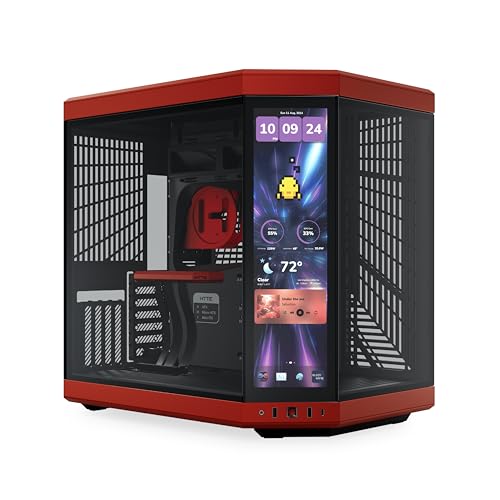
HYTE Y70 Touch Infinite Dual Chamber Case, Cherry/Red

HYTE Y70 Touch Infinite Dual Chamber Case, Snow White

Thermaltake Tower 600 Black Mid-Tower ATX Case

KEDIERS PC Case C570 ATX Mid Tower, Pink

Geometric Future M5 Tempered Glass Mid Tower, Black/Green

Geometric Future M5 Tempered Glass Mid Tower, Black/Yellow

SZSKYING Mid-Tower Gaming ATX PC Case, Black

SilverStone Technology FLP02 Retro-Inspired Tower Chassis
More Details On Our Top Picks
The integrated 2.5K touchscreen is the hook here, and it makes the case feel less like a shell and more like part of the build’s front-facing personality. In a room where the tower sits in plain view, that kind of screen changes the tone fast.
The dual-chamber layout helps keep cables and the main hardware area separated, which is a real comfort in a showcase setup. You may find the visual payoff outweighs the extra planning it asks for, especially compared with the simpler Thermaltake Tower 600.
Strong Points
- Touchscreen front panel adds live visual control.
- Dual-chamber design helps tidy cable routing.
- Ten-fan capacity gives you room to plan airflow.
- The Cherry/Red finish stands out in a themed desk setup.
- PCIe 4.0 riser cable support suits vertical hardware layouts.
Things To Consider
- The screen-forward look asks for a clean build, or the effect gets messy.
- A large showcase case takes more desk or floor space than a standard mid tower.
- Touch features add setup steps that plain cases simply do not have.
Feature Snapshot
Who It Suits Best
You suit this case best when you want a desk centerpiece and you’re comfortable spending a little extra time on cable planning and visual layout.
A Better Fit Elsewhere
SilverStone Technology FLP02 Retro-Inspired Tower Chassis suits you better when expansion bays and a workmanlike front panel matter more than a touchscreen showpiece.
The Snow White version keeps the same screen-first identity as the Cherry/Red model, but the lighter finish changes the whole mood of the build. That cleaner palette works especially well in bright rooms, white desk setups, or systems where RGB lighting needs a calmer backdrop.
Like the other HYTE entry, this one rewards careful cable work and a plan for the internal layout. The honest read is that the style makes sense only when you want the case itself to be part of the visual story, not just the hardware holder.
Upsides
- White finish pairs neatly with light-themed components.
- Touchscreen front gives the build a custom feel.
- Dual-chamber structure helps keep the inside cleaner.
- Ten-fan capacity supports larger cooling layouts.
Areas To Watch
- The white surface asks for a bit more care to keep dust and marks from showing.
- The design lands best in a showcase setup, so plain utility-focused builds may not need it.
- As with the Cherry/Red version, screen-heavy hardware can add setup complexity.
Details At A Glance
Who Will Love This
You suit this pick best when your build leans white, modern, and highly visible on a desk or shelf.
Another Choice May Suit
Geometric Future M5 Tempered Glass Mid Tower, Black/Yellow is the better fit for you when you want strong structure and bold color without a screen taking over the front.
Three tempered glass panels give this Tower 600 a more open, gallery-style look than the more enclosed HYTE cases. Hidden-connector motherboard support keeps the hardware presentation cleaner, which matters a lot in a system meant to be seen from more than one side.
The rotational PCIe slot layout points this case toward builders who like flexible component placement. It suits a careful system plan, though you may prefer the more obvious cooling approach of Geometric Future’s M5 if radiator focus matters more than display drama.
What We Like
- Three glass panels create a wide viewing angle.
- Hidden-connector motherboard support keeps the interior less cluttered.
- Rotational PCIe slots open up more layout options.
- The black finish works with understated or high-contrast builds.
Small Caveats
- Glass-heavy designs need more careful cleaning than plain steel cases.
- Open display styling leaves less room to hide uneven cable work.
- The layout rewards planning, so rushed builds can look unfinished.
Core Details
Built With In Mind
You fit this case best when you like a neat, display-heavy build and don’t mind spending time on the layout details.
Where A Sibling Pick Shines
HYTE Y70 Touch Infinite Dual Chamber Case, Snow White is a better match for a showcase-focused system that wants a touchscreen front panel instead of a more traditional glass tower.
The C570 leans hard into visual personality, with a pink finish and an open-frame style that feels built for display. Seven PWM ARGB fans make it look energetic right out of the gate, and the fan count gives you a strong starting point for a conspicuous gaming setup.
PWM means pulse-width modulation, which lets fans adjust speed more smoothly, so that part matters for noise control and airflow balance. Compared with the more polished Thermaltake Tower 600, this one is more flamboyant and less restrained, which is exactly the appeal for some desk builds.
Highlights
- Seven included ARGB fans give the case a full visual identity.
- PWM fan control helps the cooling profile feel more adaptable.
- Open-frame styling makes the hardware easy to show off.
- The pink finish suits themed or color-matched setups.
Points To Note
- Open-frame layouts leave more of the interior exposed to dust and fingerprints.
- The bold color limits how easily it blends into a plain office or living room.
- Seven fans can mean more cables to route and manage during assembly.
Feature Rundown
Perfect Match For
You fit this pick best when your build is meant to be seen and you like a bright, color-first presentation.
Swap It Out When
SZSKYING Mid-Tower Gaming ATX PC Case, Black is the calmer choice for a similar fan-heavy setup that needs a more understated finish.
The M5 moves away from screen flair and puts weight behind the frame itself. A 1.2mm steel chassis usually gives a sturdier feel than thinner panels, and the toolless panels should make routine access easier for upgrades, dusting, and cable checks.
Support for 420mm or 360mm radiators makes this a strong fit for builders who plan serious liquid cooling. Type-C on the front panel keeps it current enough for modern desktops, while the black and green finish lands with more personality than plain black without getting loud.
Positives
- 1.2mm steel adds a reassuring sense of structure.
- Toolless panels make access simpler for maintenance tasks.
- Large radiator support suits ambitious cooling plans.
- Five pre-installed 140mm ARGB PWM fans give the case a strong starting setup.
- Type-C front connectivity helps with newer peripherals.
Softer Spots
- The sturdier frame can also make the case feel less light and casual to move around.
- High-capacity cooling support only matters when your parts actually need it.
- The black and green styling is distinctive, so it won’t blend into every room.
Technical Sheet
The Right Fit
You suit this case best when you want a sturdy-looking, full-featured tower for a high-airflow custom build.
Look Elsewhere When
SilverStone Technology FLP02 Retro-Inspired Tower Chassis fits you better when expansion bays and a more storage-friendly front matter more than RGB styling.
This M5 keeps the same underlying structure as the Black/Green version, but the Black/Yellow finish gives it a brighter accent that feels a little more animated on a desk. That color balance can work well in gaming rooms where you want personality without going full neon.
The important part is still the chassis itself, and that means the 1.2mm steel body, toolless panels, and large radiator support stay front and center. Compared with the KEDIERS C570, this case looks more grounded and less showy, which may suit you better in a mixed-use room.
Best Bits
- Steel construction gives the tower a steady, substantial feel.
- Toolless panels are handy during routine upgrades.
- 420mm or 360mm radiator support keeps cooling options broad.
- Five pre-installed 140mm ARGB PWM fans reduce the need for a bare-bones start.
Room For Improvement
- The bold accent color may not suit a minimalist workspace.
- Large cooling support can be more than you need for a modest build.
- The glass-and-steel combo asks for regular cleaning to stay tidy.
Feature Card
Who Should Grab It
You suit this one best when you want a durable-looking tower with a brighter finish and real cooling headroom.
Reach For A Different Pick When
HYTE Y70 Touch Infinite Dual Chamber Case, Cherry/Red is the better match for a showcase build that needs a touchscreen front and a more dramatic presentation.
The SZSKYING case is the most straightforward fan-forward option in the group. Nine ARGB fans with a remote give you a lot of visual output from day one, and the black finish keeps the look from turning too bright for a normal room.
Support for a 360mm radiator gives you enough headroom for many mainstream cooling setups, and the Type-C front port is a useful modern touch. Compared with the KEDIERS C570, this one feels more conventional and easier to place in a home office or mixed-use bedroom.
Reasons To Buy
- Nine included ARGB fans deliver a full lighting setup.
- Remote control makes lighting changes easier from the desk.
- 360mm radiator support fits many serious cooling plans.
- Black styling stays easier to place in everyday spaces.
- Type-C connectivity adds modern front-panel convenience.
Honest Caveats
- Nine fans can mean more wiring and more assembly time.
- Lighting-heavy cases often need a bit more dust attention.
- The visual focus is strong, so plain understated builds may feel underdressed here.
Core Details
Whose Shelf It Belongs On
You suit this case best when you want a lively, fan-rich tower that still feels usable in a normal room.
Another Choice May Suit
Geometric Future M5 Tempered Glass Mid Tower, Black/Yellow is the smarter fit for you if you want a sturdier frame and larger radiator support with a slightly more restrained visual profile.
The FLP02 takes a different path from the glass-heavy towers above, leaning into retro styling and practical expansion space. A unique turbo button for full-speed cooling mode gives it a functional twist, and that kind of hardware-era personality will matter a lot to you if the front panel needs to do more than look nice.
Three front 5.25-inch bays make this the most old-school-friendly case in the group, especially for a setup that still wants optical or hot-swap flexibility. Add support for 360mm liquid cooling radiators, and you get a case that feels built around utility first, with the nostalgic styling riding along as a bonus.
What We Like
- The turbo button offers a direct, hardware-style cooling shortcut.
- Three front 5.25-inch bays help with expansion-minded setups.
- Hot-swap adapter cage compatibility adds useful flexibility.
- 360mm radiator support keeps liquid-cooling options open.
- The retro look stands apart from the glass-and-RGB crowd.
Worth Noting
- The retro front layout will feel niche beside the more modern HYTE and Geometric Future cases.
- Large expansion support is only valuable when you actually plan to use those bays.
- The styling may feel purpose-built rather than decorative, which is a plus for some and less appealing for others.
Feature Card
Made For
You suit this case best when you want a workstation-style tower with useful front expansion and a retro look that still has real function.
Skip It When
HYTE Y70 Touch Infinite Dual Chamber Case, Snow White is a better fit for you if the priority is a display-forward showpiece rather than old-school expansion support.
How To Choose The Right Custom Pc Cases
Start With The Shape Of The Build
Case style changes the whole ownership experience. A dual-chamber tower like the HYTE Y70 family keeps the main compartment cleaner, while a glass-heavy shell like the Thermaltake Tower 600 puts the interior on display from more angles.
That matters because cable routing, maintenance access, and visual polish all depend on the frame you choose. A showpiece desk build needs a different enclosure than a quiet rig tucked beside a monitor stand.
Match Cooling Capacity To Your Hardware
Large radiator support and higher fan counts matter most for hot CPUs, power-hungry graphics cards, and builders who like lower component temperatures without improvising later. The Geometric Future M5 models and SZSKYING case show how extra fan or radiator room can change the whole cooling plan.
The trade-off is size and complexity. More cooling space usually means more installation steps, more cabling, and more dusting.
Think About Access And Everyday Use
Toolless panels, front Type-C, and clear interior access sound minor until you upgrade hardware or clean a dusty system. The Geometric Future M5 feels friendlier here than a more show-oriented chassis because routine access stays simpler.
For workstation use or frequent part changes, that convenience often matters more than a dramatic front panel. A case that opens easily saves time every month, not just on day one.
Choose The Look You Can Live With
Bright finishes, glass panels, and ARGB fans can look great, but they also set expectations for the rest of the desk or room. Pink, Snow White, and retro-inspired black-and-white designs each create a different visual mood.
Pick the one that fits your space honestly. The best-looking case on paper can become the most tiring one to live with if the style fights the room around it.
Things Worth Knowing First
Common Shopping Slip Ups
Many custom-case mistakes start with size assumptions. An ATX mid tower still needs room for cable bends, radiator placement, and front-panel clearance, so the outer footprint matters as much as the motherboard support.
Another common miss is buying for looks alone. A glass-and-lighting case can be a bad fit for a dusty room or a desk that gets used for work as well as gaming.
When Paying More Pays Off
Higher-tier cases usually spend money on thicker steel, tempered glass, dual-chamber layouts, or more involved front-panel hardware. That extra cost often goes into easier assembly, cleaner cable routing, and a more polished finish.
You feel the difference most during upgrades and long-term ownership. A sturdier enclosure and better internal planning can save frustration every time you swap parts or rework cooling.
Frequently Asked Questions
What size motherboard should you check first?
Start with the motherboard format, because ATX, E-ATX, and other sizes change the case options right away. The case has to match the board before style or lighting matter.
Do more fans always mean better results?
Not always, because fan placement and airflow paths matter just as much as raw count. A well-planned smaller setup can feel cleaner than a crowded one.
Are glass panels hard to live with?
They take a little more care, since fingerprints and dust show sooner than on plain steel. The upside is a clearer view of the build you spent time putting together.
Should you choose a case with a screen?
A screen makes sense when the case sits in plain sight and you like a highly personalized front panel. It adds setup complexity, so plain utility-focused builds do not always need it.
What matters most for future upgrades?
Look at radiator support, expansion room, and how easy the panels come off. Those details tell you more about long-term usefulness than a flashy first impression.
Closing Thoughts
Custom Pc Cases are easier to sort once you decide whether your build should disappear into the room or stand out as a centerpiece. The HYTE cases lean into display value, the Geometric Future M5 models favor structure and cooling room, the SZSKYING case packs a lot of fan support, and the SilverStone FLP02 speaks to you if expansion still matters. Pick the case that matches your desk, your hardware, and the amount of upkeep you actually want. A good enclosure should make the rest of the build feel calmer, not more complicated.
