
Customizable Pc Cases matter most when you want your build to look deliberate and stay practical day after day. The right enclosure makes cable routing easier, improves airflow around hot parts, and gives you room for glass, fans, and storage without turning assembly into a headache.
That’s the real challenge here, since some cases lean hard into showpiece styling while others are built around airflow, radiator space, or drive count. You’ll find a mix below, from panoramic mid-towers to storage-heavy chassis and premium dual-chamber designs.
Quick Look At The Shortlist
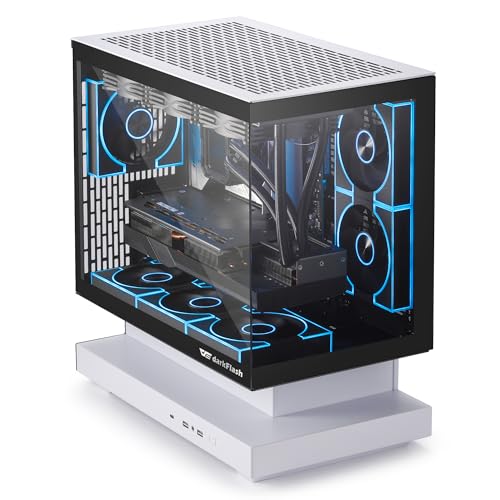
darkFlash FLOATRON F1(2025) Micro-ATX PC Case

Lian Li V100-ATX Mid-Tower PC Case Black-V100RX

CORSAIR 3500X RS ARGB Panoramic Mid-Tower PC Case

HYTE Y70 Touch Infinite Modern Aesthetic Gaming PC Case

DARKROCK Classico Storage Master ATX NAS Computer Case

Geometric Future M5 Tempered Glass Mid Tower


RUIX OV303 ATX Mid-Tower PC Case
More Details On Our Top Picks
The FLOATRON F1 leans hard into the glass-forward look, with a 270-degree panoramic style that suits a desk build you actually want to see. Back-connect motherboard support matters here, because cleaner cabling can turn a cramped Micro-ATX layout into something far easier to live with.
The trade-off is obvious, it’s built more for a tidy showcase than for people who want maximum internal bulk. For a compact gaming setup or a desk that doubles as display space, it makes a strong case, and the included Type-C port keeps the front panel current.
Strong Points
- The wide glass view gives your parts a display-case feel without needing a huge chassis.
- Back-connect support can simplify cable routing, which helps the finished build look cleaner.
- Three pre-installed ARGB PWM fans give you a head start on both lighting and airflow.
- Support for a 360mm AIO opens the door to a serious liquid-cooling setup in this size class.
Things To Consider
- Micro-ATX sizing keeps the footprint smaller, but it also narrows the expansion path compared with larger towers.
- The floating-glass style asks for regular dusting, especially on a desk near windows or open shelving.
- People who want lots of drive trays or extra internal slack may find the layout more selective than roomy.
Feature Snapshot
Who It Suits Best
You’ll get the most from this case in a compact gaming setup where visible hardware and neat cable work matter just as much as raw size.
Where A Sibling Pick Shines
RUIX OV303 ATX Mid-Tower PC Case suits you better when you want a roomier ATX layout and a more conventional internal build path.
The V100 brings a more traditional mid-tower footprint than the darkFlash pick, but it layers on visual extras that feel aimed at desk builds. Four 120mm ARGB PWM fans, an LED strip, and a display platform give you a ready-made stage for parts that deserve attention.
That mix suits a gamer who wants a polished look without jumping to a huge chassis. The tempered-glass panel raises the visual payoff, although glass surfaces usually mean you’ll notice dust and fingerprints sooner than on matte steel.
What We Like
- Four pre-installed 120mm ARGB PWM fans reduce the amount of setup you need before the first boot.
- The LED strip and display platform help the interior feel intentional instead of plain.
- Tempered glass gives your components a clear stage, which works well for color-coordinated builds.
- The mid-tower size is easier to place on a desk or under it than a full-size tower.
Room For Improvement
- The extra visual hardware helps the presentation, but it also means more surfaces to keep clean.
- People who prefer a very understated case may find the lighting package more visible than necessary.
- Compared with the storage-first DARKROCK option, this one is less about drive count and more about display.
Core Details
Who Will Love This
You’re the right fit here if you want a mid-tower that already looks dressed up before you add your own components.
A Better Fit Elsewhere
Geometric Future M5 Tempered Glass Mid Tower suits you better if you want a heavier steel frame and more room for large cooling hardware.
The 3500X sits in a useful middle lane, because it balances the panoramic look with a build that still feels practical. The spacious interior and GPU anti-sag support make more sense here than in smaller showcase cases, especially for a heavier graphics card.
Reverse-connection motherboard compatibility is a smart touch for builders who care about hidden cabling, and that pairs nicely with the three included fans. Compared with the Lian Li V100, this one reads less decorative and more workstation-friendly, though it still keeps the glass-front appeal.
Upsides
- The wide interior gives more breathing room for cable routing and component placement.
- GPU anti-sag support helps steady larger graphics cards, which matters in heavier gaming rigs.
- Three pre-installed fans reduce the number of parts you need to source separately.
- Reverse-connection motherboard support can make for a tidier visible side.
Softer Spots
- The panoramic style takes up more visual space than a plain steel tower, so it asks for a cleaner desk.
- Owners who want the highest drive capacity will probably want to compare it with the DARKROCK case first.
- Glass-heavy layouts usually need occasional wiping to keep the presentation sharp.
Details At A Glance
Perfect Match For
This suits you best for a mainstream gaming desktop that needs space, airflow, and a cleaner look without going fully extravagant.
Look Elsewhere When
MUSETEX Y6 PC Case fits you better if your priority is maximum fan count and a more dramatic lighting presence.
The Y70 Touch Infinite is the most clearly showpiece-led case in this group, and the built-in 2.5K touchscreen is the headline feature. Dual-chamber construction also matters more than it sounds, because separating components can make the inside feel less cluttered and easier to plan around.
That layout suits a high-end desktop where appearance matters just as much as hardware choices. The included PCIe 4.0 riser cable adds convenience for vertical GPU placement, although the big visual focus means this case makes the most sense when you enjoy keeping the setup polished.
Reasons To Buy
- The integrated touchscreen gives the case a built-in control and display point.
- Dual-chamber design can help separate cables and hardware more cleanly.
- Support for ten fans leaves plenty of room for a serious cooling plan.
- The included PCIe 4.0 riser cable helps with vertical graphics card setups.
Points To Note
- The touchscreen and dual-chamber layout add complexity, so this is not the simplest first-build chassis.
- Snow White finishes tend to show smudges and dust sooner than darker surfaces.
- People focused purely on value or basic airflow may find the premium layout more than they need.
Technical Sheet
Built With In Mind
You’ll appreciate this most in a premium desktop where the case itself is part of the setup’s personality.
Swap It Out When
CORSAIR 3500X RS ARGB Panoramic Mid-Tower PC Case makes more sense if you want a simpler panoramic build with less visual complexity.
The DARKROCK Classico is built for people who care more about storage than glass panels, and that focus is refreshing. With room for ten 3.5-inch hard drives and three 2.5-inch SSDs, it’s aimed at archive-heavy systems, home servers, and NAS-style setups that need actual capacity.
The included four 120mm fans help keep a loaded chassis moving air, and the support for top and front 360mm radiators gives you cooling flexibility. Compared with the HYTE case, this one is far less about showpiece flair and much more about practical hardware volume.
Highlights
- The large drive layout is a clear advantage for media libraries and backup-focused systems.
- Four pre-installed fans give the case a useful starting point for airflow.
- Top and front 360mm radiator support gives cooling planners more options.
- Vertical GPU mounting support adds another layer of build flexibility.
Areas To Watch
- The storage-first design makes it less suited to builders who want a minimalist showcase.
- A drive-dense layout can take more time to cable and organize neatly.
- Because the case is built around utility, it may feel plain next to the glass-heavy picks.
Key Specs
Whose Shelf It Belongs On
This belongs in a home lab, media archive, or NAS build where storage density matters more than a showpiece front panel.
Another Choice May Suit
Geometric Future M5 Tempered Glass Mid Tower suits you better if you want a cleaner-looking tower with a more polished exterior.
The M5 takes a more substantial path than the lighter showpiece cases above it, starting with a 1.2mm steel frame and a tempered-glass side. That thicker material choice usually translates into a sturdier hand feel and a more grounded presence on the desk, which suits a larger E-ATX or ATX build.
Toolless panels are the kind of detail you appreciate after the third time you open a chassis for cable changes or fan swaps. Add five pre-installed 140mm ARGB PWM fans and support for 420mm or 360mm radiators, and you get a case that leans hard into flexibility without looking flashy for the sake of it.
Bright Spots
- The 1.2mm steel structure feels more substantial than lighter-budget shells.
- Toolless panels make routine access simpler, which helps during upgrades and cleanup.
- Five pre-installed 140mm fans provide a strong starting point for airflow.
- Support for 420mm and 360mm radiators gives you broad cooling latitude.
- USB Type-C on the front keeps the interface current for newer gear.
Small Caveats
- The stronger steel build can make the case feel less featherweight during setup and repositioning.
- Black and yellow styling is more specific than neutral black, so it won’t suit every desk.
- Large cooling support is useful, though it matters most to builders planning for bigger components.
Feature Rundown
The Right Fit
This is a strong match for you if you want a larger desktop case that still feels easy to work inside.
Where A Sibling Pick Shines
Lian Li V100-ATX Mid-Tower PC Case Black-V100RX suits you better if you want a more colorful pre-built presentation without moving up to a larger frame.
The Y6 is the kind of case you pick when visual impact matters from the moment the system powers on. Seven pre-installed infinity-mirror ARGB fans do a lot of the work for you, and the 270-degree tempered-glass view turns the interior into part of the décor.
That much lighting is great for a bold gaming setup, though it also means the case asks for a more deliberate component color plan. Compared with the simpler RUIX OV303, this one goes harder on the show factor, which is exactly why some desks will love it and others will find it busy.
Positives
- Seven pre-installed fans give you an unusually dense starting point for airflow and lighting.
- The infinity-mirror effect adds depth that plain RGB rings don’t provide.
- Type-C on the case keeps front-panel connectivity current.
- The 270-degree tempered-glass layout makes a well-managed interior easy to show off.
Areas To Watch
- Seven fans mean more cabling and more cleaning surfaces than a simpler chassis.
- The visual style is bold, so understated setups may feel out of place here.
- People building around silence alone may want to compare it against a less lighting-heavy option first.
Core Details
Who Should Grab It
You’ll like this most if your desk build is meant to stand out and you enjoy tuning the look as much as the hardware.
Skip It When
RUIX OV303 ATX Mid-Tower PC Case fits you better when you want a simpler airflow-first layout with less visual intensity.
The OV303 reads like a straightforward answer to the everyday gaming tower question, with four 120mm prism ARGB fans already in place. USB 3.0 and Type-C on the front are useful details, since they keep the case feeling current without asking you to build around extras later.
Its value is in the simple balance: airflow, usable ports, and a mid-tower shape that fits typical desk spaces. Compared with the MUSETEX Y6, it keeps the lighting more restrained, which suits you better if you want color without turning the whole build into a light show.
Best Bits
- Four pre-installed ARGB PWM fans give you a strong starting point for cooling.
- USB 3.0 and Type-C ports make front-panel access more convenient.
- The high-airflow design suits gaming hardware that runs warm under load.
- The mid-tower format is easier to place in a normal desk setup.
Honest Caveats
- The look is practical rather than dramatic, so it won’t satisfy everyone chasing a showcase build.
- ARGB lighting is present, but it’s less elaborate than the seven-fan MUSETEX option.
- Because the focus stays on utility, you may want more visual flair from another pick on this list.
Feature Card
Built With In Mind
This fits you best when you want a sensible gaming case that handles the basics cleanly and keeps the setup simple.
Reach For A Different Pick When
Lian Li V100-ATX Mid-Tower PC Case Black-V100RX suits you better if you want more visual extras and a busier interior presentation.
How To Choose The Right Customizable Pc Cases
Start With Your Layout Needs
Form factor drives almost everything else. Micro-ATX cases like the darkFlash FLOATRON F1 save desk space, while ATX mid-towers give you more room for cable routing, extra fans, and future hardware changes.
Motherboard compatibility also matters more than the headline styling suggests. A reverse-connection-ready case can make the visible side cleaner, while a dual-chamber design like the HYTE Y70 spreads parts out so the build feels less crowded.
Match Cooling To Your Parts
Fans and radiator support should follow the heat your parts create, not just the look you want. A case that supports a 360mm or 420mm radiator gives you more room for larger liquid-cooling hardware, and pre-installed PWM fans help you start with usable airflow right away.
PWM means pulse-width modulation, a fan-control method that lets speed adjust more precisely than a simple fixed-voltage setup. That matters in a gaming room, because you can aim for quieter idle behavior without giving up cooling headroom under load.
Think About Storage, Access, And Cleaning
Storage-heavy builds need a different case personality than showpiece rigs. The DARKROCK Classico makes sense for a NAS or media archive because it accepts many drives, while glass-heavy cases ask for more frequent dusting and a more careful hand during maintenance.
Toolless panels, front Type-C, and sensible internal spacing save time over months of ownership. Those details may sound small on paper, but they’re the difference between a case you enjoy opening and one that feels like a chore.
A Quick Reality Check Before You Choose
Common Shopping Slip Ups
Shoppers often focus on lighting first and case fit second. That leads to cramped builds, awkward cable runs, or a case that looks good on paper but leaves little room for a large graphics card or radiator.
Another easy miss is drive planning. A storage-focused system needs drive bays and cable space from the start, while a showcase build usually benefits more from airflow paths and a cleaner side panel.
Why Top Tier Costs More
Higher-tier cases usually spend money on materials, layout complexity, and included extras. Dual-chamber construction, thicker steel, built-in displays, and multiple pre-installed fans all push the design beyond a basic shell.
That extra spend makes sense when you open the case often, run hotter hardware, or want the chassis to be part of the room’s design. For a simple office tower, the upgrade may be more than you need.
Frequently Asked Questions
What makes a case customizable?
A customizable case usually gives you room to change cooling, storage, lighting, or the visible layout. That can include fan mounts, radiator support, tempered glass, or easier cable routing.
Do more fans always mean better airflow?
Not always, because fan placement and case ventilation matter just as much as fan count. A well-planned three-fan case can outperform a messy seven-fan setup.
Is tempered glass worth choosing?
Tempered glass works well when you want to show the interior and keep the build visually tidy. It asks for more cleaning than a plain steel panel, so it suits people who don’t mind upkeep.
What size case works for most gaming builds?
ATX mid-towers usually give you the easiest balance of room, airflow, and part compatibility. Smaller Micro-ATX cases fit tighter spaces better, but they ask for more careful planning.
Should you pay more for premium features?
Premium features make sense when you value build experience, display quality, or advanced cooling support. They matter less when the case sits under a desk and only needs to hold parts safely.
Closing Thoughts
Your best Customizable Pc Cases choice depends on what you want the case to do every day. For a tidy compact build, the darkFlash FLOATRON F1 keeps things controlled, while the HYTE Y70 Touch Infinite turns the chassis into part of the desktop experience. Storage-heavy setups have a clear path with the DARKROCK Classico, and practical gaming builds can stay simple with the RUIX OV303. Choose the case that fits your room, your parts, and how much upkeep you’re happy to handle.
