
Dual-chamber layouts make more sense once you’ve lived with cable clutter, hot GPUs, and a side panel you’d rather not keep opening. These eight cases cover very different styles, from airflow-first towers with preinstalled fans to showcase builds with glass and touchscreen panels. You’ll find a strong fit whether you want easier cable routing, room for large radiators, or a more polished desktop look.
The Shortlist At A Glance

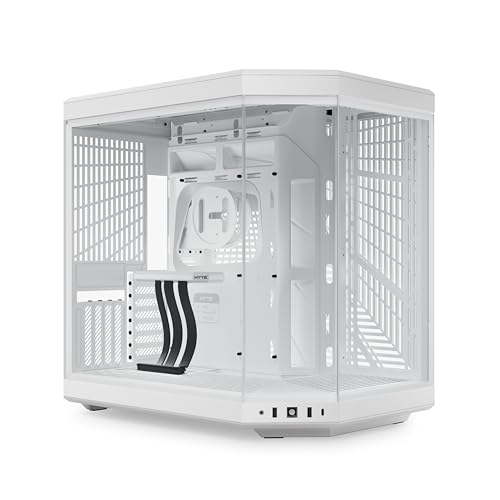
HYTE Y70 Modern Aesthetic Gaming PC Case

Antec C8 Full-Tower E-ATX PC Case

NZXT H9 Flow Dual-Chamber ATX PC Case

HYTE Y70 Touch Infinite Modern Aesthetic Gaming PC Case

HYTE Y70 Touch Infinite Modern Aesthetic Gaming PC Case

KEDIERS Gaming PC Case Dual Chamber ATX Desktop Chassis

NZXT H9 Flow RGB+ Dual-Chamber ATX PC Case
More Details On Our Top Picks
HYXN leans hard into airflow, and the eight pre-installed fans make that clear before you even start planning a build. The mix of 140 mm and 120 mm fans suits a hot GPU setup, especially for a gaming tower that stays in a living room or under a desk.
The trade-off is simple, this is more about moving air than making a quiet statement piece. You also need to like a larger mid-tower footprint, because the dual-chamber layout and 420 mm radiator support point toward serious hardware, not a minimal desk setup.
Strong Points
- Eight included fans cut down the number of parts you need to source separately.
- Mixed 140 mm and 120 mm sizing gives you a practical cooling setup for demanding components.
- Dual-chamber routing keeps the cable side separated, which helps the main compartment stay open and easier to work in.
- 420 mm radiator support gives liquid-cooling users room for larger loop planning.
Things To Consider
- The fan-heavy layout may suit airflow goals better than a quiet office build.
- Cleaning eight fans takes more upkeep than a simpler enclosure.
- The larger mid-tower format needs a bit more desk or floor space than compact cases.
Feature Snapshot
Who It Suits Best
Gamers and builders who want strong airflow with minimal extra fan shopping will get the most from this case.
A Better Fit Elsewhere
NZXT H9 Flow RGB+ makes more sense for you when you want a cleaner, more polished fan-and-lighting package with less setup friction.
HYTE’s Y70 is the most display-forward choice in this group, thanks to its panoramic glass and the kind of cable routing that keeps the build from looking busy. That matters in a showcase desk setup, because your hardware becomes part of the room instead of disappearing into it.
The 10-fan capacity gives you room to plan a serious cooling layout, although the selling point here is clearly presentation as much as thermals. In most home offices, the wide glass surfaces will need more regular dust attention than a simpler steel-sided tower, so the polished look comes with a little upkeep.
What We Like
- Panoramic glass gives you a wide view of the interior, which suits showcase-style builds.
- Cable management support helps the main chamber stay visually tidy.
- 10-fan capacity leaves room for custom airflow planning.
- The dual-chamber layout keeps the power-supply and cable side out of sight, which can make a desk build feel cleaner.
Softer Spots
- The glass-heavy design asks for more cleaning than a plain metal case.
- The visual emphasis may matter less to you than raw cooling value.
- Large display-oriented cases usually demand more care during installation and moving.
Core Details
Who Will Love This
Style-focused PC builders who want the case to be part of the visual theme will appreciate this most.
Where A Sibling Pick Shines
HYXN H2 (2026) ATX PC Case is a more straightforward fit for you when fan count and airflow matter more than panoramic styling.
Antec’s C8 feels built for larger hardware, not just a tidy desk build. The full-tower E-ATX format gives you more breathing room for a sizeable motherboard, a long graphics card, and a radiator plan that doesn’t feel cramped.
That extra space is useful during installation too, because tool-free design usually saves a bit of frustration in real builds. The trade-off is that no fans are included, so you need to plan cooling from the start rather than treating the case as a ready-to-go package.
Highlights
- Full-tower E-ATX sizing gives you more room for oversized hardware.
- Tempered glass on the front and side suits showpiece builds without making the case feel closed in.
- Tool-free touches should make access and part swaps easier than on more fussy cases.
- USB Type-C on the front panel is handy for newer peripherals.
Minor Gripes
- You need to add your own fans, so total build planning takes more thought.
- The full-tower footprint can dominate a smaller desk or room.
- Glass panels usually ask for more careful cleaning and handling during moves.
Feature Rundown
Built With In Mind
Hardware-heavy builders who want extra interior space for high-end components will get the most out of this one.
Another Choice May Suit
HYXN H2 (2026) ATX PC Case makes more sense for you when you want a fan-filled mid-tower instead of a larger chassis you need to populate yourself.
The H9 Flow sits in a comfortable middle ground, because four included fans and support for 420 mm radiators at the top and front give you a strong starting point without forcing a stripped-down or overdecorated look. That makes it easy to picture in a gaming room where you want the PC to look intentional, not loud.
Compared with the HYXN case, this one feels more composed right out of the box, though the honest read is that you still need to plan your airflow layout with care. The wraparound tempered glass brings the same maintenance trade-off you get with other showcase cases, so fingerprints and dust will be part of the routine.
Upsides
- Four included fans reduce the number of pieces you need to add before building.
- Top and front 420 mm radiator support gives cooling flexibility for larger setups.
- Wraparound tempered glass creates a polished look from multiple angles.
- The dual-chamber format helps keep cabling out of the main view.
- Black finish fits a wide range of desk and room styles without drawing too much attention.
Points To Note
- Glass panels need more regular wiping than opaque cases.
- At this size, placement and cable routing take a little planning.
Quick Facts
The Right Fit
You’ll appreciate this most as a balanced showcase case for a gaming build that still needs sensible cooling support.
Reach For A Different Pick When
HYTE Y70 Modern Aesthetic Gaming PC Case suits you better when panoramic glass and a more dramatic presentation matter more than NZXT’s restrained styling.
The Touch Infinite version turns the case into a display surface, and that changes the whole feel of the build. In a gaming room or creator desk, the integrated 2.5K LCD touchscreen gives you a focal point that ordinary tempered-glass cases simply don’t offer.
The upside is obvious, but the catch is that the screen adds another layer of setup and another surface to keep clean. Compared with the regular HYTE Y70, this model is for people who want the case to do more than frame hardware, and who don’t mind paying extra attention to the front-of-desk presentation.
Reasons To Buy
- The built-in 2.5K LCD touchscreen adds a rare front-panel feature.
- Dual-chamber construction helps hide cable clutter behind the show side.
- 10-fan capacity leaves plenty of room for a cooling plan.
- The included PCIe 4.0 riser cable supports vertical GPU presentation.
Areas To Watch
- The screen makes this a more maintenance-sensitive choice than a plain case.
- You’ll want to be sure the display feature fits the way you use your desk.
- More visual hardware usually means more time spent on layout and cable tidying.
Details At A Glance
Perfect Match For
Streamers, showcase builders, and anyone who wants a desktop case with a real display feature will get the most out of this one.
Look Elsewhere When
NZXT H9 Flow Dual-Chamber ATX PC Case is the easier fit for you when you want a polished chassis without a touchscreen in the front of the build.
Pitch Black gives the Touch Infinite idea a sharper, more restrained feel, which helps the display stand out without turning the whole setup flashy. For most black-on-black builds, that balance works well in a den or office where you want a showpiece that still looks composed.
Like the Snow White version, the screen remains the defining feature, so this is less about hidden value and more about a premium visual package. The real trade-off shows up in upkeep and planning, because a feature-rich case asks for more thought during setup than the simpler NZXT H9 Flow.
Bright Spots
- The black finish pairs well with dark components and low-key room setups.
- The integrated touchscreen gives the case a distinct front-facing identity.
- Dual-chamber spacing keeps support hardware out of the main showcase area.
- 10-fan capacity helps you build around both heat and appearance.
Small Caveats
- The screen means more surfaces to maintain.
- You may find the premium styling more than you need for a strictly practical workstation.
- The stronger visual focus can make the build process feel more involved.
Feature Card
Whose Shelf It Belongs On
You’ll like this most as a dark-themed showcase case for a high-end desktop that doubles as room decor.
Skip It When
HYTE Y70 Modern Aesthetic Gaming PC Case is the calmer choice for you when you want the same family look without the screen overhead.
KEDIERS takes a familiar formula and loads it with hardware support, which is useful for someone trying to build a lively RGB system without piecing every component together separately. Eight PWM ARGB fans and panoramic glass push it toward a complete-looking setup right away.
That said, the value angle makes the most sense for builders who like bundled extras more than brand-name minimalism. Compared with the HYXN H2, it gives you a similarly fan-rich starting point, though the tonal feel is more about bright presentation than a purely airflow-led design.
Best Bits
- Eight PWM ARGB fans create a strong starting point for lighting and airflow.
- Panoramic glass panels give the interior a wide view from the outside.
- Cable management support helps the dual-chamber layout stay neat.
- 420 mm radiator support leaves room for larger cooling plans.
Worth Noting
- ARGB-heavy cases usually take more time to route and tune neatly.
- Glass panels mean more wiping and a little more care during handling.
- The style leans showy, so it suits some desks better than others.
Spec Overview
Who Should Grab It
RGB-focused builders who want a more complete bundle out of the box will get the most from this case.
Swap It Out When
NZXT H9 Flow RGB+ suits you better when you want a more polished fan-and-hub package from a familiar premium layout.
The H9 Flow RGB+ is the most complete “plug-in and build” style option here, because the seven RGB fans and pre-installed Control Hub remove a lot of setup guesswork. That’s a real advantage for a busy weeknight build, especially when you want your lighting synced from the start rather than staged across several separate purchases.
Compared with the standard H9 Flow, this version leans harder into lighting control, and that makes it feel more turnkey. The honest read is that you’re paying for convenience as much as parts count, so it suits you best when coordinated RGB matters and you’d rather spend time building than coordinating accessories.
Standout Traits
- Seven included RGB fans give you a substantial lighting base.
- The pre-installed Control Hub simplifies cable and lighting coordination.
- Dual-chamber architecture keeps the visible side cleaner.
- CAM-based syncing helps the whole lighting setup behave as one system.
Areas To Watch
- RGB coordination adds setup steps compared with a plain black case.
- The feature set makes more sense for visual builds than barebones workstations.
- Glass and lighting both benefit from regular cleaning and cable attention.
Core Details
Made For
You’ll get the most from this case as a polished RGB centerpiece for a gaming setup that needs less piecing together.
Consider Something Else When
HYXN H2 (2026) ATX PC Case is the simpler fit for you when strong airflow and fewer lighting decisions matter more than RGB coordination.
How To Choose The Right Dual Chamber Pc Cases
Layout Comes Before Looks
Dual-chamber cases help separate the cable side from the main hardware zone, and that matters more than the label sounds. The visible chamber stays cleaner, while the hidden side gives your power supply, storage, and wiring somewhere to disappear.
That separation makes a real difference in a gaming room or on a desk that people actually see. A showcase chassis like the HYTE Y70 family rewards neat routing, while a simpler airflow-first tower like the HYXN H2 rewards straightforward cooling planning.
Cooling Space Should Match Your Parts
Fan count and radiator support decide how far you can push heat management. Larger radiator support, such as 420 mm in several of these picks, gives liquid-cooling users more room to plan around big parts and hot graphics cards.
More fans can help with airflow, but more fans also mean more cable work and more dusting later. That trade-off is worth it for high-output gaming rigs, yet a lighter build can feel easier to live with over time.
Glass, Screens, And Real-World Upkeep
Tempered glass, panoramic panels, and LCD displays all look sharp, though each one adds upkeep. Fingerprints show up quickly, and large viewing surfaces usually need a little more attention than a basic steel side panel.
Screen-equipped cases bring another layer of setup because the front display becomes part of the build story. For someone who wants a clean desk and little fuss, a more restrained model such as the NZXT H9 Flow often makes daily life easier.
Think About Build Size And Comfort
Full-tower and larger mid-tower cases give you room, but room has a footprint. On a compact desk, a large chassis can feel heavy and harder to move during cable changes or upgrades.
That’s where your component list matters most. A small-to-medium gaming setup can stay comfortable in a mid-tower, while a larger motherboard, extra storage, and a long radiator usually point you toward more generous space.
What To Weigh Before You Commit
Common Shopping Slip Ups
It’s easy to focus on glass, RGB, or a front display and forget the practical pieces. Fan support, radiator clearance, and case depth matter just as much, especially for a build with a large GPU or a tall cooling stack.
Another common miss is treating dual-chamber layout as a style cue only. The layout helps with cable management, but only when the internal space fits your hardware and you’re willing to plan the build carefully.
What The Higher Tier Buys
More expensive cases usually pay for stronger materials, more refined cable routing, and extra hardware that comes preinstalled. In this group, that can mean included fans, a control hub, a riser cable, or a touchscreen panel that changes the whole build experience.
That extra spend makes sense when you want fewer separate parts and a cleaner result on day one. For a plain workstation or a modest gaming rig, a simpler case often delivers the same basic job with less complexity.
Frequently Asked Questions
What makes a dual-chamber case different?
You get a separated interior, so the main hardware and the cable side stay apart. That usually makes the visible chamber easier to keep tidy.
Do you need lots of fans in a dual-chamber case?
Not always, but larger gaming builds benefit from stronger airflow planning. A fan-rich case is helpful when your CPU and graphics card run warm under load.
Are glass-panel cases harder to keep clean?
Yes, fingerprints and dust show up faster on glass and glossy surfaces. A soft cloth and regular wipe-downs help the case keep its clean look.
Is a touchscreen case worth the extra cost?
It makes sense when the display adds real value to your desk setup or system theme. For a plain workstation, the added feature can feel unnecessary.
Should you choose ATX or E-ATX?
ATX fits most standard gaming builds, while E-ATX gives you more room for larger boards and more complex layouts. The right choice depends on how large your motherboard and cooling hardware are.
Closing Thoughts
Dual-chamber pc cases make sense when you want a cleaner build, easier cable routing, and a setup that looks as organized as it runs. The HYXN H2 and NZXT H9 Flow stand out for practical cooling balance, while HYTE’s Y70 family leans into presentation and feature depth. Antec’s C8 gives you more room to grow, and the KEDIERS option brings a bundled approach that feels straightforward for RGB-heavy builds. Match the case to your hardware first, then let the styling follow.
