
Dual-system cases are a niche, but they solve a very real problem for you: one chassis, two machines, far less clutter. That matters in a home studio, a gaming-and-streaming setup, or a workstation where space and cable control already feel tight. The picks below range from tempered-glass showpieces to storage-heavy towers and a true dual-system super tower. You get a clear view of which case fits your desk, your hardware, and how much room you actually need.
Quick Look At The Shortlist

darkFlash DS900WS(2025) ATX PC Case 4x120mm Fans

NZXT H9 Flow Dual-Chamber ATX PC Case Black

Antec Flux Pro Full-Tower E-ATX PC Case Black

DARKROCK Classico Storage Master ATX NAS Case
darkFlash Micro-ATX PC Case DB330M Black

CORSAIR AIR 5400 RS-R ARGB Triple-Chamber PC Case Black

darkFlash Full-Tower ATX Gaming PC Case DY470 Black
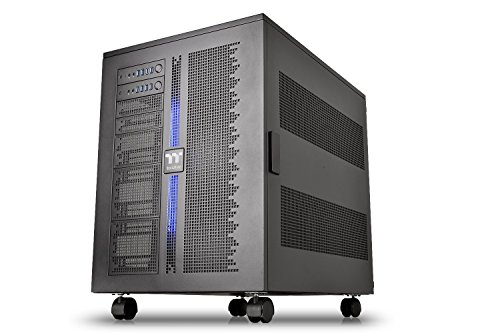
Thermaltake Core W200 Dual System Capable Super Tower
More Details On Our Top Picks
Walnut trim gives this darkFlash case a warmer look than the usual all-glass gaming tower, and that makes a difference on a desk that also has work gear on it. The preinstalled 120mm PWM fans, meaning fans that can vary speed automatically from the motherboard, point it toward airflow-first builds without making you start from zero.
You also get a Type-C front port and support for a 360mm all-in-one liquid cooler, which suits mid-range to upper-mainstream gaming systems nicely. The honest read is that the wood accent is the hook, but the spacing and cooling support are what keep it from feeling like decoration alone.
Strong Points
- Genuine walnut styling gives your build a calmer, more furniture-like feel.
- Four included PWM fans help reduce the need for immediate add-on cooling.
- Support for a 360mm AIO opens the door to stronger CPU cooling layouts.
- Type-C front access suits newer peripherals and thumb drives.
Small Caveats
- The wood accent is tasteful, though it may not suit every room theme.
- Wide open airflow usually means more dust attention over time.
- The mid-tower format still asks you to check part clearances carefully.
Feature Card
Who It Suits Best
Your best fit here is a style-conscious gamer or creator who wants a cleaner look than a standard black box without giving up practical airflow.
Where A Sibling Pick Shines
NZXT H9 Flow suits you better for a more glass-forward dual-chamber layout, especially when neat cable presentation matters more than the walnut accent.
The H9 Flow leans into that modern dual-chamber arrangement, with the power supply and cabling separated from the main view area. For a desk setup where tidy hardware presentation matters, that layout saves a lot of visual clutter and makes the inside feel easier to plan.
The wraparound tempered glass gives you a wide view of the build, and the included fans plus 420mm radiator support push it well past basic showcase territory. Compare it with the darkFlash DS900WS, and you get a cleaner, more premium-feeling shell, though you also trade away the wood warmth.
What We Like
- Dual-chamber design keeps cable-heavy parts out of the main display area.
- Wraparound tempered glass suits showcase builds with coordinated lighting.
- Four included fans help you get moving without a long parts list.
- 420mm radiator support gives ambitious cooling plans more room to breathe.
- Black finish keeps the look restrained rather than flashy.
Areas To Watch
- Large glass surfaces ask for more careful cleaning to keep smudges down.
- The showcase layout can make the case feel less understated on a small desk.
- Dual-chamber routing rewards neat planning, so rushed builds can feel fiddly.
Details At A Glance
Made For
You suit this pick best when the case is part of the room, not something you want hidden beside the desk.
Another Choice May Suit
Antec Flux Pro is the better fit for you if airflow headroom and a more traditional full-tower footprint matter more than a glass-heavy showpiece.
This Antec steps up in scale right away, and the full-tower body gives you room that a mid-tower like the NZXT H9 Flow simply cannot match. The walnut front panel softens the industrial look, while the six included PWM fans make the airflow story more serious from day one.
The 90-degree rotated PSU mount, meaning the power supply sits turned sideways for a different internal layout, is the sort of detail that helps cleaner cable paths on larger builds. Add 420mm radiator support and a CPU plus GPU temperature display, and you get a case aimed at builders who want more visibility into heat management, though the size asks for real desk or floor space.
Upsides
- Six included PWM fans give you a strong cooling base without immediate extras.
- Full-tower scale suits E-ATX boards and larger component layouts.
- Walnut front detailing adds a more restrained visual note.
- Rotated PSU mounting can help make routing feel less cramped.
- CPU and GPU temperature display gives you a fast visual check on heat.
- 420mm radiator support fits advanced liquid-cooling plans.
Worth Noting
- The larger chassis takes more room to place and move around.
- More fans mean more surfaces to dust and more cables to manage.
- The format feels better suited to big builds than simple budget rigs.
Core Details
Best Suited To
Your match here is a serious desktop build where cooling capacity, board support, and monitoring matter more than keeping the case compact.
Skip It When
darkFlash DS900WS suits you better for a more moderate mid-tower footprint, especially when you want a stylish look without full-tower bulk.
Storage density is the whole story here, and that makes this DARKROCK very different from the glass-forward NZXT and Corsair options. Ten 3.5-inch drive bays and three 2.5-inch slots make it easy to think in terms of media libraries, backups, and home-server tasks rather than flashy visuals.
USB 3.0 on the front panel, four included 120mm fans, and support for both top and front 360mm radiators round out a case that leans hard into utility. The trade-off is obvious, though, because a NAS-style tower like this makes sense in a utility room or office corner more than beside a showcase gaming desk.
Bright Spots
- Ten 3.5-inch drive positions suit large local storage plans.
- Three 2.5-inch bays add room for SSD-based system or cache drives.
- Four included fans help the storage-heavy layout stay better ventilated.
- Top and front 360mm radiator support broadens cooling options.
- USB 3.0 front access keeps everyday plugging and transfers convenient.
Points To Note
- The storage-first layout is less about visual drama and more about utility.
- Lots of drives mean more cables, more mounting work, and more dust care.
- The case suits a dedicated corner better than a compact desk setup.
Technical Sheet
Whose Shelf It Belongs On
Your best fit is a home server or media library build where storage capacity and cooling matter much more than glass panels.
Look Elsewhere When
Thermaltake Core W200 makes more sense for a dual-system workstation, especially when your goal is two complete PCs in one chassis.
This darkFlash is the size-conscious option in the group, and that matters on smaller desks where a full tower would just feel like too much furniture. Dual tempered glass gives it a display-minded look, while the preinstalled PWM ARGB fans keep the package from feeling bare.
The Type-C front port and 240mm AIO support make it useful for modest gaming or creator systems, but the micro-ATX format naturally keeps expansion tighter than on the larger cases above. For most compact setups, that’s not a flaw so much as the point, though you’ll want to plan your layout before parts start arriving.
Best Bits
- Micro-ATX sizing helps the case fit smaller rooms and tighter desks.
- Dual tempered glass gives your hardware a clean, open view.
- Three included PWM ARGB fans reduce the need for an immediate cooling purchase.
- Type-C front access fits modern peripherals.
- 240mm AIO support gives you enough headroom for many compact builds.
Room For Improvement
- Smaller internal space means careful part selection matters more.
- Glass panels can show fingerprints and dust more readily.
- Expansion limits are naturally tighter than in the ATX and full-tower cases.
Feature Rundown
Who Should Grab It
Your best fit is a small-room gaming or editing setup where you want some style without giving up desk space.
A Better Fit Elsewhere
NZXT H9 Flow suits you better for a larger dual-chamber layout, especially when a clean showcase look matters more than compact size.
Corsair takes a more engineered approach than the glass-heavy NZXT H9 Flow, and the triple-chamber layout is a big part of that. Separating major components into more distinct zones can simplify the visual field and give airflow ducts a clearer path, which suits builders who care about both appearance and thermal planning.
The three reverse-rotor RS120-R fans, meaning the fan blades are configured to help the visible side stay presentation-friendly, underline that design goal. Low-noise tuning is part of the pitch too, though the trade-off is a case that asks a lot more of your component planning than a standard mid-tower.
Reasons To Buy
- Triple-chamber layout gives the interior a very organized structure.
- Three preinstalled ARGB fans help the case start with a complete look.
- High-airflow ducts support builds that need steady ventilation.
- Reverse motherboard support opens up different presentation and cable-routing ideas.
- Low-noise focus suits systems you keep close during long sessions.
Softer Spots
- Triple-chamber layouts usually take more thought during assembly.
- The visible fan setup may not suit you if you prefer a plain enclosure.
- Advanced layouts can feel unnecessary for simple office hardware.
Feature Snapshot
Built With In Mind
Your best match is a custom gaming or creator build where layout logic and presentation matter as much as component support.
Where A Sibling Pick Shines
darkFlash Full-Tower ATX Gaming PC Case DY470 is the easier fit for you if you want a simpler dual-chamber style with vertical GPU mounting and less layout complexity.
The DY470 lands in a useful middle ground, because it combines dual-chamber organization with a more conventional full-tower approach. Back-plug-in motherboard support, meaning the connectors sit on the rear side for a cleaner front-facing build, is the sort of detail that helps neat cable work feel less like a chore.
Vertical GPU mounting and support for up to two 360mm radiators make it fit stronger gaming hardware without forcing you into a single layout style. Compare it with the Corsair AIR 5400 RS-R, and you get a less intricate setup with a similar ambition for presentation, which may suit you better in a first custom build.
Standout Traits
- Dual-chamber structure helps separate the working parts from the display side.
- Back-plug-in motherboard support can make cabling feel cleaner.
- Vertical GPU mounting suits showcase-style graphics card placement.
- Support for two 360mm radiators gives cooling setups more flexibility.
- Four included PWM ARGB fans help you start with a complete baseline.
- Panoramic glass makes it easy to see the finished build.
Areas To Watch
- Vertical GPU layouts need careful part spacing to avoid awkward fit issues.
- Panoramic glass asks for more cleaning attention than a plain steel panel.
- The full-tower scale still takes meaningful desk or floor room.
Core Details
The Right Fit
Your best fit is a gaming system where you want a tidy front view, visible hardware, and plenty of cooling flexibility.
Where A Sibling Pick Shines
darkFlash DS900WS suits you better if you want a slightly more understated mid-tower with walnut trim instead of the larger panoramic format.
The Core W200 sits in its own lane, because this is the only case here built around true dual-system capability. You are looking at a super tower that can hold two separate PCs, which makes it far more relevant to workstation users, modders, and anyone who wants one chassis to do the job of two.
The fully modular, dismantle-friendly design matters in a case this large, since big enclosures become easier to live with when the layout can be reworked. It is not a casual desk case, and that is the point, because the scale, stackable structure, and XL-ATX support all speak to highly custom installs rather than everyday gaming towers.
Highlights
- Dual-system capability sets it apart from the rest of this roundup.
- Modular construction helps with planning, access, and future changes.
- Stackable design supports advanced workspace or lab-style setups.
- XL-ATX support opens the door to larger board formats.
- Built for extreme water-cooling goals rather than light-duty use.
Points To Note
- The size is substantial, so placement needs real forethought.
- This is far more case than most standard gaming rigs need.
- Assembly and cable planning can feel demanding on a chassis this large.
- Cleaning and maintenance are easier with discipline, not impulse.
Feature Rundown
Who Will Love This
Your best fit is a serious workstation builder, water-cooling enthusiast, or modder who needs two systems in one enclosure.
Where A Sibling Pick Shines
Antec Flux Pro is the more practical choice for a large single-system build, especially when you want strong airflow without committing to dual-system scale.
How To Choose The Right Dual System Pc Cases
Start With The Layout You Actually Need
Dual-system cases are built around very different internal structures, so the first question is whether you need one machine or two. A true dual-system chassis like the Thermaltake Core W200 serves a completely different job than a showcase dual-chamber tower such as the NZXT H9 Flow.
That difference matters because space, cable paths, and cooling all change with layout. For a gaming-plus-streaming setup, a dual-chamber design can keep the main build clean without doubling the footprint in the way a true two-PC super tower does.
Match The Size To Your Space
Full-tower and super tower cases can make life easier for large boards, tall coolers, and long graphics cards. They also demand more clearance, heavier lifting, and more attention to where the case sits in the room.
Mid-tower and micro-ATX options make more sense for desks, side tables, and tighter rooms. The trade-off is obvious: you give up some expansion room, but you gain a setup that feels easier to live with every day.
Cooling Support Deserves Real Attention
Fan count gets a lot of attention, but radiator support and airflow path matter just as much. A 360mm or 420mm radiator option gives you more planning room for stronger liquid-cooling hardware, while included PWM fans help you start with better baseline airflow.
That becomes important in hotter rooms, long gaming sessions, and builds with high-wattage parts. The higher-end cases in this roundup lean on better ducting, more fan positions, and smarter internal separation, and that is where the extra money usually goes.
Think About Maintenance And Daily Use
Glass-heavy cases look good, but they also ask for more frequent cleaning. Storage-focused towers need more cable management and dust care, while modular super towers reward builders who are comfortable opening things up and revisiting the layout later.
Pick the case that fits how you actually work, not just how it looks on day one. That approach saves you frustration once the machine is built and the case becomes part of your routine.
Things Worth Knowing First
Common Shopping Slip Ups
Many people focus on the outside shape and miss the part support. That usually leads to a case that looks right but fights your radiator, motherboard, or graphics card once assembly starts.
Another common miss is ignoring space around the desk or floor. A full tower can look manageable in photos, then feel oversized once it has to sit beside a monitor arm, speaker stand, or filing cabinet.
The Upgrade Payoff
Higher-tier cases often cost more because they include more metal, more glass, more preinstalled fans, and more complex layout engineering. The better models in this list also spend money on smarter routing, stronger cooling support, and more flexible interior zones.
That upgrade makes sense when you are building around a premium graphics card, a large radiator, or two systems in one enclosure. For simpler office hardware, the extra structure may feel like more than you need.
Frequently Asked Questions
What Makes A Case “Dual System”?
A dual-system case is built to hold two separate computers in one enclosure. The Thermaltake Core W200 is the clearest example in this roundup.
Do You Need A Dual-Chamber Case For Gaming?
No, a dual-chamber case is mainly about cleaner layout and better separation of components. A single-system gaming build usually does fine in a standard ATX tower.
Are Larger Cases Harder To Maintain?
They can be, mainly because there are more fans, more cables, and more surface area to clean. That also gives you more room to work during assembly and upgrades.
Which Case Type Suits A Small Desk Best?
The darkFlash Micro-ATX PC Case DB330M Black suits a tighter desk better than the full towers here. It keeps the footprint smaller while still giving you a display-friendly look.
What Should You Prioritize First?
Start with motherboard size, cooler support, and how much room you have in the room. After that, choose the layout style that matches your build habit and the amount of hardware you plan to install.
Closing Thoughts
Your best match depends on how much machine you want to fit into one shell, and that question narrows the field fast. The NZXT H9 Flow and darkFlash DS900WS handle stylish single-system builds well, while the Thermaltake Core W200 only makes sense when two systems truly belong together. Pick the case that fits your space, your cooling plan, and the amount of build complexity you want to live with. That keeps the purchase grounded in how you actually use your setup, not just how it looks on the shelf.
