
Full-size tower cases make sense when your parts list keeps growing, your cooling needs get serious, or you want room for storage drives without turning the inside into a cramped puzzle. You also get easier cable routing, better clearance for big graphics cards, and less friction during upgrades, which matters in a long-term desktop setup. This roundup focuses on cases that fit different kinds of high-end or storage-heavy builds, from airflow-first layouts to wood-accented showpieces.
Quick Look At Our Top Picks

MONTECH XR Panoramic High Airflow ATX PC Case
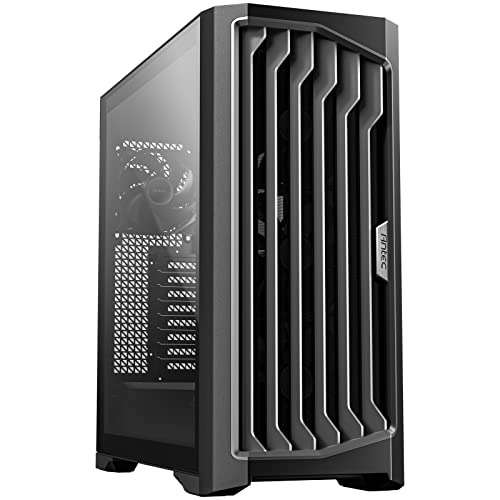
Antec Performance 1 FT Full Tower E-ATX PC Case

Antec C8 Full-Tower E-ATX PC Case, Dual-Chamber, Black

Antec Flux Pro Full-Tower E-ATX PC Case, Black

DARKROCK Classico Storage Master ATX NAS Computer Case

Geometric Future M5 Tempered Glass Mid Tower, GEO-M5F-BY

MUSETEX Y6 PC Case, Black

Antec C8 Wood Full-Tower E-ATX PC Case
More Details On Our Top Picks
Montech aims this case at builders who want space without giving up a clean-looking front. The 420mm graphics-card clearance and 360mm radiator support make it easier to plan a strong gaming or work setup, and the dual tempered glass panels give the finished build a showcase feel.
The trade-off is that the glass-heavy look puts more pressure on cable neatness and dust care, even with magnetic filters in place. For a daily desktop that needs to look tidy on a shelf or under a desk, it feels like a sensible middle ground between style and airflow.
Strong Points
- Three included ARGB PWM fans help you start with a workable airflow setup.
- Reverse blade fans can improve the visual front without making the inside feel cramped.
- 420mm GPU clearance leaves room for larger graphics cards and future upgrades.
- 360mm radiator support suits high-output cooling plans without forcing a compact layout.
- Magnetic dust filters make routine cleaning less annoying in a dusty room.
Points To Note
- Glass on both sides means fingerprints and dust show up sooner than on simpler steel cases.
- A layout like this rewards careful cable management, especially around the visible chamber.
- Up to nine fans sounds generous, but adding that many parts raises noise and wiring complexity.
Feature Snapshot
Who It Suits Best
You get the most from this case as a gaming builder who wants strong airflow and a polished display look in one shell.
Where A Sibling Pick Shines
Antec Flux Pro fits better for you if you want more included fans and a more premium front-panel feel right away.
Where the MONTECH leans into display appeal, this Antec frame feels more like a straightforward chassis for demanding parts. The full-tower layout gives you the breathing room many custom or high-power rigs need, and the included PWM fans help the case start with a controlled cooling base.
That extra room matters most in a workshop-style setup with large coolers, multiple drives, or a build that gets opened often for upgrades. It does ask for more floor or desk space, so the honest read is that it suits bigger systems better than minimalist rooms.
What We Like
- Full-tower proportions give you easier access during assembly and later upgrades.
- E-ATX support makes the case useful for larger boards and more complex layouts.
- Three PWM fans provide a practical starting point for temperature control.
- The roomy interior helps reduce the squeeze around cables, drives, and cooling hardware.
Room For Improvement
- The larger footprint can dominate a smaller desk area or floor space.
- A big interior is helpful, but it also asks for more planning during the build stage.
Core Details
Built With In Mind
You should look at this one for a high-end desktop, a workstation, or a build that will keep expanding over time.
Another Choice May Suit
Geometric Future M5 is the better fit for you if you want a smaller footprint with a more structured tempered-glass layout.
This one takes a different route from the Performance 1 FT, because the dual-chamber layout separates the visible hardware area from the cable and power section. That design usually makes a custom build look calmer, and the tool-free approach should appeal to anyone who opens a case often.
Since it ships without fans, you get full control over the cooling setup, but you also have to plan that part yourself. For a builder who likes to match airflow parts to specific hardware, that flexibility is the whole point.
Highlights
- Dual-chamber construction helps keep cables and main components more visually separated.
- Tempered glass on the front and side gives you a wide view of the build.
- Tool-free design can make access less fiddly during upgrades or cleaning.
- RTX 40 series graphics-card support gives you confidence around modern large cards.
- 360mm radiator support fits strong cooling plans without forcing a cramped layout.
Softer Spots
- No included fans means you need to budget time and parts for your own airflow plan.
- Glass panels reward careful cleaning, especially around edges and corners.
- The open show-style layout looks best after you spend time on cable placement.
At A Glance
Right Fit For
You fit this case best when your build priorities lean toward neat presentation and hands-on customization.
Look Elsewhere When
MONTECH XR makes more sense if you want fans included and a more ready-to-run airflow setup out of the box.
Antec gives this case a more finished feel than the stark black boxes above it, and the walnut front panel is the detail that sets it apart. Six included PWM fans and support for a 420mm radiator make it a strong starting point for hotter builds that still need to look polished.
The rotated power-supply mount and the temperature display add a bit of practical polish, especially in a room where you check system behavior often. It’s not the lightest or most understated option here, but that’s the point, this is the case for a build that should feel deliberate.
Reasons To Buy
- Six included PWM fans reduce the amount of extra cooling gear you need to source.
- The walnut front panel gives the case a warmer, furniture-like look.
- 420mm radiator support opens the door to larger cooling setups.
- CPU and GPU temperature display adds a useful glance point for day-to-day use.
- The rotated PSU mount can help make the lower section easier to organize.
Areas To Watch
- The design is busier than the cleaner black-and-glass cases in this list.
- Wood accents change the style equation, so it won’t suit every desk theme.
Details At A Glance
Who Will Love This
You’ll appreciate this one most if you want a premium-looking full tower that still works hard for airflow.
Swap It Out When
Antec C8 Wood fits better for you if you want a similar wood-accented style but prefer a cleaner, fan-free starting point.
This is the storage-first pick in the lineup, and the drive support makes that obvious fast. With room for ten 3.5-inch hard drives plus three 2.5-inch drives, it suits a home server, media archive, or backup-heavy build far more than a flashy gaming rig.
The four 120mm fans and radiator support on the top and front help it stay useful as a working machine, not just a box of drive cages. The trade-off is size and purpose, because this layout makes the most sense for someone who values capacity over clean display styling.
Bright Spots
- Large drive capacity suits media libraries, backups, and storage-heavy home servers.
- Four 120mm fans give the case a solid cooling foundation.
- USB 3.0 support is handy for fast external device connections on a daily machine.
- Top and front radiator support adds flexibility for thermal planning.
- Vertical GPU mounting support gives you another layout option for special builds.
Worth Noting
- The drive-first layout will feel oversized for a simple gaming tower.
- Storage cages can add weight and make cable routing more involved.
- The product photos are limited, so careful dimension checking matters before you plan a full build.
Technical Sheet
Whose Shelf It Belongs On
You get the most value from this case as a home NAS builder, media collector, or storage-first tinkerer.
Where A Sibling Pick Shines
Antec Performance 1 FT is the stronger fit for you if your build centers on a high-end gaming platform rather than lots of drives.
Geometric Future gives this case a more structured feel than the glass-heavy Antec options, starting with 1.2mm steel, which is the thickness of the main metal sheet used in the shell. That usually means a sturdier handfeel, and the toolless panels make the case friendlier for routine access.
Five pre-installed 140mm ARGB PWM fans push it toward a stronger ready-made setup than the empty C8, while the black and yellow colorway adds personality without going full neon. You may find the visual contrast bold, but for a desk setup that needs both cooling and character, it lands well.
Best Bits
- 1.2mm steel gives the chassis a more substantial feel.
- Five pre-installed 140mm fans offer a useful starting point for airflow.
- ARGB and PWM fan control helps balance lighting with speed management.
- Toolless panels make maintenance and part swaps easier.
- Type-C support suits newer peripherals and case-front convenience.
Small Caveats
- The black and yellow finish is distinctive, so it won’t suit every room.
- Mid-tower sizing gives you less sheer volume than the true full towers nearby.
- The color theme may make matching parts a little more deliberate.
Feature Card
Best Suited To
You fit this case well as a builder who wants a sturdy mid-tower with a strong visual identity.
Reach For A Different Pick
Antec Flux Pro suits you better if you want a full tower with six included fans and a more upscale wood-accented front.
MUSETEX takes a high-visibility route with seven pre-installed ARGB fans and a 270-degree tempered-glass view, which means the case is built to be seen. For a gaming desk or a room with RGB lighting, that can feel a bit like putting the whole build under a display shelf.
The trade-off is predictably more visual emphasis and less restraint, so you may want a cleaner room setup around it. The Type-C front connection helps keep the front panel useful, and the case makes the most sense for someone who likes a full light show without piecing together every fan separately.
Upsides
- Seven included fans create a strong starting point for airflow and lighting.
- The 270-degree glass view shows off components from a wide angle.
- PWM support gives you better control over fan speed than simple fixed-speed fans.
- Type-C support adds convenient modern front-panel access.
Things To Consider
- Seven fans can make cable work and cleaning more involved.
- The glass-heavy styling calls for more frequent dust care.
- Its look is bold, so it may feel loud in a minimal workspace.
Core Details
The Right Fit
You get the most from this case as a style-forward gaming build with a strong lighting focus.
Where A Sibling Pick Shines
MONTECH XR fits you better if you want a more restrained look with broader GPU support and less visual intensity.
The wood-fronted Antec C8 is the quieter styling choice in this group, and that matters in a room where you want the PC to feel less like hardware and more like part of the furniture. The seamless tempered-glass front and side panels still give you display value, but the front finish softens the look.
Since it ships without fans, your cooling plan stays fully in your hands, which can be a plus for a custom loop or a carefully matched air setup. The honest read is that it suits a more deliberate builder, not someone chasing the simplest out-of-box path.
Positives
- Wood front panel adds a warmer, more natural finish.
- Seamless glass front and side panels keep the display clean.
- RTX 40 series support gives you room for large modern graphics cards.
- 360mm radiator support works well for sizable cooling plans.
- Type-C front support helps keep the front I/O current.
Minor Gripes
- No included fans means extra planning before first power-on.
- The wood styling is tasteful, but it narrows the look to certain setups.
- Glass surfaces still need regular wipe-downs to stay clean.
Key Specs
Perfect Match For
You fit this case best as someone building a style-led full tower with a clean, furniture-friendly look.
Where Another Pick Suits Better
Antec Flux Pro is the stronger fit for you if you want the same brand family but prefer six included fans and a more aggressively cooled starting point.
How To Choose The Right Full Size Tower Cases
Start With Size And Clearance
Full-size tower cases only feel roomy on paper until a long graphics card or thick radiator enters the chat. You need enough length for the GPU, enough headroom for front or top cooling, and enough room around the motherboard tray for cable bends that don’t feel forced.
The cases here split into two broad camps, open layouts for hardware-heavy builds and more styled enclosures for show-first systems. A big interior helps, but the shape of that space matters just as much.
Match The Case To Your Cooling Plan
PWM fans, or pulse-width modulation fans, let the system vary fan speed instead of running at one fixed pace. That matters in a bedroom PC, a home office, or a gaming tower that idles quietly and then works harder under load.
Some models include several fans already, while others leave cooling entirely to you. The first path saves setup time, the second gives you more control over noise, color, and pressure balance.
Think About Storage And Access
Drive count matters more than many desktop shoppers expect, especially in backup systems or media libraries. A case with lots of 3.5-inch bays can save you from external drive clutter later, while a tool-free panel design makes maintenance less irritating over time.
You should also think about front-panel ports, glass care, and how often you’ll open the machine. A case that looks great but fights every upgrade gets old fast.
A Quick Reality Check Before You Decide
Hidden Buying Traps
People often focus on glass panels and fan counts, then forget radiator clearance, drive space, or plain old desk dimensions. A case can look roomy in photos and still feel awkward beside a monitor stand or under a tight shelf.
Another common miss is fan count without airflow path. More fans do not automatically mean better cooling, especially when filters, panel design, and cable clutter block the air route.
The Upgrade Payoff
Higher-tier cases usually cost more because of thicker steel, extra included fans, better access hardware, or more elaborate front-panel materials. That extra spend often makes sense in a build you plan to keep for years, especially one that will be upgraded several times.
You notice the value most in daily comfort, not just looks. Easier cable work, better storage options, and less hassle during swaps are the things that tend to matter after the novelty fades.
Frequently Asked Questions
What Size Graphics Card Fits In A Full Tower?
It depends on the case, but full towers usually leave more room for long graphics cards than compact enclosures. The Montech XR and Antec C8 lines are good examples of cases that give you more breathing room.
Do You Need A Full Tower For Gaming?
You do not need one for every gaming build, but a full tower helps when you want large cooling hardware or lots of expansion room. A mid-tower can still work well for smaller builds with simpler parts lists.
Are Included Fans Worth Paying For?
They are useful when you want a usable starting point without buying a full fan set separately. Cases like the Antec Flux Pro and MUSETEX Y6 make that convenience obvious.
Should You Pick Glass Or Steel Panels?
Glass gives you a cleaner display of the interior, while steel usually feels more discreet and easier to live with. The choice comes down to whether you want the PC to stand out or blend in.
What Matters Most For A Storage-Heavy Build?
Drive bays and internal layout matter more than flashy lighting. The DARKROCK Classico stands out here because it makes storage capacity the main event.
Closing Remarks
The right full-size tower case depends on what you want the machine to do every day, not just how it looks on the first setup. For airflow and broad hardware support, the MONTECH XR and Antec Flux Pro make a strong case. For storage, presentation, or a more deliberate custom layout, the DARKROCK, Antec C8, and Geometric Future M5 each solve a different kind of problem. Choose the one that matches your parts list and your room, and the rest of the build tends to fall into place.
