
Glass-front and glass-sided cases can make a build feel open instead of boxed in, but the right one still has to fit your motherboard, cooling plan, and cable layout. You also want a case that matches how you actually use your PC, whether that means a quiet work rig, a showpiece desk build, or a machine that runs warm with a big graphics card. The eight picks below focus on useful differences, not just looks.
That means you can sort out which cases arrive with fans, which lean into airflow, and which are better for clean back-connect layouts. You’ll also see where the trade-offs show up, because a polished glass panel is only half the story.
Quick Look At The Shortlist

CORSAIR 3500X Mid-Tower ATX PC Case, Panoramic Tempered Glass

MONTECH XR Panoramic High Airflow ATX PC Case
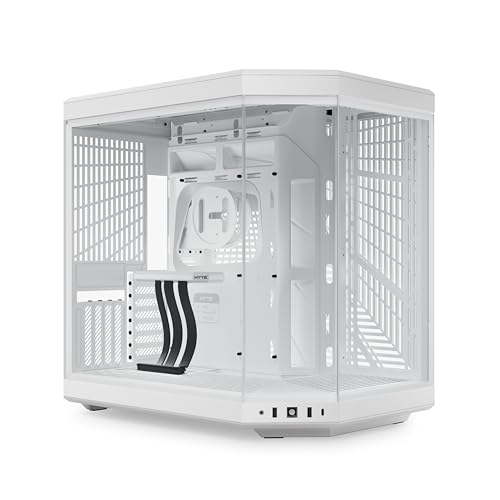
Hyte Y70 Modern Aesthetic Gaming PC Case

Lian Li V100 ATX Mid-Tower PC Case Black V100RX

Lian Li O11 Vision Compact ATX Mid Tower Case Black O11VPX

CORSAIR 3500X RS ARGB Panoramic Mid-Tower PC Case

Lian Li O11 Vision Compact ATX Mid Tower Case White O11VPW

Geometric Future M5 Tempered Glass Mid Tower GEO-M5F-BY
More Details On Our Top Picks
The 3500X keeps the focus on the glass panels, so your parts stay visible without a lot of visual clutter. The reverse-connection motherboard support matters for cleaner cable runs, especially in a desk build where the back side gets looked at just as much as the front.
The catch is that fans are not included, so you need to plan cooling from the start instead of treating the case as a ready-to-run package. That makes it a sensible fit for builders who already know their airflow plan, while beginners may prefer a model that arrives with more hardware in the box.
Strong Points
- Panoramic tempered glass gives the build an open, display-first look.
- Reverse-connection motherboard support helps keep the cable side tidier.
- Mid-tower ATX sizing keeps it manageable for most desk setups.
- It suits showpiece builds that still need everyday practicality.
Points To Note
- No included fans means you have to budget cooling separately.
- Glass panels need a bit more care during cleaning and handling.
Feature Snapshot
Who It Suits Best
You’re a good match for this case if you want a clean-looking ATX build and already have a cooling plan in mind.
Look Elsewhere When
MONTECH XR is the easier fit for you if you want fans included from the start and prefer a more complete airflow package.
The XR feels like the practical middle ground in this group, because you get three ARGB PWM fans right away and a case that still keeps the glass-heavy look. PWM means the fans can adjust speed more intelligently, which helps when your PC swings between idle browsing and longer gaming sessions.
Its support list is broad enough for many high-end parts, including a 420mm GPU length and a 360mm radiator, so the case works well for hotter builds that need room to breathe. Magnetic dust filters also make routine upkeep less annoying, although the glass and fan layout still ask for regular cleaning.
Upsides
- Three included ARGB PWM fans give you a strong starting point.
- 420mm graphics card support suits larger modern GPUs.
- 360mm radiator support helps with liquid cooling plans.
- Up to nine fans offers room to grow later.
- Magnetic dust filters make maintenance simpler.
Minor Gripes
- All that glass and fan hardware can make cable planning matter more.
- The lighting-focused design may feel busy in a very restrained office setup.
Core Details
Who Will Love This
You’ll appreciate this case most if you want a glass-heavy chassis that still arrives ready for airflow out of the box.
A Better Fit Elsewhere
CORSAIR 3500X RS ARGB suits you better if you want a similar panoramic style but with a more spacious interior and GPU anti-sag support.
The Y70 is built for a clean, display-minded system, and its dual-chamber layout helps separate the main hardware from the cable side. Dual chamber means the interior is split into two zones, which usually makes the visible side look tidier and leaves more room to plan your build like a showroom piece.
That approach suits enthusiast builds, especially where cable management and presentation matter just as much as raw hardware fit. The included PCIe 4.0 riser cable is a meaningful bonus for vertical graphics card setups, though the whole concept leans more toward style-conscious builders than plain utility seekers.
Best Bits
- Dual-chamber layout helps hide cables and clutter.
- Panoramic glass gives the system a very open view.
- Included PCIe 4.0 riser cable adds useful setup value.
- Ten-fan capacity leaves plenty of cooling room.
- High-airflow design suits warm gaming hardware.
Softer Spots
- The presentation-first design asks for a careful build plan.
- It makes the most sense for users who enjoy cable routing work.
Technical Sheet
Best Suited To
You’re the right match for this case if you want a showpiece build and enjoy the process of making every cable disappear.
Another Choice May Suit
Lian Li O11 Vision Compact fits you better if you want a similar clean aesthetic but prefer a slightly more compact back-connect layout.
The V100 is the most presentation-heavy option in this group, thanks to four pre-installed 120mm ARGB PWM fans, an LED strip, and a display platform. It’s the kind of case that helps a build look finished right away, which matters when you want visual impact without spending your first evening on fan shopping.
The trade-off is that this much built-in flair can leave less room for a minimalist look. Still, for a gaming setup on a desk or shelf, the mix of tempered glass and pre-installed lighting usually feels straightforward and practical, especially for someone who wants less assembly work.
Bright Spots
- Four included ARGB PWM fans reduce extra setup.
- LED strip adds a clear accent line.
- Display platform gives you a place for a small showcase item.
- Tempered glass helps the lighting look more open.
Room For Improvement
- The built-in lighting focus may feel busy for understated builds.
- Glass and lighting surfaces call for regular dusting.
At A Glance
Whose Shelf It Belongs On
This suits you best if you want a visually complete ATX case with fans already in place.
Swap It Out When
Geometric Future M5 is the better route if you want a sturdier shell and a more hardware-forward setup with broader radiator support.
The O11 Vision Compact is all about a neat interior, and the back-connect support helps push cables out of sight so the glass side can stay uncluttered. Back-connect boards move many cable links to the rear of the motherboard, which can make a clean build feel much easier to finish.
Because this is the compact version, it’s a smart fit for tighter desk spaces that still need a premium-looking chassis. The steel frame should also suit people who want a firmer feel than lighter show cases, though the cleaner design leaves less room for sloppy planning.
What We Like
- Back-connect support simplifies a tidy-looking build.
- Tempered glass keeps the visual side open.
- Steel construction adds a more solid feel.
- Compact size works better on crowded desks.
Small Caveats
- Compact layout can ask for more careful part selection.
- Back-connect builds need compatible motherboard planning.
Details At A Glance
The Right Fit
This is for you if you want a compact glass case and are using compatible back-connect hardware.
Where A Sibling Pick Shines
Hyte Y70 suits you better if you want a larger dual-chamber layout and more room for an elaborate display build.
This version of the 3500X leans harder into airflow than the fan-less model earlier in the list, and the three pre-installed RS ARGB fans give it a more ready-to-build feel. The spacious interior also matters in real use, because extra room makes cable routing and larger component placement less cramped.
GPU anti-sag support is the quiet practical detail here, especially for a heavier graphics card that you plan to keep installed for years. It still shares the same panoramic visual style as the other Corsair case, but this one makes more sense for people who want the case to do more of the work straight away.
Reasons To Buy
- Three included fans shorten the setup list.
- High airflow design suits warmer gaming hardware.
- Spacious interior helps with larger components.
- GPU anti-sag support addresses a common heavy-card concern.
- Reverse-connection motherboard compatibility supports cleaner cabling.
Areas To Watch
- The wide-open interior rewards careful cable planning.
- The glass-forward look still needs regular dusting.
Core Details
Built With In Mind
You should look at this case if you want a glass showcase that also handles bigger gaming hardware with less fuss.
Reach For A Different Pick When
MONTECH XR is a better fit if you want more fan flexibility and a package that feels simpler for airflow tuning.
The white O11 Vision Compact keeps the same back-connect idea as the black version, but the lighter finish changes the whole feel of a room. In a bright office or a light-toned gaming setup, it can make the glass panels look cleaner without needing much visual noise around them.
The trade-off is the same as with its black sibling, because compatible motherboard planning still matters. That makes it a strong fit for people who know the exact board and cable path they want, while casual upgraders may prefer a more forgiving chassis.
Positives
- White finish gives the build a brighter presence.
- Back-connect support helps reduce visible cable clutter.
- Tempered glass works well with light-themed parts.
- Compact footprint suits smaller workstations.
Trade Offs
- Back-connect compatibility narrows motherboard choices.
- White surfaces can show dust sooner in some rooms.
Feature Rundown
Made For
This is a smart fit for you if you want a white glass case and already know you’re building around compatible back-connect hardware.
Where A Sibling Pick Shines
Lian Li V100 is the better route if you want more included fans and a more animated lighting setup right out of the box.
The M5 reads like the most hardware-first case in the list, starting with 1.2mm steel and support for both E-ATX and ATX boards. That thicker steel is the kind of detail that usually matters in a full build, because it tends to feel more substantial once you’re handling a large system with multiple parts to install.
Toolless panels make routine access simpler, and the five included 140mm ARGB PWM fans give it a serious cooling head start. Type-C on the front is useful for modern accessories, while the 420mm and 360mm radiator support make it a strong match for larger cooling plans, especially in bigger gaming setups.
Highlights
- 1.2mm steel gives the case a more solid feel.
- Five included 140mm ARGB PWM fans provide a strong airflow base.
- Toolless panels make access quicker for maintenance.
- Type-C support adds a useful front-panel connection.
- Large radiator support suits demanding cooling setups.
Worth Noting
- The feature set makes the case better suited to involved builds.
- The black and yellow look is more assertive than neutral.
Spec Overview
Who Should Grab It
You’re the right fit for this case if you’re building a larger system and want solid-feeling materials plus plenty of cooling room.
Not Your Match When
Lian Li O11 Vision Compact is the better choice if you want a more restrained footprint and a cleaner visual style for a smaller desk area.
How To Choose The Right Glass Pc Cases
Start With Your Motherboard And Cable Plan
The first thing to check is whether your board layout actually matches the case style you want. Reverse-connection and back-connect support can clean up the visible side, but they only help when your motherboard is built for that arrangement. That makes the choice easier for people who already know their platform, and a little trickier for anyone still swapping parts around.
Cable planning matters even more in glass-heavy cases because the interior stays on display. A tidy result usually comes from matching the board, power supply, and case routing paths before you start filling the chassis with parts. The cleanest builds in this group are the ones that treat the back side as part of the design, not an afterthought.
Match The Cooling Package To Your Parts
Glass panels look best when the system stays cool enough to avoid cluttered add-ons later. Cases like MONTECH XR and the CORSAIR 3500X RS already include fans, which helps you get started faster and gives you a clearer sense of the airflow path. In warmer gaming setups, that can save you from piecing together cooling one fan at a time.
Radiator support matters too, especially for liquid cooling plans. A 360mm or 420mm support figure tells you the case can fit larger cooling hardware, but only useful dimensions on the product page count. That detail matters more than the lighting trim when your graphics card runs hot during long sessions.
Think About Size, Access, And Maintenance
Compact cases fit better on smaller desks, while larger mid-towers give you more room for routing and upgrades. A design like the Hyte Y70 or Geometric Future M5 can feel more comfortable during assembly because the interior has room to breathe, while the Lian Li O11 Vision Compact is a better fit for tighter spaces.
Maintenance should stay simple, because glass and lighting surfaces tend to collect dust where you can see it most. Magnetic dust filters, toolless panels, and front Type-C ports all help in daily ownership, even though they sound minor on paper. The honest read is that the easiest case to live with is often the one that makes cleaning and access less of a chore.
Things Worth Knowing First
Common Shopping Slip Ups
Many people focus on the glass and ignore the fan count, motherboard layout, or radiator space. That usually leads to a pretty shell with awkward airflow or a board fit that demands more compromise than expected.
Another miss is assuming every panoramic case works the same way. A back-connect case, a dual-chamber case, and a standard mid-tower all solve different problems, so the shape of your parts list should guide the shell you choose.
When Paying More Pays Off
Higher-tier models usually cost more because you’re paying for thicker steel, more pre-installed fans, cleaner cable-routing support, or more complex internal layouts. Those additions matter most when your build includes a large graphics card, a liquid cooler, or a display-focused setup that needs polish on both sides.
The upgrade makes sense when you want the case to save time and reduce compromise. A simpler shell works fine for a basic build, but a more refined model earns its place when the PC sits in plain view and you care about the final finish.
Frequently Asked Questions
Are glass PC cases harder to keep clean?
They usually need more regular dusting than plain steel cases because smudges and dust show sooner on glass. Magnetic filters and easy panel access help make upkeep less annoying.
Do I need included fans?
Included fans are useful when you want a faster setup and a clearer starting airflow plan. A case without fans can still work well, but you have to budget for cooling separately.
What does back-connect support do?
Back-connect support moves more cabling behind the motherboard area for a cleaner visible side. It works best with compatible boards, so part matching matters.
Is a dual-chamber case worth it?
It’s a strong fit for display builds because it separates the main components from the cable side. The layout also gives you more room to make the finished system look tidy.
Should a compact glass case be avoided?
No, compact can be the right call for smaller desks or tighter rooms. The trade-off is less room for large parts, so part sizing matters more.
Final Verdict
The right glass case depends on how much of the build you want to see, how much cooling you need, and how tidy you want the cable side to look. CORSAIR and Lian Li cover the cleaner, more polished end of the range, while MONTECH and Geometric Future lean harder into ready-made cooling support. For a showpiece desk system, the Hyte Y70 stands out on layout alone. For a practical build that still looks sharp, the MONTECH XR is easy to live with and easier to plan around.
