
You’re probably here because a heavy graphics card, a vertical install, or a server-style case is getting in the way of a tidy build. The right GPU rack mount can steady the card, improve clearance, and make the whole setup easier to live with day after day.
Some options focus on vertical display, others on sag support, open-air cooling, or rackmount storage density. You’ll see the differences quickly here, along with the trade-offs that matter in a home tower, a workstation, or a cramped equipment rack.
Quick Look At The Shortlist

NZXT Vertical GPU Mounting Kit AB-RH175-B1

acer GPU Support Bracket GPU Stand 70-120mm

EZDIY-FAB Vertical PCIe 4.0 GPU Mount Bracket
EZDIY-FAB Shield ARGB Vertical GPU Mount Black
EZDIY-FAB Shield ARGB Vertical GPU Mount White

6 GPU Aluminum Mining Rig Open Air Frame Case
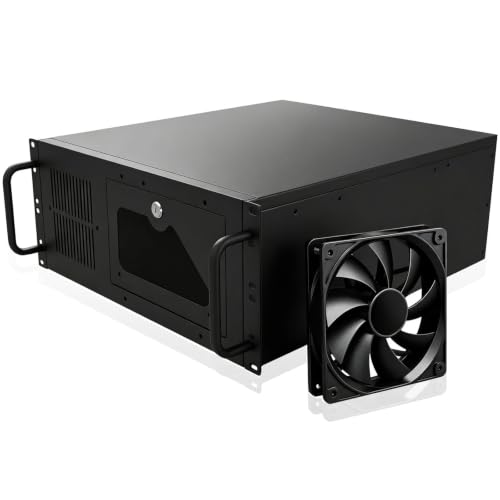
4U Server Chassis Rack Mount ATX Pc case

Rackchoice 4U Rackmount Server Chassis 8×3.5
More Details On Our Top Picks
Vertical GPU setups usually live or die on fit, and this NZXT kit keeps the focus on a steel bracket plus a 175 mm PCIe 4.0 x16 riser cable. PCIe 4.0 means the card connects through a high-bandwidth extension cable, which matters more than the pretty angle when you want a cleaner tower without giving up modern compatibility.
Compared with the simpler stand-style acer pick, this one is aimed at a full vertical presentation, so it suits showcase cases and tidy desk builds. The trade-off is obvious, you need the right chassis layout and enough interior room, but that’s the point for anyone who wants the graphics card to sit like part of the design instead of an afterthought.
Strong Points
- Steel construction gives the mount a firmer, less flex-prone feel in a vertical layout.
- The 175 mm riser cable keeps the card connected without forcing a cramped bend path.
- PCIe 4.0 x16 support fits modern graphics cards and current desktop platforms.
- It suits showcase builds where the GPU should sit upright and visible.
Points To Note
- You need a case that actually supports vertical mounting, so compatibility deserves a quick check.
- Cleaning around the bracket and cable path takes a little more care than a flat internal mount.
- In tighter cases, cable routing can feel less forgiving than a simple brace.
Feature Snapshot
Who It Suits Best
You’re the right match for this mount if you’re building a clean-looking tower and you know your case layout already supports a vertical card.
Where A Sibling Pick Shines
The acer GPU Support Bracket GPU Stand 70-120mm suits you better when you want simple sag support inside a standard case rather than a full vertical showcase.
This is the plainspoken option in the group, a stand that props up a sagging graphics card without changing the whole look of the case. The magnetic, non-slip base and the adjustable 70 to 120 mm range make it easy to understand, and that matters in a busy desktop where you want less fuss, not more.
Compared with the NZXT vertical kit, this one is for support rather than display, so it’s the sensible path for most standard towers. You may find the tool-free setup especially helpful during a quick upgrade, though the honest read is that it’s still a small part you’ll want to position carefully so it sits neatly under the card.
Upsides
- Adjustable height covers a useful 70 to 120 mm span.
- Tool-free setup keeps installation simple for quick case work.
- The magnetic base helps it stay planted in place.
- It offers a straightforward way to reduce visible GPU sag in a standard tower.
Small Caveats
- The support style is more subtle than a full vertical mount, so it won’t change the case look much.
- Positioning matters, since the stand needs to sit well under the card’s weight point.
- Dusting around a small brace can take a little attention during routine case cleaning.
Core Details
Made For
You’ll get the most from this stand if you want an uncomplicated fix for GPU sag inside a typical desktop case.
A Better Fit Elsewhere
The EZDIY-FAB Shield ARGB Vertical GPU Mount Black suits you better when the goal is a more dramatic upright presentation, especially in a case with enough room for vertical hardware.
ARGB lighting, a vertical bracket, and a 17 cm PCIe 4.0 x16 riser cable give this EZDIY-FAB kit a more styled feel than the NZXT model. ARGB means addressable RGB lighting, so the module can show controlled effects instead of a single fixed glow, which makes sense for a case that’s already leaning into visual flair.
The 90-degree right-angle cable connector helps the layout stay tidy, especially in mid-tower builds where cable bends can get awkward fast. It’s a stronger fit for someone who wants the GPU to look intentional, though the extra lighting hardware does mean you’re signing up for a bit more setup than the acer brace.
Positives
- The 5V 3-pin ARGB module adds visible styling for themed builds.
- PCIe 4.0 support keeps the connection path current for modern cards.
- The 17 cm cable gives you a clear length reference for planning.
- The right-angle connector can help the cable route more cleanly inside tighter interiors.
- It suits builds where the GPU should be seen, not hidden.
Worth Noting
- Lighting adds another layer of setup, so this is less barebones than a plain support stand.
- Vertical mounting still depends on case compatibility, so space planning matters.
- Some users will prefer a cleaner non-lit look for workstations or office desks.
Technical Sheet
Who Should Grab It
You’re the right match here if you want a vertical GPU mount with lighting built in and you’re putting together a case that already favors visual detail.
Skip It When
The acer GPU Support Bracket GPU Stand 70-120mm makes more sense for a simple workstation where you only want sag support and not extra lighting or a vertical layout.
This EZDIY-FAB version leans harder into structure, with a dual-lock setup, a 115 mm PCIe 4.0 riser cable, and 7 full-open slots. Full-open slots leave the rear area less boxed in, which can help airflow feel less cramped around a vertical graphics card, especially in cases that already run warm.
Compared with the earlier EZDIY-FAB vertical mount, the Shield version feels more purpose-built for heavier cards and tighter retention. The catch is that more structure usually means more attention during installation, but that trade-off makes sense for a build where the GPU is a major visual and physical load.
Highlights
- The dual-lock structure adds confidence for heavier vertical graphics cards.
- Seven open slots leave more breathing room around the rear of the card.
- The 115 mm cable gives a compact-length option for many tower layouts.
- ARGB sync support suits coordinated lighting builds.
- It feels tailored to showcase cases that still need strong retention.
Areas To Watch
- The extra structure may take longer to position than a bare support stand.
- Case fit still matters, so the slot layout should match your chassis.
- Keeping the open slots clear of dust will take routine case care.
Details At A Glance
The Right Fit
You’ll like this most in a heavier vertical build where retention, spacing, and a neater internal look all matter together.
Where A Sibling Pick Shines
The acer GPU Support Bracket GPU Stand 70-120mm suits a simpler desktop upgrade better when you only need a low-profile brace and not a full vertical kit.
Same Shield layout, different finish, and that matters more than it sounds in a bright or white-themed build. The white color lets the vertical mount blend in with light cases instead of standing out like a dark bracket would, so the GPU can keep the visual focus.
It carries the same 115 mm PCIe 4.0 riser cable and dual-lock structure as the black version, so your choice here leans heavily on styling and case color. That makes it a natural fit for a neat room setup or a display rig, though the white finish may ask for a little more attention during cleaning to keep dust from showing.
Reasons To Buy
- The white finish fits clean, light-colored systems very naturally.
- Dual-lock support helps the GPU sit with a firmer feel.
- The 115 mm PCIe 4.0 cable keeps the layout compact.
- ARGB sync support fits coordinated build themes.
Honest Caveats
- The styling advantage depends on a white or light case, so color matching matters.
- It still needs the same vertical-mount compatibility as the black version.
- White hardware can show dust sooner, so routine cleaning helps it stay neat.
Quick Facts
Best Suited To
You’re the right match for this one if your build theme runs light, clean, and visually coordinated from case to graphics card.
Look Elsewhere When
The NZXT Vertical GPU Mounting Kit AB-RH175-B1 is the better fit for a darker build that puts the emphasis on steel hardware and a more understated look.
This open-air aluminum frame shifts the category from a single GPU mount to a more industrial rig layout. Aluminum alloy profiles should feel more rigid than a light bracket, and the adjustable holders make the frame more adaptable when your card sizes vary across builds or upgrades.
Compared with the vertical kits above, this is for people who care about spacing, airflow, and multiple cards rather than a polished desk-side appearance. The included motherboard power switch and support for up to 2 PSU units are practical touches, though you’ll want to think about dust exposure and cable management because open frames ask for more upkeep.
Plus Points
- Aluminum alloy profiles give the frame a sturdy, practical feel.
- Adjustable holders help the case work with different card sizes.
- Open-air spacing can make multi-card layouts easier to cool.
- The motherboard power switch saves some awkward manual startup steps.
- Support for up to 2 PSU units suits more demanding rig setups.
Room For Improvement
- The open frame design leaves components more exposed to dust and room clutter.
- It’s not built for a sleek living-room look, so appearance is more utilitarian.
- Assembly and cable routing usually take more attention than a closed case.
Feature Rundown
Whose Shelf It Belongs On
You’ll get the most value from this frame if you’re building a multi-card setup and want a straightforward open-air structure instead of a conventional desktop tower.
Another Choice May Suit
The Rackchoice 4U Rackmount Server Chassis 8×3.5 is a better fit when you want the cards inside a rack-style enclosure alongside a larger storage plan.
This 4U chassis moves you into rackmount territory, so it makes sense for a workshop, lab shelf, or equipment rack where front-panel access matters. The 7 bays for 3.5-inch drives, 1 included 120 mm fan, and front lock with key point to a case that’s built around access and storage rather than sleek desktop styling.
Compared with the open-air BaselTek frame, this gives you a more enclosed setup and a better fit for organized rack environments. The trade-off is that the layout is more fixed, so you’ll want to think through airflow, drive placement, and cable paths before loading it up with hardware.
Best Bits
- The 4U rack format suits structured spaces and equipment shelves.
- Seven 3.5-inch drive bays support storage-heavy builds.
- The 120 mm fan adds baseline airflow for a loaded chassis.
- ATX, MATX, and ITX support gives useful platform flexibility.
- The front lock and key add a practical touch for shared spaces.
Minor Gripes
- The chassis is more about function than a polished desktop look.
- Storage density can make internal airflow planning more important.
- The fixed rack format asks for more advance measuring than a simple tower case.
Spec Overview
Built With In Mind
You’ll like this most if your system lives in a rack, a bench setup, or a space where storage and access matter more than a compact footprint.
Where A Sibling Pick Shines
The 6 GPU Aluminum Mining Rig Open Air Frame Case suits multi-card experimenters better when open access and cooling matter more than a closed rack enclosure.
Rackchoice pushes storage density harder than the GPERHUAN chassis, and that’s the main reason it earns a place here. The drive bay layout gives you multiple configuration paths, so you can lean toward 8 x 3.5-inch drives or split the space between 3.5-inch and 2.5-inch storage depending on how your build grows.
That flexibility is a strong match for home servers and archive systems, especially in a rack where you want drive count to matter as much as motherboard support. The compromise is predictable, more storage capability usually means more attention to airflow and cable organization, but for a dense machine that’s a fair trade.
Standout Traits
- The drive bay layout gives you several storage configurations to work with.
- Support for EATX, ATX, MATX, and Mini-ITX widens platform options.
- It suits storage-first builds where the case needs to carry a lot of drives.
- The rackmount format keeps everything in a structured enclosure.
Areas To Watch
- Dense storage layouts usually need more careful airflow planning.
- More drives also mean more cabling to keep organized.
- The enclosure is built for utility, so style takes a back seat.
Core Details
Perfect Match For
You’re the right fit for this chassis if your priority is a rack-based machine with lots of drive room and flexible storage planning.
Reach For A Different Pick When
The NZXT Vertical GPU Mounting Kit AB-RH175-B1 is the better choice for a showcase desktop where the graphics card itself should be the visual feature.
How To Choose The Right Gpu Rack Mounts
Match The Mount To The Case
Vertical brackets, sag stands, open-air frames, and rackmount chassis solve different problems. A vertical kit like the NZXT or EZDIY-FAB options needs chassis clearance and the right slot layout, while a support stand such as the acer bracket works inside a normal tower with far less drama.
Start with the case you already own or plan to buy. That simple check saves you from chasing a mount that looks right on paper but has nowhere sensible to sit.
Think About Card Weight And Layout
Heavier graphics cards benefit from firmer retention, stronger structure, and a support path that doesn’t rely on the PCIe slot alone. A dual-lock mount or a steel bracket gives more confidence than a minimal brace, especially in a system that gets moved often.
Open-air rigs and rackmount cases change the equation again, because spacing, airflow, and cable routing matter as much as the card position. That’s where the big BaselTek and Rackchoice styles make more sense than a decorative upright mount.
Decide Whether Appearance Or Simplicity Comes First
Some setups need to look polished on a desk, and others just need the card to sit safely and stay cool. ARGB mounts, like the EZDIY-FAB vertical options, work well in themed builds, but they add wiring and another part to manage.
Sag support brackets are quieter in both visual and practical terms. They’re usually the better fit for a work PC, a family tower, or any machine where you want the hardware to disappear into the background.
Plan For Ownership, Not Just Installation
Cleaning access, dust buildup, and cable strain are easy to ignore at first, then they become the annoying part later. A closed case with simple support is easier to maintain, while an open frame or rack enclosure asks for more regular attention.
That’s the long-term trade-off in this category. Pay for the layout that matches how you live with the machine, not only how it looks on day one.
What To Weigh Before You Click On A Mount
Common Shopping Slip Ups
Many people focus on the GPU itself and forget the case geometry. That leads to mounts that are too tall, too wide, or simply shaped for a different interior.
Another common miss is ignoring cable length. A 115 mm or 175 mm riser sounds straightforward until your case layout forces a sharp bend or an awkward route.
Where The Extra Money Goes
Higher-tier mounts usually spend more on structure, fit, and cable quality. You see that in dual-lock mechanisms, steel brackets, better slot layouts, and more deliberate cable routing pieces.
The upgrade pays off in heavier systems, showcase builds, or racks that stay in service for a long time. For a casual desktop, a simpler support stand can be enough.
Frequently Asked Questions
What’s The Difference Between A Vertical Mount And A Support Stand?
A vertical mount repositions the graphics card so it faces outward, which changes the look and usually needs case compatibility. A support stand only props the card up from below, so it’s easier to fit in a normal tower.
Do PCIe 4.0 Risers Matter?
PCIe 4.0 risers matter because they keep the connection path aligned with current graphics card and motherboard standards. They’re especially relevant in builds where you want a vertical layout without downgrading the link quality on paper.
Are Open-Air Frames Good For Everyday Desktops?
Open-air frames are better for test benches, mining-style systems, or multi-card setups than for a tidy office desk. They ask for more dust care and cable discipline than a closed case.
Which Option Is Easiest To Install?
The acer GPU Support Bracket GPU Stand 70-120mm is the simplest style here because it uses a tool-free, low-drama support approach. Vertical kits and rackmount cases need more planning around fit and routing.
What Should You Check Before Ordering?
Check case clearance, PCIe slot layout, GPU weight, and cable length. Those four points decide whether the mount feels natural or turns into a frustrating fit problem.
Final Thoughts
You’ve got a wide spread here because “GPU rack mount” can mean a support brace, a vertical display kit, an open-air frame, or a full rackmount chassis. The right pick is the one that matches your case, your card size, and how tidy you want the build to feel after the cables are tucked away. For simple sag support, the acer stand is easy to live with. For a cleaner showcase or a denser rack, the NZXT, EZDIY-FAB, BaselTek, and Rackchoice options each solve a different problem without pretending to do everything.
