
A heavy graphics card can pull on a PCIe slot like a backpack hanging off one shoulder, and that strain shows up fastest in cases with long cards or a slightly soft layout. These Gpu Support Brackets are for you if you want steadier alignment, cleaner case lines, and a little less worry each time you move the tower. Some are simple posts, some add magnets or anti-slip pads, and one even brings lighting into the mix. The right choice depends on your case space, your card length, and how much adjustability you want.
Quick Look At the Shortlist
EZDIY-FAB 309EZ GPU Holder Brace Black

Uyubao GPU Support Bracket L 74-120mm

California JOS GPU Support Bracket Black Large
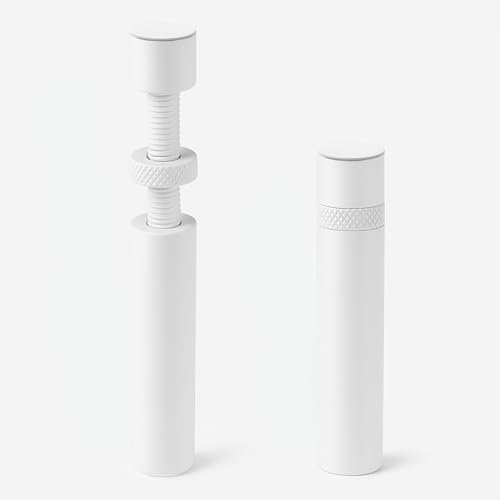
California JOS GPU Support Bracket White Large

Uyubao GPU Support Bracket for Fan Mounting

acer GPU Support Bracket L 70-120mm

acer GPU Support Bracket S 25-50mm

EZDIY-FAB 309EZ ARGB GPU Holder Brace White
More Details On Our Top Picks
EZDIY-FAB takes a more structural route than the slimmer post-style picks, with a bent support shape, aluminum alloy body, and dual rubber pads that help spread contact more evenly. That kind of setup suits you well in a gaming tower with a long card, especially when the card sits close to the PCIe slot and needs steadier support without cluttering the interior.
The trade-off is that the longer design can feel a little more prominent in compact cases, so you’ll want enough open space around the card and front fans. For most builds with a visible graphics card and a little room to spare, this is the kind of brace that feels quietly sensible rather than flashy.
Strong Points
- Lengthened frame gives broader under-card reach.
- Aluminum alloy construction feels more rigid than basic plastic-style supports.
- Dual rubber pads help soften contact against the card.
- Good fit for towers that see frequent moves or upgrades.
Areas To Watch
- The longer body can look busy in smaller cases.
- You’ll want to check clearance around front fans and cables.
- The black finish is subtle, which is nice, but not decorative.
Feature Rundown
Who It Suits Best
You’ll appreciate this most in a standard mid-tower or full-tower setup where the graphics card is long and you want a sturdier under-support than a tiny post can offer.
Where A Sibling Pick Shines
Uyubao GPU Support Bracket L 74-120mm suits you better when the case interior is tighter and a smaller magnetic footprint matters more than a longer brace.
This Uyubao bracket is built for a cleaner, simpler install style, with a magnet and a non-slip sheet doing the anchoring work. That mix makes sense in a case where you want support under the card without adding much visual bulk, and the 74 to 120 mm range gives you room to match different internal heights.
Compared with EZDIY-FAB’s longer bent brace, this one feels more about staying out of the way. The honest read is that it suits tidy builds and daily gaming PCs, though you’ll want to confirm the base can sit flat in your case layout before you commit to it.
What We Like
- Magnetic base helps placement feel straightforward.
- Non-slip sheet adds grip under the support point.
- Height range covers a useful stretch of case layouts.
- Low-visual design keeps the interior looking uncluttered.
- Good match for small-to-medium towers.
Points To Note
- The simpler form leaves less visual character than RGB-style options.
- Magnetic attachment depends on a suitable case surface.
- You’ll still need to measure the height span carefully.
Core Details
Built With In Mind
You’ll get the most from this in a case that already has neat cable routing and enough flat area for the base to sit securely.
Another Choice May Suit
EZDIY-FAB 309EZ ARGB GPU Holder Brace White is the better match for showcase builds where lighting matters as much as support.
California JOS leans into a straightforward adjustable-stand format, and the large pack of two changes the equation for anyone building with more than one tower or wanting a spare on hand. That setup can be handy in a home office or a gaming room where one card sits in a taller case and another machine needs a simple brace.
Compared with Uyubao’s magnetic base, this one feels more like a basic hardware solution and less like a placement trick. In most cases, that’s enough, though you’ll want to be comfortable with a simpler look and with buying into the larger size rather than a compact footprint.
Upsides
- Pack of two gives you more flexibility across builds.
- Height-adjustable format suits a broad range of card positions.
- Black finish keeps the brace visually quiet in darker cases.
- Useful for someone setting up multiple PCs.
Minor Gripes
- The larger format may feel unnecessary in a very small case.
- Pack size can be more than you need for a single build.
- Simple styling focuses on function over interior flair.
Feature Snapshot
Right Fit For
You’ll like this most if you run more than one PC or want a spare brace ready for another tower.
Swap It Out When
Uyubao GPU Support Bracket L 74-120mm is the better fit for a single, compact build where a magnetic base matters more than getting two supports.
This white version keeps the same basic large adjustable formula as the black California JOS model, but the finish shifts the whole feel toward cleaner case themes. That matters in white builds, pastel setups, or glass-panel towers where darker hardware tends to stand out more than you want.
It shares the same practical trade-off too, because a larger brace can feel like more hardware than a tiny card really needs. You may find the white finish especially useful in a showcase PC, though it asks for a little care during installation so the visual line stays neat.
Bright Spots
- White finish blends well with light-colored builds.
- Adjustable height keeps setup flexible.
- Pack of two adds value across multiple systems.
- Works well in cases with clear side panels.
Small Caveats
- White hardware can show dust more easily.
- Larger size may be more than some compact cases need.
- The look is best suited to themed interiors.
Details At A Glance
Whose Shelf It Belongs On
You’ll get the best fit here in a white or glass-sided PC where visual matching matters as much as support.
Reach For A Different Pick When
EZDIY-FAB 309EZ GPU Holder Brace Black makes more sense for darker builds that want the same sort of support in a less reflective finish.
This Uyubao model stands apart because it mounts through the fan area instead of sitting as a plain floor brace. That approach helps preserve airflow paths and can suit an all-view case where you want the interior to stay tidy while the card gets support from below.
Compared with the magnetic Uyubao brace, this one asks a bit more from the install but gives you a cleaner layout around the fan outlet. For showpiece systems with RGB hardware, that balance can be very attractive, though it’s less convenient than a simple drop-in stand.
Reasons To Buy
- Fan-mount style keeps the support path integrated into the case.
- Helps avoid blocking the fan outlet.
- Works well for a tidy, open-looking interior.
- Anti-slip pad adds a steadier contact point.
Areas To Watch
- Installation is more involved than a plain base stand.
- Fan-mount compatibility matters a lot here.
- The style suits build planning more than quick swaps.
Technical Sheet
Perfect Match For
You’ll get the most out of this in a showcase build where airflow, neat routing, and visual order all matter.
Look Elsewhere When
acer GPU Support Bracket S 25-50mm suits a smaller case better, especially when you need a simpler compact stand.
The larger acer version is the broad-range option in this group, with a 70 to 120 mm span and a magnet plus non-slip base. That combination fits a lot of standard cases, especially where you want a tool-free brace that settles in without fuss.
Compared with the fan-mounted Uyubao, this one is easier to place and easier to remove. The honest read is that it’s a very sensible everyday support choice for full-size systems, though the larger size can feel unnecessary in shorter cases.
Positives
- Wide height span helps with varied case clearance.
- Magnet and non-slip base support easier placement.
- Tool-free setup keeps the install simple.
- Good match for standard tower interiors.
Trade Offs
- Larger format may crowd a tighter build.
- Magnetic placement still depends on case surface fit.
- Broad range is useful, but not always necessary for short cards.
Quick Facts
Who Should Grab It
You’ll like this best in a full-size gaming tower or a work PC with a long card and decent clearance underneath.
A Better Fit Elsewhere
EZDIY-FAB 309EZ GPU Holder Brace Black is the stronger choice when you want a more structural brace for a longer graphics card.
Shorter cases need a different kind of support, and this small acer version is built for those tighter clearances. The 25 to 50 mm range makes it the most space-conscious pick here, and the magnetic, non-slip base keeps the format simple.
That smaller size is the point, but it also means you need to know your spacing before you start. In a compact office PC or a modest gaming build, it feels tidy and practical, while the larger acer model makes more sense for deeper towers.
Best Bits
- Small size suits tighter internal spaces.
- Magnetic, non-slip base helps keep placement stable.
- Tool-free format avoids extra hardware steps.
- Good choice for shorter support spans.
Softer Spots
- Narrower range limits use in larger cases.
- Space planning matters more than with the larger version.
- Best suited to compact layouts, not oversized interiors.
Feature Card
The Right Fit
You’ll appreciate this most in a compact case where every millimeter matters.
Where A Sibling Pick Shines
acer GPU Support Bracket L 70-120mm is the smarter pick for taller interiors and more generous tower layouts.
This is the decorative cousin in the EZDIY-FAB line, with 5V 3-pin ARGB sync giving you lighting that can tie into a compatible setup. The white finish, lengthened body, adjustable support, and PCIe slot protection make it more than just a pretty add-on, so it suits you when the case doubles as a display piece.
Compared with the black EZDIY-FAB brace, this one clearly leans toward visual styling. The trade-off is simple: you’re paying attention to color matching and lighting coordination, so it feels best in a glass-panel rig or a white build where the interior matters as much as the hardware.
Highlights
- ARGB sync lets the brace match compatible lighting setups.
- White finish blends well with light-themed cases.
- Lengthened design gives steadier under-card support.
- Aluminum alloy adds a firmer hardware feel.
- PCIe slot protection is useful in long-card builds.
Worth Noting
- Lighting focus may matter less in closed-off cases.
- Color coordination becomes part of the install decision.
- Best suited to systems that already use RGB parts.
Core Details
Made For
You’ll like this most in a white, RGB-heavy gaming rig where the brace should look like part of the build.
Where Another Pick Fits Better
EZDIY-FAB 309EZ GPU Holder Brace Black is the quieter choice for anyone who wants the same support shape without the lighting focus.
How To Choose The Right Gpu Support Brackets
Match The Support Style To Your Case
A support bracket does its best work when its shape fits the case, not just the card. Long bent braces help in roomy towers with large graphics cards, while smaller magnetic stands suit tighter interiors and simpler layouts.
Measure Clearance Before You Commit
Height range matters more than most people expect. A 25 to 50 mm model fits a very different space than a 70 to 120 mm brace, so your case floor, fan zone, and card underside all deserve a quick check.
Think About Material And Contact Points
Aluminum alloy usually gives you a firmer feel than lighter plastic-style hardware, while rubber pads and non-slip bases help cushion contact. That matters for long-term placement, especially in systems that get moved between desks, dorms, or work areas.
Choose For Looks Only After Fit
ARGB lighting and white finishes can look great in a glass-sided build, but the support still has to line up cleanly under the card. A clean-looking brace that sits wrong is less useful than a plain one that fits the space properly.
A Quick Reality Check
Common Shopping Slip Ups
Many people focus on the card and forget the case interior. The result is a brace that looks fine on paper but crowds cables, blocks a fan path, or sits too high for the space beneath the graphics card.
Another common miss is treating height range as a loose estimate. The range has to match your actual layout, especially in compact towers where just a few millimeters can change the fit.
The Upgrade Payoff
Higher-tier models usually cost more because they add material quality, broader adjustability, cleaner mounting, or lighting support. That extra spend makes sense for a showcase build, a heavy card, or a system you want to keep looking tidy over time.
For a plain office machine, a simpler brace is usually enough. For a long card in a glass-panel gaming rig, the nicer finish and better support geometry are easier to justify.
Frequently Asked Questions
Do Gpu Support Brackets Work With Every Graphics Card?
No single brace fits every card and every case. You still need to match height, clearance, and the way the bracket makes contact with the underside of the card.
Is A Magnetic Base Better Than A Floor Stand?
A magnetic base can make placement easier in a suitable case. A floor stand can feel more universal when the case surface and layout are less cooperative.
Does A Support Bracket Help With Long Cards?
Yes, that’s the main reason many people use one. It helps take some load off the slot area and keeps the card sitting more level.
Should You Pick RGB Support Or Plain Hardware?
RGB works best in a build where lighting is part of the look you want. Plain hardware makes more sense when the case should stay clean and understated.
What Size Range Should You Look For?
Choose the range that matches the space between your case floor and the card’s support point. A small case usually needs a shorter range, while a tall tower can use a wider one.
Closing Thoughts
The right Gpu Support Bracket does a simple job, but it matters more than it first appears. A good fit keeps a long card steadier, helps the case look neater, and can make a build feel more settled day to day. Your best choice depends on your case size, whether you want a magnetic base or a longer brace, and how much style you want in view. Start with fit, then let finish and extras follow.
