
Hard drive trays sound simple until a case, server, or enclosure stops lining up with the drive you already own. You want the right fit, the right mounting pattern, and a tray that won’t make routine swaps feel like a small repair job.
This roundup focuses on trays and caddies that suit desktop upgrades, Dell-based systems, Fractal cases, and CENMATE enclosures. You’ll see where a simple rail set makes sense, where an adapter tray earns its keep, and where a more exact model match saves time later.
Quick Look At Our Shortlist

Eshylala 4 Pack Black Chassis Hard Drive Mounting Rails

ORICO 2.5 SSD SATA to 3.5 Hard Drive Adapter Tray

Heretom 2 Pack Hard Drive Tray Caddy DN8MY 0DN8MY
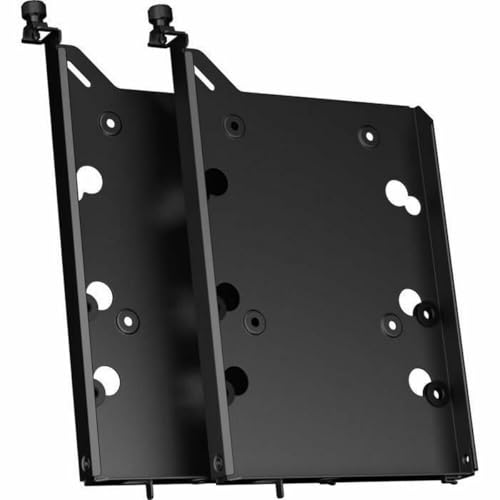
Fractal Design HDD Drive Tray Kit Type B Black Dual Pack

Heretom Pack-4 2.5 inch Hard Drive Tray Caddy 0DXD9H DXD9H

Heretom 4-Pack Hard Drive Tray Caddy X7K8W 0X7K8W

Heretom 2 Pack Hard Drive Tray Caddy KG1CH 0KG1CH

cenmate Two Trays for CENMATE Multi-Drive Hard Drive Enclosure
More Details On Our Top Picks
These plastic rails keep the focus on a plain upgrade path, not on fuss. They suit a desktop case where you want the drive held in place without adding much weight or extra metal hardware.
For a home tower or a budget build that just needs the bay filled cleanly, that simplicity helps. The trade-off is obvious, though, since plastic is less confidence-inspiring than a heavier metal caddy, so it suits careful installs more than rough handling.
Strong Points
- Light chassis-friendly build keeps the bay from feeling overbuilt.
- Black finish blends into most desktop interiors without drawing attention.
- Straightforward rail format makes basic case upgrades less fiddly.
- Useful for keeping a spare build tidy and serviceable.
Things To Consider
- Plastic construction calls for a little more care during installation.
- Best matched to cases that already expect this rail style.
- Not the pick for someone who wants a heavier enclosure feel.
Feature Snapshot
Who It Suits Best
You’ll get the most from this set in a desktop upgrade, especially around a standard tower that already uses rail-style mounting.
A Better Fit Elsewhere
ORICO 2.5 SSD SATA to 3.5 Hard Drive Adapter Tray suits mixed SSD and HDD installs better, especially for anyone converting a 2.5-inch drive into a 3.5-inch bay.
This ORICO tray makes sense in mixed-drive setups, especially where a 2.5-inch SSD needs to live in a 3.5-inch bay. It also helps that the listing supports several 2.5-inch thickness ranges, so your drive has a better shot at lining up cleanly.
Compared with the simpler Eshylala rails, this one solves a more specific adaptation problem. For a workstation, older desktop, or case with a spare 3.5-inch opening, that extra compatibility can save you a lot of awkward improvising.
Highlights
- Converts a smaller SSD format to a larger bay size.
- Works across several 2.5-inch thickness ranges for broader fit.
- Useful in systems where the drive bay layout is fixed.
- Helps a modern SSD sit neatly inside older hardware.
- Two-pack format suits dual-drive installs or a spare on hand.
Worth Noting
- Best suited to bays that already accept a 3.5-inch tray shape.
- More specific than a simple rail set, so fit checking matters.
- Owners of tightly packed cases may want to confirm clearance first.
Details At A Glance
Who Will Love This
You’ll appreciate this most in a desktop or workstation that needs a 2.5-inch SSD to behave like a standard 3.5-inch drive.
Where Another Pick Shines
Fractal Design HDD Drive Tray Kit Type B is a better fit for Define 7 and Meshify 2 case owners who want hardware tailored to those chassis.
This tray caddy is aimed at a specific Dell Precision family, and that’s the whole point. You get a match for systems like T1600, T1650, T3600, T3610, T5600, and T5610, which matters more than generic styling in this category.
For a workstation that already lives in a precision tower, a matching tray usually means fewer fit headaches during a replacement or storage refresh. The honest read is that exact model matching is a strength here, but it also narrows the audience quite a bit.
Upsides
- Model-specific fit helps keep swaps straightforward.
- Two-pack format suits a pair of drive bays or a spare.
- Works well for aging Precision towers that still have useful life left.
- Good route for replacing a missing or worn caddy.
Small Caveats
- Very specific Dell compatibility means you need to match your tower carefully.
- Less flexible than a universal adapter or rail set.
- Replacement trays for older systems can take a little part-number checking.
Core Details
Made For
You’re the right fit for this tray if your Dell Precision tower needs a direct replacement rather than a universal workaround.
Skip It When
ORICO 2.5 SSD SATA to 3.5 Hard Drive Adapter Tray makes more sense for mixed-drive setups that need format conversion instead of model-specific replacement.
Fractal’s tray kit is the cleanest fit in this lineup for owners of Define 7 and Meshify 2 cases. It ships as a dual pack and includes mounting hardware, so you’re not hunting for small parts just to finish the install.
Unlike the generic rails and adapter trays earlier in the list, this one feels built around a specific case ecosystem. That pays off in a tidier install, and the vibration-damping rubber grommets should help the drive mount feel more settled in day-to-day use.
Reasons To Buy
- Matched to Fractal Define 7 and Meshify 2 systems.
- Includes two trays, which helps with paired drive installs.
- Mounting hardware is included, reducing the parts hunt.
- Rubber grommets add a softer mounting interface.
- Black finish blends cleanly into dark interiors.
Areas To Watch
- Most useful inside the specified Fractal case families.
- Less appealing as a universal replacement outside that ecosystem.
- Careful part matching still matters before you order.
Feature Rundown
Who Should Grab It
You’ll get the most out of this tray kit inside a Define 7 or Meshify 2 build where chassis match matters more than generic compatibility.
Another Choice May Suit
Eshylala 4 Pack Black Chassis Hard Drive Mounting Rails works better for a basic desktop case upgrade that needs a simpler rail-style approach.
This Heretom set is built around Dell PowerEdge 14th generation servers, so it belongs in a very specific kind of rack or tower. That specificity can be a relief in server rooms, because a matched tray usually saves time during maintenance windows.
Compared with the more general desktop picks above, this one is less about convenience and more about platform continuity. For a small business or home lab that already runs R440, R640, R740, R740xd, R840, R940, R6415, R7415, or R7425 hardware, that focus makes practical sense.
Best Bits
- Four-pack format suits multi-bay server needs.
- Targets a broad slice of PowerEdge 14th gen models.
- Good choice for replacing several trays at once.
- Helpful for keeping a server stack consistent.
Points To Note
- Compatibility is narrow, so model checking matters.
- Less useful for general desktop builders.
- Server trays tend to reward careful part-number matching.
Technical Sheet
Best Suited To
You’re the right match for this set if your PowerEdge server needs several matching 2.5-inch trays and you want them all aligned to one family.
Look Elsewhere When
Fractal Design HDD Drive Tray Kit Type B is a better match for desktop case owners who need hardware designed for Define 7 or Meshify 2.
This tray caddy covers a wide spread of Dell PowerEdge generations, including 17th, 16th, 15th, and 14th gen systems. That broad span helps in mixed fleets, where one tray family can make life easier across several machines.
Compared with the narrower PowerEdge tray above, this one is the more flexible office or lab choice. The trade-off is that the fit still depends on your exact model, so part matching remains important even with the wider compatibility list.
What We Like
- Covers several PowerEdge generations in one tray family.
- Four-pack format helps with multi-bay refreshes.
- Useful in small server rooms with mixed hardware.
- Good way to standardize replacement parts.
- Can simplify storage planning across a fleet.
Trade Offs
- Exact server model matching still matters.
- More server-specific than desktop-friendly choices.
- Part numbers deserve a careful second look before ordering.
At A Glance
Whose Shelf It Belongs On
This belongs with you if your Dell PowerEdge setup spans more than one generation and you want a tray family that reaches across them.
Swap It Out When
Heretom Pack-4 2.5 inch Hard Drive Tray Caddy 0DXD9H DXD9H suits owners of 14th generation PowerEdge servers more closely, especially in a narrower deployment.
This tray caddy leans toward older Dell PowerEdge systems such as R430, R530, R630, R730, T430, T630, T440, R420, R520, R620, R720, T420, T620, R710, and T610. That older-generation coverage makes it useful in offices that keep a legacy server running instead of replacing the whole machine.
Relative to the newer X7K8W tray, this one is the better match for legacy hardware that still needs stable storage mounting. You may find the long compatibility list helpful, though the usual part-number checking still pays off before any replacement order.
Bright Spots
- Wide support across older PowerEdge and tower models.
- Two-pack set works well for paired bay replacement.
- Good candidate for maintenance on older office servers.
- Helps preserve a running system without replacing the chassis.
Minor Gripes
- Only makes sense for the listed Dell systems.
- Legacy compatibility asks for extra model verification.
- Less useful outside older server environments.
Spec Overview
Built With In Mind
You’re the best match for this tray if your older Dell server still has a job to do and only needs the right caddy to keep going.
Where A Sibling Pick Shines
Heretom 4-Pack Hard Drive Tray Caddy X7K8W 0X7K8W suits newer PowerEdge systems better, especially for shops moving across several later-generation servers.
This pair of trays is straightforward: it’s made for CENMATE multi-drive enclosures, and that narrow focus is exactly what some setups need. For an enclosure owner, that kind of direct fit can be a relief because it avoids guesswork around tray shape and layout.
Compared with the Dell and Fractal options above, this one is the most enclosure-specific pick in the group. It’s a neat choice for storage shelves and compact multi-drive setups, though it only makes sense inside the CENMATE ecosystem.
Plus Points
- Designed for CENMATE multi-drive enclosures.
- Two trays cover a small enclosure refresh cleanly.
- Useful for keeping a matching tray pair on hand.
- Simple fit story makes maintenance less awkward.
Room For Improvement
- Only suitable for compatible CENMATE enclosures.
- Not a flexible pick for mixed-brand storage builds.
- Very specific use case narrows the audience.
Core Details
Who Should Grab It
You’re the right fit for this set if your CENMATE enclosure needs replacement trays and you want the least complicated path.
Reach For A Different Pick When
Fractal Design HDD Drive Tray Kit Type B is the better fit for owners of Define 7 or Meshify 2 cases who need a case-specific tray kit instead.
How To Choose The Right Hard Drive Trays
Start With The Mounting Style
The first check is simple, but it saves the most trouble. A tray, rail, or adapter all serves the same broad goal, yet each one fits a different kind of bay and drive layout.
Desktop cases often use rails or generic trays, while servers usually rely on exact part numbers and connector alignment. That’s why a model like the Fractal tray kit feels easier for a matching case, while the ORICO adapter solves a format mismatch instead.
Match The Drive Size And Bay Shape
2.5-inch drives and 3.5-inch drives are not interchangeable without the right hardware. A 2.5-inch SSD adapter tray helps smaller drives occupy a larger bay, and a 3.5-inch caddy keeps a full-size drive seated correctly.
Check the thickness range on 2.5-inch trays too, because slim SSDs and thicker drives do not always sit the same way. In a busy office PC or a home tower, that detail makes the difference between a tidy install and a loose fit that keeps nagging at you later.
Think About The System Family
Brand-matched trays matter more than people expect, especially with Dell PowerEdge and workstation lines. The Heretom caddies in this roundup show how much a part number can narrow compatibility, but also how much confidence a correct match brings.
For a legacy server, the right tray keeps maintenance routine and avoids improvised mounting. For a newer chassis, a case-specific kit can be worth more than a generic option because the hardware lines up faster and looks cleaner inside the machine.
Weigh Finish, Hardware, And Maintenance
Plastic rails, black powder-style finishes, and included mounting hardware all affect day-to-day ownership. A lightweight rail may be fine for a simple desktop upgrade, while rubber grommets and included screws make a more refined tray feel easier to live with.
Cleaning stays simple in most cases, but server environments and multi-drive enclosures reward parts that can be swapped without drama. You’ll notice the value of that the first time a drive needs replacement and the tray comes out cleanly instead of fighting you.
What To Weigh Before You Choose
Common Shopping Slip Ups
The biggest mistake is assuming any tray with the right size will fit your system. Server trays, case trays, and adapter caddies all solve different problems, so model verification matters more than a quick glance at the dimensions.
Another easy miss is ignoring the bay format. A 2.5-inch SSD in a 3.5-inch slot needs an adapter-style tray, while a 3.5-inch drive in a desktop case may need rails or a case-matched caddy instead.
The Case For Spending Up
Higher-tier trays tend to cost more because they’re built around exact chassis families, include mounting hardware, or add vibration-damping touches. Those details cut down on guesswork and make the install feel less improvised.
That extra spend makes the most sense in servers, workstation towers, and branded cases where a sloppy fit would become a recurring annoyance. For a one-off desktop swap, a simpler tray often does the job without the extra complexity.
Frequently Asked Questions
What’s the difference between a tray and a rail?
A tray usually holds the drive in a cradle or frame. A rail set guides the drive into a case slot and works best in systems built for that style.
Can a 2.5-inch SSD fit a 3.5-inch bay?
Yes, but you need an adapter tray made for that conversion. The ORICO option in this roundup is the clearest example of that kind of fit.
Why do Dell tray model numbers matter so much?
Dell servers and towers often rely on exact caddy shapes and mounting points. The wrong part number can leave you with a tray that looks close but does not seat correctly.
Do these trays help with vibration?
Some do, especially models that include rubber grommets or cushioned mounting points. That matters most in quieter cases where drive noise is easier to notice.
How do you narrow the right choice fast?
Start with your case or server model, then confirm drive size and bay shape. After that, focus on whether you need a simple replacement, a format adapter, or a matching tray set.
Closing Thoughts
The right hard drive tray feels small until a drive swap, a server rebuild, or a case upgrade depends on it. For a simple desktop, Eshylala and ORICO handle the basics well, while the Fractal and Heretom trays make more sense once you move into exact case or server matching. You’ll save yourself the most trouble by matching the tray to the machine first and the drive second. That approach keeps the install clean, and it usually keeps the whole setup calmer too.
