
Huge Pc Cases make sense when your build has grown past the cramped, cable-tugging stage. You get more room for large radiators, tall graphics cards, chunky storage stacks, and cleaner cable routing, which matters a lot in a daily gaming desk setup or a media-heavy home system.
The right choice depends on what you’re packing inside, how visible you want the hardware to be, and how much maintenance you’re willing to manage. Some cases lean into airflow and fan count, while others are built for storage, showpiece styling, or easy travel between locations.
The Shortlist At A Glance

H2 (2026) HYXN ATX PC Case 8 PWM ARGB Fans
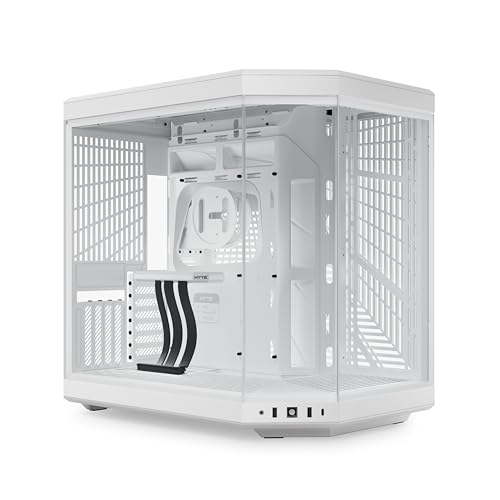
Hyte Y70 Gaming PC Case Snow White

NZXT H9 Flow Dual-Chamber ATX PC Case Black

DARKROCK Classico Storage Master ATX NAS Case

Thermaltake View 380 TG ARGB Black ATX Case

Trunab Computer Desktop Tower Carry Case

Okinos Genuine Walnut Wood PC Case Mirage 6

darkFlash Full-Tower ATX Gaming PC Case DY470
More Details On Our Top Picks
The HYXN case leans hard into airflow, with six 140 mm fans and two 120 mm fans already installed, so the out-of-box setup is aimed at builders who dislike hunting for extras. A dual-chamber mid-tower layout also gives you more separation for the main system and the cable side, which helps a busy build feel less crowded.
The 420 mm radiator support makes it a serious fit for large liquid-cooling loops, while the front Type-C 3.2 port keeps newer peripherals from feeling stranded. The trade-off is obvious, though, because a big fan layout and wide interior usually ask for more desk space and more cleanup around dust-prone areas.
Strong Points
- Eight pre-installed PWM fans reduce the need for a separate cooling plan.
- Six 140 mm units should move plenty of air for a hot gaming rig.
- Dual-chamber layout helps cables stay out of the main view.
- 420 mm radiator support opens the door to larger cooling hardware.
- Type-C 3.2 front access suits newer accessories and fast transfers.
Areas To Watch
- The chassis footprint likely asks for a generous desk or floor area.
- So many fans can mean more dusting over time.
- The black RGB styling fits gaming setups more than understated offices.
Feature Snapshot
Who It Suits Best
Gamers and high-airflow builders who want a fan-rich case with room for large cooling hardware will get the most from this one.
A Better Fit Elsewhere
The NZXT H9 Flow suits you better if you want a more polished glass-heavy showcase with a slightly calmer visual style.
Hyte’s Y70 is the kind of case you notice before you even open the side panel, and the panoramic glass makes that point clearly. The dual-chamber structure keeps the cable side from stealing attention, which matters a lot in a white-themed desk setup where every messy line shows.
The listing points to a 10-fan capacity and a luxury PCIe 4.0 riser cable, so you’re looking at a case shaped for show builds with real expansion space. The honest trade-off is that a display-first chassis can demand more planning for cooling parts and cable routes than a simpler box like the Trunab or DARKROCK options.
What We Like
- Panoramic glass gives the build a wide, clean presentation.
- Dual-chamber design helps reduce visual clutter around the board area.
- 10-fan capacity leaves room for a serious airflow plan.
- The included PCIe 4.0 riser cable helps with vertical GPU presentation.
Softer Spots
- Glass-heavy styling asks for regular fingerprint cleanup.
- The white finish rewards careful cable color matching.
- Showcase layouts usually take more setup time than plain towers.
Core Details
Best Suited To
You fit this case best when the PC is part performance machine, part display piece, especially on a white or light-toned desk.
A Better Fit Elsewhere
The Thermaltake View 380 TG ARGB makes more sense for you if hidden-connector support and a slightly simpler visual story matter more than the panoramic look.
The H9 Flow sits in that comfortable middle ground where design, airflow, and convenience all get real attention. You get four included fans, plus support for both 420 mm top and front radiators, which makes it a serious option for a large-loop build without jumping straight into a more niche storage tower.
Wraparound tempered glass adds the showroom feel, but the black finish keeps it from looking too flashy in a mixed-use room. The main trade-off is size and upkeep, because more glass and more internal space usually mean more wiping, more planning, and a little more care during assembly.
Highlights
- Four included fans give you a useful starting point.
- Top and front 420 mm radiator support broadens cooling options.
- Wraparound tempered glass shows the build from several angles.
- Dual-chamber layout helps keep the main chamber cleaner visually.
Things To Consider
- Glass panels need more attention than a plain steel side.
- The footprint suits roomy desks and larger towers only.
- Assembly may take patience if you want a very clean cable run.
Details At A Glance
Right Fit For
You’re in the sweet spot here if you want a premium-looking ATX tower for a high-end gaming or creator build that still needs practical cooling room.
Where A Sibling Pick Shines
The HYXN H2 suits you better if you want more included fan hardware right away, especially for a stronger airflow-first setup.
The DARKROCK Classico is built for storage-heavy systems first, and that focus shows immediately in the drive layout. Ten 3.5-inch bays and three 2.5-inch mounts make it a strong match for a home NAS, a media server, or a backup tower that needs room before it needs style.
It also comes with four 120 mm fans, USB 3.0, top and front 360 mm radiator support, and room for vertical GPU mounting, so it still leaves room for a more ambitious build. Compared with the glass-led HYTE or NZXT cases, this one feels more utility-driven, which is exactly the point for a rack-like desk setup.
Upsides
- Ten 3.5-inch drive bays suit dense storage projects.
- Three 2.5-inch mounts help round out SSD needs.
- Four included fans give the chassis a ready-made airflow base.
- USB 3.0 and radiator support keep the spec sheet practical.
- Vertical GPU mounting adds flexibility for mixed storage and gaming use.
Points To Note
- The drive-first design takes up more physical space than slimmer towers.
- Utility styling won’t satisfy someone chasing a glass showcase look.
- So many bays can make cable planning more involved.
- The listing text shows a typo in the drive count line, so careful spec checking matters.
Quick Facts
Whose Shelf It Belongs On
You’ll like this best for a NAS-style or media-focused tower where storage capacity matters more than flashy glass and RGB.
Swap It Out When
The NZXT H9 Flow suits you better if you want a stronger balance of display appeal and cooling in a less storage-heavy shell.
The View 380 TG ARGB is aimed at builders who want their hardware to look clean from the outside and organized underneath. Hidden-connector motherboard support matters here because it helps route cabling away from the main view, which makes a showcase build feel more intentional.
Four included 120 mm ARGB fans and dual tempered glass on the front and side keep the look lively without making the whole case feel overdone. The trade-off is that this kind of presentation case asks more of your cable planning than a simpler chassis like the DARKROCK storage tower.
Bright Spots
- Hidden-connector motherboard support helps clear the visual field.
- Four included ARGB fans give the case a ready-made lighting base.
- Front and side tempered glass create a broad display angle.
- Black finish helps the glow feel controlled rather than loud.
Small Caveats
- Glass surfaces show smudges and dust more readily than matte panels.
- Show builds usually reward careful cable work and extra time.
- The styling suits desktops more than workroom setups.
Feature Rundown
Made For
You’re the right fit for this case when the PC sits in a visible room and you care about clean-looking cable work.
Look Elsewhere When
The HYXN H2 makes more sense if you want a stronger fan count and a more airflow-heavy approach from the start.
Trunab solves a different problem than the tower cases above, because it’s a carry case rather than a chassis. The backpack format and padded protection make sense for LAN parties, moving day, or any setup where your desktop has to travel without getting knocked around in the back of a car.
It’s listed for ATX and M-ATX towers, and it also has space for a keyboard, mouse, cables, and earphones, which makes the whole move simpler. The trade-off is obvious: this is bag-only gear, so you’re not getting cooling features or expansion room, just a more sensible way to move a finished PC.
Best Bits
- Backpack design keeps both hands free during transport.
- Padded structure helps cushion a desktop tower in transit.
- Fits a keyboard, mouse, cables, and earphones too.
- Works for ATX and M-ATX systems.
Worth Noting
- Bag-only format means you still need your actual case at home.
- Space planning matters, especially with larger accessories packed inside.
- Not relevant for someone shopping for a permanent desktop enclosure.
At A Glance
Who Should Grab It
You should consider this bag when your desktop goes to events, visits, or temporary workspaces instead of staying parked in one room.
Another Choice May Suit
The darkFlash DY470 is the better match if you still need a permanent full-tower case with vertical GPU mounting and dual-chamber spacing.
The walnut trim gives the Okinos Mirage 6 a warmer feel than the mostly metal-and-glass crowd around it. That matters in a living-room setup or a home office where you want the tower to look more like furniture than a glowing appliance.
Four pre-installed 120 mm ARGB and PWM fans give you a sensible start on cooling, while the Type-C port and panoramic tempered-glass side keep the modern touches in place. The mild catch is that wood styling needs a little more visual care, because scratches and dust stand out more than they do on a plain black tower.
Positives
- Genuine walnut accents bring a warmer visual tone.
- Four ARGB and PWM fans give the build a practical airflow start.
- Type-C support keeps front-panel connectivity current.
- Panoramic glass shows off the system without closing it in.
Points To Note
- Wood accents need a little more care during cleaning.
- The design leans toward style-conscious rooms more than bare workspaces.
- Glass and wood together reward gentle handling during assembly.
Feature Card
Built With In Mind
You’re a strong fit here if your PC lives in a room where appearance matters as much as thermals and access.
Reach For A Different Pick When
The HYTE Y70 suits you better if you want a more dramatic panoramic-glass presentation with a fully showcase-forward personality.
The darkFlash DY470 is the most large-format-feeling case in this lineup, and the back plug-in motherboard approach is a big part of that story. Rear-connected board layouts help keep the front chamber cleaner, which is handy when you’re building around a vertical GPU and a panoramic-glass display.
Two 360 mm radiator positions, RTX 40 compatibility, and four PWM ARGB fans make it feel ready for a high-spec tower rather than a starter build. The trade-off is size and complexity, because this style of case usually asks for more careful part matching and more room on or under the desk.
Reasons To Buy
- Full-tower dimensions leave room for bigger component choices.
- Back plug-in motherboard support helps clean up the front chamber.
- Vertical GPU mounting suits a display-first layout.
- Two 360 mm radiator positions expand cooling plans.
- Four PWM ARGB fans give the case an immediate baseline.
Minor Gripes
- The full-tower size can dominate a smaller room.
- Back-connected boards usually require more assembly patience.
- Panoramic glass and lighting make dust more noticeable.
Spec Overview
Perfect Match For
You’re the right fit for this case if you want a huge ATX shell for a showpiece gaming build with serious cooling room.
Skip It When
The HYXN H2 is easier to live with if you want a large case that still feels a little more straightforward to build inside.
How To Choose The Right Huge Pc Cases
Start With Space And Component Size
Huge Pc Cases are only helpful when the room around them can breathe too. Measure your desk, floor space, and cable reach before you get attached to a glass-heavy tower that leaves no clearance for rear ports or side access.
Radiator length matters just as much, because a 420 mm support claim is only useful for a build that actually uses that size class. The same goes for large graphics cards and tall CPU coolers, since oversized hardware can turn a roomy case into a cramped one fast.
Match The Case To Your Daily Use
Airflow-first models like the HYXN and NZXT cases suit gaming rigs that run warm for long sessions. Storage-focused towers like the DARKROCK make more sense for media libraries, backups, and always-on machines with multiple drives.
Style-forward choices such as the HYTE, Thermaltake, and Okinos options fit a visible setup where the tower is part of the room. A plain utility bag like Trunab belongs in a very different lane, since portability matters more than internal expandability there.
Think About Maintenance And Build Time
More glass, more fans, and more lighting usually mean more upkeep. Fingerprints, dust, and cable planning all take a little more attention in a showcase case, especially around white, black-glass, or wood-accent finishes.
Builders who want a calmer experience usually do better with a layout that already solves part of the cooling or cable puzzle. That’s where dual-chamber designs and rear-connector support earn their keep, because they reduce the visual mess without forcing you into extreme compromises.
Spend For The Features You’ll Actually Use
Higher-tier cases usually cost more because they add glass panels, stronger fan support, more complex interiors, or specialty hardware like riser cables and rear-connected board layouts. Those extras matter most when the PC sits in a visible room or carries expensive parts that deserve easier routing.
You don’t need the most elaborate shell for every build, though. A simpler tower with sensible airflow and enough drive mounts can be the smarter move for a storage server, a backup machine, or a system that stays under a desk.
A Quick Reality Check
Common Shopping Slip Ups
Plenty of shoppers get fixated on the exterior and forget the inside layout. A beautiful chassis still fails the assignment when it cannot fit the radiator, GPU, or drive stack you already own.
Another common miss is treating storage towers like gaming showcases. The DARKROCK makes sense for many drives, but it will feel wrong beside a minimalist desk that wants clean glass and light instead of utility-first bulk.
What The Higher Tier Buys
Money usually goes into larger panels, more included fans, special cable paths, and roomier frames. That extra structure matters most for people building a showpiece system or a hot-running rig that needs more airflow management.
In contrast, simpler cases can still serve daily use very well. You only need the upgraded shell when the added space, cleaner layout, or specialty mounting options directly solve a problem in your setup.
Frequently Asked Questions
What makes a huge PC case different from a regular mid-tower?
You usually get more room for radiators, drive cages, and large graphics cards. The payoff is easier building, but the case also takes up more space.
Do bigger cases always cool better?
Not automatically, because airflow depends on fan placement, panel design, and interior layout. A large case with poor airflow design can still run warmer than a smaller, better-planned tower.
Are dual-chamber cases harder to build in?
They can take a little more planning because the power supply and cables live in a separate section. That extra step usually pays off with a cleaner main view.
Which case here suits a storage server best?
The DARKROCK Classico Storage Master fits that role most naturally thanks to its large drive-bay count. It’s the clearest match for a home NAS or media archive.
Which option makes the strongest display piece?
The HYTE Y70 and Thermaltake View 380 TG ARGB both lean hard into presentation. The better fit depends on whether you want panoramic drama or cleaner hidden-cable styling.
Closing Thoughts
Huge Pc Cases work best when the size matches a real need, not just a love of big hardware. The HYXN and NZXT models suit airflow-heavy gaming rigs, the DARKROCK leans into storage duty, and the HYTE, Thermaltake, and Okinos picks add more visual character. Trunab serves a totally different job, but it earns a place here for anyone who moves a desktop often. Match the shell to the room, the parts, and the amount of upkeep you want, and the rest gets much easier.
