
Space-conscious PC builds need cases that match the parts you actually plan to use, not just the footprint you wish you had. Some of these picks suit a tiny living-room gaming tower, while others make more sense for a desk-side workstation with stronger cooling or easier cable routing.
You’ll see a mix of Mini-ITX and Micro-ATX options here, plus a few models that lean into airflow, glass panels, or carry-friendly design. The right choice depends on your motherboard size, GPU length, cooler height, and how much room you want left for upgrades.
Quick Shortlist For Compact Builds

JONSBO/JONSPLUS Z20 Black Micro-ATX Mini Tower
S300 Mini-ITX PC Gaming Case

Micro ATX Case PC Case MATX Mini PC ITX Desktop
Lian Li A3-mATX Computer Case 26.3L Black

JONSBO D32 STD Micro-ATX PC Case Black
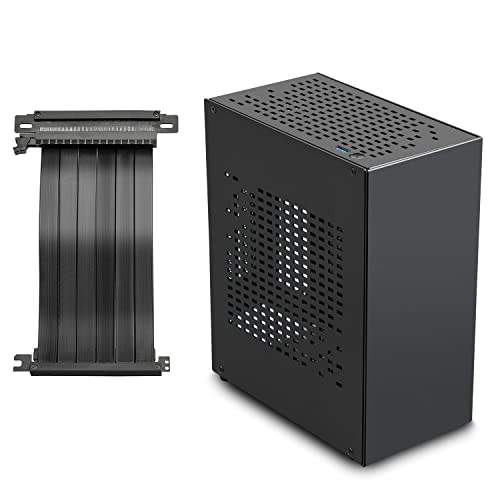
Aluminum Mini ITX Case with PCIe 3.0 Riser
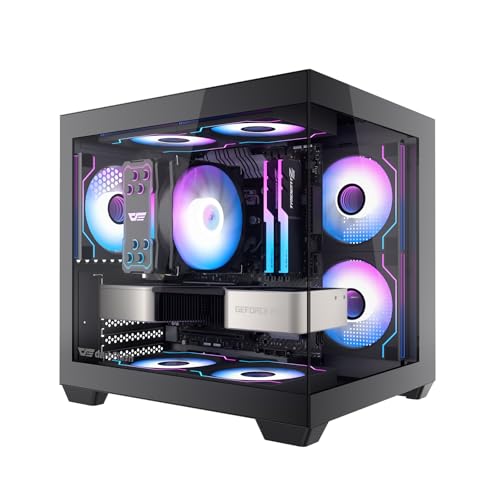
darkFlash ITX PC Case Black C275P

darkFlash ITX PC Case White C275P
More Details On Our Top Picks
Portability is the big story here, and the detachable handle makes that clear right away. In a small office, a dorm, or a living room gaming setup, the black Mini-ATX shell keeps the footprint tight while still leaving room for a 240mm all-in-one cooler and a 160mm air cooler.
That mix suits you well when you want a build that moves without feeling fragile. Compared with the lighter SFF focus of the KXRORS S300, this Jonsbo gives you more breathing room for hardware, though it still asks you to plan your parts carefully.
Strong Points
- Detachable handle makes carry-in and carry-out jobs less awkward.
- Support for 240mm liquid cooling helps manage warmer parts.
- 160mm air cooler clearance gives you more tower-cooler options.
- Mini-ATX sizing keeps desk use practical without feeling oversized.
Things To Consider
- Mini sizing still means part selection needs some care.
- Handle-based portability helps most when you move the system often.
- Black finishes usually show dust sooner on flat surfaces.
Feature Snapshot
Who It Suits Best
You’re the right match for this one if you want a compact Micro-ATX case that still feels easy to move between rooms or setups.
Swap It Out When
The Lian Li A3-mATX Computer Case 26.3L Black suits you better when modular cooling layout matters more than carrying convenience.
Front I/O with USB 3.0 Type-C gives this case a practical edge for desk use, especially when your cable routine needs to stay simple. The SFX power supply slot and 100 to 130mm supply range keep it focused on smaller, more efficient hardware, which fits a travel-friendly gaming rig or a tight apartment setup.
Compared with the JONSBO Z20, this KXRORS model is more specialized and less forgiving about part sizes. That trade-off makes sense for you when the goal is a small, tidy Mini-ITX system rather than a flexible all-rounder.
What We Like
- USB 3.0 Type-C on the front helps with modern peripherals.
- Cable management support should make small-build routing less messy.
- SFX power supply support keeps the layout focused and compact.
- The included PCIe 3.0 x16 riser cable suits vertical Mini-ITX layouts.
Minor Gripes
- Mini-ITX builds leave less room for future part changes.
- SFX supply sizing narrows your component pool.
- Portable cases reward neat wiring, which takes more patience at assembly.
Core Details
Made For
You’ll get the most from this case when your build list is already set around Mini-ITX parts and a small footprint matters more than flexibility.
Another Choice May Suit
The JONSBO D32 STD Micro-ATX PC Case Black suits you better when you want more motherboard and storage room without leaving the compact category.
This JOYJOM case stands out for plain flexibility, since it supports Micro-ATX, MATX, DTX, and ITX board sizes. That makes it a sensible starting point for a first compact build, a home office machine, or a garage workstation where you may swap parts later.
The USB 3.0 front connection and 3.5-inch hard drive support push it toward practical daily use, not just showpiece duty. Compared with the KXRORS S300, you get a broader fit range, but the design also feels more straightforward and less specialized.
Bright Spots
- Broad motherboard support gives you more build paths.
- 3.5-inch drive support helps when you still want large local storage.
- USB 3.0 up front keeps everyday plug-ins quick.
- Black styling stays neutral in workspaces and gaming corners alike.
Areas To Watch
- Broad support can still mean more planning during assembly.
- Storage-heavy builds may take more cable routing effort.
- Simple case styling may feel plain beside glass-panel models.
Quick Facts
Right Fit For
You’re a good match for this case if you want one compact shell that can cover several motherboard styles without getting fancy.
Reach For A Different Pick When
The darkFlash ITX PC Case Black C275P fits you better when dual glass and preinstalled fans matter more than storage flexibility.
The Lian Li A3-mATX takes a more open-ended approach than the JOYJOM and KXRORS cases, because it leaves cooling choices in your hands. At 26.3 liters, it still stays in compact territory, yet the support for a 360mm all-in-one cooler gives you room to build a serious small system.
That kind of flexibility matters for custom builders who care about layout as much as hardware fit. The trade-off is obvious though, since no fans are included, so your setup takes more planning before the first boot.
Upsides
- 26.3-liter size keeps the case compact without feeling tiny.
- Support for 360mm liquid cooling opens up stronger thermal planning.
- Micro-ATX and ITX motherboard support broadens system choices.
- Modular design gives you more control over part placement.
- Black finish suits restrained desk setups and show builds alike.
Worth Noting
- No included fans means you’ll need to plan airflow from scratch.
- More modular freedom usually asks for more assembly patience.
- The case is less plug-and-play than the darkFlash picks.
Feature Rundown
Best Suited To
This one suits custom builders who want a compact shell but still want room to shape the cooling plan themselves.
Where A Sibling Pick Shines
The JONSBO/JONSPLUS Z20 Black Micro-ATX Mini Tower suits you better when a carrying handle and easier mobility matter more than modular depth.
The D32 STD feels built for parts compatibility first, which is handy for a modern Micro-ATX setup with a long graphics card. Support for back-connect and BTF motherboards helps with cleaner cable routing, and that matters in a compact chassis where loose wiring can crowd the interior fast.
Compared with the Lian Li A3-mATX, this Jonsbo model leans more toward ready-made fit ranges than open-ended modularity. The honest read is that it suits you best when you want strong hardware clearance without turning the build into a puzzle.
Positives
- Back-connect and BTF support help tidy cable paths.
- 365mm graphics card support makes high-end GPUs easier to plan around.
- 240mm liquid cooling support adds useful thermal flexibility.
- 163mm air cooler support leaves room for many tower coolers.
- ATX, SFX-L, and SFX power supply support widens PSU choice.
Softer Spots
- High compatibility can still mean more careful part matching.
- Large GPU support matters most when the rest of the layout is planned around it.
- Compact cases like this reward tidy assembly habits.
Details At A Glance
Whose Shelf It Belongs On
You’re a strong match for this case if you want a compact desktop shell that can still handle bigger modern parts without drama.
Look Elsewhere When
The JOYJOM Aluminum Mini ITX Case with PCIe 3.0 Riser fits you better when aluminum construction and a smaller SFF path matter more than Micro-ATX flexibility.
Aluminum changes the feel of a case right away, and this JOYJOM model leans into that clean, rigid look. The included PCIe 3.0 riser keeps the graphics card connection in line with compact SFF layouts, so you can build a small gaming system without improvising around extra parts.
That setup makes more sense for a minimalist desk or a living-room PC than a roomy tower replacement. Compared with the JONSBO D32 STD, this case asks you to trade expansion headroom for a smaller, more sculpted footprint.
Highlights
- Aluminum construction gives the case a refined, rigid feel.
- PCIe 3.0 riser support fits vertical or offset GPU layouts.
- SFF sizing helps a small desk stay uncluttered.
- Gaming-oriented shape suits compact entertainment rigs.
Small Caveats
- SFF builds need careful part selection from the start.
- Aluminum surfaces can show fingerprints and smudges.
- Less internal space can make cable routing tighter.
Feature Card
The Right Fit
You’ll like this most if you want a small-format build with a premium metal look and a straightforward riser-based layout.
Where Shoppers Go Wrong
The darkFlash ITX PC Case Black C275P fits you better when you want preinstalled fans and a glass-forward presentation instead of a minimalist shell.
This darkFlash case is aimed at builders who want the interior to show off, not hide away. The dual tempered glass panels and three preinstalled PWM ARGB fans make it a natural fit for a visible gaming setup, and the 240mm all-in-one support keeps cooling options open.
Compared with the JOYJOM aluminum SFF option, this one is much more display-focused and less understated. You may find that trade-off worthwhile in a desk setup where appearance and airflow presentation matter almost as much as raw size.
Reasons To Buy
- Three preinstalled PWM ARGB fans reduce the number of parts you need to source.
- Dual tempered glass panels create a clean showcase look.
- 240mm liquid cooling support leaves room for a capable thermal setup.
- Mini size keeps the tower smaller than many mainstream gaming cases.
Room For Improvement
- Glass-heavy styling needs a little more finger and dust care.
- Showcase builds can take longer to cable neatly.
- The visual focus may matter less in a hidden under-desk setup.
At A Glance
Built With In Mind
This suits you best when the case itself is part of the visual theme and you want the internals to stay easy to see.
Skip It When
The JONSBO/JONSPLUS Z20 Black Micro-ATX Mini Tower suits you better if portability matters more than glass-panel presentation.
The white version keeps the same core layout as the black darkFlash model, so your choice mostly comes down to finish and room styling. In a brighter office or a white-and-silver gaming setup, that color shift can make the whole build feel cleaner and more intentional.
Since the fan, glass, and cooling support stay the same, the practical experience should track closely with the black variant. The honest read is that you’re choosing presentation here, not a different build recipe.
Best Bits
- White finish pairs neatly with light-colored desks and components.
- Three preinstalled PWM ARGB fans give you a ready starting point.
- Dual tempered glass supports a clean display build.
- 240mm all-in-one support keeps cooling options flexible.
Points To Note
- White surfaces can show grime faster in busy rooms.
- Glass panels still call for careful handling during cleaning.
- Functionally, it mirrors the black model closely.
Core Details
Who Should Grab It
You’re the right fit for this model when you want the darkFlash layout in a lighter finish that suits a clean desk aesthetic.
Where Another Pick Fits Better
The darkFlash ITX PC Case Black C275P suits you better if a darker shell hides dust and blends more easily into the room.
How To Choose The Right Itx Pc Cases
Size Comes First, Not Last
Motherboard support is the first filter to apply, because Mini-ITX and Micro-ATX cases solve different problems. Mini-ITX favors the smallest footprint, while Micro-ATX usually gives you more breathing room for drives, cabling, and future part changes.
Cooler clearance matters just as much, especially in compact builds where every millimeter counts. A 240mm all-in-one cooler, a 360mm all-in-one cooler, or a 160mm tower cooler each points you toward a different type of layout, so match the case to the parts list before you get attached to the look.
Look At The Whole Hardware Chain
Graphics card length and power supply format can make or break a small build. Cases that accept ATX, SFX-L, or SFX supplies give you different paths, and a longer GPU like the 365mm clearance on the JONSBO D32 STD can save you from a cramped fit.
Cable routing also deserves attention in this category. Back-connect or BTF motherboard support helps keep wiring cleaner, which is a real advantage once the interior space gets tight and airflow starts depending on neat routing.
Match The Case To The Room
Some compact cases are built for mobility, others for display. A carry handle helps in a dorm or on the way to a LAN night, while dual glass panels and ARGB fans suit a desk where the build stays visible.
Think about maintenance too, because glossy finishes and glass need more wiping than matte black steel or aluminum. A small case can be easy to live with, but only when the finish and layout fit the room it sits in.
Things Worth Knowing First
Common Shopping Slip Ups
One common mistake is choosing by exterior size alone and forgetting motherboard support. Another is ignoring cooler height or radiator support, which can turn a promising case into a tight squeeze during assembly.
Storage and cable routing get overlooked too. A compact case with 3.5-inch drive support or a riser cable can save time later, while a bare-bones layout asks for more planning from the start.
When Paying More Pays Off
Higher-tier compact cases usually cost more because they add stronger materials, more thoughtful layouts, or included extras like fans and riser cables. That extra spend often buys you easier assembly, better-looking cable runs, and less part hunting afterward.
Paying up makes sense when the case is part of a long-term build, especially for a system that will sit on your desk every day. For a temporary or budget machine, a simpler shell may be enough.
Frequently Asked Questions
What size motherboard works in these cases?
Some models here fit Mini-ITX boards, while others accept Micro-ATX or broader compact formats. The right match depends on how much room you want for expansion and cable routing.
Do compact cases run hot?
Compact cases can run warm, especially with stronger GPUs or tight airflow paths. Cooling support, fan count, and radiator clearance matter a lot in this category.
Is a glass panel a good idea for a small build?
Glass looks clean and shows off the parts, which suits a visible desk setup. It also asks for a little more care during cleaning and handling.
Why choose a case with a riser cable?
A riser cable helps place the graphics card in a different orientation, which can make a small build feel less crowded. It’s useful in SFF layouts where direct GPU placement would eat up too much room.
Which model is easiest for first-time compact builders?
The JOYJOM Micro ATX Case PC Case MATX Mini PC ITX Desktop gives you broad motherboard support and simple daily-use features. That wider fit range can make the first compact build feel less restrictive.
Closing Thoughts
You have more than one smart path here, and the best choice depends on how you want the case to behave in daily life. Some of these picks lean toward portability, others toward airflow or visual style, and a few give you a broader path for future upgrades. Match the case to your motherboard, cooler, GPU, and room setup, and you’ll avoid most of the usual regrets. That’s the quiet advantage of choosing well: the build feels easier from the first install onward.
