
Latest Computer Cases can shape how clean, cool, and easy your desktop feels day to day. A roomy airflow case helps a gaming tower breathe, while a glass-heavy showpiece suits a desk build that doubles as decor. You’ll see a mix here, from fan-packed dual-chamber designs to simpler mid-towers that leave more room in the budget for parts. The right choice depends on whether you value cooling headroom, display appeal, or a straightforward layout that keeps cable work sane.
Quick Look At The Shortlist

HYXN H2 (2026) ATX PC Case
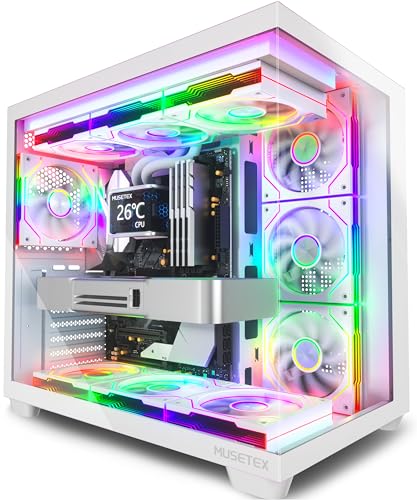
MUSETEX Y6 PC Case White

MUSETEX Y6 PC Case Black

DARKROCK EC2 ATX Mid Tower Case

Lian Li V100-ATX Mid-Tower PC Case

HYTE Y70 Touch Infinite Snow White

Lian Li O11 Vision Compact O11VPW

More Details On Our Top Picks
HYXN goes straight after cooling headroom, and that matters for a tower carrying a hotter GPU or a dense front-panel layout. Eight pre-installed PWM fans, meaning pulse-width modulation for automatic speed control, give you a lot of moving air without asking you to build a fan setup from scratch.
The dual-chamber layout also helps keep the power supply and cable clutter out of the main display area, which makes the build look tidier through the glass. The trade-off is size and complexity, so it fits best on a desk or floor stand with enough breathing room.
Strong Points
- Eight factory fans save you from piecing together a full cooling stack.
- Six 140mm fans plus two 120mm fans should move air with less strain than a sparse setup.
- The dual-chamber layout helps keep the main compartment cleaner for the parts you want to show off.
- 420mm radiator support gives liquid-cooling builders real headroom.
- Type-C 3.2 on the front panel suits newer accessories and external drives.
Things To Consider
- The larger footprint is better suited to roomy desks or a floor placement.
- Eight fans can add cabling work, even with a more organized internal layout.
- The all-in cooling approach makes it less minimal than a simple starter tower.
Feature Snapshot
Who It Suits Best
Gamers and parts-heavy builders who want airflow first will get the most from this chassis.
A Better Fit Elsewhere
NZXT H9 Flow RGB+ Black suits you better when you want a polished RGB ecosystem with a more finished out-of-box feel.
MUSETEX leans into presentation, and the 270-degree tempered glass view makes that obvious from the moment your desk lights up. Seven infinity-mirror fans create a layered look that feels more like a display piece than a plain tower, so it suits a setup where appearance matters as much as airflow.
The white finish helps the lighting read brighter, though the glass-heavy shell does ask for more regular dusting than a closed-panel case. Compared with HYXN H2 (2026), this one feels a little more focused on visual drama than raw cooling mass.
Upsides
- Seven pre-installed ARGB fans reduce the amount of extra fan shopping you need to do.
- The infinity-mirror effect gives the front side a layered, polished look.
- 270-degree tempered glass helps your graphics card, cooler, and lighting stay visible.
- Type-C support fits modern front-panel expectations for everyday use.
Room For Improvement
- The glass-forward design shows fingerprints and dust more readily than a solid-panel case.
- Seven fans are plenty for most builds, though heavy cooling loads may still push you toward a more airflow-first chassis.
- The white finish can demand a little more upkeep in busy rooms.
Core Details
Who Will Love This
Style-focused builders who want a bright white tower with a showpiece feel will get the most out of it.
Where Another Pick Fits Better
DARKROCK EC2 ATX Mid Tower Case suits you better when you want a more restrained shell with less emphasis on visual flair.
This Y6 keeps the same broad glass presentation as the white version, but it trims the lighting down to four non-LED fans. That makes it a quieter-looking option for a setup that should feel clean rather than flashy, especially in a study or shared room.
Compared with MUSETEX Y6 White, this one is the calmer sibling, and that simpler look can be easier to live with over time. The trade-off is obvious, since you give up the more dramatic lighting layer in exchange for a more restrained tower.
Highlights
- Four included fans give you a practical starting point without overcomplicating the build.
- The 270-degree glass layout still lets you show off your hardware.
- Type-C support keeps the front panel current for everyday peripherals.
- The black finish fits more desks and does not draw attention the way a brighter shell can.
Areas To Watch
- Non-LED fans mean less visual drama than the white Y6 version.
- Glass panels still need regular wiping to stay clean.
- Builders chasing a vivid RGB look may want one of the more lighting-heavy choices instead.
Details At A Glance
The Right Fit
Practical builders and first-timers who want a modern look without a lot of extra light show will appreciate this case.
Swap It Out When
MUSETEX Y6 PC Case White suits you better when you want the same layout with a more animated fan presentation.
DARKROCK takes a more straightforward route than the glassier MUSETEX cases, and that can be a relief in a build that needs room to grow. Its support for newer graphics-card generations and its stated fan and radiator headroom point to a case that expects upgrades rather than just a starter build.
The single pre-installed fan means you are not paying for a full cooling bundle here, so you keep more freedom over your own airflow plan. That trade-off works well for builders who already know the cooler and fan layout they want.
Best Bits
- Type-C readiness gives the front panel a modern touch.
- Support for newer graphics cards makes the chassis feel prepared for larger parts.
- Room for up to eight 120mm fans helps you plan a more custom airflow path.
- 360mm radiator support opens the door for liquid-cooling setups.
Small Caveats
- Only one fan comes pre-installed, so you will likely build out the rest yourself.
- The more open upgrade focus means it feels less turnkey than fan-heavy options.
- Owners who want a fully lit showpiece may prefer a more dressed-up case from this list.
Feature Rundown
Built With In Mind
Builders planning a gradual upgrade path, especially with newer GPUs in mind, will find this case easy to work with.
Look Elsewhere When
HYXN H2 (2026) ATX PC Case makes more sense for you when you want most of the cooling done before you add your own fans.
Lian Li splits the difference between airflow and presentation, which is why this V100 feels so easy to place on a desk build. Four pre-installed ARGB fans, an RGB strip, and a tempered-glass display platform give you more than a plain chassis without pushing the case into full spectacle.
The honest read is that it suits people who want their system to look finished without chasing the most dramatic enclosure in the list. Compared with DARKROCK EC2, you get more built-in styling, though not quite the cooling volume of HYXN H2 (2026).
Reasons To Buy
- Four ARGB fans help the build look complete from the start.
- The LED strip adds another layer of light without overdoing the frame.
- The display platform gives you a spot for a figurine or a small accent piece.
- Tempered glass keeps the main system visible and easy to show off.
Worth Noting
- The decorative elements add visual interest, but they also raise the amount of dusting you will notice.
- Builders focused on maximum airflow may want a more fan-dense case.
- The styling is polished, yet it still asks you to manage lighting cables with some care.
Quick Facts
Whose Shelf It Belongs On
Desk builders who want a balanced mix of lighting, visibility, and a little extra personality will get along with this case.
Reach For A Different Pick When
NZXT H9 Flow RGB+ Black suits you better when you want a more integrated RGB ecosystem with a stronger out-of-box control setup.
HYTE leans hard into the showcase side of the hobby, and the integrated 2.5K LCD touchscreen is the headline feature that sets it apart. That display can make a custom rig feel more like a designed object, almost like a framed panel in the middle of your desk.
The dual-chamber layout and ten-fan capacity give it the internal breathing room to match the exterior ambition. Compared with Lian Li V100, this is the more elaborate choice, and the luxury PCIe 4.0 riser cable makes sense in a build where clean presentation matters.
Positives
- The integrated touchscreen adds a real visual centerpiece.
- Dual-chamber construction keeps the main compartment cleaner.
- Ten-fan capacity gives advanced builders plenty of cooling flexibility.
- The included PCIe 4.0 riser cable helps support a vertical-style layout.
- The Snow White finish works especially well in bright, coordinated builds.
Minor Gripes
- The feature set leans premium, so it asks for a clearer plan and a larger budget.
- The screen adds another element to manage, which is not for every setup.
- High-visibility finishes tend to show dust sooner than darker cases.
Core Details
Perfect Match For
Showpiece builders and tech hobbyists who want a centerpiece case with a screen will get the most value here.
Where Shoppers Go Wrong
NZXT H9 Flow RGB+ Black makes more sense for you when you want strong lighting and a simpler setup than a touchscreen chassis.
This Lian Li model focuses on clean structure rather than flashy extras, and the back-connect support is the feature that matters most. Back-connect layouts move many cable connections to the rear side of the motherboard, which helps the main chamber look tidier and can simplify cable runs for careful builders.
Steel and tempered glass keep the feel solid and visual, while the white finish suits a neat office or a show build with restrained styling. Compared with HYTE Y70 Touch Infinite, this case asks for less spectacle and rewards a more orderly parts layout.
Bright Spots
- Back-connect support can make cable management feel cleaner.
- Steel construction brings a firmer, more grounded feel than lighter shells.
- Tempered glass keeps the visible side polished and display-ready.
- The compact ATX format is easier to place than larger showcase cases.
Softer Spots
- Back-connect builds can require a compatible motherboard, so planning matters.
- The cleaner layout is appealing, though it does not have the flash of RGB-heavy options.
- The smaller footprint may feel tight to builders who want lots of extra cooling hardware.
Technical Sheet
Made For
Careful builders who value neat routing and a cleaner-looking main chamber will find this case especially appealing.
Not Your Match When
MUSETEX Y6 PC Case White suits you better when you want a more expressive glass tower with stronger factory lighting.
NZXT packages this H9 as a ready-made RGB system, and the pre-installed Control Hub keeps the lighting and fan side more orderly than a pieced-together build. Seven RGB fans out of the box mean you start with a cohesive look instead of assembling the lighting piece by piece.
The dual-chamber shell helps the main area stay clean, which is useful when you want the internals to look intentional through the glass. Compared with Lian Li V100, this case feels more turnkey, while HYXN H2 (2026) leans harder into raw airflow volume.
What We Like
- The seven-fan package gives you a strong visual and airflow base right away.
- The Control Hub helps keep RGB management more organized.
- Dual-chamber design keeps cables and PSU-related clutter out of sight.
- CAM syncing gives the lighting system a more unified feel.
Points To Note
- The lighting-focused setup suits show builds more than barebones workstations.
- RGB-heavy towers usually call for a little extra upkeep to keep them looking fresh.
- The feature stack is more involved than a plain mid-tower, so the build may take more planning.
Spec Overview
Best Suited To
Builders who want a polished RGB look with less piecemeal setup will feel right at home with this case.
Skip It When
HYXN H2 (2026) ATX PC Case is the better fit when your priority is sheer airflow and radiator space over lighting control.
How To Choose The Right Latest Computer Cases
Start With Cooling And Layout
Airflow matters most in systems with power-hungry graphics cards or long gaming sessions. A case with many fan mounts, room for larger radiators, or a dual-chamber layout helps keep heat moving out instead of pooling around the parts.
That also changes the build experience. HYXN H2 (2026) and NZXT H9 Flow RGB+ show how a fan-rich shell can reduce the need for extra planning later, while a simpler case like DARKROCK EC2 leaves more decisions in your hands.
Match The Case To Your Desk Space
Size is easy to overlook until the box lands on your desk. A big showcase tower can look great, but it needs side clearance, cable slack, and enough room to breathe.
Compact ATX options such as Lian Li O11 Vision Compact O11VPW suit neater rooms and tighter setups. Larger dual-chamber choices make more sense for open floors or wide desks, where the footprint feels intentional instead of crowded.
Choose Between Display And Simplicity
Glass panels, RGB fans, and integrated screens all look impressive, though each one adds upkeep. Fingerprints, dust, and cable visibility become part of the ownership picture, especially in bright white or heavily lit cases.
MUSETEX Y6 White and HYTE Y70 Touch Infinite Snow White lean into presentation, while MUSETEX Y6 Black and DARKROCK EC2 feel easier to keep understated. That split helps you decide whether the case should be part of the room’s style or just do its job quietly.
Think About Assembly Time And Compatibility
Factory-installed fans save time, but they do not remove every build chore. Back-connect layouts, riser cables, and touchscreen features all bring their own compatibility checks and cable-routing needs.
Lian Li O11 Vision Compact O11VPW rewards careful planning, while Lian Li V100 and NZXT H9 Flow RGB+ feel more straightforward for a standard showcase build. The honest read is that the more polished the case looks out of the box, the more thought it often asks for behind the panels.
A Quick Reality Check Before You Buy
Mistakes Worth Dodging
Many shoppers focus on looks first and forget radiator space, fan count, or motherboard compatibility. That can leave you with a beautiful shell that fights your parts list.
Another common miss is underestimating cable management. Back-connect support, dual chambers, and pre-installed fans help, but they still need the right board, cooler, and space around them.
What The Higher Tier Buys
Higher-tier cases usually pay for thicker materials, more complete fan bundles, integrated hubs, or unusual features like a touchscreen. Those parts add convenience and polish, and they often reduce the number of extras you have to source separately.
The upgrade makes the most sense for a show build, a heavy gaming rig, or a system you plan to keep for years. If your tower lives under a desk and stays mostly unseen, a simpler case often leaves more room for the parts that matter most.
Frequently Asked Questions
Do Latest Computer Cases come with fans already installed?
Some do, and the count varies a lot by model. HYXN H2 (2026), MUSETEX Y6 White, and NZXT H9 Flow RGB+ arrive with much more cooling gear than a basic chassis.
What does dual-chamber mean in a PC case?
Dual-chamber means the internal space is split so the power supply and cables sit in a separate section. That usually makes the main view cleaner and helps the build look more organized.
Is tempered glass harder to maintain?
It is more demanding than a solid side panel because fingerprints and dust show up faster. A microfiber cloth and a light cleaning routine usually keep it presentable.
Should you choose a white or black case?
White cases tend to make RGB lighting pop and can brighten a setup. Black cases often hide dust and small scuffs more easily, which suits a low-key room.
Which case is easiest for a first build?
MUSETEX Y6 PC Case Black and DARKROCK EC2 are friendlier starting points because they keep the layout simpler. Heavier showcase models look stunning, but they can ask for more planning and patience.
Closing Thoughts
Your best case depends on how you plan to live with the system, not just how you want it to look on day one. HYXN H2 (2026) and NZXT H9 Flow RGB+ favor cooling headroom and a fully built-out feel, while Lian Li O11 Vision Compact O11VPW rewards neat, careful assembly. For a lighter touch, the MUSETEX and DARKROCK options give you solid style without going all the way into luxury territory. Pick the one that matches your desk space, parts list, and patience for cable work.
