
For a case that already has decent airflow and tidy cable routing, the right lighting adds character without turning the inside into visual clutter. You may want a magnetic strip for quick placement, an addressable RGB kit for more color control, or a simple white bar for a clean desk-side glow. The picks below focus on compatibility, length, control style, and how comfortably each option fits a real PC build. That mix matters more than flashy claims.
Quick Look At The Shortlist

Speclux PC RGB Strip 3pcs 5050 Magnetic PC LED Strip

Speclux PC Addressable RGB LED Strip Lights Kit 2PCS 42LEDs ARGB Strip

Warmstor 2 Pack 2-Pin PC Power Switch Cable 27-inch

Vetroo LED Strip for PC 21.7-inch 5V 3-Pin ARGB Light Bar
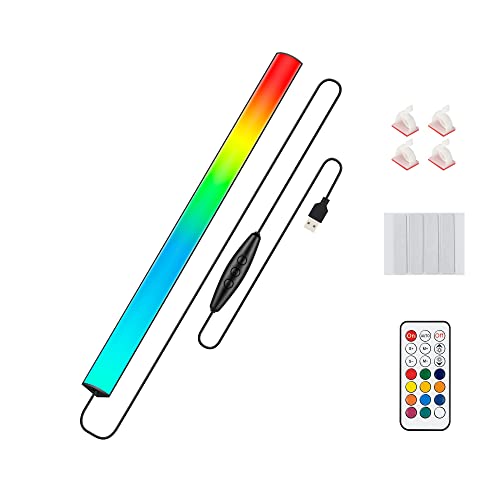
JUSJUBR Under Monitor RGB Light Bar 12 Inch 5V
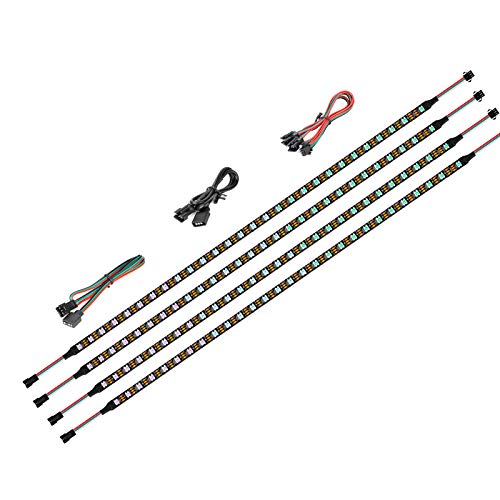
BTF-LIGHTING WS2812B IC PC Light Strip 4PCs 19in

UVTaoYuan Short LED Strip Lights COB 5V USB White 6500K

AsiaHorse ARGB Light Strip for Motherboard 28 Independent Addressable RGB
More Details On Our Top Picks
The magnetic mount makes this Speclux strip easy to place along a case frame, which suits a straightforward RGB setup more than a fussy show build. Its 12V 4-pin connection keeps it aimed at classic motherboard lighting headers, so it fits neatly into systems already using that style of control.
Compared with the addressable picks later in this list, this one is less about individual LED effects and more about a clean overall glow. That honest trade-off works well for upgraders who want simple color without adding another controller to the desk.
Strong Points
- Magnetic attachment helps placement feel quick and tidy inside a standard tower.
- Three-strip layout gives you more coverage than a single short bar.
- 4-pin RGB support suits older, widely used motherboard lighting headers.
- Good match for a uniform wash of color across the side panel area.
Things To Consider
- It follows classic RGB behavior, so it does not offer per-light animation control.
- The magnetic style is convenient, though dust buildup near the mounting path deserves occasional cleaning.
Feature Snapshot
Who It Suits Best
Desktop builders who want a simple RGB accent and already have a 12V 4-pin header will get the most from it.
A Better Fit Elsewhere
Speclux PC Addressable RGB LED Strip Lights Kit works better for anyone who wants per-LED effects and more visual detail.
This Speclux kit moves from broad glow to finer control, which is the main reason it stands apart from the previous 4-pin strip. Addressable RGB means each LED can be managed separately, so the lighting can do more than just fade as a single block.
For a gaming tower with a clear side panel, that extra control usually feels worth the step up. The trade-off is a slightly more involved setup path, especially for people who prefer a plug-in-and-forget layout.
What We Like
- Individually managed LEDs allow more detailed lighting patterns.
- Two-strip kit gives useful coverage for compact and mid-size cases.
- Magnetic mounting keeps installation more flexible than fixed adhesive layouts.
- Pairs well with modern boards that support 5V 3-pin headers.
- Better for visual customization than basic RGB strips that move as one unit.
Room For Improvement
- Needs the right 5V 3-pin ARGB header, so older builds may not suit it.
- More control usually means more setup attention during the first install.
Details At A Glance
Who Will Love This
You get the best result here from a modern PC build where lighting detail matters as much as brightness.
Swap It Out When
Vetroo LED Strip for PC 21.7-inch 5V 3-Pin ARGB Light Bar fits better for a longer, bar-style look with a cleaner chassis feel.
This Warmstor cable is less about decoration and more about keeping a desktop case usable after a front-panel swap or repair. The 27-inch length gives you room to route it across a typical tower without feeling cramped, which matters in older cases with awkward internal runs.
That makes it a sensible companion piece rather than a lighting centerpiece, and it pairs naturally with the RGB strips above. The honest read is that you only need it for case hardware work, not for visual flair.
Upsides
- Two-pack format helps when you want a spare on hand.
- 27-inch length reaches across common desktop case layouts.
- Supports power, reset, and HDD indicator wiring for front-panel repair work.
- Useful for restoring function in a case with worn or missing switches.
Areas To Watch
- It is a wiring part, so it does not add lighting by itself.
- Front-panel cabling calls for careful placement during installation.
Core Details
Built With In Mind
You benefit most here when you are restoring a desktop case, replacing a front switch, or cleaning up aging wiring.
Consider Something Else When
JUSJUBR Under Monitor RGB Light Bar 12 Inch 5V makes more sense for a desk setup where ambient glow matters more than case repair.
The longer 21.7-inch bar gives this Vetroo strip a more deliberate shape than the shorter kits earlier in the list. That extra span can help a mid-tower case look cleaner, especially along a side edge or top rail where a straight line reads more neatly than multiple small segments.
It also speaks the language of 5V 3-pin ARGB setups, so it belongs in a build that already leans modern. You may find the included bracket support useful for a tidier install, though the exact placement still depends on your case interior.
Bright Spots
- Long bar format creates a smoother visual line inside the chassis.
- 5V 3-pin ARGB support fits modern lighting control setups.
- Included bracket count gives you more mounting flexibility.
- Good fit for builders who want lighting that looks integrated rather than scattered.
Softer Spots
- Bar-style lighting is less flexible than shorter magnetic strip kits.
- Bracket placement takes a little patience during installation.
- The length may feel more than you need in a very compact case.
Feature Rundown
Whose Shelf It Belongs On
Case modders and tidy-build enthusiasts will get the most out of this one, especially in a mid-tower with visible interior space.
Where A Sibling Pick Shines
BTF-LIGHTING WS2812B IC PC Light Strip 4PCs 19in suits a more detail-heavy RGB build that benefits from several separate strips.
This JUSJUBR bar shifts the category a bit, since it is built more for a desk-edge glow than a hidden interior install. The 12-inch length and USB power make it an easy fit for a gaming station, a monitor shelf, or a small work area that needs softer lighting without extra wiring.
It stands apart from the PC-specific strips above because the remote control and 353 color modes put day-to-day convenience front and center. For a cluttered desk, that can feel like a small but real quality-of-life upgrade.
Positives
- USB power keeps setup simple near a desk or monitor.
- Wireless remote adds easier control from your seat.
- 353 color modes give plenty of room for mood changes.
- 12-inch size suits compact desk zones without taking over the space.
- Works as an accent light for both a gaming rig and a nearby tabletop.
Points To Note
- It is not a case-only solution, so PC interior fit depends on where you mount it.
- USB power means cable routing still matters for a tidy desk.
Technical Sheet
Right Fit For
Desk gamers and monitor-shelf setups suit this best, especially where you want ambient light more than case-internal styling.
Look Elsewhere When
Speclux PC RGB Strip 3pcs 5050 Magnetic PC LED Strip is the more direct choice for a true inside-the-case install.
This BTF-LIGHTING kit looks built for builders who want more than one lighting line inside the case. Four separate 19-inch strips create room for a layered layout, and the WS2812B IC format means the LEDs are individually addressable, so effects can move across the strip instead of acting as one flat block.
Compared with the Speclux addressable kit, this one gives you more pieces to place and more room to shape the light. That makes it a better match for larger interiors or for anyone who likes a precise, coordinated look around the motherboard area.
Highlights
- Four-strip kit supports more ambitious case layouts.
- Individually addressable LEDs allow detailed lighting movement.
- 19-inch length per strip helps span a wider interior.
- Works well for builders who want to spread light across multiple zones.
- Good fit for modern motherboard lighting ecosystems.
Minor Gripes
- More pieces can mean more planning during the first install.
- That extra coverage is useful, though it may feel like overkill in smaller cases.
Core Details
Who Should Grab It
You get the most value from this kit in a showcase build where lighting coverage and control both matter.
Another Choice May Suit
UVTaoYuan Short LED Strip Lights COB 5V USB White 6500K fits better for a simpler, white-only look in a display cabinet or clean desktop setup.
This UVTaoYuan strip is a different sort of lighting pick, since it trades RGB variety for a crisp 6500K white tone. COB, or chip-on-board, means the LEDs sit close together for a smoother-looking line, which suits a display cabinet, a shelf, or a PC-adjacent accent zone that needs a clean edge.
For a minimalist setup, that restrained look can be easier to live with than color-heavy strips. The catch is simple, there is no dimming, so you want to place it where that brightness level feels comfortable from the start.
Best Bits
- Crisp white output works well for clean, modern spaces.
- COB design creates a more continuous light line.
- USB power keeps the setup straightforward.
- Short 3.28-foot length suits small display areas and compact shelves.
- Useful for a PC corner that needs accent lighting without color effects.
Worth Noting
- Not dimmable, so placement matters more than with adjustable lights.
- White-only output will feel too plain for RGB-heavy case builds.
- The flexible strip still deserves careful routing to keep it neat.
Quick Facts
The Right Fit
You should look at this strip for a desk corner, cabinet, or minimalist PC setup that wants white accent lighting only.
Reach For A Different Pick When
AsiaHorse ARGB Light Strip for Motherboard 28 Independent Addressable RGB suits you better when colorful motherboard sync matters more than a single white tone.
AsiaHorse aims squarely at builders who want more control from their motherboard lighting. The 28 independent addressable RGB points give the strip a more detailed animation path than a basic color band, and that detail shows up best in a case with enough open space to appreciate it.
Compared with the simpler Speclux 4-pin strip, this one leans harder into modern ARGB behavior and a more customized visual style. The trade-off is the usual one for advanced lighting, you need the right 5V 3-pin support and a bit more patience during setup.
Reasons To Buy
- 28 addressable points allow more refined lighting movement.
- Works well for builders who want their case lighting to feel coordinated.
- 5V 3-pin support fits current ARGB motherboard setups.
- Good choice for an ATX interior with room to show the strip off.
Small Caveats
- Advanced lighting control can take a little more setup attention.
- Best results depend on compatible motherboard headers.
- In a very small case, the extra detail may be harder to appreciate.
Feature Card
Made For
PC modders and RGB-focused builders who want a more polished animated look will get the strongest use from this strip.
Where Shoppers Go Wrong
Speclux PC RGB Strip 3pcs 5050 Magnetic PC LED Strip is the easier choice for anyone who wants classic RGB without addressable complexity.
How To Choose The Right Led Lights For Computer Case
Match The Header Before The Glow
Your motherboard header decides more than people expect. A 12V 4-pin RGB header suits standard color syncing, while a 5V 3-pin ARGB header supports addressable lighting, which means individual LEDs can behave separately instead of all changing together. That one choice shapes the whole experience, so check the board first and the strip second. For older builds, classic RGB is often the smoother path.
Think About Length, Mounting, And Case Layout
A long bar looks cleaner in a roomy mid-tower, while shorter magnetic strips fit awkward corners and smaller frames more easily. Magnetic backing helps during placement, but bracketed bars can feel steadier once installed. Cable routing matters too, especially in cases where the front side of the tray already feels crowded. A tidy build can make modest lighting look far more intentional.
Pick The Effect You Actually Want To Live With
RGB variety sounds fun, yet some setups look better with a simple even glow. White COB strips suit minimal desks and cabinet accents, while ARGB kits make sense for showcase cases that keep the side panel visible. The honest read is that more lighting control also brings more setup attention. If you prefer a calm build, choose a simpler strip and let the hardware breathe.
Separate PC Interior Use From Desk Accent Use
Not every strip here belongs in the same place. Some are made for motherboard sync inside the case, while others, like the under-monitor bar, work better on a desk or shelf where the light can spill outward. That difference matters for heat, cable reach, and how often you want to adjust the look. The right pick feels natural in the space you already use every day.
What To Weigh Before You Decide
Hidden Buying Traps
A common mistake is matching the light to the look before checking compatibility. A 5V ARGB strip will not suit every board, and a case lighting bar can feel awkward in a cramped enclosure that has little room for routing. Another slip-up is ignoring how the strip attaches, since magnetic placement and bracket mounting solve different problems. Start with your header, then measure the space.
The Case For Spending Up
Higher-tier lighting usually pays for extra control, more segments, or more refined mounting hardware. That matters in showcase builds where the case is visible and the effect becomes part of the room, not just the PC. Basic strips still work well for simple glow, though advanced ARGB kits give you more room to tune the result. Paying more makes sense when the lighting is part of the finished look you want to keep.
Frequently Asked Questions
What is the main difference between RGB and ARGB?
RGB usually changes the whole strip as one unit. ARGB lets each LED act separately, which gives you more detailed motion and patterns.
Which header type should you check on your motherboard?
Look for 12V 4-pin RGB or 5V 3-pin ARGB support. The wrong match can leave the strip incompatible with your board.
Do magnetic PC light strips stay in place well?
They usually help a lot during placement, especially on metal case frames. Dust and cable tension still affect how neat the install looks over time.
Can you use a desk light bar inside a computer case?
You can in some layouts, but it often fits better as a desk or monitor accent. Case-specific strips usually route more cleanly inside the chassis.
Is a longer strip always better?
Not always, because extra length can feel clumsy in a compact case. The cleaner choice is the length that fits your mounting path without bending too sharply.
Final Thoughts
The right Led Lights For Computer Case depends on your board, your case size, and how much control you actually want to manage. Simple RGB strips suit straightforward upgrades, while addressable kits reward more careful builders with richer effects. A white COB bar can be the calmest choice of all, especially beside a clean desktop setup. Pick the style that fits the way you use your PC every day, and the result will feel much more natural.
