
Liquid cooling builds need more than a radiator mount and a glass panel. You also need enough room for tubing, fans, cable routing, and a layout that fits your parts without turning assembly into a headache.
These eight picks cover compact Micro-ATX cases, roomy panoramic mid-towers, and a standalone 360mm liquid cooler for builds that need the cooling hardware itself. The right choice depends on your board size, radiator plan, and how much of your interior you want on display.
Quick Look At The Shortlist
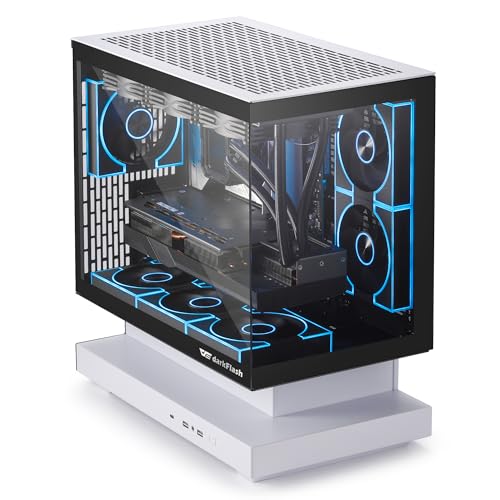
darkFlash FLOATRON F1(2025) Micro-ATX PC Case

Thermaltake TH360 ARGB Sync V2 CPU Liquid Cooler CL-W362-PL12SW-A

MUSETEX Y6 PC Case Pre-Installed 7 Infinity Mirror PWM ARGB Fans

Okinos MATX PC Case Mirage 4 White

PC CASE 9 PWM ARGB Fans Pre-Installed Mid-Tower Gaming PC Case K9

PC CASE 6 PWM ARGB Fans Pre-Installed Mid-Tower Gaming PC Case G8

msi MAG PANO 120R PZ ATX Mid-Tower Gaming PC Case

Cooler Master Q300L V3 Micro-ATX PC Case
More Details On Our Top Picks
The FLOATRON F1 leans into the floating-glass look, and that 270-degree panoramic layout gives your parts a lot of visual breathing room. It also matters that the case supports back-connect boards and a 360mm AIO, because cable clutter and radiator planning tend to decide whether a compact build feels tidy or cramped.
For a Micro-ATX gaming setup, that mix makes sense in a small desk space or a bedroom rig where the case still needs to look intentional. The trade-off is simple, this style-forward shell is about display and flow first, so you’ll want to plan your components before you start building.
Strong Points
- Panoramic glass helps your build feel open instead of boxed in.
- Back-connect support can make cable routing less awkward for clean builds.
- Three included ARGB PWM fans help start airflow without extra shopping.
- Type-C on the front panel suits modern peripherals and storage devices.
- 360mm AIO support gives you room for a serious cooling setup later.
Things To Consider
- Micro-ATX sizing narrows motherboard choices compared with full mid-towers.
- Floating-glass designs reward careful cable planning, especially around the rear chamber.
- The case focuses on layout and looks, so you may want to confirm part clearances before pairing large hardware.
Feature Snapshot
Who It Suits Best
You fit this case well if you want a compact Micro-ATX build that still feels showy and organized.
A Better Fit Elsewhere
The msi MAG PANO 120R PZ suits you better for a roomier ATX showcase build with more fan coverage and a broader case interior.
Unlike the case-based picks around it, this Thermaltake unit is the cooling hardware itself, not the shell around it. The 360mm radiator size, three 120mm fans, and mirror-style waterblock point toward a build where cooling headroom and visual polish matter together.
The adjustable fan range from 500 to 2000 RPM gives you a wide operating window, which is useful in a gaming tower that runs hot during long sessions or in a workstation that loads the CPU for hours. The honest read is that a 360mm liquid cooler asks for a case with enough clearance, so fitment matters before anything else.
Highlights
- 360mm radiator size suits higher-demand CPU cooling plans.
- ARGB infinity mirror styling adds a clean visual focal point.
- PWM control helps the fans respond to heat changes more smoothly.
- Three 120mm fans spread cooling across the radiator evenly.
- MB ARGB sync keeps lighting coordination simpler in compatible builds.
Points To Note
- You need a case with enough room for a 360mm mount.
- Liquid cooling adds more parts to manage than a basic air tower.
- Mirror lighting looks sharp, though some setups will want a calmer visual profile.
Core Details
Who Will Love This
You’re a strong fit for this cooler if your case already has the space for a 360mm radiator and you want a cleaner CPU cooling setup.
Where A Sibling Pick Shines
The darkFlash FLOATRON F1(2025) suits you better if you want the case and cooling layout to work together inside a Micro-ATX showpiece.
The Y6 comes in with a strong first impression because seven pre-installed fans already cover a lot of what many builders end up adding later. Compared with the more compact darkFlash F1, this ATX mid-tower gives you more breathing room for layout and a larger interior view through the 270-degree tempered glass.
That matters most in a living-room gaming setup or a desktop where you want airflow, lighting, and component visibility working together. You may find the fan-heavy approach especially useful for a hot-running GPU, though the trade-off is a busier interior and a case that asks for a little more desk or floor space.
Bright Spots
- Seven included ARGB fans reduce the need for early add-ons.
- PWM control helps the fans react to system load more gracefully.
- ATX mid-tower sizing suits a wider range of full builds.
- 270-degree tempered glass gives you a broad view of the internals.
- Type-C support keeps the front I/O current for modern gear.
Minor Gripes
- A seven-fan layout can take more time to wire cleanly.
- The large glass panels reward careful dust upkeep and smudge cleaning.
- Its show-first design is less subtle than a plain workhorse tower.
At A Glance
Made For
You suit this case best if you want a big visual display and prefer not to fill every cooling slot yourself.
Another Choice May Suit
The Cooler Master Q300L V3 fits you better when desk space is tight and you want a smaller Micro-ATX footprint.
The Mirage 4 White takes a more measured route than the glass-heavy MUSETEX Y6, and that can be a relief in a compact build. Top 240mm radiator support, five PCIe slots, and space for a 160mm PSU point to a case that tries to make liquid-cooled layouts easier to live with.
That mix works well for a home office tower that also handles gaming, especially when you want a neat cable path and a smaller footprint. The catch is that the included 3x120mm ARGB fans are non-PWM, so you’re getting convenience and looks, not as much fine-tuned fan control.
Upsides
- Top radiator support helps with liquid cooler placement.
- Five PCIe slots leave room for a fuller expansion setup.
- Space for a 160mm PSU helps avoid crowded power supply fitment.
- Type-C keeps the front panel current for everyday use.
- White finish gives the tower a cleaner visual profile.
Areas To Watch
- Non-PWM fan control is less granular than PWM setups.
- White surfaces can show dust and handling marks sooner.
- Top radiator support means planning around tubing and motherboard clearance.
Details At A Glance
The Right Fit
You’re a good match for this case if you want a smaller liquid-cooled system with sensible layout support and a clean white look.
Reach For A Different Pick When
The ANSAITE G8 suits you better when you want more fans pre-installed and a stronger airflow focus for a hotter gaming build.
Nine pre-installed fans put the K9 in a different lane from the Okinos Mirage 4 White, and that extra fan count is the headline. With panoramic tempered glass and support for 420mm and 360mm radiators, this mid-tower looks built for a high-heat gaming setup that still wants a clean display side.
The practical upside is obvious in a system with a powerful graphics card and a liquid cooler, because you get generous room for airflow planning. The trade-off is that the case asks for more time with cabling and more attention to dust management, especially in a busy room.
Reasons To Buy
- Nine included fans create a broad starting point for airflow.
- 420mm radiator support gives you a wide cooling ceiling.
- 360mm support adds flexibility for liquid cooling layouts.
- Panoramic tempered glass turns the build into a showcase.
- Type-C keeps front-panel connectivity relevant.
Softer Spots
- A nine-fan setup can take patience during installation.
- More glass and more fans usually mean more cleaning upkeep.
- The larger shell may feel excessive for a modest office build.
Feature Rundown
Built With In Mind
You’re the right match for this case if you want a heavily cooled showcase tower and don’t mind a larger build process.
Skip It When
The Cooler Master Q300L V3 fits better when your desk or shelf space is tight and you want a more compact Micro-ATX option.
The G8 is the calmer sibling to the K9, with six pre-installed PWM ARGB fans instead of nine. It still follows a dual-channel airflow setup, meaning it pushes cooling focus toward the CPU and GPU separately, which can help a gaming tower feel more organized under load.
Dust filters on the top and bottom make this one easier to live with in a shared room or a home setup that sees regular use. In our view, the fan count feels sensible rather than excessive, though the non-specified case details mean you’ll want to check exact fitment around your radiator and power supply plan.
Positives
- Six included PWM ARGB fans give you a solid airflow base.
- Dual-channel airflow separates CPU and GPU cooling paths.
- Top exhaust design supports a more direct airflow route.
- Top and bottom dust filters help with routine upkeep.
- Mid-tower sizing suits many full gaming builds.
Small Caveats
- The fan setup is strong, though less abundant than the K9.
- Some layout details are less specific, so fit checks matter.
- Dust filters still need regular cleaning in high-use rooms.
Feature Card
Whose Shelf It Belongs On
You fit this case well if you want a mid-tower with built-in airflow and a cleaner balance than the fan-heavier K9.
Look Elsewhere When
The darkFlash FLOATRON F1(2025) makes more sense for a smaller Micro-ATX build with a stronger emphasis on compact display styling.
The MAG PANO 120R PZ looks built for the kind of system that needs both strong presentation and serious cooling support. A 270-degree tempered glass panel, seven pre-installed ARGB fans, and liquid cooling support up to a 360mm radiator give it a lot of range for a showcase gaming build.
That combination makes sense in a high-end desktop where cable management and interior visibility matter just as much as raw airflow. Compare it with the simpler G8, and the MSI feels more polished and more complete, though it also asks for a bigger budget and a larger overall chassis.
Best Bits
- Seven pre-installed ARGB fans give the case a strong cooling base.
- 270-degree glass helps the interior look open from several sides.
- 360mm radiator support keeps liquid cooling planning flexible.
- VGA bracket support can help with heavier graphics cards.
- ATX mid-tower sizing fits substantial gaming hardware.
Worth Noting
- The case is more elaborate than a basic office tower.
- More lighting and glass usually mean more time spent on upkeep.
- Its larger layout may feel unnecessary for very simple builds.
Feature Snapshot
Perfect Match For
You fit this case best if you want a premium-looking ATX tower with built-in cooling and display appeal.
Another Choice May Suit
The PC CASE 6 PWM ARGB Fans Pre-Installed Mid-Tower Gaming PC Case G8 fits you better if you want a simpler, more restrained airflow-focused build.
The Q300L V3 is the most space-conscious pick here, and that makes it useful for a desk corner or a smaller room where you still want liquid cooling support. With room for a 366mm graphics card, 240mm AIO support, magnetic dust filters, and a modular I/O panel, it gives you a lot of flexibility for a compact shell.
Compared with the larger MSI and ANSAITE towers, this one asks you to think carefully about what actually needs to fit inside the case. That’s also its appeal, because smaller liquid-cooled builds often feel more manageable when the chassis stays simple and the layout choices stay flexible.
Standout Traits
- Micro-ATX sizing helps the case stay desk-friendly.
- 240mm AIO support gives you room for compact liquid cooling.
- 366mm graphics card support leaves space for many larger GPUs.
- Magnetic dust filters make routine cleaning easier.
- Modular I/O panel helps you arrange the front connection area.
Room For Improvement
- Micro-ATX limits expansion compared with a full ATX tower.
- A smaller shell can feel tight during first-time cable routing.
- Compact airflow planning matters more here than in larger cases.
Quick Facts
Who Should Grab It
You’re the right fit for this case if you want a compact liquid-cooled build and care more about smart layout than sheer size.
Swap It Out When
The ANSAITE K9 fits you better when you want a much larger fan count and more aggressive showcase styling.
How To Choose The Right Liquid Cooling Pc Cases
Start With Case Size And Radiator Clearance
Case size decides more than footprint. A Micro-ATX tower like the darkFlash FLOATRON F1 or Cooler Master Q300L V3 keeps things compact, while an ATX mid-tower such as the MSI MAG PANO 120R PZ gives you more room for radiator placement, cable routing, and larger graphics cards.
Radiator size matters just as much. A 360mm AIO needs a case that can actually swallow that length without blocking memory, motherboard edges, or the front panel, and the same logic applies to top-mounted 240mm setups in smaller towers.
Match Fan Count To Noise And Maintenance
More fans can help move heat out of the case, but they also mean more cables, more cleaning, and more surfaces to keep dust-free. The ANSAITE K9 with nine fans suits a high-airflow gaming build, while the G8 and MUSETEX Y6 aim for a strong balance between airflow and complexity.
PWM fans, or pulse-width modulation fans, give the system better speed control than basic fixed-speed units. That matters in a bedroom, office, or shared space where you want the machine to stay calmer during light work and ramp up only under load.
Think About Layout, Not Just Looks
Panoramic glass and floating designs can make a build look sharp, but the real win comes from how much room they leave for cable routing and component access. Back-connect support in the darkFlash F1 is a good example, because a cleaner rear layout often makes the front side look much better.
That same idea applies to modular I/O panels, magnetic dust filters, and VGA support brackets. Those little layout choices matter after the first build night, when you still need to open the case, clean it, or swap a part without fighting the chassis.
Choose For Your Actual Build Plan
Some cases suit a display-first gaming PC, while others make more sense for a quiet desk machine or a compact workstation. If your system will run a hot GPU and a liquid cooler, a roomier case with stronger airflow makes life easier than a stylish shell with tight clearances.
For most people, the safest move is to buy around the motherboard size and cooling hardware you already expect to use. That keeps the case working with your build instead of forcing you to shape the build around the case.
Things Worth Knowing Before You Buy
Common Shopping Slip Ups
People often focus on glass panels and ARGB fans before checking radiator space. That’s how a neat-looking tower ends up fighting a 360mm cooler or a long graphics card.
Cable routing gets overlooked too. A back-connect board, rear chamber space, or a modular I/O layout can save a lot of frustration once the parts are on the bench.
What The Higher Tier Buys
Higher-tier cases usually spend more on airflow hardware, thicker panels, broader radiator support, and a more polished internal layout. That extra spend tends to show up in easier assembly, cleaner cable paths, and less compromise around fan placement.
The upgrade makes sense when your system uses a large liquid cooler, a heavy graphics card, or a build you plan to keep and expand over time. For a simpler office rig, a more modest case often does enough without extra bulk.
Frequently Asked Questions
Do Liquid Cooling Pc Cases Need A 360mm Radiator?
No, they don’t. A 240mm AIO or even an air cooler can fit many builds just fine, depending on your parts and case layout.
Is Tempered Glass Hard To Live With?
It needs more regular wiping than a plain steel side panel. In return, you get a clearer view of your hardware and lighting.
Are More Fans Always Better?
More fans can help airflow, but the layout matters more than the count. A well-placed six-fan setup can make more sense than a crowded nine-fan tower in a small room.
What Matters Most For A First Build?
Motherboard size, radiator clearance, and cable space matter most. A case that fits your parts cleanly saves time and frustration during assembly.
Can A Compact Case Still Work With Liquid Cooling?
Yes, compact cases can handle liquid cooling when the radiator support matches your hardware. The Cooler Master Q300L V3 is a good example of a smaller shell with AIO support.
Closing Thoughts
You have a lot of room to match the case to the build, not the other way around. The darkFlash F1 and Cooler Master Q300L V3 make sense for compact systems, while the MSI and ANSAITE towers suit larger showcase rigs with more cooling hardware. The Thermaltake cooler fills a different role entirely, so it belongs in the plan only when you already know your case has the clearance. Pick the layout that fits your parts, your desk, and your tolerance for cable work, and the whole build feels easier from day one.
