
You’re probably here because a regular office mouse no longer feels like enough. Maybe you spend your day moving between spreadsheets, CAD files, or long editing sessions, and you want something that fits your hand, your desk, and your workflow without fuss. The mix here covers basic wired mice, compact everyday options, and true 3D control devices for design-heavy work. That gives you room to match the tool to the job instead of forcing one shape to do everything.
The Shortlist At A Glance

HP Wired Mouse 100 1600 DPI

Lenovo 100 Wired USB Computer Mouse Black
3Dconnexion SpaceMouse Pro 3DX-700040

3Dconnexion SpaceMouse Wireless Bluetooth Edition

3Dconnexion CadMouse Compact Wireless
3Dconnexion CadMouse Pro Black

3Dconnexion SpaceMouse Pro Wireless BT

3Dconnexion CadMouse Compact USB Black
More Details On Our Top Picks
HP’s wired mouse keeps the formula plain, which is exactly why it makes sense for a desk that sees email, browsing, and document work all day. The 1600 DPI optical sensor gives you a steadier pointer feel than the cheapest generic mice, while the ambidextrous shell avoids awkward hand positioning for left- or right-handed use.
The trade-off is obvious, it’s a basic three-button mouse rather than a feature-heavy control tool. For a home office, a shared workstation, or a laptop bag with a wired backup, that restraint is useful, and the easy USB connection means less setup fuss than a wireless model can sometimes bring.
Strong Points
- 1600 DPI brings smoother cursor movement for everyday office tasks.
- Ambidextrous shape works well in shared spaces and for either hand.
- Wired USB connection avoids battery checks and pairing steps.
- Three-button layout stays simple for users who want no extra clutter.
Things To Consider
- The three-button setup leaves no room for side shortcuts.
- Wired use keeps the desk tidy only up to the cable length you have available.
- The plain shell is practical, though not built for a premium hand feel.
Core Details
Who It Suits Best
You’ll like this most for general computer work, especially on a shared desk or a secondary laptop setup.
A Better Fit Elsewhere
3Dconnexion CadMouse Pro Black suits CAD users or anyone who wants more shortcut control and a more specialized hand rest.
This Lenovo leans into the same plain-and-useful idea as the HP mouse, but its full-size shape gives your palm a little more room. The red optical sensor and wired USB connection make it a sensible pick for laptops, office PCs, and Windows desktops where you want a no-drama setup.
The honest read is that it’s not trying to be fancy, and that’s part of the appeal. For long desk sessions, a larger shell can feel less cramped than the smaller budget options, though the simple three-button layout still keeps it firmly in everyday territory.
What We Like
- Full-size body can feel easier to settle into for long desk sessions.
- Ambidextrous design keeps it friendly for shared workstations.
- Wired USB setup cuts out charging and connection hassles.
- Black finish fits a plain office setup without drawing attention.
Minor Gripes
- The three-button layout leaves no room for advanced shortcuts.
- Wired use means cable placement matters on tighter desks.
- The pared-back design is practical, but not especially expressive.
Feature Snapshot
Made For
You’re best served here by a home-office setup, a student desk, or a work laptop that needs a dependable everyday mouse.
A Better Fit Elsewhere
HP Wired Mouse 100 suits you better if you want a simpler, smaller-feeling option with a slightly more compact everyday profile.
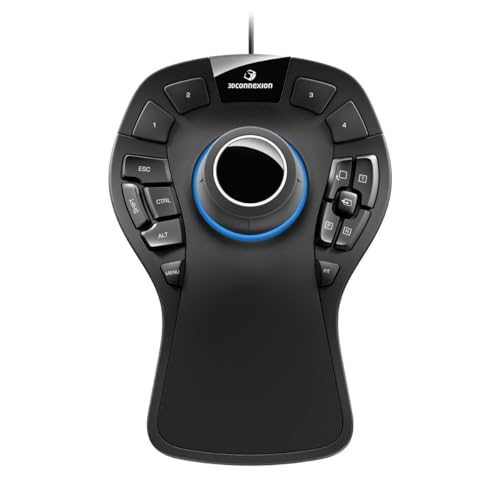
This is the first model in the list that moves beyond ordinary pointer work and into true 3D navigation. The six-degrees-of-freedom sensor, often shortened to 6DoF, lets you shift, tilt, and rotate models in ways a normal mouse cannot, and the soft-coated palm rest gives your hand a steadier landing spot during long sessions.
It’s built for desks where CAD files, modeling tools, or technical layouts stay open all day. The cord is short at about 3 feet, so placement matters, but the 15 programmable buttons, quick view keys, rotation toggle, and keyboard modifier support give you the kind of shortcut density that makes sense for power use.
Highlights
- 6DoF sensor supports direct 3D movement rather than flat-only pointer motion.
- 15 programmable keys can reduce repeated keyboard reaching in busy workflows.
- Soft-coated hand rest adds comfort during longer sessions.
- Works with Windows, macOS, and Linux, which broadens setup options.
- On-screen display helps you keep track of assigned functions.
Worth Noting
- The short cord asks for careful desktop positioning.
- The control layout makes more sense after a learning period than on day one.
- Its specialist design is less useful for casual browsing than the HP or Lenovo picks.
Technical Sheet
Whose Shelf It Belongs On
You’ll get the most from this at a design desk, especially where modeling and viewport control matter more than general office convenience.
Swap It Out When
HP Wired Mouse 100 makes more sense for straightforward work, because it asks for far less setup and fits everyday tasks better.
Compared with the wired SpaceMouse Pro, this version removes the cable and keeps the 3D control idea intact. That matters on a crowded desk, in a shared studio, or in a setup that changes locations often, because the Bluetooth connection keeps the surface cleaner and less tied down.
The trade-off is battery management, which is the usual price of going wireless. You also give up the extra physical shortcut surface that the Pro model provides, so this one fits better for people who value freedom of placement over a denser button layout.
Reasons To Buy
- Bluetooth connection cuts the cord from the desk layout.
- Wireless use suits portable or frequently rearranged workstations.
- Keeps the SpaceMouse style of 3D navigation intact.
- Works well where cable clutter gets in the way of other gear.
Areas To Watch
- Wireless gear asks for battery attention over time.
- The control set is less expansive than the SpaceMouse Pro.
- Bluetooth pairing can be another step during setup.
Details At A Glance
The Right Fit
You’ll appreciate this most in a flexible studio or mobile workspace where cable-free placement matters more than a packed shortcut array.
Where A Sibling Pick Shines
3Dconnexion SpaceMouse Pro 3DX-700040 fits better for heavy CAD desks, because its wired shortcut set is richer and easier to keep within reach.
Where the SpaceMouse models focus on 3D movement, this CadMouse Compact Wireless leans back toward a traditional mouse shape, just in a smaller body. That makes it easier to slide into a laptop bag or a dense desk setup, especially for design work that still benefits from a more compact hand position.
It feels like the middle ground between the plain HP or Lenovo mice and the full specialist 3D controls. The trade-off is that a compact shell gives you less palm room than the full-size CadMouse Pro, so your comfort will depend on how small you’re happy to go.
Upsides
- Compact size helps on smaller desks and portable setups.
- Wireless design keeps the workspace cleaner.
- Suitable for design users who still want a normal mouse shape.
- Easy to pair with a laptop-and-monitor workflow.
Softer Spots
- Compact size can feel cramped during long sessions for larger hands.
- Wireless use means batteries or charging stay part of ownership.
- It offers less control density than the SpaceMouse Pro line.
Quick Facts
Best Suited To
You’re in the sweet spot here if your work alternates between desk use and travel, and you still want a purpose-built mouse feel.
Another Choice May Suit
3Dconnexion CadMouse Pro Black is the stronger fit for larger hands and fixed workstations, because it offers a fuller wired setup.
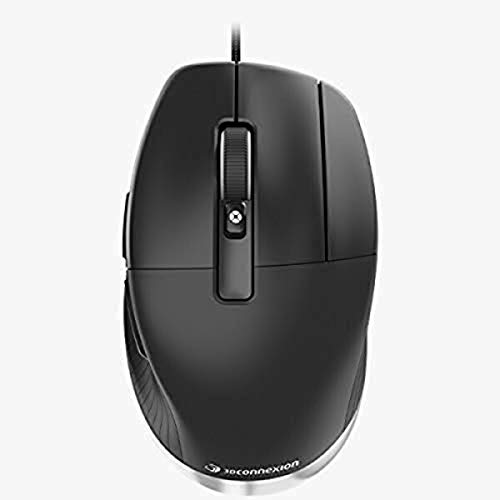
The CadMouse Pro sits closer to a specialist workstation tool than a standard office mouse. With seven buttons and an optical sensor, it gives you more control points than the HP and Lenovo picks, which matters when repeated commands start eating into your day.
Its wired setup is a practical plus for a fixed drafting desk, because you never have to think about connection drops or battery checks. The black finish keeps it understated, but the real appeal is how it supports dense work without feeling overly bulky, which is a nice middle ground for many CAD desks.
What We Like
- Seven-button layout supports more command access than basic office mice.
- Wired connection stays dependable for fixed workstations.
- Optical tracking suits detailed pointer work on a desk.
- Black finish keeps the look clean and professional.
Small Caveats
- The wired setup still ties you to the desk.
- Seven buttons can feel like more mouse than you need for casual browsing.
- Its specialist shape makes the learning curve higher than the HP or Lenovo options.
Core Details
Who Should Grab It
You’ll get the most value from this if your desk revolves around drafting, modeling, or other repeated command work.
Look Elsewhere When
Lenovo 100 Wired USB Computer Mouse Black makes more sense for plain office tasks, because it keeps the control layout simpler and less specialized.
This is the most flexible SpaceMouse-style option in the list, because it keeps wireless convenience while still aiming at serious 3D work. Compared with the Bluetooth Edition, the Pro name signals the fuller control approach, so it fits desks that need both movement control and faster access to commands.
That extra capability is handy in long sessions, though the setup still asks for some adjustment compared with a plain mouse like the HP or Lenovo models. In a studio where your layout changes or your machine sits a little farther away, the wireless format can feel very natural, almost like clearing the stage before the work begins.
Bright Spots
- Wireless setup reduces cable clutter on crowded workstations.
- SpaceMouse-style control is built for 3D navigation tasks.
- Pro positioning suggests a fuller command workflow than the basic wireless version.
- Works well in studios where desk layout shifts from project to project.
Room For Improvement
- The wireless format still means battery upkeep.
- Power users may need time to learn the control scheme.
- It makes less sense for simple office navigation than the cheaper wired mice.
Feature Card
Built With In Mind
You’ll want this for advanced design work where cable-free movement and more structured 3D control both matter.
Where A Sibling Pick Shines
3Dconnexion SpaceMouse Wireless Bluetooth Edition is easier to justify for lighter setups, since it trims some of the extra control emphasis.
This wired CadMouse Compact keeps the same small-footprint thinking as the wireless compact model, but it goes back to USB and optical control. That makes it a tidy choice for a desktop that stays put, especially where you want a compact body without giving up a direct cable connection.
The dedicated middle button is a useful touch for design software, since that command often gets repeated far more than casual users expect. You also get seven buttons, five of them programmable, so the layout gives you more room to tailor shortcuts than the simple HP or Lenovo picks, though the smaller body may feel snug during long stretches.
Best Bits
- Compact ergonomic shape helps keep the desk clear.
- Seven buttons, including five programmable ones, add shortcut flexibility.
- Dedicated middle button supports common design commands.
- High-resolution sensor suits careful pointer work.
Honest Caveats
- The compact body may feel tight for larger hands.
- Wired connection still limits movement to cable reach.
- The extra button layout makes sense most in design software, less so in simple office use.
Feature Rundown
Right Fit For
You’re a strong match for this if you want a compact wired mouse that still feels serious enough for design work.
Another Choice May Suit
3Dconnexion CadMouse Compact Wireless is the better call for travel-heavy use, because dropping the cable makes it easier to pack and reposition.
How To Choose The Right 3d Computer Mouses
Match The Mouse To The Work You Actually Do
A basic wired mouse and a 3D navigation device solve very different problems, even though they live in the same category. HP Wired Mouse 100 and Lenovo 100 are for normal cursor work, while the 3Dconnexion SpaceMouse models are meant for moving through 3D space in CAD or modeling software. That split matters more than brand loyalty, because the wrong shape can slow you down every single day.
Hand feel matters too, and you can read a lot from the body style before you ever think about button count. A full-size shell like Lenovo 100 gives more palm room, while compact choices such as the CadMouse Compact Wireless and CadMouse Compact USB keep the footprint small for tight desks. For long sessions, the honest question is not just comfort, but whether your hand position stays relaxed after an hour or two.
Wired, Wireless, And Desk Layout
Cable-free gear sounds convenient, yet it makes the most sense in workspaces that move around or stay cluttered. SpaceMouse Wireless Bluetooth Edition and SpaceMouse Pro Wireless BT help when your desk changes often, while wired models like HP Wired Mouse 100 or CadMouse Pro Black keep setup steady and simple. The trade-off is straightforward, wireless adds freedom, wired adds predictability.
Connection choice also affects maintenance. A wired mouse removes battery checks, but it asks you to live with cable reach and cable routing. Wireless designs feel cleaner in use, though they bring the usual chore of keeping them powered, which is fine for most studio desks and less fun in a bag that gets unpacked and repacked constantly.
Shortcut Density And Learning Curve
Button count starts to matter once your work includes repeated commands. The SpaceMouse Pro 3DX-700040 and CadMouse Compact USB both give you more programmable control than the plain HP and Lenovo options, which can save time in design software. That extra control, though, takes a little setup and a little patience.
Think of the high-button models as work tools, not just pointing devices. They’re better suited to people who already know their workflow and want to trim repeated keyboard trips, while simpler mice stay friendlier for shared desks and mixed-use computers. The right pick is the one that removes friction from your actual day, not the one with the longest feature list.
Before You Click Buy
Wrong Turns To Avoid
A common mistake is treating every mouse as interchangeable. A SpaceMouse belongs in 3D work, but it feels like overkill for email and browsing, while a plain three-button mouse can feel limiting once shortcut-heavy software enters the picture. Matching the control style to the job is the easiest way to avoid regret.
Size gets overlooked too. Compact bodies are great for travel or tight desk layouts, yet they can feel cramped in larger hands after long use. Full-size shapes give more room, but they take up more space and can feel bulky beside a small laptop setup.
The Upgrade Payoff
Higher-tier models usually cost more because they add specialty control, more buttons, better ergonomics, or a cleaner wireless setup. In this list, that shows up in the SpaceMouse Pro’s 6DoF control and programmable keys, and in the CadMouse line’s extra buttons and design-focused shape. You’re paying for workflow fit, not just a shell and a sensor.
That upgrade makes the most sense for CAD users, 3D modelers, and anyone who repeats the same commands all day. For plain office work, the HP or Lenovo mice already cover the basics without much fuss. Spend up only where the extra control will get used enough to matter.
Final Thoughts
For everyday office work, the HP Wired Mouse 100 and Lenovo 100 Wired USB Mouse are the easy, low-drama choices. For design or modeling, the 3Dconnexion SpaceMouse and CadMouse models make a lot more sense because they’re built around the way that work actually moves. You don’t need the most complex option, just the one that fits your desk, your hand, and your software. That’s the one that stays useful long after the novelty fades.
