
3D modeling work asks a lot from your hand, your desk, and your patience. A good control device can make viewport orbiting, menu access, and long sessions feel smoother, whether you spend your day in CAD, animation, or product design. This roundup focuses on models that suit different grip styles and workflows, from thumb-operated trackballs to dedicated 3D controllers.
Quick Look At Our Shortlist

Nulea Wireless Trackball Mouse Ergonomic 21.7 Tilt Stand Thumb Control

SABLUTE MAM1 Pro Ergonomic Wireless Trackball Mouse Adjustable Angle
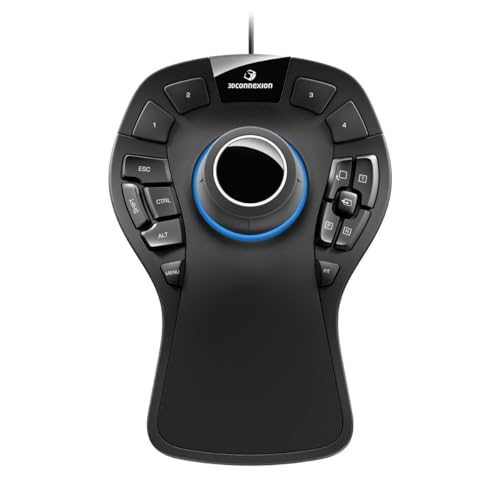
3Dconnexion 3DX-700040 SpaceMouse Pro 3D Mouse

3Dconnexion SpaceMouse Wireless Bluetooth Edition 3DX-700115

3Dconnexion CadMouse Compact Wireless

3Dconnexion SpaceMouse Pro Wireless BT

WL300 Bluetooth Mouse Silent Wireless Mice Grey

3DConnexion 3DX-700059 Spacemouse Compact 3D Mouse
More Details On Our Top Picks
The Nulea takes a trackball route that makes sense for long desk sessions, especially when your wrist prefers less side-to-side movement. The 21.7 tilt stand gives your hand a more angled posture, and that usually feels friendlier during CAD cleanup or scene browsing than a flat mouse body. It also switches among three devices, which helps in a home office where your laptop, desktop, and tablet all share the same desk.
The trade-off is straightforward, trackball control asks for a short adjustment period, and that can slow you down at first. Still, the rechargeable design and multiple DPI levels make it a flexible everyday tool rather than a niche gadget.
Strong Points
- Thumb-operated tracking keeps hand movement contained.
- 21.7-degree tilt supports a more natural grip angle.
- Four DPI levels help you tune pointer speed for detail work or broader navigation.
- Bluetooth and 2.4G support cover more setups without fuss.
- Three-device switching suits mixed workstations and shared desks.
Things To Consider
- Trackball control can feel unfamiliar for a few days.
- The ball area will need routine cleaning to stay smooth.
- It works best for control-minded tasks, not fast sweeping motion.
Feature Rundown
Who It Suits Best
You benefit most here if your day moves between spreadsheets, light modeling, and general office work, and you want one pointing device that feels settled on the desk.
Where Another Pick Suits Better
3Dconnexion SpaceMouse Pro 3D Mouse suits heavier modeling work better, since its dedicated 3D navigation controls fit more technical scene movement.
The SABLUTE MAM1 Pro stays in the same trackball lane as the Nulea, but its adjustable 0-degree and 18-degree positions give you a simpler way to fine-tune wrist angle. Quiet clicking matters more than most spec sheets admit, especially in an open office or a late-night apartment setup where sharp button noise gets old fast. Its gray ball finish also gives it a more restrained look than many flashy office peripherals.
Multi-device support through Bluetooth and a USB receiver makes it useful for a laptop-plus-desktop routine, though that extra flexibility does mean one more connection path to manage. For most desk-heavy workflows, that trade-off is worth it because the hand position remains the main story here.
What We Like
- Two angle settings let you choose a flatter or more tilted feel.
- Quiet button action suits shared workspaces.
- Bluetooth plus USB receiver support broadens compatibility.
- Rechargeable power keeps battery swaps off your to-do list.
Small Caveats
- Trackball control still needs a short adjustment period.
- Multiple connection options can add setup steps the first time.
- The ball and housing need regular dust clearing.
Core Details
Who Will Love This
You fit this model well if you want a trackball that feels adaptable without getting too complicated, especially for office work that stretches into evening hours.
Another Choice May Suit
Nulea Wireless Trackball Mouse Ergonomic 21.7 Tilt Stand Thumb Control is the easier match for anyone who wants more device switching and a more pronounced tilt base.
This is the most purpose-built control device in the list, and that shows in the 6 degrees of freedom sensor, or 6DoF sensor, which lets you push, pull, twist, and tilt through a model instead of just moving a pointer. The soft-coated palm rest and 15 programmable keys give it the feel of a serious desktop control station, especially for long CAD sessions where quick access matters. Compared with the trackball models above, it asks less for cursor accuracy and more for direct scene handling.
The corded design keeps the setup simple, though the three-foot cable does limit placement a bit. In a studio with a fixed workstation, that rarely matters much, but a cramped desk may feel the restriction.
Highlights
- 6DoF sensor supports direct 3D navigation instead of basic pointer movement.
- Fifteen programmable keys help you keep frequent commands close.
- On-screen prompts and modifier key support can reduce menu hopping.
- The full-size hand rest gives your palm a stable base.
- Works with Windows, macOS, and Linux.
Areas To Watch
- Wired use limits desk placement.
- The size takes more room than the compact models in this roundup.
- It makes the most sense in software that benefits from 3D navigation.
Technical Sheet
Best Suited To
You will get the most from this one if your day revolves around CAD, modeling, or technical design work that rewards direct 3D movement.
Look Elsewhere When
3Dconnexion CadMouse Compact Wireless fits better for travelers and laptop users who want a smaller, cordless pointer rather than a desk-anchored control station.
The wireless SpaceMouse keeps the same kind of 3D navigation focus as the Pro model, but without the cable tied to your desk. That matters in a clean studio layout or a mobile setup where you move between rooms and don’t want a cord tugging at your hand position. Compared with the wired 3DX-700040, this one is the calmer fit for people who value desk freedom over a fixed control dock.
The trade-off is that wireless convenience usually means one more thing to remember in daily use, whether that’s charging or pairing habits. Still, for portable design work and uncluttered desks, the shift away from a cord feels easy to justify.
Reasons To Buy
- Wireless layout keeps the workspace uncluttered.
- SpaceMouse-style 3D control suits modeling and navigation tasks.
- Bluetooth support fits modern desktop and laptop setups.
- Works well in studios that value a cleaner desk surface.
Minor Gripes
- Wireless gear needs regular charging habits.
- Pairing can take a little setup attention the first time.
- The larger 3D controller shape still asks for some desk room.
Details At A Glance
Whose Shelf It Belongs On
You fit this model best if your workstation shifts around a lot, or you want 3D control without giving up a cleaner desktop.
Swap It Out When
3Dconnexion 3DX-700040 SpaceMouse Pro 3D Mouse makes more sense for a fixed studio desk and for users who want a fuller key layout.
Compared with the bigger SpaceMouse controls, the CadMouse Compact Wireless feels closer to a classic mouse shape, which makes it easier to slip into a normal office routine. That smaller footprint helps on tight desks, laptop trays, and travel setups where a large control puck would be awkward. For people who want 3D-adjacent ergonomics without a dramatic learning curve, that balance makes sense.
The honest read is that compact size brings less hand support than the larger pro models, so long studio sessions may favor something fuller. Even so, the cleaner shape and wireless setup make it a sensible middle ground for everyday work.
Bright Spots
- Compact body saves desk space.
- Wireless design keeps cable clutter down.
- Classic mouse profile lowers the adjustment barrier.
- Works well beside a laptop on the move.
Room For Improvement
- Smaller shape gives you less palm support than full-size models.
- It is more of a general-use pointer than a dedicated 3D control device.
- Wireless gear still needs charging discipline.
Core Details
Perfect Match For
You should look here for a compact desktop setup, especially if you want something easier to carry than the larger 3Dconnexion controllers.
Reach For A Different Pick When
3Dconnexion SpaceMouse Pro Wireless BT suits heavier design sessions more closely, since it gives you more pro-style controls in a cordless shell.
This model splits the difference between the wired Pro controller and the simpler wireless picks, which is exactly why it stands out for mobile studios. You get the same family of serious 3D workflow thinking, but without tying your setup to a cable. That can matter in a client room, a hot desk, or anywhere you want one fewer thing snaking across the surface.
The trade-off is the usual wireless one, meaning you should expect a little more upkeep around charging and pairing than you’d get from a corded desk device. For design work that changes location often, though, that extra freedom is easy to appreciate.
Positives
- Wireless layout supports cleaner and more portable workstations.
- Pro-level focus suits heavier modeling and navigation tasks.
- Useful for people who split time between desks.
- Feels more specialized than the general-purpose trackball options.
Worth Noting
- Wireless use brings charging habits into the routine.
- It still asks for enough desk room to sit comfortably.
Feature Snapshot
Built With In Mind
You fit this model best if your workflow moves between offices or worktables and you still want a serious SpaceMouse layout.
Where A Sibling Pick Shines
3Dconnexion 3DX-700040 SpaceMouse Pro 3D Mouse makes more sense for a fixed station, since the corded setup can be simpler to leave in one place.
The WL300 sits apart from the SpaceMouse models because it stays in regular mouse territory, which makes it the easiest entry in this roundup for mixed daily use. Quiet clicking, six buttons, and a sculpted grip make it a sensible travel companion for laptop work, office tasks, and late-night sessions where button noise can get annoying. Its tri-mode connectivity covers wired, 2.4G wireless, and dual Bluetooth, so one mouse can move across a few different setups.
That flexibility is the whole story, and the trade-off is that it does less specifically for 3D navigation than the dedicated 3Dconnexion picks. For general productivity with occasional modeling, though, it’s a steady, practical choice.
Best Bits
- Tri-mode connectivity covers wired, 2.4G, and Bluetooth use.
- Quiet clicks suit shared offices and travel work.
- Six buttons give you more control than a bare-bones mouse.
- Sculpted grip should feel familiar for long everyday sessions.
- Adjustable DPI helps you shift pointer speed as needed.
Areas To Watch
- It is a general mouse first, not a dedicated 3D control device.
- More connection modes can mean more setup choices.
- Any silent-click mechanism still has moving parts that deserve gentle care.
Quick Facts
The Right Fit
You belong here if you split time between office work, travel, and occasional 3D tasks, and you want a mouse that stays easy to live with.
Skip It When
3Dconnexion SpaceMouse Pro 3D Mouse is the stronger choice for serious modeling work that benefits from direct 3D scene control.
The Compact SpaceMouse is the smallest-feeling path into 3Dconnexion’s dedicated navigation style, and that makes it appealing on cramped desks. You give up the bigger hand rest and key-heavy layout of the Pro models, but you also gain something easier to place beside a keyboard, tablet, or notebook. For a compact studio or apartment desk, that difference can matter more than a long feature list.
It still lives in the same 3D navigation family as the larger models, so the learning curve and workflow style remain similar. The honest read is that this is a smarter space saver than a comfort-first control hub.
What We Like
- Small footprint helps on tight desks.
- Dedicated SpaceMouse layout stays true to 3D navigation tasks.
- Easy to position beside a keyboard or laptop.
- Good fit for light to moderate modeling sessions.
Softer Spots
- The compact body leaves less room for the hand than larger pro models.
- It is less control-heavy than the SpaceMouse Pro variants.
- Smaller hardware can feel less planted during very long sessions.
Spec Overview
Who Should Grab It
You fit this model best if your desk space is tight and you want a simple way into dedicated 3D control.
Another Choice May Suit
3Dconnexion SpaceMouse Pro Wireless BT is the better match for mobile studios that want more freedom from cables.
How To Choose The Right 3d Modeling Mouses
Match The Control Style To Your Work
3D modeling asks different things from your hand depending on the software and the project. A trackball like the Nulea or SABLUTE models works well for everyday pointer control, while a SpaceMouse shifts the focus toward orbiting, panning, and scene movement. That difference matters more than appearance, because the right tool should match how you spend your time, not just how it looks on the desk.
Designers who jump between CAD, animation, and general office work often prefer a hybrid setup. In that case, a compact mouse plus a dedicated 3D controller can make more sense than a single device trying to do everything. Heavy modelers usually get more value from the SpaceMouse family than from a standard pointer.
Pay Attention To Hand Position And Desk Space
Angle changes, like the 21.7-degree tilt on the Nulea or the 0-degree and 18-degree settings on the SABLUTE, affect how relaxed your wrist feels during long sessions. A flatter setup may suit quick pointer work, while a more angled base can feel easier on the hand during repetitive navigation. None of that sounds dramatic, yet over a full workday it becomes hard to ignore.
Desk size matters too. The SpaceMouse Pro and the wired Pro model take more room than the compact picks, so a small desk may be happier with the Compact or the CadMouse Compact Wireless. On a larger workstation, the bigger palm rest and extra keys can feel well worth the footprint.
Think About Connection, Portability, And Setup Habits
Wireless models keep cords out of the way, which helps in a studio that changes layout often or in a laptop setup that moves from room to room. Bluetooth and 2.4G support also makes switching devices easier, though you do trade for charging routines and occasional pairing steps. A corded model is simpler in a fixed workstation, and that simplicity still appeals to many desk-bound users.
For a travel-heavy routine, compactness often matters as much as function. The WL300 gives you general mouse flexibility across wired and wireless modes, while the CadMouse Compact Wireless trims bulk for carry-friendly use. The best choice is the one that fits your real desk, your real bag, and your real habits.
Things Worth Knowing Before You Choose
Common Shopping Slip Ups
One common mistake is treating every mouse in this category as the same kind of tool. A trackball, a regular mouse, and a SpaceMouse solve different parts of the workflow, so mixing them up leads to disappointment fast. Another slip-up is overlooking desk space, because a control-heavy model can feel awkward on a crowded station.
Connection style gets missed too. A wireless model brings more freedom, but it also asks for charging attention, while a corded model stays put and usually feels simpler. Matching the device to your actual workspace keeps the setup more comfortable.
Why Top Tier Costs More
Higher-end models usually spend the money on more control surfaces, more direct navigation, and better hand support. That shows up in features like programmable keys, larger rests, or 6DoF control that makes technical work feel less fussy. You are paying for time saved and a setup that feels more specialized.
The upgrade makes the most sense for long sessions and demanding software. For lighter work, a simpler trackball or compact wireless mouse can be enough, and that is a sensible place to stop. Paying more only matters when the extra controls will get used daily.
Final Thoughts
Your best match depends on whether you need a true 3D control device or a comfortable mouse that can keep up with everyday work. The SpaceMouse Pro models fit serious modeling, while the Nulea, SABLUTE, and WL300 make more sense for mixed desk use. Keep an eye on desk space, grip angle, and connection style, and the right choice gets a lot easier. Pick the one that fits your working day, not just the spec sheet.
