
Accessible Computer Mouses matter most when standard desk habits get in the way. Long work sessions, cramped trays, travel bags, and limited hand movement all call for shapes that reduce strain on your wrist and keep control steady. Some of the picks below sit in the palm, some move with your thumb, and one leans hard into adaptive use. That mix gives you real choice instead of a one-shape-fits-all shortcut.
Quick Look at the Shortlist

YUMQUA Mini Handheld Trackball Mouse

YUMQUA Finger Handheld Mouse, Trackball Mouse Wireless

Uineer Vertical Ergonomic Mouse, Wireless Bluetooth Mouse

Uineer Ergonomic Wireless Vertical Mouse, 3-Mode Bluetooth

SABLUTE Wireless Mouse for Laptop, Quiet, Compact & Portable

Wireless Trackball Mouse, SABLUTE MAM2 Ergonomic Mouse

AbleNet BIGtrack 2 Trackball
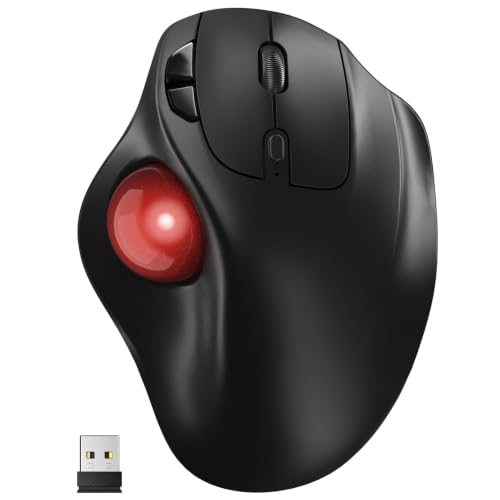
Ergonomic Wireless Trackball Mouse, Bluetooth & 2.4G
More Details On Our Top Picks
The handheld shape matters here more than the word “mouse” does. You steer with your thumb and keep it off the desk, so cramped trays, couch work, and travel setups feel less awkward than a flat pointer. The trade-off is simple, hand control takes a little adjustment, especially for anyone used to broad wrist movement.
Compared with the larger vertical picks later in this list, the YUMQUA makes space the main concern, not posture range. That makes it a smart fit for laptop users and anyone who needs cursor control in tight quarters, though the smaller body can feel less natural for long editing sessions. It’s a lean little tool, nothing flashy, and that’s part of the appeal.
What We Like
- Thumb-driven control keeps your desk clear.
- Right- or left-hand use broadens the fit.
- Plug-and-play setup lowers setup friction on laptops.
- 4D scrolling helps with navigation in long documents.
- Handheld format works well on a couch or during travel.
Things To Consider
- The compact shape asks for a short adjustment period.
- Smaller controls can feel less relaxed during all-day office work.
- Handheld storage takes some care in a bag.
Feature Snapshot
Who It Suits Best
You’ll like this most for laptop work in tight spaces, shared seating, or travel days where a flat mouse pad is a nuisance.
A Better Fit Elsewhere
Uineer Ergonomic Wireless Vertical Mouse, 3-Mode Bluetooth is the easier step up for office users who want a more traditional desk posture with less thumb-focused control.
The wireless version keeps the same handheld idea but drops the cord, which makes it easier to move between a laptop bag, a living room table, and a temporary office setup. The 2.4GHz USB connection means you use a small receiver rather than a paired desktop ritual, so it suits straightforward plug-in convenience. The trade-off is another tiny receiver to keep track of, and that matters on the road.
Compared with Item 1, this one favors cord-free convenience over a wired connection. That makes it a tidy pick for commuters, students, and anyone who works in short bursts across several places, though the handheld learning curve still applies. The honest read is that portability is the point here, not a plush desktop feel.
Highlights
- Wireless setup cuts cord clutter.
- Thumb ball control keeps movement compact.
- Small footprint suits laptop bags and shared desks.
- 2.4GHz receiver support is simple to manage.
Minor Gripes
- The receiver needs safe storage so it does not go missing.
- Handheld control still asks for a brief adjustment period.
Technical Sheet
Made For
You’ll get the most from this in travel bags, study corners, and any spot where a wire would get in the way.
Another Choice May Suit
SABLUTE Wireless Mouse for Laptop, Quiet, Compact & Portable fits better for anyone who wants a more conventional portable mouse instead of a handheld trackball.
The vertical shell gives your hand a handshake-style grip, which many people find easier to live with during long office stretches. Dual Bluetooth plus 2.4G means you can move between several devices without rethinking the whole setup, and the rechargeable design keeps it from feeling disposable. The seven-color ambient lighting adds a visual twist, though some desks will prefer a calmer look.
Compared with the handheld YUMQUA picks, this Uineer model stays closer to a standard office mouse while still changing the wrist angle. That makes it a stronger all-day candidate for mixed laptop-and-tablet work, especially for someone who jumps between devices. One thing worth considering, the lighting gives it more personality than some workspaces want.
Upsides
- Vertical angle can feel easier on the hand than flat mice.
- Three-device switching suits busy desks.
- Rechargeable design avoids constant battery swaps.
- Bluetooth and 2.4G give you flexible pairing paths.
Worth Noting
- Lighting may feel busy in a low-key office.
- Vertical shapes usually need a brief acclimation period.
- Multi-device features matter less for a single-machine setup.
Core Details
Built With In Mind
You’ll appreciate this most in a multi-device workspace where a vertical grip and wireless switching save time.
Where A Sibling Pick Shines
YUMQUA Mini Handheld Trackball Mouse Finger Mouse USB Wire is the better fit for anyone who needs a smaller off-desk control style rather than a vertical body.
This vertical Uineer leans into quiet operation, which helps in shared rooms and late-night work corners. Three connection modes, Bluetooth 5.0, Bluetooth 4.0, and 2.4GHz, make it easier to match old and new gear without changing your desk setup every time. The 4 DPI levels give you some cursor-speed control, though the exact sweet spot depends on your screen size and work style.
Compared with Item 3, this one adds a more explicit silent-mouse angle and a slightly broader wireless menu. That makes it a sensible fit for people who split time between a laptop, iPad, and PC and want fewer sharp clicks in the room. It still asks you to get used to the vertical shape, but the payoff is a calmer feel.
Reasons To Buy
- Quiet click behavior suits shared spaces.
- Three wireless modes add useful flexibility.
- Rechargeable power keeps daily use tidy.
- Four DPI steps help with cursor speed matching.
Small Caveats
- Vertical designs can feel odd on day one.
- Multi-mode pairing matters less for a single computer.
- Lighting is useful for some setups and unnecessary for others.
Feature Rundown
Who Will Love This
You’ll get the most from this in a quiet home office or shared space where click noise matters.
Another Choice May Suit
Yadkbo Ergonomic Wireless Trackball Mouse fits better for someone who wants battery-powered trackball control instead of a vertical grip.
This SABLUTE is the plain-spoken portable option in the list. It keeps a slim body, quiet operation, a USB-C adapter, three DPI levels, and sleep mode, so it suits bags, briefcases, and shared desks where you want less clutter and fewer surprises. The trade-off is that compact shapes usually feel less anchored than larger office mice during long sessions.
Compared with the Uineer vertical picks, this one gives up posture-focused shaping and wins back simplicity. That makes it a sensible call for work, study, and travel, especially when you want a mouse that disappears into your routine. One practical note, small portable gear deserves a dedicated pocket so the adapter stays with it.
Plus Points
- Slim body slides easily into a bag.
- Quiet clicks suit libraries and shared tables.
- USB-C adapter broadens laptop compatibility.
- Sleep mode helps stretch battery use between sessions.
Areas To Watch
- Compact sizing can feel less planted during long office work.
- The small adapter deserves careful storage.
Details At A Glance
The Right Fit
You’ll like this most for commuting, study tables, and any setup where portability matters more than a full-size grip.
Look Elsewhere When
AbleNet BIGtrack 2 Trackball suits you better when larger control surfaces and adaptive use matter more than a slim travel shape.
The MAM2 takes the trackball idea further with rechargeable power, three-device support, silent click behavior, and a thumb-controlled red ball. For a busy desk, that combination can feel efficient, especially when you switch between laptop, desktop, and tablet all day. It also promises easier cleaning than some trackball layouts, though any trackball still asks for occasional upkeep around the ball housing.
Compared with the earlier YUMQUA handheld picks, this SABLUTE model is more desk-anchored and more suited to repeat office use. That makes it a stronger fit for someone who wants compact cursor control without giving up a full desktop workflow. The honest read is that a trackball rewards patience, then pays it back in steadiness.
Best Bits
- Three-device support suits layered work setups.
- Thumb ball control keeps your hand mostly still.
- Silent clicks help in shared rooms.
- Rechargeable design keeps battery swaps out of the routine.
Softer Spots
- Trackballs take a little getting used to.
- Ball area cleaning is part of long-term upkeep.
- Desk-centered use matters more here than travel convenience.
Core Details
Who Should Grab It
You’ll get the most from this at a desk where you switch devices often and want a trackball that stays calm and compact.
Skip It When
SABLUTE Wireless Mouse for Laptop, Quiet, Compact & Portable is the simpler pick for travel-heavy routines that do not need a trackball.
The BIGtrack 2 stands out because it is built around easier control, not around style points. The large trackball and two-button layout give users with limited fine motor control a simpler surface to work with, and that can make everyday computer use feel far less fussy. It is less about speed and more about dependable, direct input.
Compared with the SABLUTE trackball, the AbleNet goes further toward adaptive use and away from general desktop versatility. That makes it the most purpose-driven item in this roundup, and for the right setup it can be deeply helpful. The honest trade-off is that its size and layout are about access first, portability second.
Bright Spots
- Large trackball offers a broad control surface.
- Two-button layout keeps operation straightforward.
- Adaptive focus suits users with limited fine motor control.
- Stable desktop design supports repeated everyday use.
Points To Note
- The larger body is less travel-friendly than smaller options.
- Users who want many shortcut features may find it basic.
- Its purpose-driven design matters most in supportive setups.
Feature Card
Whose Shelf It Belongs On
You’ll want this most in an accessibility-focused setup where ease of control matters more than compact size.
Reach For A Different Pick When
YUMQUA Finger Handheld Mouse, Trackball Mouse Wireless suits you better if you need a lighter, more portable off-desk control style.
The Yadkbo takes the familiar thumb-trackball route and adds both Bluetooth and 2.4G connection paths. That gives it a broad compatibility feel for Mac, Windows, laptops, and mixed home-office setups, while the five DPI settings let you tune pointer speed more finely than simpler mice. The battery-powered design keeps charging out of the picture, though that also means you’ll want spare AAA batteries on hand.
Compared with the rechargeable SABLUTE MAM2, this Yadkbo trades in charging for replaceable batteries, which some people still prefer for desk planning. That makes it a practical option for homes that want flexibility without cable management. It’s not the most specialized pick in the roundup, but it does a lot of things steadily.
Standout Traits
- Bluetooth and 2.4G broaden device compatibility.
- Five DPI levels give you more cursor control.
- Thumb trackball keeps hand movement compact.
- Battery power avoids recharge scheduling.
Room For Improvement
- AAA battery use means ongoing battery planning.
- Trackball use still rewards a short adjustment period.
- The feature set is practical rather than flashy.
Spec Overview
Best Suited To
You’ll like this most in a home office that values battery flexibility and multi-device switching.
Swap It Out When
Uineer Ergonomic Wireless Vertical Mouse, 3-Mode Bluetooth is the better fit for anyone who wants a vertical grip instead of trackball control.
How To Choose The Right Accessible Computer Mouses
Match the Shape To Your Hand
Shape comes first, because the wrong grip turns every task into a small annoyance. Vertical mice tilt the hand into a more upright position, handheld trackballs keep motion under the thumb, and classic portable mice stay closest to what most people already know. A good match feels calm after a few minutes, not like a puzzle.
Desk height, hand size, and how long you stay at the computer all matter here. A commuter with a laptop bag usually wants a smaller body, while someone stationed at a workstation can live with a larger adaptive shape. The right form factor should support the task, not force you to work around it.
Think About Connection Style
Wireless freedom sounds simple, but the details change the experience. Bluetooth works well across modern laptops and tablets, while 2.4GHz usually uses a small USB receiver for quick desktop pairing. Wired USB still has a place for anyone who wants a steady connection and no charging or battery planning.
That choice matters most in mixed-device homes and offices. A person who jumps from laptop to desktop may value multi-mode switching, while someone who keeps one machine on one desk may prefer the calm of a single connection path. Less fuss at setup usually means better day-to-day use.
Look Past the Marketing and Check the Controls
DPI means dots per inch, which is a simple way to describe pointer sensitivity. Lower DPI usually gives you finer control, while higher DPI can move the cursor more quickly across a larger screen. Extra settings help, but only when they match your habits and display size.
Click feel, silent operation, trackball cleaning, and battery upkeep also deserve attention. Quiet buttons help in shared spaces, while trackballs ask for occasional cleaning around the ball housing. Small maintenance chores sound minor now, yet they matter a lot after months of use.
Before You Click Around
Common Shopping Slip Ups
Many people focus on shape alone and skip the little details that shape daily comfort. A trackball can be great on a cramped desk, but it still needs an adjustment period, and a slim travel mouse can feel too small for long work blocks. Portability and comfort rarely peak in the same place.
Another common miss is ignoring connection fit. A USB receiver helps some setups, while Bluetooth suits others, and battery style can matter more than it first appears. Matching the mouse to your actual device mix saves more frustration than chasing extra features.
What The Higher Tier Buys
Higher-tier models usually pay for better switch layouts, more connection choices, rechargeable power, and stronger multi-device support. In this category, that can mean quieter clicks, more DPI steps, or a shape that gives your hand a cleaner resting position. Those extras do not matter to everyone, but they matter a lot in full workdays.
The upgrade is worth it for people who use a mouse for hours, move between several devices, or need a more deliberate control style. If your use is light and occasional, simpler picks can be enough. Spend for the features you touch every day, not the ones that just sound nice on the page.
Final Thoughts
Accessible Computer Mouses cover a wide range of needs, from pocket-size handheld trackballs to purpose-built adaptive designs. The best fit comes down to your desk space, your hand comfort, and how much device switching you do during the week. YUMQUA and SABLUTE handle portability well, while Uineer and AbleNet lean harder into posture or adaptive control. Pick the shape that fits your routine, and the rest tends to fall into place.
