
Need a mouse that pairs quickly, travels well, and does not eat desk space? These eight affordable Bluetooth mouses cover the practical middle ground, from quiet office work to laptop carry-on life. You get different strengths here, including multi-device switching, adjustable sensitivity, and rechargeable designs, so your choice can match how you actually work. The best fit is usually the one that disappears into your routine and stays comfortable after a long session.
Quick Look At The Shortlist
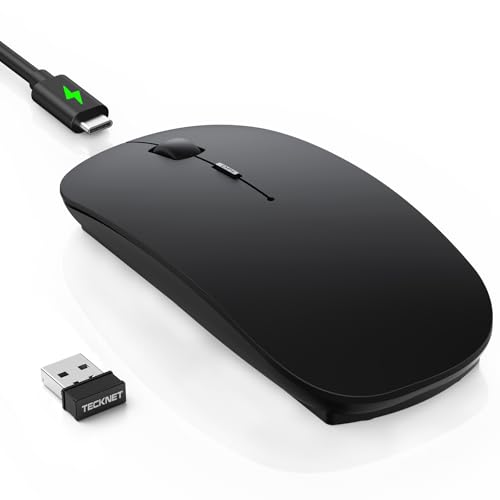
TECKNET Bluetooth Wireless Mouse Ultra-Thin Rechargeable Mouse

WL300 Bluetooth Mouse Silent Wireless Mice-Grey
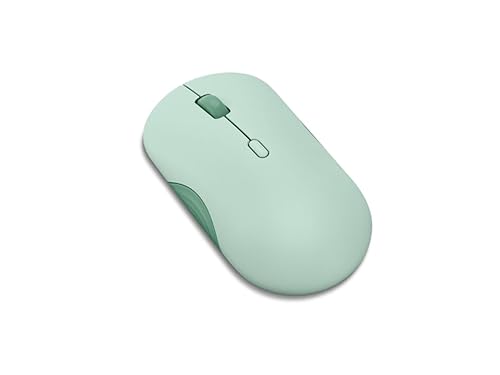
Lenovo 350 Wireless Bluetooth Mouse Breeze Moss

WL300 Bluetooth Mouse Silent Wireless Mice-Grey

Logitech M240 Compact Silent Bluetooth Wireless Mouse Graphite

Logitech M196 Compact Ambidextrous Bluetooth Wireless Mouse Rose

TECKNET Wireless Mouse with LED Display Tri-Mode Bluetooth Mouse for Laptop

KANMABPC Wireless Bluetooth Mouse Silent Dual Mode Mouse Black
More Details On Our Top Picks
The thin profile makes this TECKNET feel easy to slip into a laptop sleeve, and the recharge-first setup suits anyone who prefers fewer spare batteries in a bag. Bluetooth 5.2, Bluetooth 3.0, and 2.4G wireless give you room to match different devices, which helps in a mixed home office.
The adjustable 4800 DPI setting matters because it gives you more control over cursor speed across spreadsheets, documents, and quick edits. That flexibility is handy for Mac, iPad, Windows, and Android use, though the trade-off is that a long feature list can be more than you need for very basic browsing.
Strong Points
- Three connection paths cover more desk setups.
- Rechargeable power keeps routine upkeep lighter.
- Six DPI steps help you tune cursor feel.
- Low-profile shape works well beside a laptop.
Things To Consider
- The feature set feels richer than a basic travel mouse, which can be more than casual users need.
- Ultra-thin bodies are not always the most palm-filling choice for very long desktop sessions.
Feature Snapshot
Who It Suits Best
You get the most from this pick in a laptop-heavy setup where switching between devices matters and a slim shell is a plus.
Where A Sibling Pick Shines
Lenovo 350 Wireless Bluetooth Mouse Breeze Moss suits a low-fuss desk better, especially for you if battery stretch matters more than extra connection modes.
This wegear WL300 leans into quieter desk manners, which is exactly what helps in a shared office, a library corner, or a late-night work session. Six buttons and a sculpted grip give it more control than the plainest travel mice, so you get a little more structure under your hand.
Adjustable DPI gives you room to soften or speed up cursor movement, and the 18-month battery life claim fits the kind of set-it-and-forget-it routine many commuters want. The honest trade-off is size and shape, since a sculpted body can feel more locked-in than a flatter mouse during very casual use.
What We Like
- Quiet clicks suit shared spaces well.
- Six-button layout adds useful control.
- Sculpted grip supports longer desk sessions.
- Battery stretch reduces maintenance attention.
Room For Improvement
- The shaped body may feel less universal than a simple ambidextrous shell.
- More buttons can take a little getting used to.
Core Details
Built With In Mind
You are a strong fit for this one if you work around other people and want quieter clicks without giving up a more substantial grip.
Another Choice May Suit
Logitech M240 Compact Silent Bluetooth Wireless Mouse Graphite is the easier everyday carry for you if a simpler three-button layout matters more than added control.
The Lenovo 350 feels geared toward people who want a clean, low-drama mouse rather than a pile of extras. Silent clicking, a 3-step DPI range, and pairing with two devices give it a straightforward shape that works well beside a work laptop or a home desktop.
Its 36-month battery claim stands out in this group, especially next to shorter-life options like the Logitech M196. That long stretch is handy for anyone who dislikes frequent maintenance, although a simpler layout also means fewer tailoring options for power users.
Upsides
- Long battery stretch reduces upkeep pressure.
- Two-device pairing helps with desk swapping.
- Silent click behavior suits quiet rooms.
- Three DPI steps cover common cursor needs.
Small Caveats
- Three sensitivity levels are enough for many tasks, but not as flexible as higher-range models.
- The minimal control set may feel plain next to the TECKNET models above it.
Details At A Glance
The Right Fit
You will appreciate this most in a work setup that prizes low maintenance, quiet clicks, and simple switching between two machines.
Where A Sibling Pick Shines
TECKNET Wireless Mouse with LED Display Tri-Mode Bluetooth Mouse for Laptop is the more feature-heavy option for you if a status screen and three-way connectivity matter more than Lenovo’s cleaner simplicity.
Among the more flexible options here, this XBG version stands out because it adds wired use alongside 2.4G wireless and dual Bluetooth modes. That makes sense for a desk that changes shape often, or for a commute where you might swap between a tablet, laptop, and desktop without thinking about drivers.
The wired fallback is the useful bit, since it gives you another path when you prefer not to think about charging or pairing. The trade-off is that more connection modes can mean more moving parts in day-to-day use, so it suits organized users more than minimalist ones.
Reasons To Buy
- Three connection styles add real flexibility.
- No driver setup keeps first use simple.
- Works across laptop, tablet, and desktop setups.
- Quiet operation suits shared work areas.
Areas To Watch
- The extra modes can feel more complex than a basic Bluetooth-only mouse.
- Feature depth is useful, but it also asks for more attention to switching and charging habits.
Feature Rundown
Who Should Grab It
You get the most value here if your day moves between several devices and you want one mouse that can keep up without extra accessories.
Swap It Out When
TECKNET Bluetooth Wireless Mouse Ultra-Thin Rechargeable Mouse suits you better if you want a slimmer carry and do not need the wired fallback.
The M240 keeps things tidy: Bluetooth connection, no USB receiver, and a compact body that slips easily into a laptop bag. For commutes, hotel desks, or a small home office, that simplicity is a real advantage because there is less to carry and less to forget.
Three non-customizable buttons keep the design straightforward, which is fine for general browsing and office work. The trade-off is obvious, though, since you give up extra controls in exchange for a cleaner setup and a shape that stays out of the way.
Best Bits
- No receiver keeps the kit lighter.
- Quiet clicks work well in shared spaces.
- Compact size suits travel bags and tight desks.
- Simple controls make it easy to learn.
Minor Gripes
- The button layout is fixed, so you do not get much personalization.
- Compact sizing can feel small for larger hands during longer work blocks.
Technical Sheet
Made For
You are the best match for this mouse if you want a simple, small, office-friendly option that travels cleanly with a laptop.
Look Elsewhere When
TECKNET Wireless Mouse with LED Display Tri-Mode Bluetooth Mouse for Laptop is a smarter fit for you if you like visual status cues and more connection flexibility.
The M196 is the most straightforward option in this set, and that makes sense for home offices, school bags, or anyone who wants a mouse that just gets out of the way. Ambidextrous shaping is useful because it keeps the hand position neutral, which helps left- and right-handed use without overthinking it.
Its 12-month battery claim is shorter than the Lenovo 350 and the M240, but that still works fine for many people who already rotate devices and do not mind a more regular maintenance rhythm. The catch is the minimal control layout, which is great for simplicity but not ideal for anyone wanting extra buttons or deeper tuning.
Positives
- Ambidextrous shape suits both hands.
- Compact body stores easily in a bag.
- Quiet clicks keep desk noise down.
- Bluetooth-only setup stays uncluttered.
Points To Note
- The shorter battery claim means you may revisit upkeep more often than with the Lenovo 350.
- Three fixed buttons keep it simple, but they also limit control.
Core Details
Best Suited To
You will like this most if you want a basic, easy-carry mouse that works cleanly in school, office, or home setups.
Reach For A Different Pick When
Logitech M240 Compact Silent Bluetooth Wireless Mouse Graphite is the better match for you if a longer battery claim and a slightly more mature feel matter more than this model’s lighter footprint.
This TECKNET is the most information-rich mouse in the group, and the LED screen is the part that changes day-to-day use the most. Seeing DPI, battery level, and connection mode at a glance is handy during busy work sessions, especially when your laptop, iPad, and MacBook all share the same desk.
Tri-mode support, including BT5.2, BT5.0, and 2.4G, gives you real switching range, and Type-C charging keeps it current with modern gear. The trade-off is that a screen and extra modes can feel a little more involved than the simpler Logitech models, so it suits organized multitaskers more than minimalists.
What We Like
- LED display removes guesswork about status.
- Three-device switching helps busy desk workflows.
- Type-C charging matches newer laptop accessories.
- Silent click behavior stays office friendly.
Honest Caveats
- The screen adds another element to keep clean.
- Feature depth makes it less minimal than the M240 or M196.
Feature Card
Whose Shelf It Belongs On
You fit this mouse best if your desk regularly shifts between several devices and you like visible status feedback instead of silent guessing.
A Better Fit Elsewhere
Logitech M240 Compact Silent Bluetooth Wireless Mouse Graphite is the calmer choice for you if you would rather keep the setup plain and pocketable.
The KANMABPC lands in a practical middle zone with Bluetooth 5.2, 2.4G support, and a rechargeable battery, so it covers the basics without a lot of extra fuss. Its quiet left and right buttons make it easier to use in shared rooms, and the LED indicator adds a small but useful status cue.
That 2-hour charge and 7 to 15 day use window may suit a desk routine that stays near a cable, though it is less hands-off than the longest-running models in this list. The ergonomic shape helps the mouse feel steadier in hand, but users who like a flatter silhouette may prefer the Logitech M240 instead.
Bright Spots
- Dual-mode support adds useful pairing flexibility.
- Rechargeable power keeps battery swaps out of sight.
- Quiet buttons suit offices and shared homes.
- LED indicator helps you track status quickly.
Worth Noting
- The use window is shorter than long-stretch options like the Lenovo 350.
- Charging more often may suit desk use better than constant travel.
Feature Rundown
Who Will Love This
You are a good match for this mouse if you want a quiet, rechargeable option for laptop, desktop, or tablet use without paying for excess bells and whistles.
Where Another Pick Fits Better
Lenovo 350 Wireless Bluetooth Mouse Breeze Moss is the steadier choice for you if longer battery stretch matters more than recharging convenience.
How To Choose The Right Affordable Bluetooth Mouses
Connection And Device Fit
The first question is not style, it’s how your devices actually connect. A Bluetooth-only mouse keeps the desk clean, while dual-mode or tri-mode models like the TECKNET picks add flexibility for tablets, older laptops, and desktops that still feel better with a USB receiver or wired fallback.
That matters more than most people expect. In a commute-heavy routine, you may prefer no receiver at all, while a shared home office often benefits from a mouse that can jump between machines with less friction.
Shape, Noise, And Control
Mouse shape changes comfort fast. A compact ambidextrous design like the Logitech M196 feels easy to carry and easy to share, while a sculpted body such as the wegear WL300 offers more hand support for longer desk sessions.
Quiet-click switches are worth a look in libraries, classrooms, and open offices. DPI, which means dots per inch, controls cursor sensitivity, so a wider range helps you move from careful spreadsheet work to quicker general navigation without feeling stuck.
Battery And Maintenance Reality
Battery claims tell you a lot about upkeep. A 36-month figure, like the Lenovo 350, means less attention over time, while rechargeable picks ask for more charging discipline but save you from keeping spare cells around.
You may also want to think about cleaning and storage. Smaller mice slip into a bag more easily, but they can collect crumbs and lint around seams and buttons, so a smooth shell is often simpler to wipe down after a week of travel.
Things Worth Knowing First
Traps First Timers Fall Into
Many shoppers focus on Bluetooth alone and forget about shape, button count, and battery rhythm. That leads to a mouse that pairs fine but feels awkward during a long workday, which is a bad trade for something you use constantly.
Another easy miss is assuming every quiet mouse feels the same. Silent switches vary, and a firmer click can still be noticeable in a small room, so you want to match the feel to your environment, not just the spec sheet.
The Upgrade Payoff
Higher-tier mice usually cost more because of extra modes, better ergonomics, stronger battery claims, or useful extras like the TECKNET LED display. Those parts do not matter to everyone, but they do pay off for multitaskers who move between laptops, tablets, and desktops all day.
Spending up also makes sense when your mouse gets heavy use. A more comfortable shell or clearer status readout can save small annoyances every day, and those tiny savings add up faster than flashy specs ever do.
Closing Thoughts
You have plenty of solid choices here, but the right one depends on how you work. For travel and simple pairing, the Logitech M240 and M196 keep things easy, while the Lenovo 350 is the calm pick for long battery stretch. For more switching power, the TECKNET models and the XBG WL300 bring extra flexibility without leaving the budget lane. Match the mouse to your desk habits, and it should feel like a natural extension of your setup.
