
You want a remote that feels less like a blunt TV clicker and more like a pointer that follows your hand. That matters on a couch, at a projector, or beside a desktop where a regular remote keeps missing the mark.
These eight picks cover voice input, motion control, trackball use, backlit keys, and presentation-friendly controls. The right one depends on how often you move between TV, laptop, projector, and streaming apps.
Quick Look At Our Top Picks

BL Air Mouse Remote Control 2.4G RF
EASYTONE Air Mouse Remote Control 2.4 GHz

Nulea M512 Wireless Trackball Mouse Dark Red
Air Mouse Remote MX3 Pro Mini Keyboard

A61 Air Mouse Remote Power Button Only

Rechargeable Air Mouse with Touchpad Black
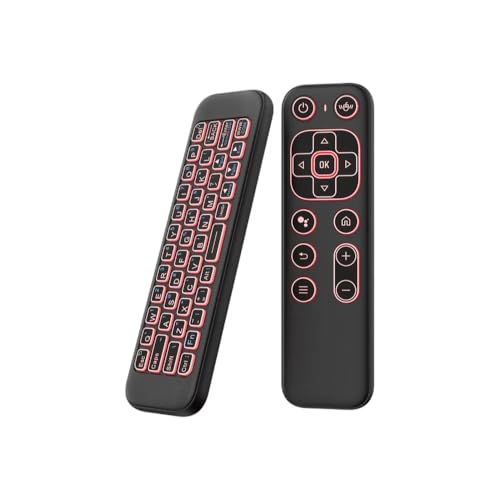
Mini Air Mouse Remote Keyboard 7-Color Backlight

Adesso iMouse P30 Air Mouse GO Plus USB Wireless
More Details On Our Top Picks
BL keeps this model focused on two useful traits, voice input and 6-axis gyroscope control. The gyroscope, which tracks hand motion to move the pointer, suits you well on a TV or projector setup where a regular directional remote feels slow.
The voice side is narrower than it sounds, since the listing says it works inside built-in search boxes and supported apps rather than across every app. That trade-off is fine for home streaming, and the RF wireless link makes the remote feel practical for a living room or a small office.
What We Like
- Voice input adds quick text entry for supported apps.
- 6-axis motion control helps the pointer feel more direct.
- RF wireless support keeps setup simple for a TV or PC.
- Works across several common home-device scenarios, including Android TV boxes and laptops.
Points To Note
- Voice search does not work everywhere, so app fit matters.
- Motion remotes take a little getting used to in tighter spaces.
- You may find the learning curve mild at first because gesture control is less familiar than buttons.
Feature Snapshot
Who It Suits Best
You fit this remote best when you use a smart TV, Android TV box, or HTPC and want voice search without adding a full keyboard.
Where A Sibling Pick Shines
EASYTONE B08DFDNZCV makes more sense for you when you want a broader 3-in-1 control setup and a slightly more keyboard-like feel.
This EASYTONE model leans into a very usable mix, air mouse control, voice input, and IR learning in one handheld body. The 17-key layout is helpful in a couch setup because it gives you direct volume and page controls without forcing every action into gestures.
Compared with the BL remote, this one feels more button-forward, which some people prefer for basic streaming and TV navigation. The built-in microphone helps with spoken input, though the same app-bound voice limitation still applies, so it works best with the right software environment.
Strong Points
- Three control modes make it more versatile than a plain pointer remote.
- 17 keys support fast volume and page changes.
- Voice input can save time during search-heavy use.
- USB receiver use keeps pairing straightforward in a living room or bedroom setup.
Small Caveats
- Voice entry stays limited to supported search areas and apps.
- The denser key layout may take a little familiarization.
- IR learning adds flexibility, but you still need to map it to the gear you use most.
Core Details
Whose Shelf It Belongs On
You suit this remote best when you want one controller for TV menus, simple media navigation, and occasional voice search.
Swap It Out When
BL B08V5JG7JB makes more sense for you when motion steering matters more than button density and app-switching convenience.
Nulea takes a different path from the handheld remotes above, using a 55 mm trackball instead of motion sensing. That matters on a desk because the pointer stays under your thumb, so you move less and keep the mouse parked in one spot.
The left-or-right-hand compatibility and rechargeable design make it useful for long work sessions, travel desks, or cramped setups. Four DPI levels, meaning pointer sensitivity settings, give you a practical range for precise edits or faster scrolling, though the trade-off is a brief adjustment period.
Upsides
- Trackball control reduces the need to move the whole device around.
- Four DPI levels help you tune pointer feel to the task.
- Rechargeable design fits well in a daily workstation.
- Left- or right-hand use broadens comfort across different setups.
Things To Consider
- Trackballs feel different at first, especially for casual mouse users.
- The learning curve is real, so short-term speed may lag behind a standard mouse.
- Ball maintenance matters, since dust and skin oils can affect smooth movement over time.
Details At A Glance
Made For
You fit this mouse best for desk work, mixed-device use, and tight work surfaces where a conventional pointer keeps running out of room.
A Better Fit Elsewhere
Adesso iMouse P30 B09WZGWT88 suits you more when you want a presentation-style USB wireless controller instead of a thumb-driven trackball.
The MX3 Pro pushes harder into all-in-one control than the simpler BL and EASYTONE picks. Its 2.4G wireless link and no-driver setup make it easy to drop into an Android TV box, Smart TV, projector, or Raspberry Pi build without much fuss.
The built-in 6-axis motion sensor helps the cursor follow your hand, which is handy for browsing menus or moving through a projector interface from the sofa. The trade-off is the same one common to motion remotes, you gain flexibility, but precision depends a bit on your hand habits.
Bright Spots
- Mini keyboard support adds more direct text entry than pointer-only remotes.
- Plug-and-play wireless setup keeps setup simple.
- Motion control makes on-screen movement feel less clumsy than arrow keys.
- Broad home-device compatibility helps in mixed-media rooms.
Worth Noting
- Mini keyboard layouts can feel crowded until you learn the key positions.
- Gesture control works best with steady hand movement.
- It makes more sense for media gear than for heavy typing.
Feature Rundown
The Right Fit
You suit this controller best for media rooms where a mini keyboard and cursor control both matter.
Look Elsewhere When
BL B08V5JG7JB is the cleaner fit for you when voice input matters more than typing support.
A61 mixes several useful controls into one compact body, including 2.4G wireless, Bluetooth, backlighting, voice input, and gyroscope steering. The dual-sided mini keyboard is the part that changes daily use the most, because it gives you more direct text entry without leaving the couch.
Only the power button supports infrared learning, so this is not a full-home universal solution in the broadest sense. Still, that partial learning setup can be enough for a living room where you mostly want to unify power control and keep the rest of the handling simple.
Positives
- Dual connectivity widens compatibility across different gear.
- Backlit keys help in dim rooms.
- Voice support and gyroscope input cover both typing and pointer movement.
- Mini keyboard design reduces the need for a separate input device.
- Compact shape suits a media cabinet or coffee table.
Areas To Watch
- Infrared learning is limited to the power button only.
- More features mean a little more setup time than simpler remotes.
- Backlit gear often needs occasional cleaning so the keys stay easy to read.
Core Details
Best Suited To
You suit this model best when you want a richer controller for smart TV use and do not mind a slightly busier learning curve.
Reach For A Different Pick When
Adesso iMouse P30 B09WZGWT88 fits you better for a simpler USB cursor tool built around presentations and desktop work.
ZOZVO aims this remote at people who move between screens, because it works with PC, iOS, and Android while also adding a touchpad and PPT presenter mode. That combination is useful for someone who presents in meeting rooms and then goes back to casual phone or tablet control afterward.
The touchpad gives you a more familiar surface than a pure gyroscope remote, which can feel easier for cursor nudging and slide control. The broad app support listed for PowerPoint, Keynote, TikTok, camera use, and Kindle App makes it flexible, though the wide feature spread also means the layout can feel busy at first.
Reasons To Buy
- Touchpad control feels familiar for many laptop users.
- PPT presenter mode makes it practical for talks and training sessions.
- Cross-platform support helps you move between devices more easily.
- Rechargeable design suits travel bags and shared workspaces.
Minor Gripes
- The broader feature set can take time to learn.
- Touchpads are handy, but they need more precise finger movement than simple buttons.
- Too many modes can feel cluttered in quick couch use.
Feature Card
Who Should Grab It
You fit this remote best when you travel with a laptop, present often, or want one controller that can move across several device types.
Another Choice May Suit
Nulea M512 B0FVF1PLL5 makes more sense for you when thumb-based pointer control on a desk matters more than presentation features.
iPazzPort goes for a familiar living-room blend, a mini keyboard, wireless control, and seven-color backlighting in one compact shell. That mix is handy for couch browsing because you can type a little, point a little, and still keep the remote light enough for casual use.
Rechargeable power and dual-mode operation help it fit a shared TV setup without much clutter. The trade-off is simple, the keyboard layout can feel small compared with a larger handheld controller, so it suits short searches and menu work better than long typing sessions.
Highlights
- Backlighting improves visibility in dim rooms.
- Mini keyboard format keeps the controller compact.
- Rechargeable design reduces routine upkeep.
- Dual-mode control helps it cover several room setups.
- Works well for short text input and browsing from the sofa.
Softer Spots
- The small keys may not suit long typing sessions.
- Compact layouts can take a little muscle memory.
- It leans more toward media control than heavy desktop use.
Spec Overview
The Right Fit
You suit this remote best when you want a compact controller for streaming boxes, smart TVs, and quick searches from the couch.
Skip It When
ZOZVO B0F883YMWZ fits you better when a touchpad and presentation mode matter more than a compact keyboard.
Adesso aims this model at a slightly different crowd, especially people who use a TV, projector, desktop, or camera feed and want simple cursor control. The included charging stand is the detail that makes it easier to keep in one place, which helps in office desks and media stations.
Compared with the motion-first remotes above, this one feels more like a straightforward pointer tool for presentations and controlled navigation. That makes it a sensible choice for a conference room, security-monitoring desk, or any setup where a charging cradle is more useful than extra keyboard layers.
Standout Traits
- Charging stand helps keep the remote parked and ready.
- USB wireless design suits quick setup on common devices.
- Cursor control works well for presentations and screen navigation.
- Broad use across TV, projector, desktop, and camera setups adds flexibility.
Room For Improvement
- It leans more functional than feature-heavy.
- Charging stand use adds one more item to place on the desk.
- People wanting typing support will need a different style of remote.
Technical Sheet
Built With In Mind
You suit this remote best when you need a simple cursor controller for meeting rooms, office screens, or projector-based setups.
Where A Sibling Pick Shines
BL B08V5JG7JB is the better fit for you when voice search and gyroscope control matter more than a charging stand.
How To Choose The Right Air Mouses
Match The Control Style To The Room
Motion-based remotes suit a couch, a projector, or a living room TV where you want pointer movement without a desk. Trackball models suit you better at a workstation, because the hand stays planted and the ball does the moving.
That difference sounds small until you use it daily. A gyroscope remote feels natural for browsing menus from a sofa, while a trackball feels calmer for email, editing, or long sessions at a laptop dock.
Check The Input Mix Before You Commit
Voice input helps with searches, but the listing details matter, since some remotes limit it to supported apps or search boxes. Mini keyboards and touchpads cover more typing and navigation tasks, though they also make the remote busier.
You get the cleanest ownership experience when the control mix matches your habits. Short searches, streaming menus, and app hopping reward simpler layouts, while presentations and mixed-device use often justify extra buttons or a touchpad.
Think About Compatibility And Setup
2.4G USB receivers are easy for TVs, TV boxes, and PCs because the connection tends to be straightforward. Bluetooth helps more with multi-device flexibility, especially around tablets and laptops, but pairing can take a little more attention.
IR learning adds another layer for device control, yet partial support is common in this category. You benefit most when your gear list is clear before you order, especially in rooms where you want one remote to cover more than one screen.
Comfort, Lighting, And Daily Handling
Backlit keys help in dim rooms, and they matter more than many people expect during late-night use. Rechargeable models reduce routine upkeep, while compact bodies are easier to store in a media cabinet or laptop sleeve.
The trade-off is usually size versus control surface. Smaller remotes travel well, but larger layouts or stands can make daily use smoother, especially for shared living rooms or presentation carts.
What To Weigh Before You Commit
Common Shopping Slip Ups
Many people focus on motion control and overlook voice limits, which leads to a remote that feels less useful than expected. Others skip compatibility checks and end up with a device that works on one box but not the rest of the setup.
Another miss is choosing a tiny layout for heavy text entry. A compact keyboard is great for short searches, but it can feel cramped for long sessions or repeated app switching.
Where The Extra Money Goes
Higher-tier models usually spend more on connection options, backlighting, dual-sided layouts, charging docks, or broader device support. That extra flexibility makes sense when the remote is part of a daily desk or media routine.
For casual TV use, a simpler remote may be enough. Spend up when you regularly jump between devices, present slides, or want a controller that replaces several separate tools.
Closing Thoughts
Your best choice comes down to how you control screens every day, not how many features the box lists. BL and EASYTONE fit the classic living-room role, Nulea serves desk use more naturally, and the others cover keyboard, presenter, or charging-stand needs. Pick the one that matches your space, and the whole setup feels easier right away.
