
Bluetooth rechargeable mouses make sense when you want fewer cables, less desk clutter, and a mouse that can travel between a laptop bag, a kitchen table, and a work setup without much fuss. The eight picks below lean in different directions, from premium multitaskers to lighter budget-friendly options, so you can match shape, button layout, and connection style to your day. Some are better for long office sessions, while others suit quick laptop work or a packed commute. The sweet spot is the one that feels steady in your hand and fits the way you actually work.
Quick Look At The Shortlist

Logitech MX Anywhere 2S Bluetooth Edition Compact Wireless Mouse

Logitech MX Master 3S Bluetooth Wireless Mouse No Receiver – Graphite

hunart H6 49g Wireless Mouse, Bluetooth & 2.4GHz, Rechargeable, Green

TECKNET Wireless Mouse, BT 5.0/2.4G, Rechargeable 6-DPI Silent, Grey

TECKNET Wireless Mouse with LED Display, Tri-Mode Bluetooth Mouse for Laptop

Lenovo Yoga Pro Mouse, Bluetooth, USB-C Rechargable, Dual Mode Bluetooth, 6 Button

Afaartcci Rechargeable Wireless Mouse, Silent Bluetooth Mouse (Black)
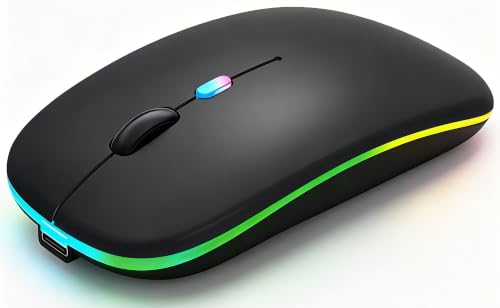
WREANU Wireless Bluetooth Mouse, Rechargeable Laptop Mice, Black
More Details On Our Top Picks
This one makes sense for mobile work because the body stays compact while still aiming at serious desk use. The 4K DPI sensor means pointer movement can feel more responsive for fine edits, and the multi-laptop control angle helps you move between a MacBook and a Windows machine without reshaping your whole setup.
The trade-off is that a compact shell usually asks more from your grip than a larger office mouse does. For commuting professionals and cafe workers, though, that smaller footprint is exactly the point, and the no-receiver Bluetooth setup keeps bag clutter down.
Strong Points
- Compact shape travels easily in a laptop sleeve or travel pouch.
- High-DPI tracking helps with precise cursor control in spreadsheets and design tools.
- Bluetooth-only setup avoids a USB dongle taking up port space.
- Works well for switching between several laptops during a busy day.
Things To Consider
- Smaller mice can feel less relaxed during very long desk sessions.
- You give up the option of a receiver-based backup connection.
Feature Snapshot
Who It Suits Best
Travel-heavy professionals and laptop users who split time across several computers will get the most from it.
A Better Fit Elsewhere
Logitech MX Master 3S Bluetooth Wireless Mouse No Receiver – Graphite suits desk-based multitaskers who want a larger body and more control features.
Compared with the smaller MX Anywhere 2S, this one leans into a fuller hand feel and a more desk-friendly control layout. The quiet click design matters in shared offices or late-night home setups, where repetitive noise gets old fast, and the 8K DPI sensor gives you plenty of room to tune pointer speed.
The honest read is that this is more of a workstation mouse than a bag-stuffer. That makes it a strong match for people who spend hours in documents, browser tabs, and creative apps, but less appealing for anyone who wants the lightest possible carry.
What We Like
- Quiet-click switches keep desk noise low in shared spaces.
- 8K DPI tracking gives you room to fine-tune cursor speed.
- Shape and controls suit long office sessions better than tiny travel mice.
- Bluetooth-only design keeps the USB ports open.
- Graphite finish keeps the look understated and work-ready.
Small Caveats
- The larger shell takes more bag space than compact travel models.
- No USB receiver is included, so Bluetooth pairing is the path here.
- No charging cable is included, which matters for first-time setup planning.
Core Details
Who Should Grab It
Desk workers, editors, and multitaskers who live in apps all day will appreciate the extra control and quieter feel.
Look Elsewhere When
hunart H6 49g Wireless Mouse is the better match for anyone who wants something lighter and easier to toss into a travel bag.
Weight is the headline here, and 49 g is light enough to matter the moment you start moving the mouse around all day. The dual connection setup, Bluetooth and 2.4 GHz wireless, gives you flexibility for a laptop on the move and a desktop that still has a spare receiver slot.
That lighter shell can feel less planted than larger office mice, so people with a heavier hand may notice the difference. Still, for bag-and-desk routines, the USB-C charging and silent click setup make it easy to live with.
Highlights
- 49 g weight keeps it easy to carry and quick to move.
- Bluetooth and 2.4 GHz support fit mixed-device setups.
- USB-C charging aligns with modern laptop accessories.
- Silent clicks suit library, classroom, and shared office use.
Areas To Watch
- Light bodies can feel less anchored during precision-heavy desktop work.
- Right-hand ergonomic shape narrows who it suits best.
- Green styling is more personal than neutral black or grey.
Details At A Glance
Made For
Commuters, students, and laptop users who want a lighter mouse for varied work locations will fit this best.
Swap It Out When
Logitech MX Master 3S Bluetooth Wireless Mouse No Receiver – Graphite is the stronger desk companion for people who want a fuller shape and more advanced control feel.
This TECKNET model stays focused on straightforward usefulness rather than fancy extras. The two-device switching is handy for a laptop-plus-tablet routine, and the six-button layout plus adjustable DPI range gives you more control than the simplest travel mice.
For small and medium hands, the ergonomic shape should feel more manageable than a bulky office model. The trade-off is that people with larger hands may want a fuller grip, and the grey shell keeps the look understated rather than premium.
Upsides
- Two-device switching supports simple work-and-personal setups.
- Bluetooth 5.0 and 2.4 GHz widen compatibility across devices.
- Six buttons offer more control than basic two-button designs.
- Adjustable DPI up to 4800 helps you tailor pointer speed.
- Silent clicks suit open-plan spaces and home offices.
Points To Note
- The fit is aimed more at small and medium hands.
- People who prefer a larger palm rest may want a different shape.
- The more utilitarian finish is about function, not style drama.
Feature Rundown
Best Suited To
Students, office staff, and home users who want a no-frills mouse with more than basic control will get along with it.
Where A Sibling Pick Shines
hunart H6 49g Wireless Mouse is a better fit for people who want a lighter body and easier packing for travel.
The LED status screen gives this mouse a practical edge, because you can check DPI, battery level, and connection mode without guessing. That matters most on busy desks where a dead battery or wrong mode causes a small but annoying interruption.
Compared with the simpler TECKNET option above, this one is more about visibility and control than minimalism. The trade-off is that more features usually mean a busier body, so it suits people who value quick status checks over a stripped-down shape.
Bright Spots
- LED display shows battery, DPI, and connection mode at a glance.
- Tri-mode support covers BT 5.2, BT 5.0, and 2.4 GHz.
- Three-device switching works well for laptop, tablet, and desktop routines.
- Type-C charging matches common modern cables.
- Silent clicking keeps the mouse calm in quiet rooms.
Minor Gripes
- The screen adds complexity that some people may not need.
- A feature-heavy shell can feel less minimal than a plain travel mouse.
- The extra modes may take a moment to learn during setup.
Core Details
The Right Fit
Desk-based multitaskers and gadget-minded users who like live status readouts will get the most from this model.
Another Choice May Suit
TECKNET Wireless Mouse, BT 5.0/2.4G, Rechargeable 6-DPI Silent, Grey is the simpler match for anyone who wants fewer extras and a cleaner layout.
The right-hand shape and ergonomic contour give this Lenovo a more deliberate feel than the flatter travel-first picks. The two-way metal scroll wheel is a useful touch for spreadsheet work, long web pages, or any routine where you keep moving vertically for stretches at a time.
Programmable buttons add another layer of control, which matters most for people who like assigning common actions to hardware instead of menus. One thing worth considering is that the shape is clearly tuned to right-handed use, so left-handed shoppers will need a different option.
Reasons To Buy
- Ergonomic right-hand shape supports longer desk sessions.
- Metal scroll wheel brings a more substantial feel to scrolling.
- Programmable buttons can shorten repetitive tasks.
- Dual Bluetooth mode helps with multi-device routines.
- USB-C charging fits modern cable kits.
Room For Improvement
- Right-hand shaping limits flexibility for left-handed use.
- The comfort-first body is less compact than travel mice.
- People who prefer a very simple shell may find the controls busy.
Feature Card
Whose Shelf It Belongs On
Right-handed office workers and productivity-focused laptop users who want extra control should feel at home with this shape.
Reach For A Different Pick When
Logitech MX Anywhere 2S Bluetooth Edition Compact Wireless Mouse is the better travel companion for anyone who values a smaller profile above all else.
This Afaartcci model covers the basics cleanly, with Bluetooth and a 2.4 GHz receiver for people who move between devices or want a backup path. The silent click design is useful in classrooms, shared offices, or late-night home sessions where noisy buttons would be distracting.
It also keeps the setup simple, since no driver installation is required and the receiver stores inside the mouse. The practical catch is that you cannot run both modes at once, so the choice between Bluetooth and the receiver is something you set per device.
Best Bits
- Silent clicks keep the mouse unobtrusive in shared spaces.
- Bluetooth 5.2 and 2.4 GHz give you two connection paths.
- No-driver setup keeps pairing straightforward on common laptops.
- Receiver storage inside the mouse helps with carry convenience.
Softer Spots
- You cannot use Bluetooth and receiver mode at the same time.
- Some people will prefer a more feature-heavy control layout.
- The black finish is plain, which suits function-first setups more than style-led desks.
Technical Sheet
Built With In Mind
Casual laptop users and students who want a simple, quiet mouse with two connection paths will find this appealing.
Where Shoppers Go Wrong
TECKNET Wireless Mouse with LED Display suits anyone who wants a more information-rich control experience and the added visibility of a status screen.
The WREANU leans into a slim shape with LED lights, so it has a more visual, carry-friendly personality than the plainer Afaartcci above. Its dual mode setup, Bluetooth 5.2 and a portable 2.4 GHz receiver, makes it easy to shift between a tablet bag and a desktop without much setup friction.
That slim profile is convenient, but it also means the mouse is better suited to light and moderate use than marathon desktop sessions. For travel, student work, or a secondary mouse kept near a laptop, the balance of portability and quiet operation feels sensible.
Positives
- Slim body slips easily into a laptop bag.
- LED lighting gives it a more visible, modern look.
- Bluetooth and receiver support cover common portable setups.
- Silent design helps in quiet work or study spaces.
Honest Caveats
- The slim build is less supportive for all-day heavy desk work.
- Lighting is mostly a style feature, not a productivity one.
- Portable mice like this tend to suit shorter sessions best.
Quick Facts
Who Will Love This
Students, commuters, and anyone who wants a quiet secondary mouse for laptop travel will get the most from it.
A Better Fit Elsewhere
Lenovo Yoga Pro Mouse, Bluetooth, USB-C Rechargable, Dual Mode Bluetooth, 6 Button suits desk users who want a fuller right-hand shape and more control options.
How To Choose The Right Bluetooth Rechargeable Mouses
Fit, Weight, And Hand Feel
Shape comes first because a mouse that looks good on paper can still feel awkward after an hour of spreadsheets. Compact models like the Logitech MX Anywhere 2S are easier to pack, while fuller options such as the Logitech MX Master 3S and Lenovo Yoga Pro Mouse suit longer desk sessions better. Hand size matters too, since smaller shells usually favor fingertip control and larger bodies support a more relaxed palm hold.
Weight changes the whole experience in a real way. A 49 g mouse like the hunart H6 feels quick and easy to move, while heavier-feeling productivity models tend to sit more steadily on a desk. That trade-off is simple: lighter for travel, fuller for comfort, and the right answer depends on how long you stay at the same workstation.
Connection Paths And Device Switching
Bluetooth-only mice keep ports open and reduce clutter, which helps on thin laptops and small work areas. Models with a receiver or second wireless mode add flexibility for desktops, tablets, and laptops that behave differently with pairing, and that can save time in mixed-device setups.
Device switching matters more than many people expect. TECKNET’s two-device layout and TECKNET’s tri-mode screen-equipped model both make sense for people moving between a laptop and tablet, while the Logitech MX Anywhere 2S stands out for control across multiple computers. The honest read is that the more devices you juggle, the more useful those extra pairing options become.
Buttons, Scroll Feel, And Daily Workflow
Extra buttons are worth paying attention to because they can turn a mouse from basic pointer control into a genuine work tool. The Logitech MX Master 3S and Lenovo Yoga Pro Mouse both add more control than simpler travel-first picks, and that matters for shortcuts, app navigation, and repeated tasks. Quiet clicks are also more than a comfort detail, since they make sense in libraries, offices, and shared homes.
Scroll wheels deserve a closer look, especially for long documents and web-heavy work. A metal wheel or high-control scrolling system can make page movement feel smoother and more deliberate, while basic wheels are perfectly fine for casual use. Choose the control style that matches your day, not the spec list that sounds most exciting.
Things Worth Knowing First
Hidden Buying Traps
Many shoppers focus on Bluetooth and skip the hand feel, then end up with a mouse that’s fine for five minutes and irritating after lunch. Another common miss is ignoring whether a model includes a receiver or charging cable, since some listings lean on Bluetooth only. The safest move is to match the connection setup and shape to your real devices before anything else.
Noise and portability get overlooked too. Quiet switches help in shared rooms, and lighter bodies matter for travel bags, but neither trait is useful in the same way for every desk. A slim mouse can be great for commuting, yet a heavier productivity model may feel steadier for all-day office work.
The Upgrade Payoff
Higher-tier mice usually cost more because the shell is more refined, the sensor is more capable, and the controls are more layered. That shows up in features like 8K DPI tracking, programmable buttons, metal scroll hardware, and quieter click mechanisms. You are paying for smoother daily use, not just for a longer feature list.
The upgrade makes sense for anyone who spends hours in documents, editing tools, or browser-heavy workflows. It also matters in shared spaces where quieter clicks and better ergonomics reduce friction during the day. For occasional use, a simpler mouse can be enough, but heavier work sessions tend to justify the extra comfort and control.
Final Thoughts
The best Bluetooth rechargeable mouse for you depends on whether your priority is travel, comfort, control, or price. The Logitech MX Master 3S and Lenovo Yoga Pro Mouse lean toward desk work, while the Logitech MX Anywhere 2S and hunart H6 make more sense for lighter, mobile routines. For a straightforward everyday setup, the TECKNET and WREANU options keep things practical without feeling barebones. Pick the one that fits your hand and your day, and the rest tends to fall into place.
