
You want a Bluetooth mouse that keeps your desk tidy, pairs without fuss, and still feels pleasant after a long workday. That matters even more on laptops, shared workstations, and travel setups, where a tiny accessory can either disappear into the background or become a daily annoyance.
The eight picks below focus on quiet clicks, compact bodies, battery life, and the kind of button layouts that make sense for everyday work. Some are simple and dependable, while others add dual-mode connectivity, side scroll, or more grip shaping for longer sessions.
Quick Shortlist for Busy Desks

wegear WL300 Bluetooth Mouse, Grey

Logitech M240 Compact Silent Bluetooth Wireless Mouse – Graphite
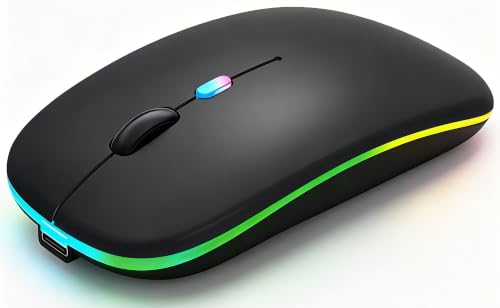
WREANU Wireless Bluetooth Mouse, Black

Afaartcci Rechargeable Wireless Mouse, Black

Logitech M196 Compact Ambidextrous Bluetooth Wireless Mouse – Rose

Logitech M196 Compact Ambidextrous Bluetooth Wireless Mouse – Graphite

TECKNET Wireless Mouse, Bluetooth Mouse (BT5.3/5.0 & 2.4G) Black

TECKNET 3-Device Portable Wireless Bluetooth Mouse for Laptop Black
More Details On Our Top Picks
The WL300 leans into the kind of comfort that matters during long spreadsheet sessions or cross-town work days. Its sculpted shape, six buttons, and adjustable DPI give you a little more control than the plainest Bluetooth mice, while the quiet click design keeps desk noise down.
The honest trade-off is that the extra buttons only help when you actually want them, so minimalists may prefer something simpler. Still, for laptop work, travel, and general office use, this one feels like a sensible middle ground with a bit more hand support than Logitech M240.
Strong Points
- Quiet clicks suit shared offices and late-night work.
- Sculpted grip helps reduce the flat, toy-like feel some budget mice have.
- Six buttons can speed up routine navigation once you learn the layout.
- Adjustable DPI lets you tune cursor speed for a laptop screen or external monitor.
- 18-month battery life suits travel or desk use without constant battery checking.
Things To Consider
- The extra controls add value only for people who use them.
- Right-hand shaping can feel less friendly to left-handed use.
- Button crevices may need the occasional wipe to stay tidy in a bag.
Feature Snapshot
Who It Suits Best
It suits laptop users who want a quiet, shaped mouse with a little more control than a basic two-button model.
Where A Sibling Pick Shines
Logitech M240 Compact Silent Bluetooth Wireless Mouse – Graphite fits better for you if you want a simpler, no-frills setup with fewer buttons to think about.
The M240 is the cleanest answer for anyone who wants Bluetooth only and nothing dangling from a USB port. That simplicity helps on modern laptops, especially on desks where you already have a charger, a drive, and too many cables fighting for space.
Compared with the WL300, this one gives up extra buttons and grip shaping, but it also asks for less attention. The compact body and quiet clicks make it a tidy fit for office work, classrooms, and living-room laptops, though left-handed users may want to check the shape before committing.
What We Like
- Bluetooth-only setup keeps your port free for other gear.
- Quiet click behavior suits meetings and shared rooms.
- Compact size slides easily into a sleeve or small laptop bag.
- Three-button layout stays simple for casual browsing and office work.
- 18-month battery life is friendly for low-maintenance use.
Worth Noting
- No USB receiver means less flexibility for devices without Bluetooth.
- The fixed button layout leaves little room for shortcuts or customization.
- Small shells can feel cramped for larger hands during longer sessions.
Core Details
Best Suited To
It suits laptop users who want a plain Bluetooth mouse for everyday office tasks and travel-friendly packing.
A Better Fit Elsewhere
wegear WL300 Bluetooth Mouse, Grey works better for you if extra buttons and a more shaped grip matter more than keeping the layout ultra-simple.
The WREANU stands out for anyone who moves between a Bluetooth laptop and a second device that still prefers a USB receiver. Dual mode means it can live a double life, and that matters in home offices where one machine is modern while another is a little older.
The LED lighting adds personality, though not everyone wants visual effects on a work mouse. The real draw here is flexibility, but the trade-off is a busier feature set than the Logitech M196 pair, so minimal setups may feel a little cleaner elsewhere.
Upsides
- Dual-mode connectivity gives you Bluetooth and 2.4G options.
- Rechargeable design removes the need to keep spare batteries around.
- Silent operation helps in quiet rooms or shared workspaces.
- Portable shape suits laptop bags and casual commuting.
Minor Gripes
- LED effects may feel unnecessary for plain office use.
- The USB receiver storage adds one more part to keep track of.
- Dual-mode designs can feel busier than a single-purpose mouse.
At A Glance
Whose Shelf It Belongs On
It suits you if your work setup includes both a Bluetooth laptop and a second computer that still benefits from a receiver.
Swap It Out When
Logitech M240 Compact Silent Bluetooth Wireless Mouse – Graphite is the calmer choice for you if you want a cleaner desk and fewer features to manage.
The Afaartcci leans on a comfort-first shape and the kind of connection flexibility that helps in mixed-device homes. Bluetooth 5.2 paired with a 2.4GHz receiver gives you two ways to connect, and the plug-and-play setup keeps the learning curve light.
The catch is that it can only use one mode at a time, so it’s not built for simultaneous switching. Still, for MacBooks, iPads, and laptops that need a portable mouse with a softer fit, it lands in a useful middle spot between the simpler Logitech M240 and the more control-heavy TECKNET options.
Highlights
- Ergonomic shape supports longer desk sessions with less hand strain.
- Dual connection paths suit newer devices and receiver-based setups.
- Plug-and-play setup keeps installation out of the way.
- Portable size works well for commuting and coffee-shop work.
Areas To Watch
- You can’t use Bluetooth and receiver mode at the same time.
- The receiver lives inside the mouse, so it needs careful storage.
- People who want lots of buttons may find the layout plain.
Details At A Glance
The Right Fit
It suits you best if you want a portable mouse for laptops, tablets, and Apple devices with a more comfortable hand feel than the simplest shell designs.
Look Elsewhere When
TECKNET Wireless Mouse, Bluetooth Mouse (BT5.3/5.0 & 2.4G) Black makes more sense for you if side scroll and more button control matter in daily work.
The rose M196 keeps the same compact, ambidextrous shape as the graphite version, but this colorway adds a softer visual note for a desk or dorm setup. The three-button layout, quiet clicks, and Bluetooth-only design keep it straightforward, which is exactly why some people prefer it over feature-heavy options.
Its 12-month battery life is shorter than the M240’s 18-month figure, though that still feels very reasonable for everyday browsing, note-taking, and travel. The small size helps in tight laptop sleeves, but larger hands may prefer the more shaped WL300.
Best Bits
- Ambidextrous shell works for right-handed and left-handed use.
- Quiet clicks fit shared spaces and calm home offices.
- Bluetooth-only pairing keeps your USB port open.
- Compact body packs neatly with a laptop and charger.
Small Caveats
- Three-button layout leaves little room for shortcuts.
- 12-month battery life trails the M240’s longer figure.
- Small shells can feel less relaxed during long sessions.
Quick Facts
Made For
It suits you if you want a quiet, ambidextrous mouse for daily laptop work, especially in smaller spaces.
Another Choice May Suit
Logitech M240 Compact Silent Bluetooth Wireless Mouse – Graphite fits you better if longer battery life matters more than color or the slightly softer shape.
The graphite M196 is the cleanest-looking of the two M196 versions, and the darker finish makes visual sense beside black laptops and docked workstations. Its appeal is still the same: Bluetooth simplicity, quiet clicks, and an ambidextrous body that stays out of the way.
Compared with the rose version, this one feels a bit more understated, which can be a better match for work gear. The trade-off is the same modest button count and shorter battery life than the M240, but for small desks or travel bags, the low-profile shape does its job without fuss.
Reasons To Buy
- Ambidextrous shape works well across hand preferences.
- Quiet clicks suit offices, classes, and home use.
- Graphite finish blends easily with darker accessories.
- Small body makes it easy to pack for trips.
Room For Improvement
- The three-button layout stays very basic.
- 12-month battery life is fine, but not class-leading here.
- Compact feel may not satisfy people who prefer a fuller palm rest.
Core Details
Built With In Mind
It suits you if you want a compact Bluetooth mouse that blends quietly into a home office or travel kit.
Reach For A Different Pick When
wegear WL300 Bluetooth Mouse, Grey is the better route for you if a more shaped grip and extra buttons matter more than low-profile simplicity.
The TECKNET here is the pick for people who want more control without jumping into a much pricier tier. Side scroll, seven buttons, six DPI steps, and a USB-A receiver give it a broader toolset than the basic Logitech choices, and that matters on larger spreadsheets or side-scrolling timelines.
Its ergonomic shape also makes sense for regular desk use, though the extra controls can feel like overkill for casual browsing. The honest read is that this is the mouse for people who know they will use the added functions, not just admire them from the box.
Plus Points
- Six DPI steps help you tune pointer speed for different tasks.
- Side scroll adds a practical advantage for wide documents and sheets.
- Seven-button layout supports more efficient navigation.
- BT5.3, BT5.0, and receiver support widen device compatibility.
- Ergonomic shape fits longer desk sessions better than flat shells.
Honest Caveats
- The richer feature set can feel like more than you need for casual use.
- More buttons and modes mean more to remember during setup.
- Receiver-based use adds one more accessory to keep track of.
Feature Rundown
Who Should Grab It
It suits you if you spend time in spreadsheets, side-scrolling documents, or mixed-device work and want a mouse with more controls.
Another Choice May Suit
Logitech M240 Compact Silent Bluetooth Wireless Mouse – Graphite is the calmer fit for you if you want fewer controls and a simpler day-to-day routine.
The three-device TECKNET is the most flexible option in this group for people juggling a laptop, tablet, and desktop. Dual-device connectivity, silent clicks, and 4800 DPI give it a wider operating range than the basic Bluetooth-only models, so it suits a busier workflow rather than a single desk.
The 34-foot signal range and ambidextrous shape round out the package, though the extra flexibility does make it feel more feature-forward than minimalist. That’s the trade-off, and for hybrid work setups it can be a useful one, especially compared with the simpler M196 pair.
Best Bits
- Three-device support helps you move between setups with less friction.
- Silent clicks suit shared rooms and late work sessions.
- 4800 DPI gives you a broad cursor-speed ceiling.
- Ambidextrous design helps right- and left-handed use.
- 34-foot range adds flexibility around a desk or meeting room.
Areas To Watch
- More device switching means a bit more setup attention.
- The extra capability may feel unnecessary for simple browsing.
- Feature density can be more than casual laptop users want.
Feature Card
Perfect Match For
It suits you if your workday moves between a laptop, tablet, and desktop and you want one mouse for all three.
Skip It When
Logitech M196 Compact Ambidextrous Bluetooth Wireless Mouse – Graphite is enough for you if you prefer a lighter, simpler setup with fewer moving parts.
How To Choose The Right Budget Bluetooth Mouses
Connection Style And Device Fit
Bluetooth-only mice keep ports open and make sense for newer laptops, tablets, and slim desktop setups. Models with a USB receiver still matter for older machines or workstations that pair less smoothly, and dual-mode designs are the most flexible of the group.
That flexibility has a cost in simplicity. A mouse like the Logitech M240 stays easy to live with, while the TECKNET and WREANU models ask you to manage more connection choices.
Shape, Buttons, And Long-Session Comfort
Shape matters more than most shoppers expect, especially during long work sessions or travel days. A compact shell like the Logitech M196 keeps packing easy, while the WL300 and Afaartcci give your hand a more guided resting point.
Extra buttons are useful only when your workflow supports them. Side scroll, adjustable DPI, and multi-button layouts help with spreadsheets, editing timelines, or frequent window switching, but they can feel like clutter for basic browsing.
Battery Life And Power Habits
Long battery life helps most on laptops, business travel, and home offices where you do not want another device asking for attention. The 18-month figures on the M240 and WL300 are especially convenient for low-maintenance use, while the M196’s 12-month rating still feels practical for daily tasks.
Rechargeable models shift the routine from replacing batteries to remembering a charge cable. That can suit you well, although a simple battery-powered mouse sometimes feels easier for occasional use.
Worth Paying More For
Higher-tier budget mice usually earn their extra cost through more controls, broader connectivity, or better shaping. The TECKNET models show that clearly, with side scroll, more buttons, and multiple connection modes that can speed up real work.
That upgrade makes sense for hybrid workers, spreadsheet-heavy routines, or anyone using more than one device. For light browsing and email, a simpler mouse often leaves more money for the rest of the setup.
A Quick Reality Check Before You Choose
Common Shopping Slip Ups
People often focus on Bluetooth and forget to check hand fit. A tiny shell can be fine for travel, yet tiring on a full workday, which is why the WL300 and Afaartcci matter more than their plain photos suggest.
Another common miss is buying extra buttons that never get used. A simple three-button model can be the cleaner move for students, casual browsing, or a docked laptop that does not need much control.
The Upgrade Payoff
Higher-end budget models usually spend the extra money on flexibility, not flash. Multi-device support, side scroll, adjustable DPI, and a better-shaped body all help once your desk work gets more demanding.
That is where the TECKNET options justify themselves. For light use, though, the M240 or M196 keeps things straightforward and avoids paying for controls you may never touch.
Final Thoughts
For everyday use, the safest path is matching the mouse to your routine instead of chasing the longest feature list. The Logitech M240 and M196 are easy, quiet, and travel-friendly, while the WL300 and TECKNET models give you more control when your workday gets busier. Pick the shape and connection style that fits your devices, and the rest tends to fall into place.
