
Budget normal sized mouses make sense when you want a straightforward pointer for work, school, or a home setup without paying for extras you may never use. You get the most value from models that feel stable in the hand, connect cleanly, and keep daily tasks moving without fuss.
That means the right choice depends on more than just shape. Cable length, wireless receiver style, button count, and hand fit all matter once the mouse spends hours beside your laptop or desktop.
Quick Look At The Shortlist

HP Wired Mouse 100 1600 DPI

Acer Wireless Mouse for Laptop 1600 DPI

Logitech B100 Ambidextrous Wired Mouse

Logitech M185 Compact Ambidextrous 2.4 GHz Wireless Mouse


Dell Wired Mouse MS116 Black
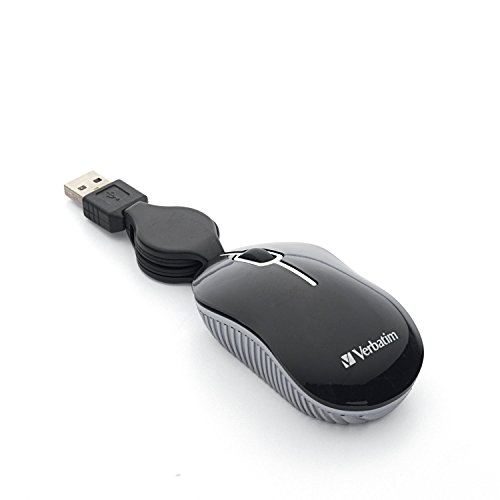
Verbatim Wired Optical Computer Mini USB-A Mouse

Amazon Basics 3-Button USB Wired Mouse
More Details On Our Top Picks
HP keeps this one plain and practical, which suits a crowded desk or a spare computer just fine. The 1600 DPI optical sensor gives you a firmer pointer response than many bare-bones office mice, and the ambidextrous shell avoids forcing a handed shape on you.
The wired USB connection means you skip battery checks, though you do give up the clean desk look that wireless picks bring. For daily browsing, forms, and spreadsheet work, that trade feels reasonable, especially beside the lighter travel-minded M185.
What We Like
- 1600 DPI helps the pointer feel steady for everyday window work.
- USB wired setup keeps the connection simple and predictable.
- Ambidextrous shape suits left-handed and right-handed use.
- Three-button layout stays familiar, so there’s little learning curve.
Things To Consider
- The cord keeps you tethered to the computer, which some desk setups won’t mind and others will.
- Three buttons cover basics well, but power users may miss extras.
- The shape is friendly, though larger hands may want a fuller body.
Feature Snapshot
Who It Suits Best
You fit this mouse well if you want a dependable desk staple for schoolwork, email, and light office use.
Where Another Pick Suits Better
Logitech M185 Compact Ambidextrous 2.4 GHz Wireless Mouse makes more sense for commuters who want a cord-free pocket companion.
This Acer option gives you more flexibility than the wired HP, mainly because it leans on a 2.4 GHz wireless link and a USB-A receiver. The six-button layout and 1600 DPI setting make it feel better suited to a laptop bag or a desk where extra shortcuts actually matter.
Medium and larger hands are the clear target here, so the shape should feel less cramped than mini travel mice. In a busy office or a home setup with a laptop dock, that extra room can make long sessions feel less fiddly, though the receiver can still be one more small thing to keep track of.
Strong Points
- Wireless 2.4 GHz connection keeps the desk free of a cable.
- Six buttons offer more control than basic three-button designs.
- 1600 DPI gives you a familiar middle-ground speed for office work.
- Medium to large hands get a roomier fit.
Minor Gripes
- The USB receiver is another small accessory to store safely.
- More buttons help in workflows, but they can feel unnecessary for simple use.
- The shape is aimed at larger hands, so compact seekers may want something slimmer.
Core Details
Made For
You suit this pick well if you want a cordless desk mouse with more controls and a hand-friendly body for laptop work.
Swap It Out When
HP Wired Mouse 100 1600 DPI fits you better when you want a no-battery setup for a steady home desk.
The B100 is the sort of desk mouse that disappears into routine, which is often exactly what you want. Its wired USB setup, ambidextrous body, and plain black finish suit shared computers, office stations, and low-drama home setups.
Compared with the Acer and Logitech M185, it gives up wireless convenience, but it also skips batteries and pairing. That trade-off feels sensible for anyone who leaves a mouse plugged in beside a monitor most days.
Upsides
- Ambidextrous shape works for either hand.
- Wired USB connection keeps setup straightforward.
- Plain design fits offices and shared desks without drawing attention.
- Low-maintenance format helps when you want something you can leave in place.
Softer Spots
- The cable limits how far you can move from the computer.
- The design stays basic, so it won’t satisfy gadget-heavy preferences.
- Right now, the fit is more about function than hand-padded comfort.
Details At A Glance
Whose Shelf It Belongs On
You fit this mouse well if you want a plain office corded option for everyday clicking and scrolling.
A Better Fit Elsewhere
Logitech M185 Compact Ambidextrous 2.4 GHz Wireless Mouse suits travelers and laptop users who want to leave the cable behind.
The M185 feels aimed at laptop life first, thanks to its compact size and the tiny USB-A nano receiver. That nano receiver is just a very small wireless dongle, so it’s easy to leave plugged in while you move between home, office, and coffee shop work.
Logitech also lists 12-month battery life, which helps this mouse fit a carry bag without making you think about charging every week. Compared with the wired B100, it gives you a cleaner setup, though the smaller body may feel less relaxed in larger hands.
Bright Spots
- Compact body packs easily for commuting and travel.
- Wireless setup keeps your laptop area less cluttered.
- USB-A nano receiver stays small and discreet.
- 12-month battery life lowers day-to-day upkeep.
Areas To Watch
- The smaller shell may feel cramped during long desktop sessions.
- Battery-powered use still means keeping an eye on replacements.
- The compact shape is useful, though it is not the roomiest choice here.
Technical Sheet
Built With In Mind
You fit this mouse well if you travel often and want a compact wireless tool for a laptop bag.
Reach For A Different Pick When
Logitech B100 Ambidextrous Wired Mouse makes more sense for a shared office desk that stays in one place.
Guiheng keeps things tiny and inexpensive in spirit, which makes it a sensible backup mouse for a crowded drawer or a laptop sleeve. Its wired USB setup and ambidextrous shape are basic, but basic is the point here, especially for quick desktop tasks.
Compared with the fuller HP and Acer picks, this mini body is easier to stash, though it will feel less spacious in a long work session. The durable-click claim also points to everyday use rather than delicate handling, which suits students and casual office setups well.
Best Bits
- Mini size stores easily in a bag or drawer.
- Ambidextrous design keeps the fit flexible.
- Wired connection avoids the need for batteries.
- Plain black finish blends into most computer spaces.
Small Caveats
- The compact body may feel tight during longer sessions.
- Mini mice usually trade comfort for portability, and this one follows that pattern.
- Wired use keeps it tidy, but it still adds a cable to manage.
Feature Rundown
The Right Fit
You fit this mouse well if you want a small backup for travel, classrooms, or quick home use.
Look Elsewhere When
Logitech M185 Compact Ambidextrous 2.4 GHz Wireless Mouse suits you better when a cordless setup matters more than minimum size.
Dell keeps the MS116 stripped back in a way that works well for office desks and shared PCs. You get a wired mouse that avoids batteries, avoids setup fuss, and stays focused on simple navigation instead of extra features.
That plain approach makes it a natural step up for workstations that need a steady daily mouse more than a travel companion. Compared with the smaller Guiheng, this Dell pick should feel a touch more at home in a regular office hand position, though it still won’t chase fancy extras.
Positives
- Office-first design suits routine computer work.
- Wired connection keeps the setup predictable.
- Black finish blends into professional spaces.
- Low-maintenance build fits a mouse you leave on the desk.
Worth Noting
- The design is plain, so style-focused users may want more personality.
- Wired use keeps it stable, but you still manage a cord.
- The listing does not spell out extra controls, so basic navigation is the main story here.
Core Details
Who Should Grab It
You fit this mouse well if you want a dependable desk mouse for emails, documents, and standard navigation.
Another Choice May Suit
Amazon Basics 3-Button USB Wired Mouse suits a minimalist home office where a very plain setup feels right.
The retractable cable is the feature that separates this Verbatim mouse from the rest of the list. For a backpack, laptop case, or hotel desk, that built-in cable storage keeps loose cord mess to a minimum, which is handy in tight spaces.
Because it’s a mini mouse, the trade-off is comfort during extended desktop work, where a larger shell usually feels calmer in the hand. Still, for travel, class, or occasional use, the plug-and-play setup makes it very easy to keep in rotation.
What We Like
- Retractable cable helps cut down on tangles during transport.
- Mini size slips easily into a travel kit.
- Plug-and-play setup keeps the learning curve low.
- Optical tracking supports basic everyday cursor movement.
Room For Improvement
- The small body may not suit long office sessions.
- Mini format is practical, though it gives up palm support.
- Moving parts in the cable system add one more thing to look after.
Feature Card
Best Suited To
You fit this mouse well if you move between desks and want a compact corded option that packs neatly.
Skip It When
Logitech B100 Ambidextrous Wired Mouse is the calmer choice for a fixed workstation that never leaves the office.
This Amazon Basics mouse is exactly the kind of simple gear that suits a spare computer or a small home office. The 3-button layout and responsive tracking keep the focus on easy navigation, which is helpful when you want the mouse to stay out of the way.
Compatibility with Windows and Mac broadens its usefulness, and the plug-and-play style means setup should feel quick on a standard desktop or laptop. Compared with the Dell MS116, it feels more like a general-purpose backup, though that’s often enough for email, browsing, and light spreadsheet work.
Standout Traits
- Three-button layout keeps things familiar.
- Responsive tracking helps everyday pointer movement feel steady.
- Windows and Mac support widens the use case.
- Plug-and-play setup keeps installation light.
Honest Caveats
- The design is very basic, so it won’t feel premium.
- Three buttons cover essentials, but that’s where the feature set ends.
- Wired use keeps it reliable, though the cord still needs desk space.
Core Details
Built For
You fit this mouse well if you want a plain, dependable option for a basic home office or backup station.
Where Shoppers Go Wrong
Acer Wireless Mouse for Laptop 1600 DPI suits you better when you expect to use extra buttons and prefer a cordless desk.
How To Choose The Right Budget Normal Sized Mouses
Shape, Hand Fit, And Desk Time
Hand fit matters more than most people expect, especially on a mouse you’ll use for email, spreadsheets, and browser tabs all day. A compact shell like the Verbatim is great for transport, but a fuller body like the Acer usually feels calmer during longer desk sessions.
Ambidextrous shapes help because they don’t force a right-hand bias. That’s useful in shared offices, classrooms, and home setups where one mouse might serve more than one person.
Wired Or Wireless, And Why It Changes The Feel
Wired mice keep setup simple, and they remove battery worry from the picture. The HP, Logitech B100, Dell MS116, and Amazon Basics pick all lean into that easy routine, which suits a fixed desk nicely.
Wireless models earn their place through cleaner surfaces and easier travel. The Logitech M185 and Acer wireless option matter more to laptop users, though you do need to keep track of a receiver and, in some cases, battery life.
Buttons, DPI, And Everyday Control
DPI, or dots per inch, describes pointer sensitivity, so higher numbers can feel quicker on screen. A 1600 DPI mouse like the HP or Acer gives you a middle-ground pace that works well for general office tasks without feeling twitchy.
Extra buttons help most when you rely on shortcuts, web navigation, or frequent app switching. Casual users often stay happiest with a three-button mouse, because fewer controls can mean fewer accidental presses.
Travel Use Versus Stationary Work
Travel mice need to pack cleanly and survive life in a bag, so size and cable handling matter. The Logitech M185 and Verbatim mini mouse fit that brief better than the larger desk-first picks.
Stationary work changes the priority list. For a home office or work cubicle, you can put more weight on comfort, cord length, and how naturally the shape rests under your palm.
Things Worth Knowing First
Mistakes Worth Dodging
A lot of shoppers choose by shape alone and ignore connection type. That’s a miss, because a mouse that feels good in the hand can still annoy you every day if the cable is too short or the wireless receiver keeps moving between ports.
Another common slip is overvaluing extra buttons. They help in the right workflow, but for basic browsing and office work, simple controls often keep the experience cleaner.
The Case For Spending Up
Higher-tier mice usually cost more because they bring better materials, smoother tracking, more thoughtful ergonomics, or a smarter wireless package. In this list, that shows up in the compact Logitech M185 and the more feature-rich Acer, both of which add convenience beyond the plain wired basics.
Spending up makes sense when the mouse lives in your hand for hours, travels often, or needs to fit a specific workstation role. For occasional use, the simpler picks already cover the job without extra complexity.
Final Thoughts
Your best choice depends on how you work, not on the flashiest spec on the page. For a fixed desk, the HP, Logitech B100, Dell, or Amazon Basics mouse keeps things straightforward, while the Logitech M185 and Verbatim suit travel better. The Acer sits in a nice middle zone for people who want wireless freedom with more control, and the Guiheng fills the backup-mouse role without drama. Pick the one that matches your desk, your bag, and your hand, and the rest gets easy.
