
Cheap gaming wireless mouses can save desk space, cut cable drag, and still handle everyday play plus school or work. You need clear DPI steps, a shape that sits well in your hand, and a connection that stays steady during a late-night match or a long commute with a laptop. The eight picks below lean into different strengths, from lightweight shells to multi-device support, so you can match the mouse to your routine instead of settling for whatever looks flashy.
The Shortlist At A Glance
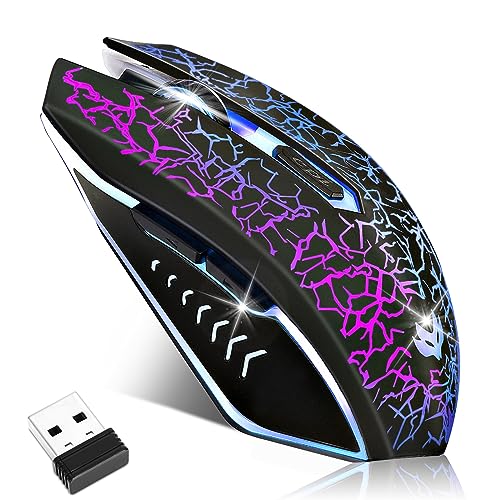
LuLabboard Wireless Gaming Mouse 2400 DPI

MELOGAGA Wireless Gaming Mouse RGB White

Redragon M725 Honeycomb Shell Gaming Mouse

Logitech G305 Lightspeed Wireless Gaming Mouse Black

MELOGAGA Wireless Bluetooth Gaming Mouse Silent Black

MELOGAGA Wireless Gaming Mouse 3-Mode Black

WolfLawS KM-1 RGB Wireless Gaming Mouse

Typehaven G57 Wireless Gaming Mouse Black
More Details On Our Top Picks
LuLabboard keeps things straightforward, which suits you well for a desk that does double duty. The six silent buttons matter most in a shared room or a late-night gaming setup, since the clicks stay less distracting than a louder shell.
The 2,400 DPI ceiling and three-step adjustment are modest, but that also keeps the learning curve gentle for casual play and everyday navigation. You may find the black finish and LED lighting a little plain next to the honeycomb models below, yet the trade-off is a simpler shape that feels easy to live with.
Strong Points
- Six-button layout keeps common actions close at hand.
- Silent click design helps in shared spaces.
- Three DPI steps make cursor speed easy to tune.
- Rechargeable setup cuts down on battery swaps.
- Ergonomic shape should feel familiar for long desk sessions.
Things To Consider
- 2400 DPI is enough for casual play, but serious aim work may want more headroom.
- LED styling is more decorative than essential.
- Plain black housing looks understated beside lighter honeycomb designs.
Feature Rundown
Who It Suits Best
You want a simple wireless mouse for casual gaming, browsing, and schoolwork on a laptop or desktop.
A Better Fit Elsewhere
Redragon M725 Honeycomb Shell Gaming Mouse suits you better when you want lighter handling and more connection modes.
The honeycomb shell is the main story here, because the perforated ABS body trims weight and gives your hand more airflow during long sessions. In a dorm room or a busy home office, that lighter feel can make repeated flicks and menu work less tiring.
USB-C charging is a real convenience, and the 2.4G receiver keeps the setup simple with a plug-and-play routine. Compared with LuLabboard’s quieter but more basic shape, this MELOGAGA model leans harder into speed and airflow, though the open shell does need a little more attention during cleaning.
Upsides
- Honeycomb shell lowers overall weight.
- ABS housing keeps the body light and manageable.
- 2.4G wireless connection suits quick plug-in setups.
- USB-C charging is easier to live with than older ports.
- Four DPI levels give you more cursor tuning than the first pick.
- Light strip adds a visible gaming look without changing the shape.
Softer Spots
- Open-shell styling can collect dust more easily than a closed body.
- Lightweight feel is great for speed, less so for people who prefer a heavier mouse.
- RGB lighting is optional visual flair, not functional muscle.
Core Details
Who Will Love This
You want a light mouse for fast pointer movement, laptop travel, or long sessions where a heavy shell feels tiring.
Swap It Out When
Logitech G305 Lightspeed Wireless Gaming Mouse Black fits you better when you want a more traditional shell with stronger onboard memory support.
Redragon gives you the most flexible setup in the group, thanks to Bluetooth, 2.4GHz, and Type-C wired support. That matters in a mixed-device home, where your mouse might move from a desktop to a laptop, then to another screen without a second thought.
The 49g body is strikingly light, and that kind of weight makes fast swipes feel almost effortless. The trade-off shows up in the open honeycomb shell, which looks modern but asks for a little more dust care than a closed design like the Logitech G305.
Positives
- Three connection modes widen device compatibility.
- 49g weight helps reduce drag during fast movement.
- 8000 DPI ceiling gives more speed headroom than the first two picks.
- Five programmable buttons support custom shortcuts.
- Macro support helps with repeated actions in games or work.
Points To Note
- Tri-mode flexibility can feel like extra setup for people who want a very simple mouse.
- Honeycomb body needs routine dusting.
- Light shell may not suit those who like a denser hand feel.
Feature Snapshot
Best Suited To
You switch between devices often and want a very light mouse with room for custom controls.
A Better Fit Elsewhere
WolfLawS KM-1 RGB Wireless Gaming Mouse suits you more when you want a simpler two-button-side layout without paying for tri-mode flexibility.
This pick stands out because the HERO sensor, 12,000 DPI ceiling, and six programmable buttons give you a more mature control set than the lighter budget mice above. For most desks, that means smoother cursor response and enough customization to keep common game actions close.
The battery figure is unusually long for a wireless gaming mouse, and onboard memory matters when you move between PCs without rebuilding your settings. The honest read is that this is less flashy than the honeycomb models, but the closed body and familiar shape can feel better for people who want consistency over novelty.
Bright Spots
- HERO sensor brings a more advanced tracking platform.
- 12,000 DPI leaves room for sensitive aim and quick desktop sweeps.
- Six programmable buttons support deeper control.
- Onboard memory helps keep settings with the mouse.
- Battery figure is strong for a wireless gaming model.
Areas To Watch
- Shape is more traditional, so it may feel less airy than honeycomb options.
- Less visual flair than RGB-heavy picks.
- Advanced features may be more than casual users need.
At A Glance
Right Fit For
You want a more refined gaming mouse for regular play, office switching, and a setup that benefits from saved button profiles.
Another Choice May Suit
MELOGAGA Wireless Gaming Mouse 3-Mode Black fits you better when you need Bluetooth and wired backup in the same shell.
Bluetooth plus 2.4G makes this one feel especially useful on a desk that moves between personal and work gear. The sleep mode after ten minutes of inactivity is a small but practical detail, because it helps stretch charging intervals without asking you to babysit the mouse.
The silent click style also fits shared spaces better than louder shells, especially beside the brighter, more gaming-forward look of the White honeycomb model. One thing worth considering is the first-charge routine, since the listing notes a two-hour charge before first use and a wake click after sleep.
What We Like
- Bluetooth and 2.4G options make pairing more flexible.
- Silent click design helps in libraries, dorms, and offices.
- Rechargeable battery avoids disposable cells.
- RGB lighting adds a visible gaming accent.
- Sleep mode can help manage power use between sessions.
Small Caveats
- Sleep behavior means you may need a quick wake click after idle time.
- Initial charging step matters before first use.
- Bluetooth setup depends on device compatibility listed by the seller.
Details At A Glance
The Right Fit
You want a quiet mouse that can move between a Bluetooth laptop and a 2.4G desktop with very little fuss.
Where A Sibling Pick Shines
Typehaven G57 Wireless Gaming Mouse Black fits you better when you want three connection types plus more programmable controls.
Eight DPI steps, 1000Hz polling, and three connection modes give this model a more serious spec sheet than the simpler mice above. Polling rate means how often the mouse reports its position to the computer, so 1000Hz generally helps movement feel more immediate in fast games or editing work.
The 71g body keeps the profile light without going as skeletal as the Redragon M725, and the USB-C wired fallback is handy when you want uninterrupted use during charging. For a desk that does a little of everything, this is the sort of mouse that covers a lot without feeling overbuilt.
Reasons To Buy
- Eight DPI levels give you fine-grained pointer control.
- 1000Hz polling supports smoother-feeling movement.
- Bluetooth, 2.4G, and USB-C wired modes cover many setups.
- 71g weight keeps handling quick and easy.
- Play-while-charging support helps avoid downtime.
Room For Improvement
- More features can mean more setup decisions than the simplest picks.
- Light body may feel too airy for people who prefer a heavier shell.
- Cross-device strength only matters when your gear actually needs it.
Feature Card
Made For
You want a light, multi-mode mouse for gaming, travel, and mixed work setups where wired backup still matters.
Reach For A Different Pick When
Logitech G305 Lightspeed Wireless Gaming Mouse Black fits you better when onboard memory matters more than multi-mode flexibility.
WolfLawS keeps the formula simple with a honeycomb shell, six buttons, and a 2.4G receiver. That setup suits a first gaming desk or a spare mouse for a laptop bag, especially when you want something that feels less fussy than tri-mode models.
The three DPI steps are practical rather than extravagant, which is enough for everyday gaming and routine desktop work. Compared with the more feature-heavy MELOGAGA picks, this one feels easier to understand at a glance, though the open shell still asks for regular cleaning.
Highlights
- Honeycomb shell keeps the profile lighter than a closed body.
- Six buttons give you extra control without crowding the shape.
- 2.4G receiver supports quick plug-in use.
- Three DPI steps keep control simple.
- Rechargeable design avoids disposable battery swaps.
Worth Noting
- 2.4G-only connection is more limited than tri-mode options.
- Honeycomb openings can collect dust over time.
- Simple DPI range works best for casual play rather than highly tuned setups.
Core Details
Built With In Mind
You want a straightforward wireless mouse for casual gaming, school projects, and everyday laptop use.
Look Elsewhere When
Redragon M725 Honeycomb Shell Gaming Mouse suits you better when Bluetooth and wired backup are part of the plan.
Typehaven’s G57 lands near the higher end of this roundup without going overboard. The 80g body, 8000 DPI ceiling, and triple connectivity make it a neat fit for a laptop desk that shifts between gaming, work, and travel.
The five programmable buttons give you more control than the simpler models, though not as much hardware flexibility as Redragon’s tri-mode setup. You may find the middle ground appealing if you want one mouse that handles most daily tasks without demanding constant profile tweaking.
What We Like
- 80g weight stays light while still feeling a little more planted than ultra-light shells.
- 2.4G, Bluetooth, and USB-C widen your options.
- 8000 DPI ceiling supports faster cursor movement.
- Five programmable buttons give useful shortcut control.
- PC and Mac compatibility helps on mixed-device desks.
Minor Gripes
- More capable hardware can be more than casual users need.
- Five buttons are helpful, though power users may want more.
- Triple connectivity matters most for people who actually switch devices often.
Technical Sheet
Whose Shelf It Belongs On
You want a single wireless mouse for laptop travel, mixed operating systems, and everyday gaming without a lot of bulk.
Where A Sibling Pick Shines
MELOGAGA Wireless Gaming Mouse 3-Mode Black fits you better when you want an even lighter body with a higher polling-rate focus.
How To Choose The Right Cheap Gaming Wireless Mouses
DPI, Polling, And Real Cursor Feel
DPI, or dots per inch, tells you how far the cursor moves for each inch of hand movement. Lower numbers suit controlled aim and routine work, while higher ranges help you sweep across wide monitors faster. Polling rate matters too, because it describes how often the mouse reports its position to the computer.
For casual gaming on a laptop, a mouse with 3 or 4 DPI steps is usually enough. Competitive play and fast-paced editing work tend to benefit from broader ranges like 8000 DPI or 12000 DPI, especially on larger screens.
Shell Shape And Weight
Honeycomb shells shave weight through cutouts in the body, which can help your wrist during long sessions. Closed shells feel more traditional and often trap less dust, so maintenance stays simpler. Neither style is automatically better, it depends on whether you want speed or a fuller hand feel.
Weights around 49g to 80g cover a wide spread in this roundup. Lighter models suit quick flicks and travel bags, while slightly heavier models can feel steadier during general desktop use.
Connection Options And Device Switching
2.4G wireless suits most plug-in-and-go setups, especially on a desktop or gaming laptop. Bluetooth helps on tablets and slimmer laptops, and USB-C wired mode gives you backup during charging or in spots where radio connections feel crowded.
For mixed work and play, multi-mode mice earn their keep fast. You may not need all three options every day, but the flexibility helps when your desk, laptop bag, and living room setup all ask for different things.
Buttons, Battery, And Maintenance
Programmable buttons matter most when you want shortcuts for game actions or repeated desktop commands. Silent clicks are helpful in shared homes, though they usually come with a softer tactile feel than louder switches. Battery notes also deserve attention, because sleep modes and recharge times affect how often you need to think about power.
Honeycomb mice often need a little more dust care, while simpler closed bodies are easier to wipe down. That trade-off is worth accepting when the lighter shape fits your hand better, but it’s still part of ownership.
What To Weigh Before You Commit
Mistakes Worth Dodging
Many shoppers focus on DPI alone and ignore shape, button layout, and connection type. That usually leads to a mouse that sounds impressive on paper but feels awkward after a week of desk use.
Another common miss is choosing a shell style that does not match the room. Open honeycomb bodies can be great for speed, yet they need more routine cleaning than a smooth closed mouse.
When Paying More Pays Off
Higher-tier mice usually spend extra on sensor quality, broader connectivity, and better button customization. That money also tends to go into lighter materials, onboard memory, or faster polling, which helps more in fast play and heavy daily use.
For a gaming laptop that travels often, the upgrade makes sense when Bluetooth, 2.4G, and wired backup all matter. For a simple home desk, a more basic mouse can still be the smarter fit.
Closing Thoughts
Your best match depends on how you actually use the mouse, not just how many gaming features it lists. LuLabboard and WolfLawS suit simple setups, Redragon and Typehaven stretch farther for mixed-device work, and Logitech G305 feels more settled for steady daily play. Choose the shape and connection pattern that fits your desk first, then let DPI and buttons fill in the rest.
