
Cheap wireless mouses can be a smart fit for school desks, shared offices, travel bags, and home setups that do not need fancy extras. The right one saves desk space, trims cable clutter, and feels easier during long email stretches or quick task switching. Some of these picks lean small and simple, while others add Bluetooth, higher DPI control, or rechargeable power. The trick is matching the shape and connection style to how you actually work.
Quick Look At The Shortlist

ONE-UP Wireless Mouse 2.4G Silent USB Nano Receiver (Black)

wegear USB Wireless Mouse 2.4GHz 6 Buttons 4000 DPI (Black)
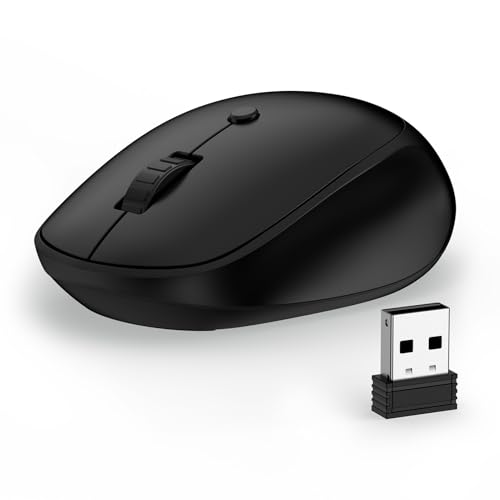
CIQILY Wireless Mouse 2.4G Quiet USB Receiver 800/1200/1600 DPI

Rii Wireless Mouse 2.4G Portable Computer Mice Black

Afaartcci Rechargeable Wireless Mouse Silent Bluetooth Mouse (Black)

KANMABPC Wireless Bluetooth Mouse Silent Dual Mode Mouse (Black)

Acer Wireless Mouse for Laptop 2.4GHz 1600 DPI USBA Receiver

Guiheng Wireless Bluetooth Mouse LED Dual Mode Rechargeable Silent Slim
More Details On Our Top Picks
ONE-UP keeps things plain in a good way, with a small body that slips into a laptop sleeve or school bag without much fuss. The ambidextrous shape suits either hand, and the 800, 1200, and 1600 DPI steps give you a little room to adjust pointer speed for homework, email, or casual browsing.
That makes it a sensible fit for commuters, students, or anyone who wants a mouse that disappears into a carry case between uses. The trade-off is obvious, though, you are getting a simple 2.4G setup rather than extra buttons or Bluetooth flexibility, so it is more about easy daily handling than a feature list.
Strong Points
- Small enough for tight desk space and travel kits.
- Ambidextrous shape works comfortably in either hand.
- Three DPI steps help you tune cursor speed.
- Silent clicking suits shared offices and late-night study.
Things To Consider
- Single 2.4G connection keeps the setup simple, not flexible.
- No extra side buttons for heavier multitasking.
- The compact shell may feel slight in larger hands.
Feature Snapshot
Who Should Grab It
Students, commuters, and office staff who want a small, quiet mouse for simple everyday tasks will get the most from this one.
Another Choice May Suit
wegear USB Wireless Mouse 2.4GHz fits better for power users who want more buttons and a higher DPI ceiling than the ONE-UP Wireless Mouse offers.
wegear stands out in this list because it packs more control into a budget-friendly shell, starting with six buttons and a 4000 DPI ceiling. DPI, or dots per inch, is the sensitivity setting that changes how far the pointer moves for each hand movement, so a higher range helps in wider monitor layouts or faster navigation.
That extra control can feel useful in a busy home office or on a laptop paired with a larger screen. The catch is that more buttons only help when you use them, and some people will still prefer the cleaner, simpler feel of the ONE-UP or Rii.
Highlights
- Six-button layout adds shortcuts for everyday work.
- 4000 DPI range gives you more pointer tuning.
- Ergonomic shape can ease long desk sessions.
- Portable size still fits a laptop bag well.
- Battery claim suggests less frequent upkeep for routine use.
Small Caveats
- Extra buttons matter most for shortcut-heavy workflows.
- The feature set may feel more than casual users need.
- Ergonomic shells are personal, so hand feel can vary.
Core Details
Built With In Mind
Office multitaskers and laptop users who like extra buttons and a wide sensitivity range will find the wegear mouse a practical match.
A Better Fit Elsewhere
ONE-UP Wireless Mouse 2.4G Silent USB Nano Receiver suits you better for lighter school or travel use, where a simpler shape matters more than more controls.
CIQILY keeps the focus on ease, with a standard USB receiver, quiet clicking, and three DPI steps that cover basic office movement well. The 32-foot wireless range gives you room to move around a desk, which can be handy during presentations or a cluttered workspace.
It also promises quick device pairing across laptops, tablets, and PCs, so it makes sense for mixed-device homes or a shared desk. The honest read is that this one is built for smooth simplicity, not extra controls, so it is a good fit when you want a small mouse that just gets out of the way.
Upsides
- Quiet clicks suit libraries, dorms, and shared rooms.
- Three DPI options give basic control over cursor speed.
- 32-foot range leaves room for desk movement.
- USB-A receiver makes setup straightforward.
Areas To Watch
- Four-button design stays on the simple side.
- USB-A receiver means the port choice matters.
- Travel use is easy, though the small size can vanish in a bag.
Details At A Glance
Right Fit For
Hybrid workers and students who want a light, quiet mouse for everyday browsing and document work will find this one easy to live with.
Where A Sibling Pick Shines
Afaartcci Rechargeable Wireless Mouse makes more sense for people who need Bluetooth plus receiver support and want to cut down on battery swapping.
Rii takes a straightforward route, and that simplicity is the point. With a 2.4G wireless connection and a bundled USB dongle, it fits the sort of everyday office use where you want a mouse that starts working without drama.
Compared with the more feature-heavy wegear, this one is for people who would rather keep things lean than chase extra settings. That plain approach can be a plus on spare desktops or in classrooms, though it also means you should expect basic mouse behavior rather than flashy extras.
Best Bits
- Plain setup suits quick desktop deployment.
- USB dongle is included with the mouse.
- Portable shape works well for office carry.
- Simple controls keep the learning curve low.
Worth Noting
- Basic feature set leaves little room for customization.
- The simple shell may not suit bigger hands.
- Wired alternatives are not the point here, so port use still matters.
Quick Facts
The Right Fit
Students, office workers, and anyone outfitting a spare computer desk will appreciate how uncomplicated this mouse is.
Look Elsewhere When
wegear USB Wireless Mouse is the better match for you if extra buttons and stronger pointer control matter more than keeping things minimal.
Afaartcci is the first pick here that really leans into multi-device flexibility, because it can work over Bluetooth 5.2 or through a 2.4G receiver. That matters on laptops, iPads, and MacBooks, where a switch between tablet and computer use can happen all day long.
The rechargeable design cuts out battery swaps, and the mouse stores its receiver inside the body, which is handy for travel. The trade-off is that both modes are not meant to run at once, so it suits people who switch, not people who need parallel connections.
Reasons To Buy
- Bluetooth and receiver support add setup flexibility.
- Rechargeable power reduces routine battery upkeep.
- Silent clicks keep shared spaces calmer.
- Receiver storage inside the mouse helps travel organization.
Room For Improvement
- You cannot use both wireless modes at the same time.
- Wireless switching is useful, but not as simple as a single-path mouse.
- Some users will prefer a lighter, more basic shell.
Technical Sheet
Who Will Love This
People moving between MacBooks, tablets, and a desktop setup will get the most value from the Afaartcci mouse.
Swap It Out When
CIQILY Wireless Mouse is the simpler choice for someone who wants a single receiver-based mouse with fewer connection decisions.
KANMABPC sits in a comfortable middle ground, with Bluetooth 5.2 and 2.4G support plus a rechargeable battery. The LED indicator adds a small but useful visual cue, and the silent buttons make it easier to use during meetings, shared study hours, or late-night browsing.
It feels like the sort of mouse you can leave in a work bag and bring out for whatever device is nearby. The one thing worth considering is that rechargeable models ask you to stay aware of charging, so it suits organized routines better than forgetful ones.
Positives
- Dual wireless support gives you device flexibility.
- Rechargeable design reduces battery swaps.
- Silent clicks suit quiet rooms well.
- LED indicator helps you spot status at a glance.
Minor Gripes
- Charging routine matters more than with battery-powered mice.
- The LED feature is helpful, though not essential for everyone.
- One mouse, two modes, so setup choices still matter.
At A Glance
Best Suited To
Remote workers and students who want one mouse for multiple devices without much fuss will find this a sensible middle-ground option.
Where Another Pick Fits Better
Rii Wireless Mouse makes more sense for a person who wants the plainest possible setup and does not care about Bluetooth or charging.
Acer goes a little more office-friendly than the smaller mice above, especially for medium to larger hands. Its 1600 DPI ceiling gives you enough control for documents, web tabs, and daily multitasking without pushing into the heavier feature set that wegear brings.
The six-button layout is another reason it feels practical for work, not just casual use. The trade-off is size, because a fuller shell helps comfort over longer sessions but takes up a bit more room in a compact bag.
Bright Spots
- Medium-to-large hand fit is useful for fuller grips.
- Three DPI steps keep cursor control straightforward.
- Six buttons support workday shortcuts.
- 2.4GHz receiver setup stays simple and familiar.
Things To Consider
- Better comfort usually means a larger footprint in the bag.
- 1600 DPI is enough for most work, though not for every specialty task.
- USB-A receiver means the host device needs the right port or adapter.
Core Details
Whose Shelf It Belongs On
Desktop workers and laptop users with medium to larger hands will probably appreciate the Acer mouse most.
Skip It When
ONE-UP Wireless Mouse is the better travel companion for someone who wants a smaller mouse that tucks away more easily.
Guiheng is the slimmest-feeling option in this group, and that matters for anyone packing a work bag or setting up a small desk. Bluetooth 5.2 plus the USB receiver gives you two connection paths, while the rechargeable battery keeps the routine a little lighter than swapping disposables.
The LED detail and silent click design fit a shared room or travel setup nicely. The honest caveat is that slim mice can feel less filling in hand, so the comfort story depends a bit on your grip style and how long you stay at the desk.
Plus Points
- Slim profile saves room in compact bags.
- Dual mode support works across more device setups.
- Rechargeable power reduces battery maintenance.
- Silent buttons help keep noise down.
- LED feature adds a small visual touch.
Softer Spots
- Thin shells can feel less substantial in hand.
- Charging routines still need a bit of attention.
- The feature mix helps, though not every user needs both connection paths.
Feature Rundown
Made For
Frequent travelers and mobile workers who care about a thin shape and two connection choices will get the most out of this mouse.
Reach For A Different Pick When
Acer Wireless Mouse for Laptop is the better call for larger hands that need a fuller shell and a more anchored feel at the desk.
How To Choose The Right Cheap Wireless Mouses
Match The Shape To Your Day
A small mouse is easy to pack, but a smaller shell can feel cramped during long spreadsheet sessions. Medium and larger shapes usually help your palm relax, which matters more than people expect after a full workday.
Ambidextrous designs suit left-handed and right-handed use, while contoured bodies often feel steadier for longer desk time. The better fit depends less on style and more on how long your hand stays on the mouse.
Choose The Right Connection Style
2.4G receiver mice are straightforward and usually simple to set up, which helps on older laptops or shared computers. Bluetooth models skip the dongle and can make life easier on tablets or slim laptops with fewer ports.
Dual-mode mice cost more because they give you both paths, plus the parts needed to support them. That extra flexibility is worth it for mixed-device homes, but a single-mode mouse makes more sense for a basic office desk.
Look Past DPI Numbers Alone
DPI tells you how sensitive the pointer feels, so higher numbers can help on wide monitors and lower numbers can feel steadier for careful work. The number matters, yet the real question is whether you prefer quick movement or a slower, calmer glide.
Button count matters too. Extra buttons help during tab-heavy work or frequent copy-and-paste routines, while a simple four-button mouse keeps things easy and keeps learning time low.
Think About Power And Maintenance
Battery-powered mice are simple, but you will eventually swap cells. Rechargeable picks reduce that chore, though they ask you to keep an eye on charging habits, especially during travel weeks.
Silent switches, USB receiver storage, and slim bodies all add convenience in real life, not just on a spec sheet. Those are the kinds of details that make a cheap wireless mouse feel easy after the first week, which is what you want from a workhorse.
Things Worth Knowing First
Hidden Buying Traps
Many shoppers focus on price alone and end up with a mouse that feels too small, too plain, or too fussy for their setup. Port type matters too, because a USB-A receiver needs the right port or an adapter.
Another common miss is overvaluing button count. Extra controls help only when your workflow uses them, so a simpler mouse can be the smarter choice for basic browsing and schoolwork.
The Upgrade Payoff
Higher-tier models usually spend the extra money on dual-mode wireless support, rechargeable power, better hand shaping, and more buttons. Those features matter most when you move between devices, work long hours, or want less day-to-day upkeep.
For casual use, though, a simpler mouse can be the better value. The sweet spot is a model that fits your hand, connects the way you need, and stays comfortable without adding clutter you will never use.
Final Thoughts
The best cheap wireless mouse for you is the one that matches your hand size, your devices, and how much control you really need. ONE-UP and CIQILY make sense for simple carry-around use, while wegear and Acer are better for people who want more buttons or a fuller grip. If your setup changes often, Afaartcci, KANMABPC, and Guiheng add useful flexibility without leaving this budget lane. Keep the shape and connection style front and center, and the right pick becomes much easier to spot.
