
Picking a mouse for schoolwork, games, or a shared family computer often comes down to comfort, size, and how much clutter you want on the desk. Kids usually need something smaller than a standard office mouse, with controls that feel simple right away and a shape that does not fight their hand.
The eight picks below lean toward smaller builds, easy setup, and kid-friendly designs, while still making sense for laptops, desktops, and Chromebook-style school setups. You’ll see cordless choices, wired basics, and a few playful shapes, so you can match the mouse to the way the computer gets used.
Quick Look At Our Shortlist

ONE-UP Wireless Mouse Blue

Guiheng Wired Mini Optical Mouse
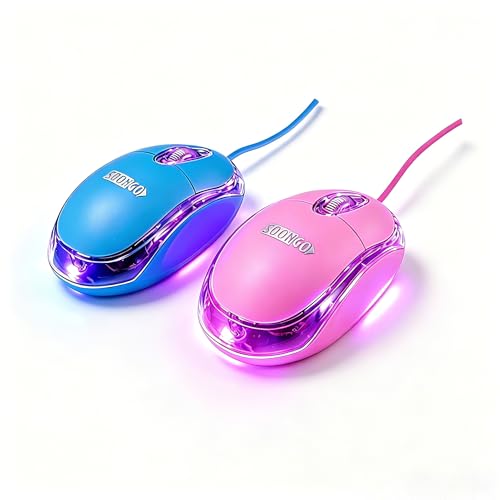
SOON GO Kids Mouse 2 Pack Pink Blue


Sokelinn-six Wired Cute Mouse Green Frog
Clevy Kids Mouse Colorful Ergonomic Bluetooth
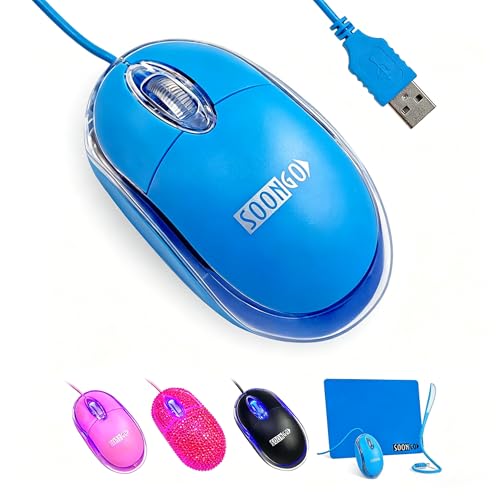
SOONGO Kids Mouse Blue Color 1.5M Cable

More Details On Our Top Picks
The ONE-UP keeps things compact, which matters a lot for small backpacks and cluttered desks. Its ambidextrous shape makes it easy to hand off between left- and right-handed use, and the 800 to 1600 DPI range gives you room to tone the pointer speed up or down.
The wireless 2.4G connection uses a USB nano receiver, so setup stays simple on laptops and desktop towers. The honest trade-off is that a small travel mouse can feel a little less planted than a full-size office model, but that’s usually a fair trade for school bags and shared computers.
Strong Points
- Small body slips into a pencil case or side pocket without hogging space.
- Ambidextrous shape works for either hand, which helps in shared family setups.
- Three DPI steps let you choose a slower or quicker pointer feel.
- Wireless use keeps the desk cleaner than a corded mouse beside a laptop.
Things To Consider
- A tiny shell can feel cramped for older kids with bigger hands.
- The receiver is another small piece to keep track of during travel.
- Wireless gear usually asks for occasional battery attention, so it suits a tidy routine.
Key Specs
Who It Suits Best
Students who move between a laptop, Chromebook, and desktop setup get the most value from this small wireless design.
A Better Fit Elsewhere
Clevy Kids Mouse Colorful Ergonomic Bluetooth is the stronger match for younger children who need a more clearly shaped grip and a child-focused fit.
The Guiheng goes straight to the point: a wired mini mouse with a compact shape and a standard USB connection. That makes it easy to plug in for homework sessions, classroom machines, or an older desktop that just needs a basic pointing device.
Compared with the wireless ONE-UP, this one removes battery thinking and receiver storage, which can be handy in a busy household. The trade-off is the cord, though some families prefer that because it keeps setup predictable and reduces one more small part to lose.
What We Like
- Wired setup avoids battery swaps and pairing steps.
- Mini size fits easily beside notebooks and tablet stands.
- Optical tracking suits ordinary schoolwork and browsing.
- Compatibility across Windows, Linux, and Mac broadens where you can use it.
Worth Noting
- The cord can crowd a tight desk more than a wireless mouse would.
- Smaller shells tend to feel better for younger hands than for teens.
- Wired mice usually need a bit more cable care during storage.
Feature Snapshot
Built With In Mind
Kids who spend most of their time at one desk and need a small, uncomplicated mouse will feel right at home here.
Where A Sibling Pick Shines
ONE-UP Wireless Mouse Blue suits families who want a cord-free setup for laptops and travel bags.
Two mice in one package makes this set useful for siblings, a home office, or a backup kept in a drawer. The pink and blue pairing also keeps the setup friendly for kids who like having their own color without any fuss about extra accessories.
Because these are wired mini mice, they fit best in routine desk use rather than constant carrying. Compared with the single Guiheng mouse, this set gives you a spare right away, and that simple extra piece often matters more than flashy styling.
Highlights
- Two-pack format helps with shared computers or a backup unit.
- Mini wired design stays straightforward for school tasks.
- Broad compatibility covers older and newer home systems.
- Color pairing helps separate each child’s setup at a glance.
- Low-hassle plug-in use works well in families that want a simple routine.
Minor Gripes
- The corded format is less tidy than a wireless mouse on the go.
- Mini proportions may feel snug for larger hands.
- Keeping two mice organized takes a little more drawer space.
Core Details
Who Should Grab It
Families sharing one desk, especially with two children using different computers, will get the most out of the twin pack.
Another Choice May Suit
seenda Wired Mouse Purple makes more sense for a child who wants a single mouse with a more polished look and backlit styling.
This pick leans hard into the car shape, which is exactly why it stands out on a child’s desk. The headlight detail gives it extra personality, and the 1600 DPI setting means it still aims to do regular computer work, not just sit there looking cute.
That playful look makes it a natural gift choice, especially for kids who already like vehicles. The flip side is simple, some families want a calmer shape for classroom focus, and in that case the Guiheng or ONE-UP feels more understated.
Bright Spots
- Sports-car styling gives the desk a fun, memorable look.
- Wireless use keeps cords out of the way.
- 1600 DPI gives a brisk pointer feel for general use.
- Works across laptop, PC, and Mac setups listed by the seller.
Areas To Watch
- The playful shell may not suit every classroom or shared office space.
- Wireless use adds the usual battery and receiver upkeep.
- The themed shape matters more here than pure simplicity.
At A Glance
The Right Fit
Kids who care as much about the look of their desk gear as the way it works will appreciate this one most.
Where Shoppers Go Wrong
Clevy Kids Mouse Colorful Ergonomic Bluetooth is the better call for younger hands that need a more clearly defined grip than a novelty shape can offer.
The frog shape gives this mouse a friendly, toy-like feel without dropping the practical basics. You still get a three-button layout, a wired USB connection, and optical tracking, so it stays useful for homework and everyday computer time.
Compared with the car-shaped SDGSQHA mouse, this one feels softer and a little more classroom-friendly. The sturdy plastic shell and the high click rating are nice touches, though a mini mouse always works best for smaller hands and lighter desktop use.
Positives
- Cartoon frog styling makes it easy for kids to claim as their own.
- Plug-in use keeps setup simple for school and home devices.
- Three-button layout covers ordinary browsing, homework, and basic games.
- Optical tracking helps the cursor stay steady on common desk surfaces.
- Small grip size suits younger hands and short study sessions.
Softer Spots
- The playful shape may feel too novelty-driven for older kids.
- Wired use keeps the mouse tied to the desk area.
- Mini sizing can feel tight for bigger hands during longer sessions.
Technical Sheet
Whose Shelf It Belongs On
Young kids who want a mouse that feels playful first and functional second will get the most from this frog design.
Look Elsewhere When
Guiheng Wired Mini Optical Mouse suits an older child who wants a plainer shape and a more standard desk look.
The Clevy stands apart because it is shaped and sized with younger children in mind, especially ages 3 to 10. That kind of fit matters more than flashy extras in early school years, since a mouse that feels natural can make computer time less fussy.
Bluetooth connection gives it a cleaner desk than a corded mouse, and the compatibility list covers Windows, macOS, and Chromebook use. Compared with the more novelty-led models above, this one feels more deliberate, though the child-specific sizing means it is not meant to be a long-term pick for bigger hands.
Upsides
- Child-specific shape helps smaller hands settle in more naturally.
- Bluetooth use avoids a dangling cable on a homework desk.
- Colorful design gives kids something more inviting than a plain office mouse.
- Works across the main school-platform mix, including Chromebook setups.
- The size focus makes early computer practice feel less awkward.
Room For Improvement
- The age focus narrows its fit once hands grow larger.
- Bluetooth pairing can take a little more setup than a simple wired plug-in.
- The child-friendly sizing is the main point, so adults may find it too small.
Details At A Glance
Best Suited To
Early elementary kids who need a mouse shaped for smaller hands will benefit most from this design.
Swap It Out When
SOON GO Kids Mouse 2 Pack Pink Blue works better for families that want two simple wired mice for shared use instead of a single Bluetooth model.
A 1.5-meter cable gives this mouse a little breathing room on a desk, which is helpful when the CPU sits under the table or the laptop is docked farther away. The blue finish keeps the look simple, so it blends into school setups without drawing much attention.
Compared with the wireless choices, this one keeps power concerns out of the picture and behaves like a basic plug-in tool. That makes it a sensible option for homework stations, though the cord can feel less neat than the ONE-UP or Clevy in a bagged-up routine.
Best Bits
- Long cable helps with awkward desk layouts.
- Ergonomic shape is easier to live with during study time.
- Blue finish keeps the look calm and straightforward.
- USB plug-in use keeps startup quick.
Small Caveats
- The cable adds desk clutter compared with cordless options.
- It suits a fixed workstation more than a travel pouch.
- Minimal styling may feel plain next to the themed mice in this list.
Quick Facts
Made For
Kids who mostly work at one desk and need a no-fuss mouse with extra cable reach will like this setup.
Reach For A Different Pick When
ONE-UP Wireless Mouse Blue fits better for school bags and laptop use where a cord would get in the way.
The seenda feels a touch more polished than the plain wired basics, mainly because of the RGB backlight and the quiet click design. That combination can make a homework desk feel a little more personal without getting loud or complicated.
Its corded setup still keeps it practical for school computers, desktops, and home laptops, and the 1600 DPI tracking brings a responsive pointer feel. The trade-off is obvious, this is still a wired mouse, so the convenience story is about consistency rather than travel-friendly freedom.
Reasons To Buy
- Quiet clicks help keep study space noise down.
- RGB lighting adds a bit of personality to a plain desk.
- 1600 DPI gives a responsive feel for routine computer tasks.
- Plug-and-play use keeps setup quick on common devices.
- Works well as a shared family mouse for school and home.
Points To Note
- The cord keeps it anchored to one workstation.
- RGB styling matters less if you want a very plain look.
- Wired storage is simpler than battery upkeep, but still asks for cable care.
Feature Rundown
Perfect Match For
Kids who want a wired mouse with a little style, but still need something easy for daily schoolwork, fit this one well.
Not Your Match When
SOON GO Kids Mouse 2 Pack Pink Blue makes more sense for a family that wants two simple mice at once rather than a single styled corded pick.
How To Choose The Right Computer Mouses For Kids
Size And Grip Come First
Kids usually do better with a mouse that matches their hand size instead of a standard adult shell. A compact body, a lower profile, or a clearly shaped grip can make pointer movement feel less awkward during homework, art projects, or basic browsing.
Smaller hands often benefit from mice shaped for children or mini models with simple button layouts. Larger kids may outgrow very tiny shells quickly, so a slightly fuller shape can be the safer long-term choice.
Wired, Wireless, Or Bluetooth
Wired mice keep setup simple and avoid battery thoughts, which works well for a desk used every day. Wireless models cut cable clutter and make sense for backpacks, while Bluetooth can feel cleaner on newer school laptops that already have limited ports.
The trade-off usually shows up in upkeep. Wired choices are easier to live with at one station, while wireless options need a little more attention to receivers, charging, or batteries depending on the model.
Shape, Tracking, And Click Feel
DPI, or dots per inch, tells you how sensitive the pointer feels. Lower settings can help younger kids stay controlled, while higher settings make the cursor move faster across a larger screen.
Optical tracking is the common setup here, and it suits ordinary desks and school tables well. Quiet clicks can also help in a shared room, especially during evening study time or classroom work.
Think About The Real Use Case
A child using one laptop at home needs something different from a family sharing a desktop. Travel-friendly mice should stay small and light, while a fixed homework station can handle a corded model with a longer cable and a little more desk presence.
The themed designs in this roundup, like the car and frog shapes, are fun, but the more practical picks often last longer in regular use because they stay easier to handle and easier to store.
What To Weigh Before You Choose
Traps First Timers Fall Into
A common mistake is choosing a mouse for looks alone. Novelty shapes can be fun, yet they still need a comfortable grip, a usable button layout, and a size that suits the child’s hand.
Another slip-up is overlooking the setup style. A wireless mouse sounds convenient, but a wired model may be simpler for a child who mostly works at one desk and doesn’t need another small item to manage.
The Upgrade Payoff
Higher-tier kids’ mice often cost more because the shape is more carefully tuned, the materials can feel a bit more substantial, and extra features like Bluetooth or quieter clicking add convenience. A child-specific ergonomic shell, such as the Clevy design, can also justify the step up for early school years.
That extra spend makes sense when computer use is daily and comfort matters more than novelty. For occasional use, a straightforward wired mouse usually covers the basics without asking for much maintenance.
Final Thoughts
The best mouse here depends on how your child uses the computer, not just on the look of the shell. ONE-UP and SOONGO keep things practical, Clevy is the most thoughtful fit for younger hands, and the car and frog options add personality without dropping the basics. For a desk that sees schoolwork every day, comfort and size matter more than anything flashy. Pick the shape that matches your child’s routine, and the rest usually falls into place.
