
Work mice look small on a desk, but they shape how your hand feels after a long spreadsheet session, a commute with a laptop, or a day split between laptop and desktop. The right pick can make cursor control steadier, shortcuts easier, and travel less annoying. The wrong one tends to show its flaws fast, especially in small hands, shared desks, or tight bag space.
Quick Look At Our Workday Shortlist
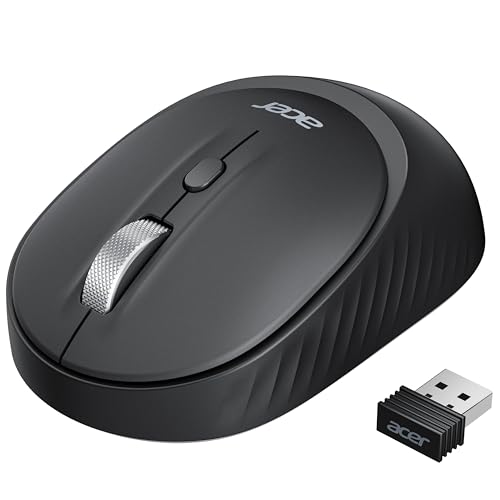
Acer Bluetooth Wireless Mouse for Laptop, Office Cordless Mouse (BT5.2+2.4GHz)

Wireless Mouse for Laptop, Cordless Office Mice M21

Logitech M510 Full Size Ambidextrous Wireless Mouse

Acer Wireless Mouse for Laptop, 2.4GHz Computer Mouse 3 Adjustable 1600 DPI

TECKNET Wireless Mouse, Bluetooth Mouse (BT5.3/5.0 & 2.4G) Black

TECKNET Wireless Mouse, 2.4G Ergonomic Computer Mouse, 2600 DPI, Purple

Logitech M185 Compact Ambidextrous Wireless Mouse – Swift Grey

Logitech M240 Compact Silent Bluetooth Wireless Mouse – Rose
More Details On Our Top Picks
This Acer mouse makes sense on a desk that changes shape during the day, since it can move between Bluetooth and a USB receiver without much fuss. The toggle for three connections suits a laptop, tablet, and desktop setup, though you can’t run Bluetooth and 2.4 GHz at the same time. Small-handed users and left- or right-handed workers get the most from the compact, ambidextrous shape.
The 800, 1200, and 1600 DPI settings give you a simple way to slow down for detail work or speed up for broader cursor movement. That flexibility is handy in spreadsheets and browser-heavy work, but the smaller shell may feel a bit tight for larger palms during long sessions. Compared with the Logitech M510, this one feels more portable and less traditional, which helps more than it hurts in shared work bags.
What We Like
- Bluetooth plus 2.4 GHz support gives you flexibility across work devices.
- Three connection slots help you keep a laptop and secondary devices in rotation.
- Ambidextrous shaping keeps the mouse friendly for either hand.
- Adjustable DPI makes cursor speed easier to match the task.
- Compact sizing slips neatly into a laptop sleeve or pouch.
Points To Note
- Bluetooth and wireless receiver use are separate modes, so you need to switch rather than combine them.
- Small hands are the clearest fit, larger hands may want more palm support.
- Four buttons keep the layout simple, but power users may want extra controls.
Core Details
Who It Suits Best
You’ll like this most if you split your day between a laptop and another device and want a compact mouse that keeps up without taking much bag space.
Where A Sibling Pick Shines
Logitech M510 is the steadier fit for full-size hand support and longer desk sessions, especially for anyone who wants a more traditional work mouse shape.
The M21 keeps its pitch straightforward, which is handy for a cluttered office where you want the mouse to just work with a laptop, desktop, or tablet. Its USB-A receiver and USB-C adapter broaden compatibility, and that matters more than flashy extras on a mixed-device desk. Small to medium hands should find the shape easier to settle into than a larger full-size shell.
Six buttons give you a little more room to manage everyday tasks without hunting through menus, though the added controls still stay within a simple office layout. The 3-level DPI setup offers a practical middle ground for general work, but it won’t satisfy someone who wants very fine pointer tuning. Compared with the Acer option above, this one leans less on multi-mode switching and more on connection convenience.
Highlights
- USB-A receiver plus USB-C adapter makes setup friendlier across newer and older ports.
- Works across laptop, desktop, and tablet use without feeling locked to one platform.
- Six buttons add useful controls for routine office work.
- Small to medium hands get a size profile that should feel manageable.
Room For Improvement
- 2.4 GHz only keeps things simple, but it limits wireless options.
- Three DPI steps are useful, though they leave less room for very precise tuning.
- The shape sounds best suited to modest hand sizes rather than larger grips.
Feature Rundown
Who Will Love This
This suits you best if your desk jumps between devices and you want an uncomplicated wireless mouse that handles port changes without much friction.
Another Choice May Suit
TECKNET Wireless Mouse, Bluetooth Mouse (BT5.3/5.0 & 2.4G) fits better for someone who wants Bluetooth alongside a wider feature set and more control options.
Logitech’s M510 feels like the most office-native shape in this group, especially for people who spend long stretches in documents or browser tabs. The full-size body gives your hand more room than the Acer compact options, and the ambidextrous shape keeps the fit broad without getting fussy. The honest read is that it’s less portable than the smaller picks, but that’s the trade-off for a steadier desk feel.
The tilt-to-scroll wheel stands out for horizontal movement in spreadsheets or wide timelines, and that’s a real comfort boost in work-heavy use. A 2-year battery life claim points to less routine swapping, which matters when you don’t want maintenance to interrupt the week. Chrome, Windows, Mac, and Linux support also make it easier to drop into mixed environments without extra thought.
Reasons To Buy
- Full-size shape gives your hand a more relaxed resting position.
- Ambidextrous design keeps the mouse comfortable for either hand.
- Tilt-to-scroll helps with wide spreadsheets and long project timelines.
- Broad system support makes it a safe fit for mixed office setups.
- Two-year battery claim reduces routine upkeep for busy schedules.
Softer Spots
- The larger body takes more bag space than compact travel mice.
- USB-A receiver use means you’ll want a compatible port or adapter.
- It’s practical rather than flashy, so feature hunters may want more controls.
Details At A Glance
Best Suited To
You’ll get the most from this if your workday centers on a permanent desk and you want a familiar mouse shape that stays comfortable through long sessions.
Look Elsewhere When
Logitech M240 Compact Silent Bluetooth Wireless Mouse is the better fit for travelers or quiet shared spaces where a smaller, cable-free setup matters more.
This Acer model keeps the formula simple, and that suits a no-drama work setup well. The 2.4 GHz connection and USB-A receiver make it easy to plug into a laptop or desktop, while the six-button layout adds a little more control than the most stripped-down picks. Medium to large hands should have the easier time here, especially during longer desk sessions.
The three adjustable DPI steps cap at 1600, which is plenty for general office tasks and smoother pointer movement. You give up Bluetooth and multi-device switching, but that absence also keeps setup straightforward, which some people will prefer. Compared with the M21 above, this one feels a little more traditional and less port-flexible, though it remains a clean fit for everyday work.
Positives
- 1600 DPI ceiling covers common office movement without fuss.
- Six buttons provide helpful control for regular desk work.
- Medium to large hands get a more natural fit here.
- USB-A receiver keeps setup direct on many work machines.
Minor Gripes
- No Bluetooth support narrows its use with newer port-light devices.
- The layout is straightforward, but power shortcuts stay limited.
- It’s less travel-friendly than the smaller compact picks.
Quick Facts
Right Fit For
This is a solid match for desk workers who want a plain wireless mouse with a little more control and a shape that suits larger hands.
Skip It When
Acer Bluetooth Wireless Mouse for Laptop, Office Cordless Mouse (BT5.2+2.4GHz) is the better call for multi-device users who want Bluetooth alongside receiver-based use.
TECKNET’s black model leans into control, and that shows up in the mix of Bluetooth 5.3, Bluetooth 5.0, and 2.4 GHz support. For a desk that hops between machines, that’s a lot of flexibility in one shell, and the rechargeable design cuts down on routine battery changes. Quiet clicks matter in open offices or late-night work sessions, where sound can carry farther than you expect.
The seven-button layout, side scroll, and six DPI steps give you more ways to handle work-heavy days without feeling boxed in. The trade-off is a busier control scheme, so people who want a plain mouse may find it more than they need. Compared with the simpler Acer and Logitech M185 picks, this one clearly serves users who want more functions under one roof.
Upsides
- Bluetooth and 2.4 GHz support help it fit mixed-device setups.
- Rechargeable design reduces the need to keep spare batteries around.
- Quiet clicks suit shared offices and evening work.
- Side scroll and seven buttons add useful control for heavy desk work.
- Six DPI levels give you more room to fine-tune cursor speed.
Small Caveats
- The control layout may feel busy to someone who just wants basics.
- Extra functions can take a little time to memorize.
- Rechargeable gear asks for occasional charging planning.
Feature Card
Who Should Grab It
This works best for power users and mixed-device setups where extra controls, Bluetooth support, and quieter clicking all matter in the same day.
Where A Sibling Pick Shines
Logitech M510 is the calmer fit for someone who wants a fuller hand rest and a more traditional office mouse without as many moving parts.
This TECKNET model stands out because it focuses on hand position first, then layers on everyday wireless utility. The side grips should help it sit more securely in hand during long document sessions, and the compact size keeps it less bulky than the full-size Logitech M510. Purple also gives it a bit more personality than the usual office-black crowd, which is a small plus on a personal desk.
The 2600 DPI ceiling is the highest in this group, so cursor movement can feel brisk without needing constant wrist travel. A USB-A plug-and-play receiver keeps setup easy, and the 2-year battery claim suggests less maintenance over time. The honest trade-off is that compact ergonomic mice can feel less roomy for larger hands, even when the grip surfaces are well shaped.
Bright Spots
- Side grips help the mouse sit more securely in hand.
- 2600 DPI gives you a faster pointer range than the lower-step picks.
- Compact shape stores well in a work bag or desk drawer.
- Two-year battery claim keeps upkeep relatively low.
- Purple finish adds a little visual character to a plain workspace.
Areas To Watch
- Compact ergonomic shaping may feel tight for larger hands.
- 2.4 GHz only means no Bluetooth pairing option.
- Small mice can take a moment longer to get used to during long sessions.
Spec Overview
The Right Fit
You’ll appreciate this most if you want a compact ergonomic mouse with a higher DPI ceiling and a bit more hand support than a basic travel model.
Swap It Out When
Logitech M240 Compact Silent Bluetooth Wireless Mouse is the cleaner choice for quiet rooms and Bluetooth-only setups that don’t need the extra control set.
The M185 is the kind of mouse that disappears into your bag and asks for very little in return. Its compact, ambidextrous shape keeps it simple for laptop work, and that restraint is exactly why it fits commuters, students, and anyone who splits time between desks. Compared with the larger M510, this one sacrifices palm support for easy carrying, and that trade-off is easy to accept in a travel kit.
Optical tracking keeps cursor movement straightforward, while the 12-month battery claim reduces how often you need to think about power. The USB-A nano receiver is tiny enough to leave in place, though you still need the right port or adapter on newer machines. It’s a plain tool, not a showpiece, and that’s usually enough for everyday portability.
Best Bits
- Compact body fits well in a laptop bag or carry case.
- Ambidextrous shape keeps it usable for either hand.
- Optical tracking provides dependable everyday pointer movement.
- 12-month battery claim cuts down on routine maintenance.
- Small receiver helps the setup stay low-profile on a desk.
Honest Caveats
- Compact size means less palm support for long desk marathons.
- USB-A receiver use can be awkward on port-light laptops.
- It’s built for simplicity, so extra controls stay minimal.
Feature Snapshot
Whose Shelf It Belongs On
This belongs with you if portability matters more than palm support and you want a mouse that handles daily laptop use without taking over your bag.
Reach For A Different Pick When
Logitech M510 is the better match for long desk sessions, larger hands, and anyone who wants more body under the palm.
The M240 is the quiet, minimalist option in this group, and that makes it appealing in shared offices or late-night work corners. Bluetooth connection means you don’t have to give up a USB port, which is handy on thin laptops and travel machines. The compact body keeps it easy to pack, though the simple three-button layout leaves less room for custom control than the TECKNET feature-heavy model.
The quiet-click design matters more than it sounds on paper, because repeated desk noise adds up during long typing sessions. An 18-month battery claim also helps the mouse feel low-maintenance for routine work. Compared with the Logitech M185, this one is more modern in connection style, while the M185 still wins for anyone who prefers a receiver-based setup.
Positives
- Bluetooth connection leaves your USB ports open.
- Quiet clicks suit shared rooms and open desks.
- Compact shape travels well with a laptop.
- Three-button simplicity keeps the layout easy to learn.
- 18-month battery claim helps reduce routine attention.
Worth Noting
- No USB receiver is included, so Bluetooth is the whole story.
- Three fixed buttons keep shortcuts basic.
- Compact sizing may feel light for people who want a fuller palm rest.
Core Details
Built With In Mind
This suits you best if you work in quiet rooms, carry a thin laptop, and want a small Bluetooth mouse that stays out of the way.
Where A Sibling Pick Shines
Acer Bluetooth Wireless Mouse for Laptop, Office Cordless Mouse (BT5.2+2.4GHz) is the smarter fit for someone who wants both Bluetooth and receiver-based flexibility.
How To Choose The Right Computer Mouses For Work
Fit Starts With Your Hand And Desk
Hand size matters more than many people expect. Compact models like the Logitech M185 and M240 suit travel and tight laptop setups, while the Logitech M510 gives your palm more room for a full desk day.
Grip shape matters too. Ambidextrous shells work well for mixed-handed use or shared offices, while ergonomic side grips, like the TECKNET purple model, tend to feel more secure during long sessions.
Connection Type Changes The Whole Routine
Bluetooth helps on thin laptops because it saves a USB port, and that matters in modern office carry cases. Receiver-based 2.4 GHz mice stay straightforward and usually feel familiar right away, which helps in desks that barely change from day to day.
Multi-mode mice bring extra flexibility, but they also ask you to think about switching between connection types. That’s a fair trade for people hopping between a laptop, desktop, and tablet, yet a simple receiver mouse often feels easier for anyone who wants less setup.
Buttons, DPI, And Scroll Behavior Should Match The Work
DPI means dots per inch, which is a simple way to describe how fast the pointer moves for a given hand motion. Lower steps, like the Acer compact mouse at 800, 1200, and 1600 DPI, suit steadier office work, while the TECKNET ergonomic model’s 2600 DPI gives more speed headroom.
Extra buttons can help with browser tabs, shortcuts, or document navigation, but only to a point. Tilt scrolling, side scroll, and six-button layouts are useful for spreadsheet-heavy jobs, yet they can feel unnecessary for someone who mostly clicks and types.
What To Weigh Before You Decide
Wrong Turns To Avoid
Many work mice look interchangeable until you match them to your setup. A compact body can feel awkward in a full-time desktop role, while a full-size mouse can be annoying in a carry bag.
Port matching matters too. A USB-A receiver mouse needs the right port or adapter, and Bluetooth-only designs depend on your machine’s wireless support. A quick compatibility check saves a lot of small frustration later.
The Upgrade Payoff
Higher-tier mice usually cost more because they add connection flexibility, extra buttons, better hand support, or rechargeable power. Those features matter most for people who spend hours at the same desk and want the mouse to feel like part of the workflow instead of a distraction.
That extra spend makes sense for multi-device setups, shared offices, or long sessions with spreadsheets and documents. For occasional work or light laptop use, a simpler mouse often covers the job without asking for more money or more upkeep.
Closing Thoughts
For work, the right mouse is less about flash and more about fit, connection style, and how your hand feels after the third hour of use. The Logitech M510 stands out for full-size desk comfort, the Acer Bluetooth model is smart for multi-device juggling, and the Logitech M240 keeps things quiet and compact. Your best match comes down to where you work most often and how much control you want under your fingertips.
