
You want a keyboard and mouse set that fits the way you work, game, or switch between both without a pile of setup fuss. Some of these lean into RGB flair and loud typing, while others focus on wireless convenience, compact layouts, or a more polished desktop feel. The right match comes down to how much desk space you have, how you like your keys to feel, and whether you need a simple plug-in set or a more tailored setup.
Quick Look at the Shortlist

CHONCHOW RGB Gaming Keyboard and Mouse Combo
SEUNKWANG Typewriter Style Mechanical Gaming Keyboard

SABLUTE Wireless Keyboard and Mouse Backlit Typewriter

XISOGUU Wireless Keyboard and Mouse Combo RGB Backlit
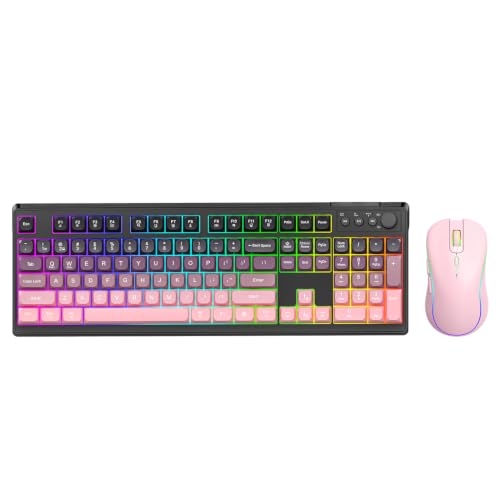
XISOGUU Wireless Keyboard and Mouse Combo RGB Backlit White-Pink

RedThunder K75 Wireless Membrane Keyboard & Mouse Combo

MageGee Gaming Keyboard and Mouse Combo K1 RGB LED Backlit Keyboard White

Womier SK80 75% Keyboard with Color Multimedia Display
More Details On Our Top Picks
CHONCHOW leans hard into visual flair, with a transparent shell, rainbow backlighting, and the option to switch between a single color or a multicolor look. That makes it a natural fit for a dorm desk, a casual gaming corner, or a setup where you want the keyboard to be part of the room instead of just a tool.
The mouse keeps the same theme going with seven-color breathing light and five DPI steps from 1200 to 7200, which gives you a wider tracking range than the usual basic combo. The trade-off is simple, the design is loud and the keyboard feels more style-first than minimalist, so you’ll like it most when the look matters as much as the function.
Strong Points
- Transparent key housing gives the board a bright, modern look.
- Keyboard lighting offers multiple color modes and easy adjustments through function-key shortcuts.
- The mouse covers a broad DPI range, which helps with casual gaming and everyday cursor work.
- USB plug-and-play setup keeps first-time installation simple.
Things To Consider
- The clear finish can show dust and fingerprints more quickly than a matte board.
- The style is busy, so it may feel distracting on a low-key office desk.
- Wired placement means your desk layout needs a little cable planning.
Feature Snapshot
Who It Suits Best
You’ll get the most out of this set in a gaming setup, a shared room, or a home desk where lighting effects are part of the appeal.
Where A Sibling Pick Shines
SEUNKWANG’s typewriter-style keyboard suits you better when typing feel matters more than RGB flair, especially for a more characterful desk.
SEUNKWANG takes the old-school typewriter look and pairs it with a metal panel, round keycaps, and clicky blue switches, so the whole board feels more tactile than the translucent CHONCHOW set. That kind of setup suits a home office or creative corner where you want more presence on the desk and a stronger typing feel under your fingers.
The white backlight keeps the retro shape readable without turning the board into a light show. The honest trade-off is sound, because blue switches are known for their audible click, so you’ll probably appreciate this most in a private room rather than a shared space.
What We Like
- The metal top plate adds a more substantial feel than plastic-heavy designs.
- Round keycaps give it a distinct vintage look that stands apart from standard office boards.
- Clicky mechanical switches suit people who want clear key feedback while typing.
- Full-size layout helps you keep number entry and shortcut access in reach.
- White backlighting stays simple and easy on the eyes.
Minor Gripes
- Blue switches can be noisy, which may not suit quiet apartments.
- The typewriter shape takes up more desk depth than compact layouts.
- Round caps can feel unusual for a first mechanical board.
Core Details
Who Should Grab It
You’ll like this most for typing-heavy evenings, a personal workstation, or any desk where look and key feel matter together.
Look Elsewhere When
CHONCHOW suits you better than this one if you want RGB color and a mouse that matches the keyboard’s lighting style.
SABLUTE feels made for desk users who want a little more comfort built in, thanks to the magnetic wrist rest and phone holder. That’s useful in long work sessions or school setups, because it gives your hands a softer landing and keeps your phone in sight without taking over the desk.
The round keycaps and backlit typewriter styling give it personality, but the wireless 2.4GHz connection keeps the overall setup cleaner than the wired CHONCHOW or SEUNKWANG options. The downside is that the more accessory-like features also make it a touch more specialized, so it makes the most sense for people who really use that wrist rest and phone perch.
Highlights
- Magnetic wrist rest helps reduce strain during long typing stretches.
- Phone holder keeps a second screen view close at hand.
- Wireless layout clears cable clutter from the desk.
- Backlit round keys give the set a distinctive, softer look.
Room For Improvement
- The extra accessories make it less minimal than a plain office combo.
- Wireless gear needs battery awareness, which adds one more thing to manage.
- The typewriter styling may feel playful in stricter work spaces.
Details At A Glance
Made For
You’ll get the most from this set in a mixed-use desk setup, especially where comfort details matter more than a stripped-down look.
A Better Fit Elsewhere
RedThunder K75 suits you better if you want a keyboard and mouse combo with more connection modes and a slightly more versatile layout.
XISOGUU pushes hard on versatility, with Bluetooth, 2.4GHz, and USB-C support in a single combo. That kind of flexibility matters for a desk that moves between a laptop, tablet-style work, and a main computer, because you can keep the same kit in place while changing devices.
The 2000 mAh battery and RGB media knob add a more premium-feeling layer than the simpler wired sets earlier in the list. The catch is that all those extras make it more involved than a basic plug-in combo, so it suits you best when you actually need the switching options and not just the lights.
Upsides
- Tri-mode connectivity gives you several ways to pair it with different machines.
- USB-C support fits a modern desk better than older-only wireless gear.
- The rechargeable battery removes the routine of swapping disposable cells.
- RGB media knob adds a hands-on control point for quick adjustments.
Areas To Watch
- More connection options can mean a little more setup thought up front.
- The feature set may be more than a basic office desk needs.
- Wireless charging habits become part of ownership, so planning matters.
Technical Sheet
Best Suited To
You’ll appreciate this most if your desk rotates between multiple devices and you want one set that can keep up.
Another Choice May Suit
SABLUTE fits better for you when wrist comfort and a phone holder matter more than tri-mode flexibility.
The white-pink finish gives this XISOGUU set a softer personality than the darker RGB combos in the roundup. It’s the kind of visual shift that works well on a vanity desk, a pastel gaming corner, or any workspace where the keyboard should match the room instead of looking purely technical.
Under the surface, it shares the same tri-mode and rechargeable setup as the other XISOGUU option, so the main difference is really the look. That makes it a neat pick for someone who wants the same practical feature set but prefers a lighter color palette.
Positives
- The white-pink finish softens the desktop without sacrificing the RGB theme.
- Rechargeable power keeps the desk cleaner than battery-swap setups.
- Three connection modes make it useful across more than one device type.
- The media knob adds quick control that feels convenient in daily use.
Small Caveats
- Light colors can show smudges more quickly than darker shells.
- The personality-led design may not suit a formal office.
- All the extras make it less bare-bones than a simple wired combo.
Key Specs
Right Fit For
You’ll enjoy this most if your setup leans decorative, colorful, or simply a little more personal than standard black gear.
Where Shoppers Go Wrong
XISOGUU’s darker tri-mode version is the better match if you want the same feature set in a more understated finish.
RedThunder’s K75 lands in the middle ground in a useful way, because it gives you wireless convenience, wired fallback, and Bluetooth all in one set. That makes it a practical fit for a home office, a family computer, or a work corner that needs to move between devices without a lot of extra hardware.
The 75 percent layout saves space by trimming the keyboard down from a full-size board, while the side-engraved keycaps keep labels visible from the front edge. The trade-off is the tighter layout, so number-heavy work may feel better on the larger SEUNKWANG or MageGee options.
Best Bits
- Three connection modes give you strong placement flexibility.
- Wireless and wired options make it easier to keep working during charging or connection changes.
- 75 percent size helps reclaim desk space.
- 4800 DPI on the mouse supports quicker cursor movement for general use and light gaming.
- Rechargeable battery design cuts down on cell replacements.
Honest Caveats
- The smaller layout leaves less room for dedicated number work.
- Membrane keys tend to feel softer than a mechanical board.
- RGB styling may be more than a purely office setup needs.
Feature Rundown
The Right Fit
You’ll like this most in a smaller desk setup where connection flexibility matters more than a full-size number pad.
Skip It When
MageGee’s full-size K1 is the better call if you rely on the number pad every day.
MageGee keeps things simple in a way that still makes sense for a lot of desks, especially starter gaming setups and family PCs. The full 104-key layout means you’re not giving up the number pad, which makes this feel more familiar than the smaller RedThunder board.
The white finish helps it blend into brighter desks, and the RGB lighting adds some character without requiring a more complicated wireless setup. The honest read is that this is less about extra features and more about covering the basics well, which is often exactly what you want for a first combo.
Reasons To Buy
- Full-size key count keeps number entry easy.
- Wired setup avoids pairing steps and battery tracking.
- RGB lighting gives a gaming look without extra complexity.
- White finish works nicely on light or neutral desks.
Softer Spots
- The no-frills approach leaves less room for advanced extras.
- A full-size board asks for more desk space than a 75 percent layout.
- The design feels straightforward rather than polished or premium.
At A Glance
Who Will Love This
You’ll appreciate this most if you want a simple, full-size combo for a desk that sees everyday use.
Where A Sibling Pick Shines
Womier SK80 is the stronger match for you if you want hot-swap freedom and a more enthusiast-focused keyboard feel.
Womier SK80 sits closer to the enthusiast end of the scale than the rest of the list, mainly because of the color display, hot-swappable design, and gasket mount construction. Hot-swappable means you can change switches without soldering, and gasket mount refers to a softer, cushioned mounting style that changes the typing feel in a noticeable way.
That combination makes it a strong match for a desk where typing feel, sound, and customization all matter. It’s more involved than the simpler combos from MageGee or CHONCHOW, so the payoff shows up most for someone who enjoys tuning a keyboard instead of just plugging it in and forgetting about it.
What We Like
- The color display adds useful visual information and a more premium desktop presence.
- Hot-swap support gives you room to change switches later.
- Gasket mount construction usually appeals to people who want a softer typing feel.
- Pre-lubed stabilizers help the larger keys feel smoother out of the box.
- The 75 percent size keeps the desk cleaner than a full-size layout.
Worth Noting
- The feature depth makes it less plug-and-play than basic combos.
- Customization takes more care, so it suits hobbyists more than casual users.
- The smaller layout still means you give up a number pad.
Spec Overview
Built With In Mind
You’ll get the most from this board if you care about typing feel, switch customization, and a more polished desk setup.
Swap It Out When
MageGee’s K1 is the simpler choice for you when a full-size layout matters more than customization.
How To Choose The Right Custom Keyboard And Mouses
Start With The Way You Actually Work
Desk fit comes first. A 75 percent board like RedThunder K75 or Womier SK80 leaves more room for a mouse, while a full-size board like MageGee K1 gives you the number pad that still matters for spreadsheets, entry work, and quick calculations.
Connection style matters just as much. Wired sets keep things simple and stable, while tri-mode or 2.4GHz wireless combos suit a desk that moves between a laptop, a main PC, and a second device. That’s where the setup either feels tidy or starts to feel fussy.
Match The Feel To The Room
Mechanical boards such as SEUNKWANG usually feel sharper and more tactile, while membrane options like RedThunder often feel softer and quieter. That difference matters in a shared room, a late-night work area, or a household where sound carries.
Lighting is more than decoration here. RGB on CHONCHOW or XISOGUU can suit a gaming setup, while plain white backlighting on SEUNKWANG feels calmer and easier to live with day to day.
Pay Attention To The Mouse Too
The mouse is easy to overlook, but it affects daily comfort fast. CHONCHOW’s DPI range runs from 1200 to 7200, which gives you more room to tune pointer speed than a barebones office mouse, and RedThunder’s 4800 DPI is plenty for general home use.
Shape and controls matter too. A media knob on XISOGUU helps if you like quick access, while the optical mouse included with RedThunder keeps the package feeling balanced. The best combo is the one where the mouse doesn’t feel like an afterthought.
Choose For Ownership, Not Just Appearance
Think about upkeep before the first week of use. Clear shells can show dust more easily, wireless sets need charging habits, and hot-swappable keyboards like Womier SK80 only make sense when you want future tinkering as part of ownership.
That’s the practical divide: simple sets save time, feature-heavy sets give you room to grow. Your best choice depends on whether you want a plug-in tool, a style piece, or a keyboard you can keep shaping over time.
Things Worth Knowing First
Mistakes Worth Dodging
Many people focus on lighting first and comfort second, then regret it later. A flashy board can look great on a product page, but a noisy switch, cramped layout, or awkward key spacing becomes obvious the moment you use it for real work.
Another common miss is ignoring the mouse altogether. A combo is only as comfortable as its least pleasant piece, so pay attention to DPI range, shape, and whether the mouse feels like it belongs with the keyboard.
What The Higher Tier Buys
More expensive combos usually give you stronger materials, more connection options, or extras such as hot-swap support and display panels. Those additions don’t just change the look, they change how long the setup stays useful as your habits shift.
The upgrade makes sense when you care about typing feel, device switching, or desk polish. For a basic family computer, a simpler wired set is enough, but for a personal desk you use every day, the extra refinement can be easier to live with.
Closing Thoughts
Your best match depends on what you want your desk to do. CHONCHOW and XISOGUU lean into color and style, SEUNKWANG and Womier SK80 lean toward a more deliberate typing experience, and MageGee keeps the setup plain and familiar. For most home desks, the sweet spot is the one that fits your space, your sound tolerance, and how much customizing you actually plan to do. Pick the set that feels natural to use, because that’s the part you’ll notice every day.
