
Desktop Keyboard And Mouses can look similar at a glance, but the feel changes fast once you type all day, share a desk, or keep a laptop parked at home. This roundup focuses on full-size layouts, wireless convenience, quiet office pairs, and a few style-forward sets that still make sense for real work. You’ll also see where wired simplicity still makes sense, especially for stationary setups that just need steady input and no fuss.
Quick Look At The Shortlist
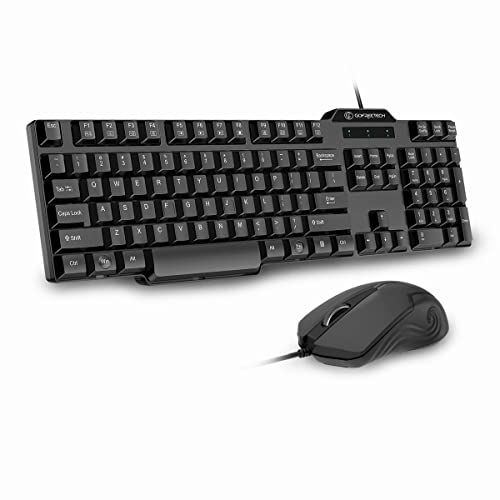
GF GOFREETECH Full-Size Wired Keyboard and Mouse Combo 104-key layout

Logitech Signature MK650 Combo for Business Keyboard and Mouse Graphite

TECKNET Wireless Keyboard and Mouse Combo Full Size Ergonomic Keyboard and Mouse

SABLUTE Ergonomic Wireless Keyboard and Mouse Combo Rechargeable 4000mAh Backlit Keyboard

Wired Typewriter Keyboard and Mouse Combo Low Noise Pink Switch-Green
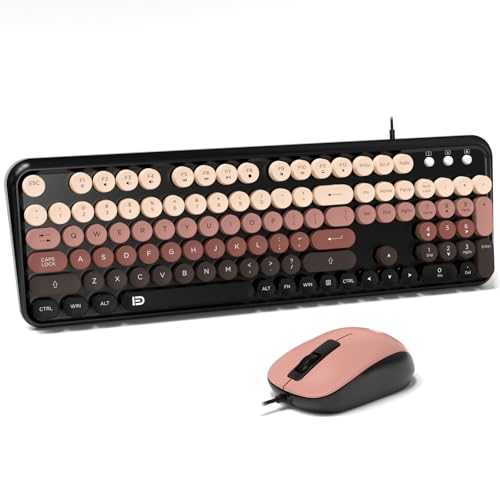
FOPETT 8870P Wired Keyboard and Mouse Combo Full-Sized Computer Keyboards 104 Round Keys

Logitech MK270 Full Size Wireless Keyboard and Mouse Combo Black

Logitech MK345 Full Size Wireless Keyboard and Mouse Combo Black
More Details On Our Top Picks
A wired combo like this makes sense for a desk that stays put. The 104-key layout gives you a full number pad, and the 12 shortcut keys trim a few steps from common media tasks, which matters more than it sounds in a busy home office. The optical mouse is ambidextrous, so left-handed use doesn’t feel like an afterthought.
The trade-off is simple: you’re giving up wireless freedom for straightforward setup and fewer batteries to think about. Anti-slip feet help keep the board anchored, and the Windows and macOS support broadens its reach for mixed-device homes. For commuters who dock a laptop at the same desk every day, that steady, no-drama setup is the point.
What We Like
- Full-size layout includes a number pad, which helps with spreadsheets and data entry.
- USB plug-and-play setup keeps installation simple on a work desk or backup station.
- Shortcut keys make music and basic media control faster.
- Ambidextrous mouse suits left-handed and right-handed use.
- Anti-slip feet help the keyboard stay planted during long sessions.
Things To Consider
- Wired routing can feel crowded on compact desks.
- The mouse is basic rather than ergonomically sculpted.
- Cleaning around the full-size key field takes a little more time than on a smaller board.
Feature Snapshot
Who Should Grab It
You’re a good match for this set if you want a simple wired desktop pair for home, school, or a secondary work station.
Where A Sibling Pick Shines
Logitech MK270 Full Size Wireless Keyboard and Mouse Combo Black suits you better when you want a cable-free desk and can live without the direct wired connection.
For long workdays, this set leans hard into comfort and smooth motion. Logi Bolt is Logitech’s wireless system for secure, stable connections, and the mouse adds SmartWheel scrolling, which shifts between precise line-by-line moves and faster scrolling in larger documents. That makes it especially useful for spreadsheet-heavy days or crowded inboxes.
The small mouse keeps the footprint tight, though it won’t feel as roomy as a full-size sculpted model. Compatibility stretches across Windows, Mac, Chrome, and Linux, so a mixed office or a tech-heavy home setup can use it without much drama. Compared with the wired GF GOFREETECH combo, this one feels more polished for shared workspaces and less tied to a single desk.
Highlights
- Logi Bolt wireless support suits office settings that value stable connections.
- SmartWheel scrolling helps you move through long documents with less finger strain.
- Small mouse keeps the kit compact for shared desks and laptop bags.
- Cross-platform compatibility broadens its use across mixed computer setups.
- Comfort-forward design fits long typing sessions better than bare-bones desktop pairs.
Room For Improvement
- The smaller mouse may feel snug in larger hands.
- Wireless setup adds pairing and battery upkeep.
- The business focus is overkill for very casual desktop use.
Core Details
Built With In Mind
You’re the right match for this combo if your desk time is long, your device mix is varied, and you want a wireless set with office-friendly polish.
Look Elsewhere When
GF GOFREETECH Full-Size Wired Keyboard and Mouse Combo 104-key layout makes more sense for a fixed desk where you want to skip wireless setup altogether.
This TECKNET set leans into desk comfort in a more practical way than the business-focused Logitech MK650. The wrist rest gives your palms a softer landing, and the included phone or tablet holder keeps a second screen upright without stealing desk space. For long typing sessions, that kind of arrangement feels orderly rather than fancy.
The 2.4G cordless connection keeps the desk cleaner than a wired setup, and the silent mouse suits shared rooms or late-night work. Sleep mode helps reduce needless wake-ups between sessions, though wireless sets always bring battery awareness into the picture. You’ll appreciate it most in a home office where posture, clutter, and quick glances at a phone all matter at once.
Reasons To Buy
- Wrist rest eases pressure during long typing stretches.
- Phone or tablet holder keeps a second device visible without extra stands.
- Silent mouse helps preserve a quieter work area.
- 2.4G wireless connection keeps the desk free of cable tangles.
- Sleep mode supports more efficient everyday use between work sessions.
Points To Note
- Accessory pieces add a little more desk width than a plain combo.
- Wireless upkeep means you’ll need to stay aware of power management.
- The comfort features help most in stationary setups, not travel.
Quick Facts
Best Suited To
You’re a strong match for this combo if your desk work is long and you like built-in comfort extras that reduce clutter.
Swap It Out When
Logitech MK345 Full Size Wireless Keyboard and Mouse Combo Black is the cleaner fit for someone who wants a simpler wireless pair with fewer add-ons.
The SABLUTE combo leans into shape and lighting more than the TECKNET set, and that makes it feel friendlier for people who care about hand position. The wave-style keys guide your fingers into a more natural path, while the soft faux lambskin palm rest adds a cushioned surface that should appeal to anyone parked at a desk for hours.
Its 4000mAh rechargeable battery is a useful anchor for wireless life, and the backlit keyboard gives you better key visibility in dim rooms. The trade-off is that the comfort-first styling takes more desk space than a compact pair, and the extra features may feel like overkill for a spare computer station. In most home offices, though, it lands as a thoughtful upgrade rather than a flashy one.
Positives
- Wave-shaped keys support a more relaxed hand position.
- Soft palm rest adds comfort during longer typing sessions.
- Rechargeable 4000mAh battery reduces routine battery swaps.
- Backlit keys help in dim evening workspaces.
- Works with Windows, Mac, and Chrome OS, which broadens its reach.
Softer Spots
- Comfort features take up more room than a plain compact combo.
- Wireless charging habits matter more with a rechargeable set.
- The styling may feel too specific for a very plain office desk.
Details At A Glance
Who Will Love This
You’re the right fit for this combo if you want your desktop set to feel comfortable, rechargeable, and a little more refined.
Reach For A Different Pick When
GF GOFREETECH Full-Size Wired Keyboard and Mouse Combo 104-key layout makes more sense for a simpler, lower-maintenance station.
This set is for the person who wants their desk to feel more like a statement piece without abandoning practical typing gear. The typewriter-style keycaps, white backlight, metal panel, and knob create a look that stands apart from the more utilitarian GF GOFREETECH and Logitech MK270 sets. The low-noise pink switch-green setup softens the mechanical feel a bit, so the style doesn’t come at the expense of everyday comfort.
In a home office or creative workspace, the visual character matters, and this combo gives you that in a clear, deliberate way. The trade-off is size and personality, because the retro styling will either click with your desk or feel like too much. For laptop users who want a more expressive desktop anchor, it’s easy to understand the appeal.
Bright Spots
- Retro typewriter styling gives your desk a distinct look.
- White backlight helps with low-light typing.
- Metal panel adds a more substantial feel to the keyboard body.
- Knob control gives you a handy physical input point.
- Low-noise switches suit shared rooms better than louder mechanical sets.
Small Caveats
- The bold styling may not suit a very plain office.
- Wired routing can clutter small desks.
- Retro keycap shapes can take a little adjustment for some hands.
Feature Rundown
The Right Fit
You’ll like this combo most if your desktop gear needs to look distinctive and still stay practical for daily typing.
A Better Fit Elsewhere
Logitech MK345 Full Size Wireless Keyboard and Mouse Combo Black suits you better when you want a calmer, more understated desktop setup.
Round keys and a colorful black-berry look give this FOPETT set a friendlier personality than the plain wired GF GOFREETECH combo. The 104-key format still keeps the number pad in play, so you aren’t giving up desk utility just to get a more playful shape. For a student desk or a home computer that sees light to moderate use, that balance feels sensible.
The wired layout keeps setup simple, and the lower-cost positioning makes it easy to place in a secondary room or basic office corner. The trade-off is that the rounded key shape is more about character than speed, so touch typists may need a brief adjustment. It’s the kind of set you choose with your eyes first and your wallet second, which is not a bad thing in this category.
Best Bits
- 104-key layout preserves the usefulness of a full desktop board.
- Round key design brings a lighter visual tone to the desk.
- Wired connection keeps setup straightforward.
- Colorful finish gives a plain workspace more personality.
Areas To Watch
- Round keys can feel different at first.
- The styling may be too playful for formal office use.
- Wired cabling adds the usual desk management chore.
At A Glance
Perfect Match For
You’re a strong match for this set if you want a full-size wired combo with a little extra character and a modest buy-in.
Another Choice May Suit
Logitech MK270 Full Size Wireless Keyboard and Mouse Combo Black works better for a cleaner wireless desk with less visual noise.
Some desktop combos win by being easy to live with, and that’s the MK270 story. The full-size keyboard keeps your number pad available, while the wireless layout clears the desk for notebooks, a monitor stand, or the usual pile of paperwork. For a home office that just needs to stay moving, that simplicity matters.
Compared with the business-oriented MK650, this one feels more straightforward and less specialized, which can be exactly right for casual work or a family computer. The mouse is compact enough to tuck into a bag, though larger hands may wish for more contour. It’s the sort of set that disappears into the background in the best practical sense, like a lamp you stop noticing because it just works.
Upsides
- Wireless design keeps the desk free of cable clutter.
- Full-size layout supports spreadsheets and everyday typing.
- Compact mouse makes the kit easy to move between rooms.
- Plain black finish fits nearly any desk style.
Minor Gripes
- The mouse shape is basic rather than deeply sculpted.
- Wireless upkeep means you’ll need to watch power management.
- The overall design is practical, not decorative.
Core Details
Made For
You’re a good fit for this combo if you want a straightforward wireless desktop set for home, school, or light office use.
Not Your Match When
Logitech Signature MK650 Combo for Business Keyboard and Mouse Graphite suits you better if you want more business-focused features and a more premium wireless feel.
The MK345 leans into daylong desk comfort more than the slimmer MK270. The integrated palm rest gives your wrists a more relaxed place to sit, and the compact right-handed mouse keeps the companion piece from feeling bulky. That combo makes sense for anyone parked at a computer for a full shift or a long stretch of work from home.
Its single USB-A Nano Receiver simplifies the connection story, which is handy on a desktop where you want one small plug and done. The trade-off is that the mouse is clearly shaped for right-handed use, so left-handed shoppers should look elsewhere. Compared with SABLUTE’s more stylized ergonomic layout, this Logitech feels steadier and less fashion-forward, which some desks will prefer.
What We Like
- Integrated palm rest supports a more relaxed typing posture.
- Compact right-handed mouse saves desk space.
- Single USB-A Nano Receiver keeps the connection simple.
- Full-size keyboard suits standard desktop work.
Worth Noting
- The mouse shape favors right-handed use.
- Wireless design still adds battery upkeep.
- The set is comfort-first, so style stays conservative.
Spec Overview
The Right Fit
You’ll appreciate this combo most if you want a calm, comfortable wireless set for a fixed desk and you’re right-handed.
Where A Sibling Pick Shines
Logitech MK270 Full Size Wireless Keyboard and Mouse Combo Black is the better match for someone who wants a simpler wireless pair without the palm rest emphasis.
How To Choose The Right Desktop Keyboard And Mouses
Layout And Desk Fit
Start with the shape of your workday, not the color of the set. A full-size board with a number pad helps with spreadsheets, data entry, and the kind of desk work that never stays tidy for long, while a smaller mouse keeps the space usable around notebooks and a laptop stand.
Wired sets like GF GOFREETECH and FOPETT keep things simple on a fixed desk. Wireless options such as Logitech MK270 or MK345 clear cable clutter, which matters more once your desk also holds a monitor, charger, and paperwork.
Comfort Features That Matter
Palm rests, wave-style keys, and a shaped mouse can make a noticeable difference during long sessions. TECKNET and SABLUTE go harder on comfort, while Logitech MK345 uses a palm rest and a compact right-handed mouse for a calmer, less fussy feel.
Those extras are useful only when they match your habits. A casual weekend computer may not need them, but a full workday at the same desk can make them feel worthwhile pretty quickly.
Connection Type And Maintenance
Wired combos usually win on simplicity because there’s no pairing, no receiver to track down, and less battery thinking. Wireless sets bring a cleaner desk and more flexibility, though they ask for more attention to power management and occasional dongle handling.
For shared rooms or office corners, the trade-off is usually worth it. For a dedicated desktop that never moves, wired still has a very real appeal.
Style Versus Plain Utility
Some sets lean into personality, like the retro typewriter look from SEUNKWANG or the round-key FOPETT board. Others, like Logitech MK270, keep the visual noise low and stay out of the way.
The better choice comes down to whether you want your desk gear to blend in or carry some character. Both can work well, but they solve different problems.
Things Worth Knowing First
Wrong Turns To Avoid
A common mistake is choosing on looks alone and forgetting hand position, mouse shape, and desk size. Another is overlooking whether you want wireless convenience or the steadier simplicity of a corded setup.
Pay attention to hand dominance too, because a compact right-handed mouse can feel awkward fast. That one detail can matter more than a bright finish or a clever keycap shape.
The Upgrade Payoff
Higher-tier combos usually spend more on comfort shaping, better scrolling, rechargeable power, or broader software compatibility. That’s why MK650, SABLUTE, and MK345 feel more polished than the plain wired sets, even before you factor in the material choices or added features.
The upgrade makes sense when your desk time is long, your hands get tired, or your work mix is more demanding than basic typing. If you only need a dependable keyboard and mouse for occasional use, the simpler pairs already cover a lot of ground.
Final Thoughts
The right Desktop Keyboard And Mouses depend less on specs in a vacuum and more on how you sit down and work every day. Wired sets suit fixed desks and low-maintenance setups, while wireless pairs earn their keep when you want cleaner space and easier movement. Comfort extras matter most once the hours stack up, and style matters most when the desk is part of the room you actually live in. Choose the one that fits your routine, and the rest gets much easier.
