
Large-hand mice only feel right when the shell supports your palm without forcing a cramped claw grip. That matters most during long office days, spreadsheet work, creative editing, or any session where your wrist starts to complain before your task is done. You’ll see a mix here, from classic curved designs to vertical shapes and a trackball, because hand size alone does not tell the whole story. The right match depends on how you move, how many devices you switch between, and how much desk space you want to give up.
Quick Look At The Shortlist

Logitech Signature Plus M750 L Wireless Mouse Graphite
ProtoArc EM11 Pro Ergonomic Mouse for Large Hands, Side Scroll, Black

ELECOM Huge Plus Wireless Trackball Mouse 52mm Large Ball

Wireless Ergonomic Vertical Mouse for Large Hands Rechargeable
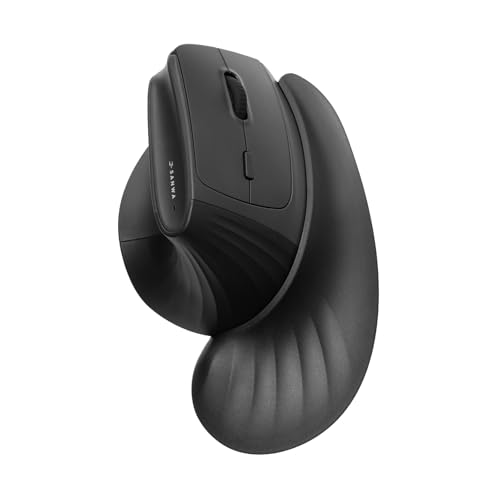
SANWA Wireless Ergonomic Mouse for Large Hands with Wrist Rest

Logitech Signature M650 L for Business Wireless Mouse Large Graphite
SABLUTE Ergonomic Vertical Wireless Mouse MAM4

Transformers Vertical Ergonomic Mouse with LED Screen & Knob Control Black
More Details On Our Top Picks
Logitech’s M750 L leans toward the easygoing side of large-hand mice, with a contoured shell, silent clicks, and side buttons that help keep everyday work moving. The SmartWheel should suit people who hop between short scrolls and longer pages all day, especially in office work or home setups with a lot of tabs.
The trade-off is that it stays fairly traditional, so you’re getting comfort and convenience rather than a bold ergonomic shape. That said, for long commutes into a laptop bag or a mixed device desk, the Bluetooth and multi-device setup make it a practical, low-fuss pick.
What We Like
- Contoured body supports larger palms without feeling bulky.
- Silent clicks are useful in shared spaces and late-night work.
- SmartWheel scrolling helps you move through long documents with less fuss.
- Custom side buttons can speed up routine shortcuts.
- Bluetooth and multi-device support fit a desk with more than one machine.
Minor Gripes
- Its shape stays familiar, so it may not satisfy you if you want a stronger vertical angle.
- Dark graphite finishes can show smudges over time.
Core Details
Who It Suits Best
Office workers and home users who want a roomy, familiar shape with simple wireless convenience will get the most from it.
A Better Fit Elsewhere
ProtoArc EM11 Pro Ergonomic Mouse for Large Hands, Side Scroll, Black suits you better when side scrolling and custom browser controls matter more than a classic mouse feel.
This ProtoArc model feels built for desk work that involves more than simple point-and-click use. The side scroll wheel matters most in spreadsheets, video timelines, and any browser-heavy routine where horizontal movement saves time and wrist motion.
It also makes sense for larger hands that need a more deliberate grip, since the design is aimed at hands between 7.5 and 8.5 inches. The catch is that the extra controls add complexity, so casual users who only open email and a few tabs may not need this much mouse.
Highlights
- Side scroll control is well suited to spreadsheets and editing timelines.
- Browser-based customization gives you room to tailor button behavior.
- Built for larger hands, with sizing aimed at 7.5 to 8.5 inch hands.
- Multi-device support fits a workbench with more than one computer.
Worth Noting
- The control set asks for a little setup time before it feels natural.
- Specialized features can feel like extra clutter for light browsing.
- The black finish is sensible, though it may still pick up fingerprints.
Feature Rundown
Built With In Mind
You’ll appreciate it most as a spreadsheet helper, editing tool, or work mouse for a desk that sees frequent horizontal scrolling.
Another Choice May Suit
Logitech Signature Plus M750 L Wireless Mouse Graphite is the calmer option for you if you want a simpler shape and fewer controls.
Trackballs ask you to move the cursor with your thumb or fingers instead of sliding the whole mouse, and that changes the whole desk experience. ELECOM’s Huge Plus leans hard into that style with a 52 mm ball, so it suits people who want pointer control in a tighter space or just want less arm motion during the day.
The 10 programmable buttons make it especially useful for power users, though the learning curve is real compared with the more familiar Logitech shapes above. For a home office, an editing station, or a cramped desk where a large pad is awkward, this one can feel like a smart trade.
Upsides
- The 52 mm ball gives you controlled cursor movement without sweeping the mouse around.
- Ten programmable buttons support shortcuts for advanced workflows.
- Bluetooth, 2.4 GHz wireless, and wired use cover a wide range of setups.
- Rechargeable power is more convenient than replacing cells.
- Silent clicks help keep noise down during long work sessions.
Points To Note
- A trackball asks for a short adjustment period before it feels natural.
- Cleaning the ball and housing matters more than on a standard mouse.
- The shape is specialized, so casual browsing may not justify all the controls.
Details At A Glance
Who Will Love This
You’ll get the most from it in a compact workspace, or in any setup where a traditional mouse pad feels like wasted real estate.
Reach For A Different Pick When
Logitech Signature M650 L for Business Wireless Mouse Large Graphite makes more sense for a straightforward office mouse with less adjustment time.
Vertical mice change the angle of your hand so your grip feels more like a handshake than a flat palm spread. This SHARE SUNSHINE model keeps the idea simple, which makes it attractive for people who want a lower-cost entry into vertical ergonomics without adding a lot of extras.
The 3600 DPI setting gives it enough sensitivity for everyday office work, while the quiet click design helps in shared rooms. The honest read is that this style works best for users who already know they want a vertical shape, because the posture change can feel odd at first.
Reasons To Buy
- Vertical shape changes wrist position in a way many users find easier over long sessions.
- Rechargeable power keeps the setup simpler.
- Quiet clicks suit libraries, meetings, and shared workspaces.
- 3600 DPI gives a useful range for routine desktop tasks.
Small Caveats
- Vertical mice often need a short adaptation period.
- The budget-focused build may not feel as refined as higher-priced options.
- Cleaning around the side grips is part of normal upkeep.
Feature Card
Right Fit For
This suits you best in a simple laptop-and-monitor setup where you want a vertical shape without a long feature list.
Where Another Pick Suits Better
SANWA Wireless Ergonomic Mouse for Large Hands with Wrist Rest suits you better if you want built-in wrist support along with the vertical stance.
SANWA takes a more supportive route than the SHARE SUNSHINE vertical mouse above, mainly because the magnetic wrist rest adds another layer of comfort. The 46 degree tilt keeps your hand angled upright, and the detachable rest means you can strip it down when you want a smaller footprint.
That mix makes it a strong choice for long desktop sessions, especially in home offices where your mouse hand stays parked for hours. The 3-device switching also helps when your day moves between a laptop, work PC, and tablet, though the extra parts mean a little more desk clutter than a simpler mouse.
Positives
- The 46 degree vertical angle supports a more natural hand position.
- Magnetic wrist rest adds cushioning for long stretches at the desk.
- Three-device switching fits multi-screen or mixed-machine routines.
- Silent clicks suit shared offices and late-night work.
- 2 Bluetooth 5.4 connections plus 2.4 GHz give you flexible pairing options.
Areas To Watch
- The wrist rest adds bulk, so storage takes a little more space.
- More parts also mean more pieces to keep track of during travel.
- Vertical layouts can still take a few days to feel natural.
Core Details
Made For
You’ll like this most in a long-session office setup where wrist support matters as much as pointer control.
Skip It When
SHARE SUNSHINE Wireless Ergonomic Vertical Mouse suits you better if you want the same upright style without the attached rest.
This is the corporate-leaning cousin to the M750 L, and the difference shows in the connection language. Logi Bolt is aimed at secure wireless setups, so it makes more sense in managed offices where IT wants consistent device behavior across many desks.
For the end user, the large graphite shell still focuses on comfort during long hours, and the SmartWheel remains handy for everyday scrolling. The catch is availability, since this listing is currently unavailable, so it makes more sense as a model to track than a quick grab.
Strengths
- Large size suits bigger hands during long work sessions.
- Logi Bolt wireless support fits managed workplace setups.
- Bluetooth adds another way to connect without a dongle.
- SmartWheel scrolling helps with documents, email, and long web pages.
Softer Spots
- The listing status may make immediate purchase planning awkward.
- Its business focus can be more than home users need.
- Graphite finishes can still show hand marks after heavy daily use.
Technical Sheet
Whose Shelf It Belongs On
IT-managed workstations and office teams will get the most value from this one, especially where connection consistency matters.
Swap It Out When
Logitech Signature Plus M750 L Wireless Mouse Graphite makes more sense for a home desk that wants similar comfort without the business-first angle.
SABLUTE tries to do a lot for the money, and that starts with the vertical shell, three-device switching, and 8000 DPI adjustment. Fast scrolling and programmable buttons give it a work-friendly edge, so it’s useful for people who jump between tabs, documents, and multiple machines through the day.
The rechargeable USB-C setup keeps the experience modern, though the 30-day battery figure points to a model that expects regular charging. That trade-off is fair at this level, and it makes more sense for a desk user than for someone who wants to forget about power for months.
Bright Spots
- 8000 DPI adjustment gives you a wide sensitivity range.
- Three-device switching helps when your day moves across multiple screens.
- Programmable buttons can reduce repetitive steps in everyday work.
- USB-C charging is easier to live with than older charging styles.
- Fast scrolling is helpful in long documents or web research.
Room For Improvement
- A 30-day battery figure means charging stays part of the routine.
- Feature density can be a little much for very simple use.
- Vertical shapes still ask for an adjustment period.
Feature Snapshot
The Right Fit
You’ll get the most from it in a multitasking home office where price control matters but you still want flexible controls.
Look Elsewhere When
ProtoArc EM11 Pro Ergonomic Mouse for Large Hands, Side Scroll, Black suits you better if side scrolling matters more than a bigger feature count.
This model stands out because of the LED screen and knob, which make it feel more like a control center than a plain desktop mouse. The vertical shell still aims at medium to large hands, so you get a more upright grip alongside the extra interface.
It suits you best when you like seeing settings at a glance and using a mouse that feels a little more hands-on than the usual office shape. The trade-off is obvious though, since more interface elements can feel busy on a small desk or in a simple work setup.
Best Bits
- LED screen adds at-a-glance feedback.
- Knob control gives the mouse a more tactile feel.
- Three-device connectivity suits mixed-device workstations.
- Vertical design gives medium to large hands a more upright grip.
- Rechargeable wireless use keeps the setup clean.
Honest Caveats
- The feature set can feel crowded for very simple tasks.
- More controls usually mean more learning at the start.
- Glossy details and screens tend to need regular wiping.
Core Details
Perfect Match For
You’ll like this most if you enjoy feature-rich desk gear and want a mouse that doubles as a small control hub.
Where A Sibling Pick Shines
Logitech Signature Plus M750 L Wireless Mouse Graphite suits you better when you want a simpler, more familiar large-hand shape.
What To Weigh Before You Choose
Wrong Turns To Avoid
Size matters, but shape matters just as much. A mouse that technically fits your hand can still feel awkward if the thumb slope, button reach, or palm support does not match how you hold it during long sessions.
Connection style is another easy place to miss. Bluetooth keeps the desk tidy, 2.4 GHz wireless often feels more straightforward, and multi-device switching helps only when you actually move between machines.
Vertical designs and trackballs ask for patience. A few days of adjustment is normal, so the real question is whether your work style rewards that learning curve.
When Paying More Pays Off
Higher-priced ergonomic mice usually spend the money on more precise sensors, more durable switch gear, richer connection options, or extra controls. That matters most for spreadsheets, creative work, and office days that run long enough for little comforts to add up.
Wrist rests, programmable buttons, and multi-device support also raise the price because they add parts and design work. For a casual home desk, those extras may feel unnecessary, but for a work computer used all day, they can be worth it.
You can think of the upgrade as buying fit, control, and convenience instead of just a pointing device. That is a small shift in thinking, but it makes the category much easier to shop.
Final Thoughts
The best ergonomic mouse for large hands is the one that matches your grip, your desk, and the way you work. Logitech’s M750 L gives you the most straightforward comfort, ProtoArc and ELECOM lean into more specialized control, and SANWA brings a strong comfort-first vertical setup. For a clean, practical office mouse, stay simple. For heavier multitasking or a wrist-rest design, move up the list with a clear purpose in mind.
