
Small hands need a mouse that doesn’t fight back. A vertical shape, the right button reach, and a compact body can make long desk sessions feel far less awkward, especially for commuting workers, home office setups, and anyone who spends hours in spreadsheets or design apps. The eight picks below focus on fit, hand position, and day-to-day practicality rather than flashy extras. You’ll see where wireless freedom helps, where multi-device support earns its keep, and where a simple layout is the smarter call.
Quick Look At The Shortlist

PHILIPS SPK7628 Ergonomic Mouse 3 Adjustable DPI
SANWA 2.4G Wireless Ergonomic Mouse White

SABLUTE MAM3 Ergonomic Mouse Wireless Mouse for Small Medium Hands
Lekvey Ergonomic Mouse Rechargeable Wireless Mouse for Small Hands Black

Ergonomic Vertical Wireless Mouse 57 Degrees Small Medium Hands Black
J-Tech Digital Left Handed Wireless Ergonomic Vertical Mouse V628ML

DAREU Ergonomic Vertical Wireless Mouse for Small Hands

Ergonomic Vertical Mouse Wireless 2.4G High Precision Rechargeable
More Details On Our Top Picks
PHILIPS keeps this one simple in a way that suits small hands well. The vertical shape and compact wireless layout make more sense for daily desk work than a flat mouse that twists your wrist outward, and the six-button setup gives you a little more control without feeling crowded.
The adjustable DPI levels matter most for mixed tasks, from casual browsing to more precise pointer movement in spreadsheets or design tools. The light body and auto-sleep behavior also fit a bagged-up laptop routine, though the right-hand shape and small-to-medium fit make the use case fairly specific.
What We Like
- Three DPI steps give you room to tune pointer speed for different tasks.
- Quiet clicks suit shared spaces, late-night work, or calls at the same desk.
- The compact vertical form helps smaller hands keep a steadier grip.
- Auto-sleep support is useful for travel bags and desk clutter alike.
Worth Noting
- Right-hand use only, so left-handed shoppers need a different shape.
- The small-to-medium fit may feel tight for broader palms.
- Extra buttons are welcome, but they can still take a little time to memorize.
Feature Rundown
Who It Suits Best
Small-handed right-handed users who want a quiet office mouse with a plain learning curve will get the most from it.
A Better Fit Elsewhere
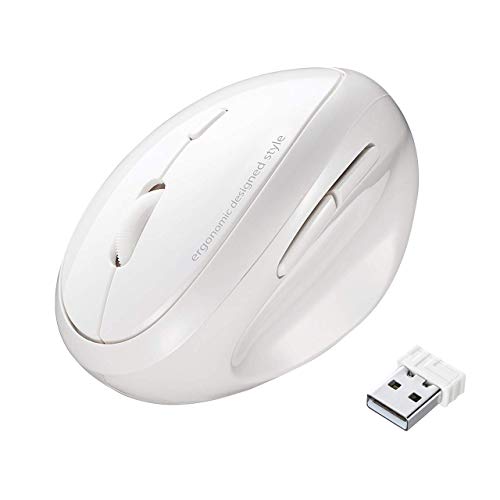
SANWA 2.4G Wireless Ergonomic Mouse White suits anyone who wants a more classic vertical profile and a straightforward button layout.
SANWA leans into the classic vertical idea, and that suits cramped hands nicely. The handshake position is the point here, since it keeps your palm upright rather than flattened over the desk, which many people find easier during long office stretches.
The white shell gives it a cleaner, less bulky look than the PHILIPS option above, though the shape still asks you to accept a vertical learning curve. In most home offices, that trade feels fair, especially for small palms that need a more natural resting angle.
Positives
- The handshake style helps your wrist sit in a more neutral position.
- Three DPI settings let you slow down for detail work or speed up for browsing.
- Five buttons keep the layout useful without turning it into a control panel.
- Mac, Windows, PC, and desktop support broadens where you can use it.
Small Caveats
- The rounded vertical body may feel unfamiliar for a few days.
- White finishes usually need a little more care to stay looking fresh.
- Users who want lots of thumb shortcuts will find the button count modest.
Core Details
Built With In Mind
You’ll like this most as a small-hand vertical mouse for straightforward office work and everyday browsing.
Swap It Out When
SABLUTE MAM3 makes more sense for people who bounce between three devices and want Bluetooth alongside wireless use.
This one stands out because it stretches beyond basic desktop use. The three-device Bluetooth support matters for people who move between a laptop, work machine, and tablet-style setup, while the rechargeable battery keeps it from feeling disposable.
Compared with SANWA, it’s more about switching and less about pure simplicity. That makes it a smart fit for small-to-medium hands in busy workspaces, though the extra flexibility also means a little more setup attention than a barebones USB mouse.
Highlights
- Three-device Bluetooth support suits multi-screen work routines.
- Rechargeable power means less battery swapping over time.
- Four DPI settings let you fine-tune cursor response.
- The small-to-medium size target helps the shape feel less oversized.
- Useful for laptops and Macs, so it fits mixed-device desks well.
Areas To Watch
- Bluetooth pairing adds more steps than a plain receiver-only mouse.
- The feature set is richer, so first setup may take a little longer.
- People who only need one device may not use the extra switching at all.
Technical Sheet
Whose Shelf It Belongs On
You’ll get the most out of it if your desk routine jumps between devices and you want a more adaptable vertical mouse.
Reach For A Different Pick When
Lekvey Ergonomic Mouse Rechargeable Wireless Mouse for Small Hands is easier to live with for shoppers who want a simpler single-receiver setup.
Lekvey takes a more stripped-down route, and that can be a relief for anyone who just wants a comfortable mouse without much fuss. The claimed 150-hour charge life is the kind of detail that fits an office bag or shared family desk, especially when you don’t want to think about power every few days.
Its small-and-medium sizing keeps the body from feeling oversized, which is useful if your hand slips around on chunkier vertical mice. The trade-off is that the straightforward 2.4G receiver style leaves out the extra device switching you get from SABLUTE and DAREU.
Upsides
- Long charge life suits steady desk use and travel.
- Three DPI settings give enough range for everyday pointer control.
- Plug-and-play use keeps setup simple on most compatible systems.
- The compact build helps smaller hands avoid overreaching for buttons.
Things To Consider
- No multi-device switching, so it stays closer to single-computer use.
- The black finish can show dust and fingerprints more than lighter shells.
- People who like lots of shortcut buttons may want a richer layout.
Details At A Glance
The Right Fit
You’ll appreciate it most in a straightforward laptop or desktop setup where comfort matters more than extra features.
Another Choice May Suit
SABLUTE MAM3 suits you better if you need Bluetooth plus three-device switching in a busier work flow.
The 57-degree angle is the key detail here, since it splits the difference between a full vertical stance and a softer wrist transition. That middle ground can feel friendlier than a taller mouse for small hands that want support without a steep learning curve.
Forward and back buttons make everyday browsing easier, and the quiet click design is useful in shared rooms or late office hours. Compared with Lekvey, this pick feels a touch more task-friendly, though its small-to-medium sizing still keeps it in a fairly specific lane.
Bright Spots
- The 57-degree body gives a less abrupt angle than some vertical mice.
- Quiet buttons suit shared desks and focused evening work.
- Forward and back controls help with web navigation and document work.
- Rechargeable power keeps the routine cleaner than disposable-cell models.
Room For Improvement
- The 57-degree shape still takes a short adjustment period.
- Hands that run very small may want to check the grip size carefully.
- Extra side buttons can feel busy until muscle memory settles in.
Feature Snapshot
Perfect Match For
You’ll like this most for everyday office work, browsing, and longer sessions where a softer vertical angle feels easier.
Where A Sibling Pick Shines
PHILIPS SPK7628 is the stronger fit for small-hand users who want six quiet buttons and a more button-rich layout.
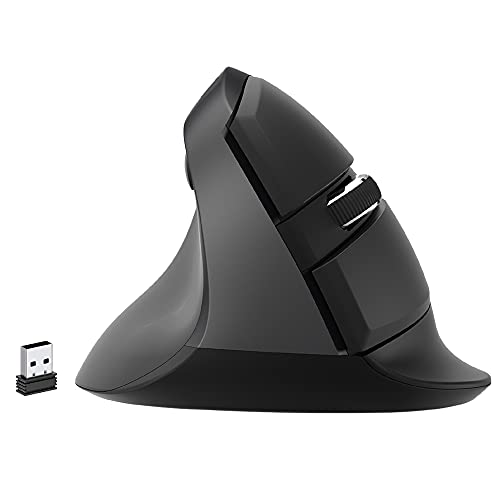
Left-handed vertical mice are still uncommon enough that this one earns attention on fit alone. The compact form is aimed at smaller hands, and the shape supports a more natural forearm angle for people who want a dedicated left-side setup.
The trade-off is clear, though, since the AA battery approach is less convenient than rechargeable options like Lekvey and DAREU. Still, for left-handed desk users, that old-school power setup is a small price for a mouse that’s shaped for the correct hand.
Reasons To Buy
- Dedicated left-hand design solves a hard-to-find fit problem.
- The compact body suits smaller hands better than many full-size vertical mice.
- USB nano transceiver setup keeps the connection simple.
- Compatible with Mac and PC, which broadens desk placement options.
Minor Gripes
- AA battery power means you’ll need spare cells on hand.
- Left-handed users get the real benefit, so this is a narrow purchase.
- The small-hand focus makes it less appealing for larger palms.
Core Details
Who Should Grab It
You’re the best fit here if you’re left-handed and want a smaller vertical mouse for a Mac or PC desk.
Look Elsewhere When
DAREU Ergonomic Vertical Wireless Mouse for Small Hands suits right-handed multitaskers who want more connection flexibility.
DAREU is the most connection-flexible option in this group. The mix of 2.4GHz and Bluetooth support, plus three-device switching, makes it a strong match for desk setups that bounce between computers more than once a day.
That flexibility does add a bit of complexity, so it’s not the plainest pick here. Even so, for small hands that also need easy device hopping, it feels like a tidy middle ground between the simpler Lekvey and the Bluetooth-led SABLUTE.
Best Bits
- 2.4GHz and Bluetooth support give you more connection options.
- Three-device switching helps keep mixed workspaces moving.
- The vertical shape aims to reduce wrist awkwardness during long sessions.
- Built for small hands, so the size target is clear.
Softer Spots
- More connection modes can mean more setup decisions.
- People who only use one computer may not need the extra flexibility.
- The feature set is broader, which can feel a bit busy at first.
Feature Card
Best Suited To
You’ll appreciate it most in a multi-device workspace where you still want a compact vertical mouse.
Where Shoppers Go Wrong
Lekvey Ergonomic Mouse Rechargeable Wireless Mouse for Small Hands is the simpler choice for anyone who does not need Bluetooth or multi-device switching.
BeWishes keeps the focus on a small-hand right-handed fit, and that directness is part of its appeal. The adjustable DPI range and rechargeable design make it easy to slot into a simple laptop or desktop routine without much learning time.
Compared with the more feature-loaded DAREU and SABLUTE picks, this one feels cleaner and more straightforward. That can be exactly right for a home office or school desk, though people who want lots of shortcuts will probably find the layout a little plain.
Standout Traits
- The compact shape is built around small-hand use.
- Rechargeable power keeps the setup cleaner than battery-only mice.
- Three DPI settings let you adjust speed without extra complexity.
- Wireless 2.4G use keeps the desk free of a cable.
Areas To Watch
- Right-handed only, so it leaves out left-handed setups.
- The simpler control layout may feel limited for shortcut-heavy work.
- People with medium-plus hands may want a roomier body.
Core Details
Built With In Mind
You’ll get the best fit from it as a no-fuss right-handed mouse for everyday home or school use.
Skip It When
J-Tech Digital Left Handed Wireless Ergonomic Vertical Mouse V628ML is the clearer match for left-handed shoppers who need a dedicated shape.
How To Choose The Right Ergonomic Mouses For Small Hands
Size And Hand Shape Matter First
Small hands usually need a mouse that fits the palm without forcing the fingers to stretch for buttons. A vertical body often helps because it keeps the hand in a more natural handshake position, but the size still has to be right or the mouse feels bulky rather than supportive. The cleanest match is usually a compact shell with a thumb rest and buttons placed close enough to reach without shifting your grip.
Wireless Style Changes Daily Use
2.4 GHz wireless uses a tiny USB receiver, which keeps the desk tidy and usually makes setup easy. Bluetooth matters more for laptop users and multi-device desks, since it reduces dongle dependence and works well across newer machines that already juggle a lot of ports. Rechargeable power suits regular desk use, while battery-powered models appeal to people who prefer a simple swap instead of another charging habit.
Button Layout And DPI Are Not Small Details
DPI, which means dots per inch and acts as cursor sensitivity, can make a big difference on smaller hands because you’re often moving the mouse with shorter motions. Lower settings help with careful pointing, while higher settings speed up day-to-day work across large monitors. Extra side buttons help with browsing and file movement, but a crowded button cluster can feel awkward in a compact body, so the sweet spot is useful control without fingertip gymnastics.
Match The Mouse To The Way You Work
People who spend hours in documents and email usually want quiet clicks, a stable vertical angle, and a body that disappears into the routine. Multi-device users need switching and Bluetooth more than extra buttons, while left-handed shoppers should focus on models built specifically for that hand rather than trying to adapt a right-handed shape. The right choice feels boring in the best way, like it belongs on your desk from day one.
What To Weigh Before You Decide
Common Shopping Slip Ups
Many shoppers focus on the word “ergonomic” and forget to check the actual hand size target. That’s how a mouse ends up feeling too tall, too wide, or too stiff around the thumb area. A quick look at handedness, button count, and whether the model is truly made for small hands prevents most regrets.
Another common miss is forgetting the connection style. A receiver-based mouse is simple, but Bluetooth or multi-device support may be the better route for a laptop routine that shifts between workspaces. The honest read is that comfort and connection need to match your desk life, not just your shopping list.
What The Higher Tier Buys
You usually pay more for extra connection modes, multi-device switching, quieter switches, and rechargeable power with better convenience. A richer feature set also tends to mean more careful shell shaping, which can matter a lot in smaller mice where a few millimeters change the grip. That extra cost makes sense for heavy desktop use or mixed-device work, but a simple single-receiver model is plenty for basic browsing and office tasks.
Final Thoughts
Small hands do best with a mouse that stays compact, keeps button reach sensible, and matches the way you work. The PHILIPS and SANWA picks are easy places to start for straightforward desk use, while SABLUTE and DAREU make more sense when device switching matters. J-Tech Digital is the clear left-handed outlier, and that kind of fit matters more than extra features. Choose the shape that feels natural in your hand, and daily work tends to feel less fussy almost immediately.
