
Foldable mouses make sense for anyone who carries a laptop between desks, cafés, terminals, or hotel rooms. You get a flatter shape in the bag, less bulk on the tray table, and usually a more relaxed grip than a tiny travel mouse. The trade-off is simple, though, because some folding designs feel more natural than others and a few rely on touch strips instead of a wheel. The picks below focus on portability, connection style, and the kind of daily use that exposes the little details.
Quick Look At The Shortlist

NYIEFADA Bluetooth Wireless Arc Travel Mouse

NYIEFADA Bluetooth Wireless Arc Travel Mouse
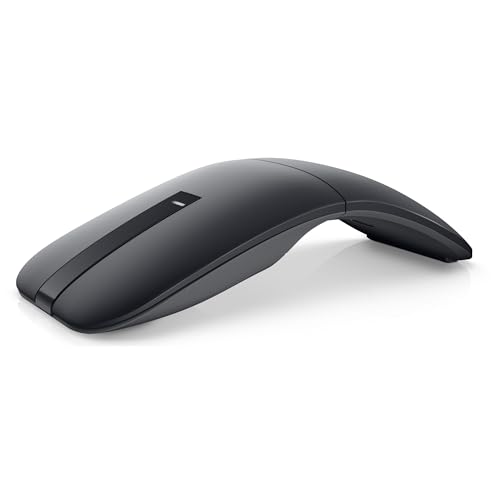
Dell Bluetooth Travel Mouse MS700
WUDEMWWFE Bluetooth Arc Mouse Foldable Slim

Logitech Mobi Fold Foldable Wireless Mouse, Graphite

Logitech Mobi Fold Foldable Wireless Mouse, Lilac

PoseiTun Wireless Mouse Foldable Folding Mice
GlowarcPro Bluetooth Arc Touch Mouse
More Details On Our Top Picks
This NYIEFADA model makes sense for commuters who jump between a laptop, tablet dock, and office PC. Bluetooth 5.0, Bluetooth 4.0, and 2.4G radio support give you three connection routes, which matters when one device is fussy about pairing and another still works best with a dongle.
The rotating arc shape should feel more natural than a flat travel shell, especially during longer desk sessions in a café or hotel room. The soft-click design also helps in shared spaces, though the trade-off is that the folding mechanism adds one more moving part to keep an eye on over time.
Strong Points
- Tri-mode connectivity gives you more pairing flexibility across work devices.
- Type-C recharge support is easier to live with than swapping tiny disposable cells.
- Silent clicks suit open offices, libraries, and late-night hotel work.
- The arced body can reduce that cramped, pinched feeling common with flatter travel mice.
Things To Consider
- The rotating fold design has more hinges and joints than a fixed mouse.
- Tri-mode support is useful, but you still need to match the right connection to each device.
- Compact folding shapes can feel small for larger hands during long spreadsheets.
Feature Rundown
Who Should Grab It
Frequent travelers and mixed-device laptop users who want one mouse for several setups will get the most out of it.
A Better Fit Elsewhere
Dell Bluetooth Travel Mouse MS700 suits you better when you want a more established travel model with touch scrolling and a more office-ready feel.
The blue finish gives this version a bit more personality than the black NYIEFADA pick, but the real story is still the same folding arc and multi-device support. That makes it a good fit for people who carry a slim laptop bag and want a mouse that disappears into a side pocket without feeling flimsy.
Quiet clicking matters more than it sounds, especially in lecture halls, trains, and open offices. The trade-off is that style changes nothing about the core format, so your comfort still depends on how well the folding curve matches your hand shape.
What We Like
- Blue finish adds a little visual identity without changing the footprint.
- Tri-mode connectivity helps across mixed laptop and desktop setups.
- Silent clicking is useful in shared spaces where every tap carries.
- Type-C charging keeps cable clutter lower for travel packing.
Room For Improvement
- The core hardware mirrors the black model, so the difference is mostly cosmetic.
- Compact folding mice can still feel tighter than full-size desk mice during long work blocks.
- The fold mechanism deserves careful packing so it does not get pressed in a crowded bag.
Core Details
Made For
Style-conscious travelers who want the same travel-first shape as Item 1, just in a blue finish, will appreciate it most.
Swap It Out When
Logitech Mobi Fold Foldable Wireless Mouse, Graphite is the cleaner fit for office-heavy use, especially if you want a more polished brand experience and 4K DPI detail.
The Dell MS700 feels aimed at travelers who still want a more desk-like control surface in a compact shell. Bluetooth 5.0 LE, touch scrolling, and Swift Pair put it a step closer to a polished office tool than the simpler foldable options from NYIEFADA and PoseiTun.
Four thousand DPI is a useful figure here because DPI, or dots per inch, affects pointer sensitivity and how far the cursor jumps on screen. That matters a lot on external monitors or higher-resolution laptops, though the two-button layout keeps the mouse lean rather than rich in shortcuts.
Highlights
- Touch scroll gives you a smoother alternative to a mechanical wheel.
- Swift Pair can reduce the usual Bluetooth setup fuss on supported systems.
- AAA batteries are easy to replace during long trips.
- 4000 DPI offers enough sensitivity for many office and travel screens.
- Dell’s travel focus makes it feel more settled for work carry than the ultralight no-name options.
Softer Spots
- Two buttons keep the surface clean, but they also limit shortcut control.
- AAA power means you need to remember spares for long stretches away from home.
- The touch-strip style may take a little getting used to for wheel-heavy habits.
Feature Snapshot
Best Suited To
Business travelers and office commuters who want a cleaner Bluetooth mouse with touch scrolling will get the most from it.
Where A Sibling Pick Shines
Logitech Mobi Fold Foldable Wireless Mouse, Graphite suits you better when quieter clicks and Fast Pair matter more than Dell’s touch-scroll approach.
This WUDEMWWFE mouse takes the folding idea in a very direct direction, because the bent shape powers it on and flattening it powers it down. That kind of behavior is neat in a travel bag, though you do need to follow the bend position carefully so it wakes up the way it should.
The touch bar replaces a standard wheel, which keeps the top surface very clean and cuts down on bulk. Compared with the Dell MS700, it feels more stripped back and less office-oriented, so it suits quick browsing, note-taking, and light task work better than marathon spreadsheet use.
Positives
- Fold-to-power behavior makes the on-off step very direct.
- Touch-bar scrolling preserves a low-profile shape.
- Mini size fits crowded laptop sleeves and smaller desk setups.
- The slim arc form can be friendlier than a blocky travel mouse in a packed bag.
Minor Gripes
- The bending angle matters, so casual handling is a little more fussy.
- Touch controls can feel different from a wheel for long-time mouse users.
- The brand-light presentation may matter less to some shoppers than a known office line.
Technical Sheet
Whose Shelf It Belongs On
Minimal packers and tablet-plus-laptop commuters who want the smallest practical shape should feel at home with it.
Another Choice May Suit
Dell Bluetooth Travel Mouse MS700 is the calmer pick for office users who want touch scroll plus a more polished travel profile.
Logitech’s graphite Mobi Fold feels more finished than the budget-style foldable mice above it, and that shows up in the quiet-click setup and Bluetooth pairing focus. The 4K DPI spec gives you plenty of cursor speed for a travel mouse, which matters when you move between a compact screen and a larger monitor in a hotel or office.
Fast Pair is the detail that usually saves the most time, because it smooths the first connection on supported systems. The compromise is price-positioning, since this model makes more sense for someone who wants a smoother daily carry than for someone hunting the plainest possible mouse shape.
Upsides
- Quiet clicks make it easier to work in shared rooms without drawing attention.
- 4K DPI gives you enough sensitivity for mixed screen sizes.
- Bluetooth plus Fast Pair helps reduce setup friction.
- The graphite finish feels restrained and professional beside the brighter lilac version.
- Logitech’s travel line is a sensible step up from the no-frills folding shells.
Areas To Watch
- The more polished experience can come with a higher outlay than basic foldable mice.
- Quiet clicks are a plus in offices, but some people still prefer a firmer button feel.
- Travel-friendly mice still reward careful packing so the folding body does not get pressed hard in a bag.
Quick Facts
Right Fit For
Frequent laptop users who want a quieter, more polished folding mouse for office travel should put it high on the list.
Look Elsewhere When
NYIEFADA Bluetooth Wireless Arc Travel Mouse suits you better if tri-mode flexibility matters more than the smoother Logitech finish.
This lilac version keeps the same core hardware as the graphite Logitech, so you are mainly choosing the finish rather than a different travel experience. That makes it a tidy match for people who like their tech to feel less corporate while still wanting the same quiet click, 4K DPI, and Bluetooth behavior.
In a bag full of dark accessories, the color can help the mouse stand out fast, which is a small but real convenience during rushed packing. The honest read is that the appeal lives in presentation and brand polish, not in a different feature set, so it suits style-led setups more than utility-first setups.
Best Bits
- The lilac finish adds a softer, more personal look.
- Quiet clicks are useful in libraries, meetings, and shared desks.
- Bluetooth and Fast Pair keep the connection story simple.
- 4K DPI gives the same useful pointer speed as the graphite version.
Small Caveats
- The feature set closely matches the graphite model, so color is the main difference.
- Style-first shoppers may love it, but utility-only shoppers may not see enough contrast to justify swapping finishes.
- Any foldable mouse still deserves careful storage inside a crowded bag or sleeve.
Details At A Glance
Best Suited To
Laptop users who want the same Logitech travel formula in a lighter-looking finish will like this version most.
Another Choice May Suit
Logitech Mobi Fold Foldable Wireless Mouse, Graphite is the safer fit for buyers who prefer a more subdued color and the same feature mix.
PoseiTun keeps things plain, and that simplicity has a real use case for casual laptop carry. USB-only connectivity means you are not juggling Bluetooth pairing at all, which can be handy on an older work machine or a shared desktop that still expects a receiver-based mouse.
The two-way touch scrolling adds a modern touch, while the ambidextrous shape keeps it usable for both left and right hands. It sits closer to the basic end of the list than the Logitech or Dell models, so the trade-off is fewer premium cues in exchange for a straightforward travel shape.
Reasons To Buy
- USB-only setup avoids Bluetooth pairing steps.
- Ambidextrous design works for either hand.
- Two-way touch scrolling helps with broader page navigation.
- Works on virtually any surface, which is useful for hotel desks and uneven work spots.
Worth Noting
- USB-only connectivity narrows the connection style compared with the tri-mode NYIEFADA picks.
- Basic positioning means you get less of the polish found in Logitech and Dell options.
- Touch scrolling can take a little adjustment for anyone used to a standard wheel.
Core Details
The Right Fit
Casual travelers, shared computer users, and anyone who wants a simple receiver-based mouse should find it easy to live with.
Where Shoppers Go Wrong
NYIEFADA Bluetooth Wireless Arc Travel Mouse is the better match for anyone who needs Bluetooth and tri-mode flexibility instead of a USB-only setup.
GlowarcPro leans into the same folding logic as the WUDEMWWFE mouse, but it swaps in AAA battery power and a touch-scroll bar. That combination is handy for longer trips because you can pack spare batteries more easily than a charging cable, though the lack of a USB dongle may matter to some older setups.
The touch-scroll format keeps the top surface thin, and the quiet click design helps it stay unobtrusive in cafés, trains, and shared hotel work areas. Note the brand’s own comparison point, too, because this is not a Microsoft Surface Arc Mouse, so you should treat it as a separate travel shape rather than a direct clone.
What We Like
- AAA battery power suits travel packing and quick replacement needs.
- Touch scroll preserves the slim arc style.
- Quiet clicks fit well in quiet public spaces.
- Foldable body keeps the mouse easy to tuck beside a tablet or laptop.
Honest Caveats
- No USB dongle means the setup path is less flexible for some older computers.
- AAA operation adds another small item to remember before longer trips.
- The touch-scroll approach can feel different from a classic wheel during long browsing sessions.
Quick Facts
Built With In Mind
Tablet travelers and laptop commuters who prefer replaceable batteries over built-in charging will get the most value from it.
Skip It When
Dell Bluetooth Travel Mouse MS700 fits better for people who want touch scroll plus a more office-leaning Bluetooth mouse with a stronger brand track record.
How To Choose The Right Foldable Mouses
Connection Style Comes First
A foldable mouse only feels good to carry when it also fits your devices without a fight. Bluetooth suits newer laptops and tablets, a 2.4G receiver helps on computers that prefer a dongle, and USB-only can still be the cleanest answer for older office machines. The right setup depends on how many systems you move between during the week.
Fold Shape And Hand Comfort
Arc-style shells usually feel more natural than flat travel mice, especially for longer sessions in a café or hotel room. A touch bar keeps the body slimmer, but a wheel can feel more familiar for people who scroll constantly through spreadsheets or long web pages. Shape matters more than most spec sheets admit, because a mouse that looks neat but pinches your hand gets old fast.
Power And Maintenance Habits
Rechargeable Type-C models suit people who already carry the same cable for other gear, while AAA-powered mice fit travelers who want simple replacement power. Folding hinges, touch strips, and curved shells also reward careful packing, since loose items in a crowded bag can press on them. That little bit of care often decides whether a travel mouse feels tidy or fussy after a month on the road.
Match The Mouse To Your Routine
Daily commuters usually want quiet clicks and easy pairing more than flashy styling. Travelers who split time between laptop, tablet, and office desktop should look harder at tri-mode or Bluetooth plus receiver options, because connection flexibility saves hassle in the real world. For short sessions and light carry, a simpler shell can be enough, but heavier office use benefits from stronger software polish and a steadier grip.
What To Weigh Before You Choose
Common Shopping Slip Ups
A lot of people focus on the fold and ignore the connection path, then end up carrying the wrong kind of mouse for their work machine. Others buy the slimmest shape available and discover that their hand wants a taller arc or a more familiar scroll control. The safer move is to match the mouse to your main device, not the device you use once in a while.
What The Higher Tier Buys
More expensive foldable mice usually spend their money on better pairing behavior, quieter switches, finer sensor settings, and a more polished body finish. That extra spend starts to make sense for frequent travelers, office commuters, and anyone who uses the mouse for hours at a stretch. For occasional use, a simpler model often covers the job without asking for much in return.
Final Thoughts
Foldable mouses work best when portability and comfort meet in the middle, not when one side overwhelms the other. The Logitech picks feel the most polished for regular travel, the Dell model brings a more office-ready touch-scroll setup, and the NYIEFADA pair gives you flexible connection options without overcomplicating the shape. For lighter carry and simpler routines, the budget picks still make sense. Choose the one that fits your bag, your devices, and the kind of day you actually live.
