
You want a gaming mouse that fits your hand, your desk, and the way you actually play. Some days that means featherweight speed for fast aim, other days it means extra buttons, grippy sides, or a shape that won’t fatigue you during a long session. This roundup keeps the focus on real use, not hype, so you can match the right wireless mouse to your setup without wading through filler.
The Shortlist At A Glance

Logitech G PRO X2 SUPERSTRIKE Wireless Gaming Mouse – Black/White

Razer Viper V4 Pro Wireless Esports Gaming Mouse, 49g, Black

Logitech G305 Lightspeed Wireless Gaming Mouse – Black

WL300 Bluetooth Mouse Silent Wireless Mice, Cordless Computer Mouse-Grey

Redragon M730 PRO Wireless Lightweight RGB Gaming Mouse 10000 DPI
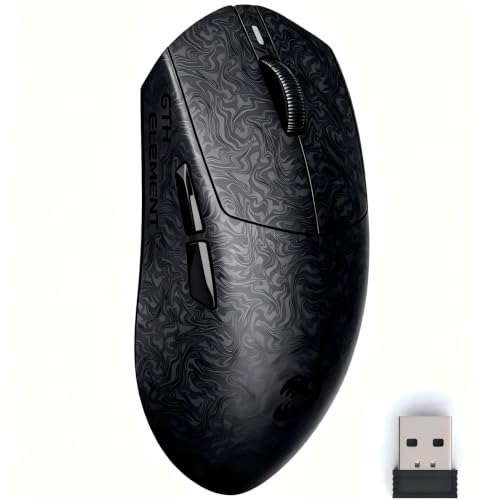
ZORNHER X Mloong MX301 PRO Lightweight Gaming Mouse

Logitech G PRO X Superlight 2 Wireless Gaming Mouse – Black
Logitech G502 Lightspeed Wireless Gaming Mouse – Black
More Details On Our Top Picks
Logitech’s magnetic analog switch setup is the headline here, and that matters because click behavior can feel more tuned to your hand than on a standard mechanical shell. At 61g, it stays in the light side without going extreme, so long aim sessions or quick flicks don’t ask much from your wrist.
You also get USB-C charging and broad PC, Mac support, which keeps it practical for a shared desk or a mixed-device setup. The trade-off is simple, this is for you when fine click control matters more than a pile of extra buttons or a bulky shape.
What We Like
- Magnetic analog switches can suit precise, repeatable input.
- 61g keeps movement light without feeling too bare.
- USB-C makes daily charging less fussy.
- PC and Mac compatibility helps a mixed setup.
- Adjustable click haptics may suit very specific preferences.
Things To Consider
- The feature set leans specialist rather than broad.
- Lightweight shells can feel less anchored to some hands.
- You may spend a little time dialing in the click feel.
Feature Snapshot
Who It Suits Best
Competitive PC players who care about click feel and low mass will get the most from this shape and switch system.
A Better Fit Elsewhere
Logitech G PRO X Superlight 2 Wireless Gaming Mouse suits you better when you want a simpler, more stripped-back feel with fewer interaction points.
At 49g, this one leans hard into speed, and the lighter body will feel especially natural in fast FPS matches or for long sessions where you want less drag. The 50K DPI optical sensor and 8K polling point to a very responsive setup, though that kind of headroom matters most on a well-tuned PC and a mouse pad you already trust.
The 180-hour battery claim gives it a more relaxed ownership feel than many featherweight rivals, and USB-C charging keeps the upkeep familiar. You’re paying for a very focused esports profile here, so the honest read is that it fits best when you want speed first and extra features second.
Highlights
- 49g weight supports quick, low-effort motion.
- 50K DPI sensor gives plenty of pointer headroom.
- 8K polling targets very responsive input.
- 180-hour battery reduces charging interruptions.
- USB-C keeps daily power-ups simple.
Points To Note
- Its stripped-back shape won’t suit every grip style.
- High-end responsiveness matters most in tuned setups.
- Very light mice can feel a touch airy at first.
At A Glance
Who Will Love This
Fast-paced PC and Mac gamers who value low weight and high sensor headroom will feel right at home here.
Where A Sibling Pick Shines
Logitech G PRO X2 SUPERSTRIKE Wireless Gaming Mouse makes more sense for you when click feel matters more than bare-minimum mass.
The G305 stays appealing because it keeps the formula plain and useful, with a HERO sensor, 12,000 DPI range, and six programmable buttons. That combo works well for everyday gaming, but it also suits a desk where you want one mouse that can move between work and play without learning a new shape.
On-board memory matters more than it sounds, since it lets your preferred settings travel with the mouse instead of living only on one machine. The 250-hour battery spec is another practical plus, although the trade-off is a simpler feature list than the heavier, more ambitious picks above it.
Upsides
- HERO sensor gives dependable pointer tracking.
- 12,000 DPI offers enough range for most play styles.
- Six programmable buttons add useful flexibility.
- On-board memory helps settings follow you.
- 250-hour battery supports low-maintenance use.
Room For Improvement
- It feels more straightforward than the premium picks above.
- Fewer controls may leave MMO fans wanting more.
- Battery life is a benefit, but not rechargeable by spec here.
Core Details
Whose Shelf It Belongs On
Casual and mid-level gamers who want a clean, familiar wireless mouse with long battery life will get solid mileage from this one.
Not Your Match When
Redragon M730 PRO Wireless Lightweight RGB Gaming Mouse suits you better when you want more visible styling and macro flexibility.
The WL300 reads more like a work-and-travel companion than a pure gaming tool, and that’s exactly why it belongs in this roundup. Quiet clicks, six buttons, sculpted grip, and adjustable DPI make it useful in a laptop bag, on a shared desk, or beside a living-room PC where loud clicks get old fast.
Tri-mode connectivity, meaning wired, 2.4G wireless, and Bluetooth, gives you real flexibility across laptop, tablet, and desktop setups. The 18-month battery life is a strong practical draw, though you trade away the sharper gaming focus that the lighter Logitech and Razer models bring.
Strong Points
- Quiet clicks suit shared spaces and late-night work.
- Tri-mode connectivity broadens device compatibility.
- Six buttons keep everyday shortcuts close at hand.
- Sculpted grip helps the mouse feel settled.
- 18-month battery life lowers routine upkeep.
Softer Spots
- It’s more office-friendly than esports-focused.
- Bluetooth flexibility can matter more than raw speed here.
- Grey finishes tend to show grime more than darker shells.
Details At A Glance
Best Suited To
Commuters, students, and home-office users who split time between productivity and light gaming will appreciate the flexibility.
Look Elsewhere When
Logitech G305 Lightspeed Wireless Gaming Mouse fits better for you when gaming responsiveness matters more than Bluetooth versatility.
Redragon aims this one at customization-minded gamers, and the mix of five DPI levels, software-adjustable sensitivity, and macro support makes that clear. The 62g body keeps it light enough for quick movement, while the RGB backlighting gives it a more expressive look than the plain shells above.
The wired and wireless options make it easier to match your desk and latency preference, which is handy for a setup that doubles as both game station and work desk. The trade-off is that the software side matters more here, so you’ll want to be comfortable spending time on settings rather than just plugging in and moving on.
Bright Spots
- Five DPI levels cover a range of play styles.
- Macro support helps with repeated commands.
- Wired and wireless modes add flexibility.
- 62g weight supports quick cursor movement.
- RGB lighting adds visible personality to the desk.
Minor Gripes
- Macro setup asks for more attention than simpler mice.
- RGB styling won’t suit every workspace.
- The software-driven approach can feel busy at first.
Technical Sheet
Made For
Gamers who like macros, lighting, and the option to tune sensitivity by software will get the most from this mouse.
Reach For A Different Pick When
Logitech G PRO X Superlight 2 Wireless Gaming Mouse is the cleaner choice for you when you want a simpler competitive shell with fewer extras.
The carbon-fiber-inspired texture gives this mouse a more tactile, premium feel than the smoother shells in the rest of the list. At around 60g, it keeps a light gaming profile without leaning so far into featherweight territory that it feels hard to settle during aiming or desktop work.
The PAW3315 sensor and TTC switches make this a sensible pick for FPS play, and the web-based driver keeps customization lighter than bulky desktop software. You may find the small size and grip texture especially useful in hot or long sessions, though larger hands could want a roomier shell.
Best Bits
- Carbon-fiber-style texture adds grip and visual character.
- About 60g keeps the mouse quick to move.
- PAW3315 sensor supports steady tracking.
- TTC switches deliver crisp, tactile clicks.
- Web-based driver avoids heavy software installs.
Areas To Watch
- Small sizing may feel cramped in larger hands.
- Textured finishes can need a little more wiping over time.
- The style leans specialized rather than universal.
Feature Rundown
Right Fit For
FPS players with smaller hands and a taste for textured grips will get especially good mileage from this shape.
Swap It Out When
Razer Viper V4 Pro Wireless Esports Gaming Mouse suits you better when you want a lighter, more stripped-back esports profile.
This is the stripped-down, competition-first choice in the list, and its 60g weight plus symmetrical shape keep the design focused on clean movement. The 44K DPI ceiling and sub-8K polling speak to a very responsive platform, while PowerPlay support matters most for desks that already use Logitech’s charging ecosystem.
Five buttons keep the shell uncluttered, which is part of the appeal, but it also means you’re not buying a mouse for lots of onboard tricks. The honest read is that it suits you best when consistency, low drag, and a straightforward shape matter more than bells and whistles.
Positives
- 60g mass keeps motion light and clean.
- Symmetrical shape works for a broad range of grips.
- 44K DPI leaves plenty of tuning room.
- PowerPlay support helps with compatible charging setups.
- USB-C charging keeps power handling familiar.
Small Caveats
- Five buttons keep the feature set lean.
- PowerPlay support only matters in a matching setup.
- Minimalism is the point, so utility extras stay limited.
Core Details
The Right Fit
Competitive gamers who want a pared-back shell and already like symmetrical mice will appreciate this shape most.
Where Shoppers Go Wrong
Logitech G502 Lightspeed Wireless Gaming Mouse suits you better when extra buttons and adjustable weight matter more than minimalist speed.
The G502 takes a different path from the lighter competitive picks above, because it gives you adjustable weights and 11 programmable buttons instead of chasing the bare minimum. That makes it feel like a toolbox mouse, especially for MMO players, stream control, or a workstation where you keep a lot of shortcuts close.
RGB lighting and on-board memory round out the package, while POWERPLAY compatibility matters most for desks built around Logitech charging gear. You may find the shape and feature count a little much for pure twitch aim, but for mixed gaming and productivity, the extra control is the point.
Reasons To Buy
- 11 programmable buttons help keep shortcuts close.
- Adjustable weights let you tune hand feel.
- RGB adds desk personality without changing function.
- On-board memory supports portable settings.
- POWERPLAY compatibility helps in matching setups.
Trade Offs
- The added controls make it busier than slim esports mice.
- Weight tuning takes a little setup time.
- It suits utility-first play more than ultra-minimal aim work.
Feature Card
Built With In Mind
Gamers who want more controls under the fingers, along with a mouse that can also help in everyday desktop work, will get the best fit here.
Another Choice May Suit
Logitech G PRO X Superlight 2 Wireless Gaming Mouse is the cleaner option for you when you want a lighter, simpler shell for faster movement.
How To Choose The Right Gaming Wireless Mouses
Shape, Weight, And Grip Feel
The first decision is hand feel, and that starts with shape. A 49g mouse like the Razer Viper V4 Pro feels very different from a 62g option like the Redragon M730 PRO, even before you touch a DPI setting. Lightweight shells help in quick aim games, while fuller bodies often feel steadier for longer sessions or mixed desktop use.
Sensor And Polling Matter More Than Hype
Sensor quality and polling rate shape how the cursor responds. DPI is sensitivity, and polling rate is how often the mouse reports its position to the system, so higher numbers can help with fast motion and tighter tracking. That said, those specs matter most when your game, monitor, and hand movement are already matched well.
Buttons, Macros, And Daily Flexibility
Extra buttons are worth paying attention to in MMO, MOBA, or productivity-heavy setups. The Logitech G502 Lightspeed’s 11 programmable buttons give you far more control than the cleaner Logitech G PRO X Superlight 2, but the trade-off is a busier shell. For many desk setups, six to seven useful buttons land in the sweet spot.
Battery, Charging, And Connectivity
Wireless convenience can mean different things depending on the mouse. Some models use USB-C charging, while others lean on longer battery life or special charging ecosystems like PowerPlay support. Bluetooth, 2.4G wireless, and wired modes each solve a different problem, so your best choice depends on how many devices you switch between and how often you want to plug in.
A Quick Reality Check
Mistakes Worth Dodging
A common slip is chasing the highest DPI number and ignoring shape. A mouse can look impressive on paper and still feel awkward in your palm during a long match. Another miss is buying extra buttons you won’t use, then ending up with a shell that feels cluttered for no reason.
The Upgrade Payoff
More expensive models usually pay for lighter materials, cleaner sensors, better switches, or more advanced charging support. That’s why the Razer Viper V4 Pro and Logitech G PRO X2 SUPERSTRIKE sit higher in the stack, they ask for more money because they give you more focused hardware. The upgrade makes sense when you play often, care about low-latency feel, or want a mouse that stays comfortable through long sessions.
Final Thoughts
The best wireless gaming mouse for you depends on how you play and how your hand likes to rest. Go light and stripped back for fast competitive aim, or choose extra buttons and adjustable weight when your games and desk work overlap. The Logitech G305 is the easy practical call, the G502 is the utility specialist, and the two Logitech and Razer flagship shapes serve speed-first players well. Pick the one that matches your routine, not the one with the loudest spec sheet.
