
You’re probably here because your current mouse feels too small, too loud, or too awkward after a long day at the desk. The eight picks below focus on comfort, smoother scrolling, and connectivity that fits real routines, whether you split time between a laptop and desktop or spend hours in spreadsheets and creative apps.
Some lean into palm support and multi-device switching, while others stay simple and dependable for everyday office work. You’ll see where each one fits best, along with the trade-offs that matter before you choose.
The Shortlist At A Glance
PHILIPS Ergonomic Wireless Mouse, Multi-Device Bluetooth (USB-A/C) for Laptop & Mac/PC

Logitech MX Master 3S Bluetooth Wireless Mouse No Receiver – Graphite

Logitech Signature Plus M750 L Wireless Mouse – for Large Hands

Logitech MX Master 3S – Performance Wireless Mouse

WL300 Bluetooth Mouse Silent Wireless Mice, Cordless Computer Mouse-Grey
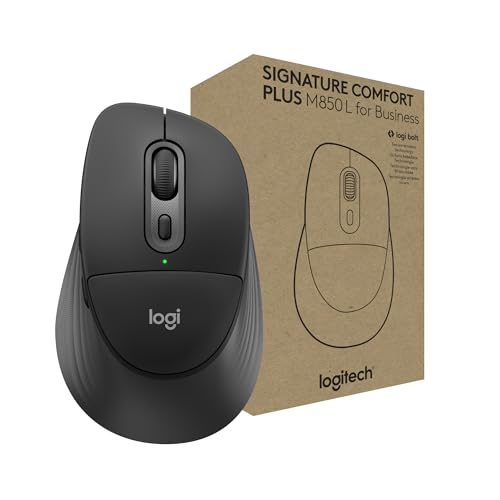
Logitech Signature Comfort Plus M850 L for Business Wireless Mouse

Logitech M510 Full Size Ambidextrous 2.4 GHz Wireless Mouse

Logitech Signature M650 L Full Size Wireless Mouse Large Sized – Black
More Details On Our Top Picks
The PHILIPS model is aimed at workdays that bounce between devices, because its USB-A/C support and Bluetooth pairing fit a mixed laptop setup cleanly. Right-handed shaping and side scroll controls make it feel more desk-friendly than a plain travel mouse, while the silent click design keeps noise down in shared spaces.
The trade-off is that this kind of comfort-first shape won’t feel as compact as a bare-bones portable mouse. Still, for commuting professionals, home-office setups, or anyone who wants fewer hand shifts during long sessions, it looks like a sensible middle ground.
What We Like
- Bluetooth plus USB-A and USB-C support gives you more ways to pair it across newer and older computers.
- Silent clicking is useful in open offices, libraries, and late-night work sessions.
- Side scrolling helps with wide spreadsheets and timeline work, so you move less around the screen.
- Rechargeable power trims the hassle of swapping batteries during a busy week.
- Right-hand shaping should feel steadier for long desk stretches than a flat travel mouse.
Minor Gripes
- The right-handed shape limits flexibility for left-handed use.
- Extra controls can take a little time to learn, especially beside a simpler office mouse.
- Its comfort-first build may feel larger than you want for very light travel bags.
Feature Rundown
Who Will Love This
You’re a good match for this mouse if you split time between work laptops, desktop systems, and quieter shared spaces.
Another Choice May Suit
Logitech M510 Full Size Ambidextrous 2.4 GHz Wireless Mouse suits you better when you want a simpler, ambidextrous shape with fewer controls.
This version of the MX Master 3S keeps things wireless through Bluetooth only, so it suits a cleaner desk setup that doesn’t need a receiver or adapter in the box. The 8,000 DPI sensor, meaning the pointer can track with high sensitivity, gives you fast movement across screens, and the quiet clicks are useful beside the louder, more basic options above.
The catch is the Bluetooth-only approach, since you’ll need to rely on your computer’s built-in wireless support rather than a spare dongle. For creators, analysts, or anyone who lives in large spreadsheets, the combination of precise tracking and quiet operation feels especially well judged.
Highlights
- Bluetooth-only setup keeps the desk uncluttered and avoids a receiver to misplace.
- 8,000 DPI tracking supports quick pointer movement across wide displays.
- Quiet clicks help in shared workrooms where constant tapping gets tiring.
- Customizable sensitivity gives you room to tune control for detailed work.
Areas To Watch
- No USB receiver or charging cable comes in the package, so you’ll need to plan your setup.
- Bluetooth-only pairing may feel less convenient for older systems.
- Its feature depth makes it more mouse than minimalists usually need.
Technical Sheet
Built With In Mind
You’ll appreciate this one most if you work across multiple windows, timeline-heavy apps, or large displays all day.
Where A Sibling Pick Shines
PHILIPS Ergonomic Wireless Mouse, Multi-Device Bluetooth (USB-A/C) for Laptop & Mac/PC fits you better when USB-A and USB-C support matter more than raw pointer speed.
The M750 L is built around hand comfort more than gadget flair, and that makes sense for long stretches at a desk. Its larger size, contoured body, and SmartWheel scrolling help you move through documents without constantly resetting your grip, which is a relief during work-heavy days.
Compared with the more feature-packed MX Master models, this one stays a little calmer and easier to live with. The 24-month battery claim points to less maintenance, and the silent clicks suit open-plan offices or home desks where you don’t want a lot of chatter from your peripherals.
Positives
- Larger shell suits bigger hands better than many compact wireless mice.
- SmartWheel scrolling helps you move between line-by-line control and quicker navigation.
- Silent clicks keep the work surface quieter during meetings or late-night sessions.
- Custom side buttons can speed up common commands once you set them up.
- Bluetooth support makes it useful across laptop and desktop routines.
Softer Spots
- The larger body may feel oversized for smaller hands.
- Feature set is more restrained than the MX Master family.
- Side-button setup can take a bit of personal tuning before it feels natural.
Core Details
The Right Fit
You’re the best match here if your hands run large and your desk work leans more toward comfort than deep customization.
Look Elsewhere When
Logitech MX Master 3S – Performance Wireless Mouse with Ultra-Fast Scrolling suits you better when you want richer controls and a more advanced feel.
This MX Master 3S brings together a sculpted ergonomic body, very fast scrolling, and a high-sensitivity 8,000 DPI sensor, so it feels aimed at serious desk work rather than casual browsing. The track-on-glass ability is useful on the kinds of mixed surfaces you see in home offices, hotel desks, or shared workstations.
Relative to the Bluetooth-only MX Master 3S above, this one is framed more squarely around performance and comfort as a full-size tool. The honest read is that it makes the most sense for people who spend real time in design tools, huge spreadsheets, or constant tab switching.
Best Bits
- MagSpeed-style scrolling gives you fast movement with fine control for large documents.
- Ergonomic shape supports a more natural wrist position during long sessions.
- Track-on-glass support helps on less predictable desk surfaces.
- Quiet clicks reduce noise without making the button feel vague.
- 8,000 DPI tracking suits wide monitors and detailed pointer work.
Room For Improvement
- Its advanced features make it more mouse than a basic home setup needs.
- Full-size ergonomics take more desk room than a travel-friendly option.
- Learning the controls may take a little time, especially beside simpler mice.
At A Glance
Who Should Grab It
You’re looking at a strong fit for heavy computer use, especially in setups that reward speed, control, and hand comfort.
Swap It Out When
Logitech Signature Plus M750 L Wireless Mouse – for Large Hands makes more sense when you want a calmer, less feature-dense everyday option.
The WL300 takes a more flexible route than the polished Logitech models, because it offers wired, 2.4 GHz wireless, and Bluetooth connections in one design. That tri-mode setup is handy for home, office, and travel use, since you can adapt to different ports and pairing habits without switching mice.
Its six-button layout, sculpted grip, and adjustable DPI point toward practical everyday work rather than fancy extras. You may find it especially appealing on the road, where one mouse has to handle a laptop today and a desktop dock tomorrow.
Bright Spots
- Three connection modes give you flexibility across more devices and desk setups.
- Six buttons offer more control than a simple two-button mouse.
- Sculpted grip supports a steadier hold during long work stretches.
- Adjustable DPI helps you tune cursor speed for different tasks.
- Quiet-click behavior suits shared spaces and evening use.
Things To Consider
- The more modes it offers, the more setup choices you have to sort out.
- Branding and accessory support feel less polished than the bigger-name options here.
- Button count can be useful, but it also adds a little learning curve.
Details At A Glance
Whose Shelf It Belongs On
You’re the right match for this mouse if you move between devices often and like having connection choices close at hand.
Where A Sibling Pick Shines
Logitech M510 Full Size Ambidextrous 2.4 GHz Wireless Mouse suits you better when you want a simpler everyday shape with less setup to think about.
The M850 L pushes comfort and office readiness harder than the more general-purpose mice in this list. A sculpted shape and palm cushion matter when your hand stays planted for hours, and the secure receiver plus Bluetooth support give you two ways to connect without cluttering the workstation.
Compared with the M750 L, this one reads as a more business-focused comfort option, especially for desks where consistent control matters more than novelty. For office managers, hybrid workers, or anyone sitting through back-to-back admin work, that focus can be worth paying attention to.
Reasons To Buy
- Palm cushion and sculpted body support a relaxed hand position.
- Secure receiver plus Bluetooth gives you setup flexibility.
- Business-oriented design suits dependable daily office use.
- Works across several operating systems, so mixed device fleets stay manageable.
Points To Note
- The comfort-first shape takes more room than a slim travel mouse.
- Its office focus may feel more serious than casual home users need.
- More comfort usually means a little more bulk in the hand.
Core Details
Perfect Match For
You’ll get the most from this mouse in business-style workspaces where comfort and reliable pairing matter every day.
Another Choice May Suit
Logitech Signature M650 L Full Size Wireless Mouse Large Sized – Black suits you better when you want a simpler large-hand mouse without the business-first feel.
The M510 keeps the formula plain in a good way, with a full-size ambidextrous body and a 2.4 GHz receiver that plugs into USB-A. That makes it a low-fuss fit for households, school desks, and office stations where you want a familiar shape without learning a lot of extra controls.
Its tilt-to-scroll function adds a bit of horizontal movement support, and the two-year battery claim suggests less tinkering over time. Compared with the more advanced MX Master mice, it’s the kind of mouse you choose because it stays out of your way.
Upsides
- Ambidextrous shape works for either hand.
- USB-A nano receiver keeps setup straightforward on many desktops.
- Tilt-to-scroll helps with spreadsheets and wide layouts.
- Long battery claim means fewer maintenance interruptions.
- Broad compatibility suits mixed home and office devices.
Small Caveats
- It lacks the richer control layout found on the MX Master line.
- USB-A receiver support is less handy for port-light modern laptops without adapters.
- Its familiar shape is practical, but not especially sculpted.
Feature Card
Who Should Grab It
You’re a strong match for this mouse if you want a familiar, full-size wireless option for home or office use.
Reach For A Different Pick When
Logitech MX Master 3S – Performance Wireless Mouse suits you better when you want more advanced controls and a more sculpted feel.
The M650 L stays focused on size, comfort, and everyday use, which makes sense for a mouse meant to sit in your hand for hours. It doesn’t try to out-feature the MX Master models, and that restraint can be a virtue for people who want something simple, comfortable, and easy to trust at the desk.
Compared with the M510, this one feels like the more modern large-hand option, while still avoiding the complexity of the premium picks above. For long email sessions, office tasks, or light creative work, that balance is a pretty easy one to appreciate.
Standout Traits
- Large-size shape gives bigger hands more room to settle in.
- Simple wireless design keeps setup easy.
- Modern full-size feel makes it a sensible everyday desk companion.
- Comfort-first shape should help during long use sessions.
Honest Caveats
- It leaves out the richer control features found on the MX Master line.
- Large sizing may feel bulky for compact hands or tight travel bags.
- People who want lots of customization will probably want a more advanced model.
Core Details
The Right Fit
You’re the right match for this mouse if you want a large, straightforward wireless option that feels comfortable without extra fuss.
Look Elsewhere When
Logitech Signature Comfort Plus M850 L for Business Wireless Mouse suits you better when palm support and office-focused comfort matter more.
How To Choose The Right High Quality Computer Mouses
Start With The Way Your Hand Works
Shape comes first, because a mouse that fights your grip gets old fast. Large-hand models like the Logitech Signature Plus M750 L and Signature M650 L give you more room to rest your palm, while right-handed designs such as the PHILIPS mouse support a more natural hold for one hand shape. Ambidextrous models like the M510 stay simpler, and that can be a relief for shared desks or mixed-hand households.
Scroll behavior matters almost as much as shape. A SmartWheel or MagSpeed-style wheel helps when you jump between long pages and detailed work, while tilt-to-scroll helps with wide sheets and timelines. The trade-off is learning a few extra controls, so plain office users may prefer a calmer model with fewer moving parts.
Match The Connection To Your Devices
Bluetooth-only mice keep the desk cleaner, but they depend on your computer’s wireless support. Receiver-based mice are easy to plug in and leave alone, which helps on desktops and work laptops with available USB ports, while dual-mode options reduce friction when you move between systems. The WL300 goes further with wired, 2.4 GHz, and Bluetooth support, so it suits a more mixed routine than the average mouse.
Think about your daily setup, not just the spec list. A laptop commuter may prefer a mouse that pairs quickly and stores easily, while a home-office user may care more about a stable connection and fewer interruptions. The right choice usually feels boring in the best way, because it fits your devices without extra fiddling.
Pay Attention To Quiet Operation And DPI
Quiet clicks matter in open offices, classrooms, and late-night work spaces. The MX Master 3S models, the PHILIPS mouse, and the M750 L all lean into lower click noise, which can make a long session feel less tiring to everyone nearby. Higher DPI, meaning greater pointer sensitivity, helps on large screens, but very high settings can feel twitchy without careful adjustment.
That’s why a midrange mouse often makes more sense than the flashiest one. A simpler, well-shaped body with usable scroll controls can serve you better than extra features you never touch. For most desk users, comfort and control beat spec chasing once the workday gets long.
Think About Maintenance And Daily Wear
Rechargeable models cut down battery swaps, while long-battery mice reduce the number of times you need to think about power at all. Smooth shells and sculpted grips also tend to show wear differently, so a mouse you clean often should have surfaces that are easy to wipe down. Shared spaces, travel bags, and busy home offices all reward a design that stays easy to keep in shape.
That’s also where size matters. A larger comfort mouse can be a blessing on a full workday, but it takes more room in a backpack and feels less nimble in a crowded tote. You get the best result by matching the mouse to the routine you actually live with, not the one you only use once in a while.
Things Worth Knowing First
Hidden Buying Traps
Many people focus on button count and forget about hand fit, which leads to a mouse that looks capable but feels tiring after an hour. Another common slip-up is picking Bluetooth-only hardware for a machine that already struggles with wireless support. A quick check of your ports, grip preference, and desk space avoids most of that frustration.
It also helps to ignore features you won’t use. Extra buttons, multiple modes, and very high sensitivity sound appealing, but they only earn their keep in the right workflow. A simple mouse that feels stable in your hand often brings more day-to-day value than a crowded feature list.
The Case For Spending Up
Higher-tier mice usually cost more because of materials, scroll systems, and fit. Sculpted bodies, thumb controls, track-on-glass support, and quieter switches all require more engineering than a plain plastic shell with a basic wheel. That extra work matters most for people who spend long hours at a desk and notice small comfort differences fast.
The upgrade pays off when your mouse is a work tool, not an accessory. Creators, analysts, and heavy office users gain the most from better scrolling, better tracking, and a shape that stays comfortable through the afternoon. For lighter use, a simpler model can be the smarter place to stop.
Final Thoughts
For High Quality Computer Mouses, comfort and control matter more than flashy language on the box. The MX Master models make the strongest case for heavy desk use, the M750 L and M650 L keep things comfortable without much fuss, and the M510 still has a place for anyone who wants a straightforward wireless mouse. Match the shape and connection style to your routine, and your desk starts feeling calmer almost right away.
