
You want a wireless mouse that feels dependable from the first click, not fussy after a week of use. This roundup focuses on models that suit desk work, travel, shared offices, and long sessions where hand comfort and scroll control matter more than flashy extras. You’ll see a mix of ergonomic shapes, multi-device pairing, receiver-based options, and Bluetooth-only picks, so you can match the mouse to your setup instead of forcing your setup around the mouse.
The Shortlist At A Glance

Logitech MX Master 3S Bluetooth Wireless Mouse No Receiver

Logitech 910005592 M720 Triathalon Multi-Device Wireless Mouse

Logitech Signature Plus M750 L Wireless Mouse

Logitech MX Master 3S Performance Wireless Mouse

WL300 Bluetooth Mouse Silent Wireless Mice

Logitech MX Anywhere 3S for Business Wireless Mouse
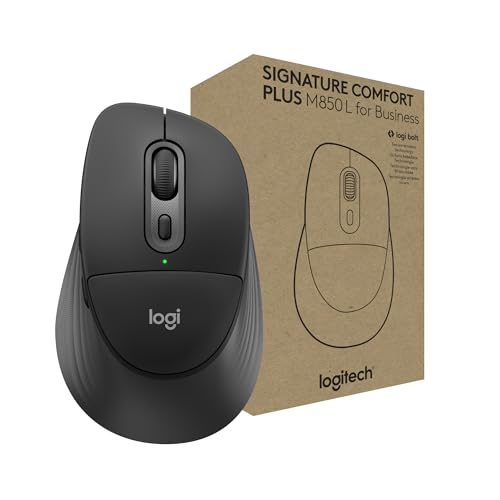
Logitech Signature Comfort Plus M850 L for Business Wireless Mouse

Logitech M510 Full Size Ambidextrous 2.4 GHz Wireless Mouse
More Details On Our Top Picks
This Bluetooth-only version makes sense for a desk that already feels crowded, since you’re not juggling a receiver or extra cable. The 8K DPI sensor and glass-tracking support matter most when your workspace changes from wood desk to meeting-room table, and the quiet clicks keep late calls less distracting.
Compared with the M720, this one leans far more toward precision and premium control than simple convenience. The trade-off is clear, though, since you give up the bundled receiver and charging cable, so it suits a cleaner setup better than a grab-and-go kit.
What We Like
- Bluetooth-only design keeps the desk free of extra dongles.
- High-resolution tracking helps you make small, controlled cursor moves.
- Quiet clicks suit shared offices and evening work sessions.
- MagSpeed scrolling is useful for long sheets and large documents.
- Programmable buttons can save time in repetitive workflows.
Small Caveats
- No USB receiver or charging cable comes in the box.
- The advanced shape feels more specialized than a basic office mouse.
- Bluetooth pairing can be less immediate than a receiver-based setup.
Feature Snapshot
Who It Suits Best
Desk-focused professionals who spend hours in spreadsheets, document editing, or creative tools will get the most from it.
A Better Fit Elsewhere
Logitech 910005592 M720 Triathalon Multi-Device Wireless Mouse suits you better when you want a simpler receiver option and broad everyday compatibility.
The M720 feels built for people who keep switching between a laptop, a desktop, and a tablet without wanting to think about the mouse every time. Its right-handed, full-size shell and rubber finish point toward long workdays, while the scroll wheel’s rapid spin mode is handy for long reports and web pages.
Compared with the Bluetooth-only MX Master 3S above, this one is less premium in feel but more flexible in connection options. The 24-month battery life is a real convenience for busy routines, though the larger body suits right-handed use best and won’t feel as compact as a travel mouse.
Bright Spots
- Dual connectivity gives you Bluetooth or receiver-based pairing.
- One receiver can handle several compatible Logitech peripherals.
- Fast scrolling helps with long documents and endless feeds.
- Full-size shape supports a relaxed palm grip.
- Wide operating-system support makes it easy to move between devices.
Areas To Watch
- Right-handed shaping limits comfort for left-handed use.
- The larger body takes more bag space than travel-first designs.
- The feel is practical rather than premium.
Core Details
Who Will Love This
Hybrid workers who use several devices during the day and prefer a full-size mouse will appreciate the balance here.
Another Choice May Suit
WL300 Bluetooth Mouse Silent Wireless Mice suits you better when you want a simpler, lower-key mouse for travel and mixed connectivity.
Large-handed users tend to notice shape before software, and the M750 L puts its contoured body front and center. SmartWheel scrolling helps the mouse shift between smoother movement and more controlled lines, which is useful in spreadsheets, inboxes, and day-long office work.
Unlike the M720, this model leans into comfort and quiet use more than multi-receiver flexibility. The trade-off is that it feels more purpose-built for a steady desk than for frequent device-hopping, so that’s a fair match for many office setups.
Positives
- Large-hand sizing gives your palm more room to settle.
- Silent clicks help keep shared spaces calmer.
- SmartWheel scrolling makes long and short scrolling feel easier to manage.
- Custom side buttons can speed up routine tasks.
- Bluetooth support keeps the desk free of a receiver.
Things To Consider
- The larger shell may feel bulky in a small laptop bag.
- It is tuned more for comfort than for travel lightness.
- Right-handed contouring may not suit every grip preference.
Details At A Glance
The Right Fit
You’ll like this most in a steady office or home workspace, especially when your hands feel cramped on smaller mice.
Where A Sibling Pick Shines
Logitech MX Anywhere 3S for Business Wireless Mouse suits you better for travel or tighter desks where a smaller body matters more.
This version of the MX Master 3S keeps the same premium shape but adds the kind of scrolling and pointer control that makes long work sessions feel less tedious. The 8K DPI sensor, quiet clicks, and MagSpeed wheel matter most for you if your day is split between precise edits and fast document movement.
Compared with the Bluetooth-only MX Master 3S earlier in the list, this one is more clearly framed as a performance-first desktop mouse. The ergonomic shell helps, though the size and feature set are still better suited to a permanent desk than a light travel kit.
Highlights
- MagSpeed scrolling moves fast while staying controlled.
- Quiet clicks keep noise down in shared work areas.
- Ergonomic shape supports a more natural wrist position.
- Thumb controls are placed for quick, easy reach.
- Track-on-glass support broadens where you can work.
Worth Noting
- The feature set is rich, so it may feel more than casual use needs.
- The larger body is less pocket-friendly than compact options.
- It rewards a desk setup more than a moving one.
Feature Rundown
Best Suited To
Power users, spreadsheet workers, and anyone who spends hours on a desktop setup will get the most from it.
Swap It Out When
Logitech M510 Full Size Ambidextrous 2.4 GHz Wireless Mouse is the easier fit for a simpler household computer and less specialized use.
The WL300 keeps the pitch simple, which can be refreshing in a category that often piles on extras. Its tri-mode setup gives you wired, 2.4G wireless, and dual Bluetooth connectivity, so it fits a laptop at home, a tablet on the road, or a desktop in a pinch.
Compared with the Logitech models around it, this one is less about premium ergonomics and more about flexibility per dollar. The sculpted grip and six-button layout help, though the overall feel is likely to suit practical everyday work more than heavy creative use.
Reasons To Buy
- Three connection paths make it easy to match different devices.
- Silent clicks are helpful in offices, dorms, and late-night sessions.
- Six buttons add useful control without making the mouse feel crowded.
- Adjustable DPI gives you some room to tune pointer speed.
Softer Spots
- The brand name is less established than the Logitech entries here.
- Tri-mode flexibility may feel like overkill for a single-device desk.
- The design is functional, not especially polished.
Quick Facts
Whose Shelf It Belongs On
Budget-minded shoppers who still want multiple connection modes and quiet clicks will get a lot of mileage from it.
Look Elsewhere When
Logitech MX Master 3S Performance Wireless Mouse suits you better for a more premium feel, stronger ergonomics, and deeper control features.
Small mice can feel flimsy, but this one aims for portability without giving up serious control. MagSpeed scrolling, 8K DPI tracking, and quiet clicks make it fit neatly into a mobile work routine, especially for people who move between coffee shops, airport seating, and hotel desks.
Compared with the fuller MX Master 3S, this model is easier to tuck into a bag and less committed to a permanent desktop posture. The trade-off is that the compact body leaves less room for your hand, so the comfort story depends more on your grip style than on bulk.
Best Bits
- Compact size fits easily beside a laptop and charger.
- Track-on-many-surfaces support helps on uneven or temporary desks.
- Quiet clicks suit shared spaces and travel settings.
- MagSpeed scrolling helps you move through work quickly.
- Bluetooth keeps setup simple on newer laptops.
Room For Improvement
- Smaller dimensions may feel tight for larger hands.
- The travel focus leaves less room for a fully relaxed palm grip.
- It makes more sense as a mobile tool than a big desktop anchor.
At A Glance
Made For
Frequent travelers and hybrid workers who carry a laptop everywhere will appreciate the compact shape and serious feature set.
A Better Fit Elsewhere
Logitech MX Master 3S Bluetooth Wireless Mouse No Receiver suits you better when desk comfort matters more than pocketability.
This one leans heavily into hand support, with a sculpted body and palm cushion that make sense for long office stretches. The secure receiver or Bluetooth pairing gives you a straightforward way to match different workstations, and that’s useful in shared desks or hybrid setups.
Compared with the M750 L, the M850 L sounds more focused on physical comfort than on general-purpose versatility. The honest read is that the fit matters a lot here, so the shape will feel reassuring to some hands and merely fine to others.
Standout Traits
- Palm cushion support helps long sessions feel less tiring.
- Receiver or Bluetooth pairing works across many setups.
- The business focus suits steady office routines.
- Broad system support makes it easier to move between platforms.
Points To Note
- The comfort-first shape may feel more tailored than general purpose.
- It makes the most sense in longer desk sessions.
- It may feel too specialized for a casual household computer.
Core Details
Built With In Mind
Office workers who want a gentler hand feel and a simple connection choice will get the most from it.
Where Shoppers Go Wrong
Logitech M720 Triathalon Multi-Device Wireless Mouse suits you better if multi-device switching matters more than a plush grip.
The M510 stays straightforward in a way many homes still need, with a full-size shape and ambidextrous layout that lowers the learning curve. The USB-A nano receiver keeps it simple for older desktops and laptops, while tilt-to-scroll adds a bit of horizontal movement control for spreadsheets and side-to-side browsing.
Compared with the M850 L, this one feels less specialized and easier to share across different hands. It won’t feel as modern as the higher-end Logitech picks above, but for general use that trade-off often makes sense.
Upsides
- Ambidextrous shape works for left-handed and right-handed use.
- Full-size body gives your hand a familiar resting point.
- Tilt-to-scroll is useful for spreadsheets and wide pages.
- USB-A receiver keeps setup simple on many older machines.
- Two-year battery life supports low-maintenance everyday use.
Minor Gripes
- The design is straightforward rather than feature packed.
- USB-A receiver support is less current than Bluetooth-first options.
- The shape is practical, but it lacks the premium feel of the upper-tier Logitechs here.
Technical Sheet
Perfect Match For
You’ll appreciate this most for family computers, simple home offices, and shared setups that need easy, familiar controls.
Reach For A Different Pick When
Logitech MX Master 3S Performance Wireless Mouse suits you better if you want more advanced scrolling and a more premium hand feel.
How To Choose The Right High Quality Wireless Mouses
Match The Mouse To Your Workday
Start with how you actually use your computer. Desk-heavy editing, spreadsheets, and long documents reward a mouse with a sharper sensor, a scroll wheel that can move fast without feeling loose, and a shape that keeps your wrist from feeling cramped after a few hours.
Travel work calls for a different balance. A compact body, Bluetooth pairing, and a mouse that slips easily beside a laptop charger matter more there than a large ergonomic shell with extra controls.
Connection Style Changes The Experience
Bluetooth is handy for newer laptops and cleaner desks because it removes the receiver. A 2.4 GHz USB receiver still has real value on older machines, shared workstations, and setups where plug-and-go simplicity matters more than minimalism.
Tri-mode options sit in the middle and suit people who move between devices often. The trade-off is that more connection choices can mean more setup decisions, so the mouse should match your routine instead of adding small annoyances.
Shape, Buttons, And Scroll Behavior Matter
Ergonomic mice with thumb rests and contoured shells are worth paying attention to during long sessions. Larger hands usually do better with fuller frames, while compact mice are easier to carry but can feel tight during all-day work.
Extra buttons help only when they’re placed where your thumb naturally lands. Scroll design matters just as much, since a fast wheel is useful for long pages, while a precise click-to-click feel works better in spreadsheets and detail-heavy tasks.
Battery Life And Maintenance Are Part Of The Choice
Long battery life reduces interruptions, especially in home offices and hybrid schedules. Still, it’s worth checking whether the mouse uses replaceable batteries or a built-in rechargeable design, since that changes how you’ll keep it ready.
Surface care matters too. Quiet-click models often work well in shared spaces, but textured grips and sculpted shells can hold dust more easily than simple smooth bodies, so a quick wipe now and then keeps the mouse feeling fresher.
What To Weigh Before You Commit
Hidden Buying Traps
Many shoppers focus on DPI and ignore shape. That usually leads to a mouse that sounds impressive on paper but feels awkward once your hand spends a full workday on it.
Another common miss is connection mismatch. A great Bluetooth mouse won’t help much on a machine that needs a receiver, and a receiver-based mouse can be less convenient on a laptop with limited USB ports.
The Upgrade Payoff
Higher-tier mice often cost more because the shape is better thought out, the scroll system is smoother, and the buttons feel quieter or more refined. You’re also paying for better build materials and the kind of detail that matters during long stretches at a desk.
That upgrade makes the most sense for anyone who works in spreadsheets, creative tools, or a split home-and-office routine. For casual browsing, a simpler model can be the smarter spend because the extra controls won’t get used often enough to matter.
Final Thoughts
The right wireless mouse should make your workday feel easier, not more complicated. The Logitech MX Master 3S models stand out for desk comfort and control, while the M720, M750 L, and M510 cover more everyday needs with less fuss. For travel, the MX Anywhere 3S keeps serious features in a smaller shell, and the WL300 adds flexibility at a lower-key level. Pick the shape and connection style that fits your own routine, and the rest usually falls into place.
