
Choosing a low-cost mouse sounds simple until you need one for long work sessions, a shared family laptop, or a travel bag that already feels too full. Some people want a cord that never needs charging, while others care more about a quiet click, a compact shape, or a hand position that does not feel awkward after an hour. This roundup focuses on that practical middle ground, where small design choices matter more than flashy extras.
Quick Look At Our Shortlist

wegear USB Wireless Mouse 2.4GHz Cordless Black
ONE-UP Wired Office Mouse USB 3-Button Optical Black
Wired Mini Optical Mouse Ergonomic USB Black

Classic Wired Office Mouse Ergonomic USB Optical Black

Rii Wireless Mouse 2.4G Portable Computer Mice Black

Amazon Basics 3-Button USB Wired Mouse Black

Guiheng Wired mini Mouse USB Ergonomic Black

Afaartcci Rechargeable Wireless Mouse Silent Bluetooth Black
The wegear leans into flexibility, with 2.4GHz wireless control, six buttons, and a five-step 4000 DPI range that gives you more room to tune pointer speed. For laptop work in a couch setup or a busy desk with little cable tolerance, that extra control feels useful rather than fussy.
The shape is meant to stay portable, so it suits commuting professionals and anyone who moves between rooms more than once a day. The trade-off is simple, it gives you more features than a plain office mouse, so you may value it most when you actually use those extra inputs.
What We Like
- Wireless 2.4GHz setup keeps the desk clear.
- Six-button layout gives you more quick actions without moving to the keyboard.
- Five DPI steps help match slow detail work and faster general browsing.
- Portable shape suits bag carry and shared spaces.
- The stated battery life points toward long stretches between swaps, which helps on travel weeks.
Points To Note
- More buttons also mean a little more learning than a basic three-button mouse.
- Wireless gear still asks you to keep track of the receiver and power source.
Feature Rundown
Who It Suits Best
Frequent laptop users who want a wireless mouse with more control than the bare minimum will get the most from this one.
A Better Fit Elsewhere
Amazon Basics 3-Button USB Wired Mouse Black suits anyone who wants a simpler desk setup with fewer extras to learn.
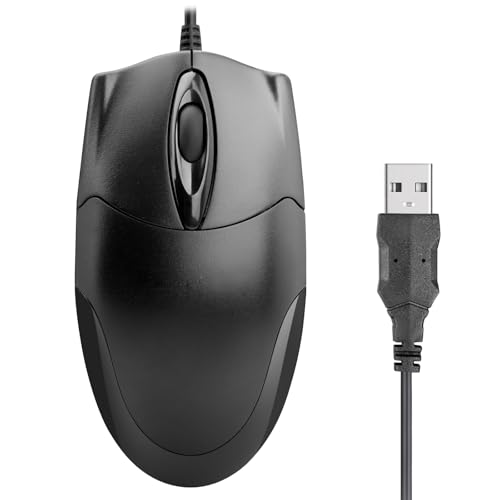
The ONE-UP stays refreshingly plain, and that suits office desks where you want a mouse that just sits there and works. The 1000 DPI optical sensor is a straightforward fit for browsing, documents, and everyday cursor control, especially on Windows or Mac laptops and desktops.
Its ambidextrous shape matters more than the spec sheet looks. Left-handed and right-handed users both get a comfortable grip, though the trade-off is that this kind of uncomplicated wired mouse will not feel as feature-rich as the wegear.
Strong Points
- Three-button layout keeps learning time low.
- USB wired connection removes charging and pairing steps.
- Ambidextrous shape helps left-handed and right-handed use.
- 1000 DPI suits routine office work and web tasks.
Small Caveats
- Wired use keeps the cable on your desk.
- Basic button count limits shortcut-heavy workflows.
- Best for routine control, not precision gaming-style needs.
Core Details
Made For
Home-office workers who want a low-fuss wired mouse for typing, browsing, and spreadsheets will feel right at home with this one.
Another Choice May Suit
wegear USB Wireless Mouse 2.4GHz Cordless Black makes more sense for commuters who want cable-free movement and extra buttons.
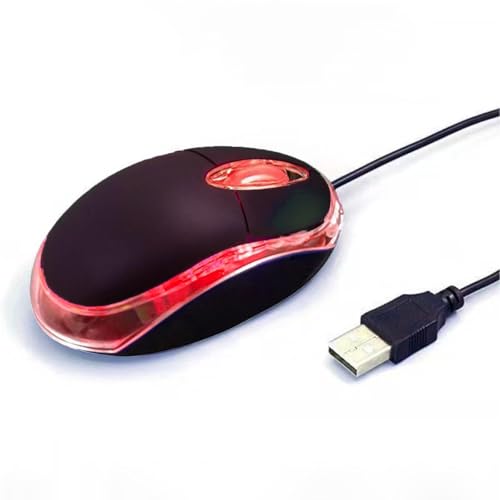
Small mice can be awkward, but this Yadojingcn model keeps the profile tight for school bags, travel sleeves, and shared computer stations. The LED optical design and ergonomic shaping are aimed at comfort over long sessions, which is helpful for kids or anyone with a smaller hand.
Compared with the fuller-bodied ONE-UP, this one feels like a better match for compact setups where desk space matters. The trade-off is obvious enough, a mini mouse often asks your hand to stay a little closer together, so larger hands may want a roomier shape.
Highlights
- Mini size slips into tight desk and bag spaces.
- Wired USB use is easy to set up on school or home machines.
- Ergonomic shaping aims to reduce hand strain during longer sessions.
- Works well for younger users and secondary computers.
Areas To Watch
- Mini sizing may feel cramped for larger hands.
- Wired use keeps movement tethered to the port.
At A Glance
Built With In Mind
Students, younger users, and travelers who want a compact wired mouse should feel comfortable with this shape.
Swap It Out When
Guiheng Wired mini Mouse USB Ergonomic Black is a better fit for anyone who wants a similarly small mouse with right-or-left-hand use in mind.
Mofkirg keeps the formula classic, which is a fair approach for desks that need comfort more than novelty. The ergonomic shell follows the hand’s natural curve, and that usually matters most during long office stretches, especially when you are living in documents and browser tabs.
Unlike the mini Yadojingcn, this one is built for a more traditional feel, so your palm gets a fuller resting point. The honest read is that it should suit everyday office use very well, though users chasing shortcuts or wireless freedom will probably want a different style.
Upsides
- Traditional wired setup is easy to trust for desk use.
- Ergonomic curve supports more relaxed hand placement.
- Three-button layout keeps day-to-day use simple.
- 1000 DPI fits general browsing and office work.
Softer Spots
- Wired use leaves less room to roam.
- Basic feature set may feel plain for power-heavy shortcuts.
Details At A Glance
Right Fit For
Desk workers who want a comfortable, no-drama mouse for routine office tasks are the best match here.
Look Elsewhere When
wegear USB Wireless Mouse 2.4GHz Cordless Black suits anyone who wants more buttons and a wireless setup.
Rii keeps things portable with a 2.4G wireless setup and a compact body that suits office carry, coffee-shop work, or a laptop bag you use every week. The included USB dongle means setup should feel straightforward, which matters more than glossy extras when you just want to get moving.
Compared with the wired picks above, this one saves you from cord clutter and gives a neater travel kit. The trade-off is that wireless convenience adds one more piece to keep track of, so it rewards people who already have a habit of packing accessories together.
Bright Spots
- Wireless design keeps a travel workspace tidy.
- USB dongle setup is simple for routine laptop use.
- Compact size works well in bags and small work zones.
- Good match for office, laptop, and home carry.
Things To Consider
- You’ll need to keep track of the dongle.
- Wireless convenience adds one more thing to pack.
Core Details
Whose Shelf It Belongs On
Travel-focused users and laptop workers who want a simple wireless mouse for bags and shared desks are a natural fit.
Where A Sibling Pick Shines
Amazon Basics 3-Button USB Wired Mouse Black suits you better when a tethered setup feels easier to manage.
This Amazon Basics mouse is about as straightforward as office control gets, with three buttons and responsive tracking for ordinary navigation. That simplicity can be a relief on shared computers or backup desks, where you want a mouse that behaves without asking for much attention.
It sits close to the ONE-UP in spirit, though this one leans even harder into no-frills utility. The trade-off is obvious, you do not get extra controls or a wireless setup, but you do get a clean plug-and-play routine that many people still prefer.
Best Bits
- Three-button layout stays easy to learn.
- Plug-and-play setup keeps installation simple.
- Responsive tracking supports everyday browsing and office tasks.
- Fits well as a spare mouse for home or work.
Minor Gripes
- No extra buttons for shortcuts.
- Wired design keeps the cable in play.
Technical Sheet
Perfect Match For
Anyone who wants a simple backup mouse for everyday navigation, office work, or a second computer will appreciate this one.
Where The Extra Money Goes
wegear USB Wireless Mouse 2.4GHz Cordless Black costs more because it adds buttons, wireless control, and adjustable speed settings.
Guiheng follows the mini-mouse path, but it adds right-or-left-hand use, which makes it a practical fit for shared spaces and people who do not want to think about hand orientation. The durable-click idea also points toward a mouse that should hold up to daily school or office tapping, though the compact body still keeps the overall feel light.
Compared with the Yadojingcn mini mouse, this one stands out mainly through ambidextrous use. That makes it a sensible spare for Chromebook carts, notebook stations, or any setup where multiple people may grab the same mouse.
Positives
- Ambidextrous shape helps both hand orientations.
- Mini size is easy to store and carry.
- Wired connection keeps setup simple.
- Durable-click focus suits repeat daily use.
Room For Improvement
- Mini sizing may feel tight for larger hands.
- Wired format limits freedom of placement.
Feature Card
Best Suited To
Shared desks, school setups, and left-handed or right-handed users who want a small wired mouse are the clearest match here.
Not Your Match When
Rii Wireless Mouse 2.4G Portable Computer Mice Black is the better call for anyone who wants wireless movement in a travel bag.
Afaartcci brings the most flexibility in the group, with Bluetooth 5.2, a 2.4GHz USB receiver, and a rechargeable design that suits a desk with multiple devices. The silent-click angle also makes sense in quiet rooms, shared offices, or late-night laptop work where loud tapping gets old fast.
Unlike the simpler wired picks, this one asks more of you in return for more convenience. You cannot use both connection modes at once, and the receiver stores inside the mouse, so it rewards people who like tidy setups and do not mind managing device switching.
What We Like
- Bluetooth and 2.4GHz options suit different devices.
- Rechargeable design cuts down on battery swaps.
- Silent click feel works well in shared rooms.
- Portable shape fits laptop and tablet carry.
Trade Offs
- You can use only one mode at a time.
- The USB receiver lives inside the mouse, so it needs a little attention during packing.
- Multi-device use adds a bit more setup than a basic wired mouse.
Quick Facts
Who Should Grab It
People who move between laptops, tablets, and mixed desk devices will get the most from this flexible wireless mouse.
Where Shoppers Go Wrong
Amazon Basics 3-Button USB Wired Mouse Black is a smarter fit for anyone who wants a simpler setup without mode switching.
How To Choose The Right Inexpensive Computer Mouses
Match The Mouse To Your Desk Habit
Daily laptop movers usually care most about connection type, size, and carry comfort. Wireless models like wegear, Rii, and Afaartcci keep bags cleaner, while wired picks such as ONE-UP, Mofkirg, Amazon Basics, Guiheng, and Yadojingcn avoid charging and receiver management.
Desk-bound users often prefer the wired route because it removes one more thing to remember. That matters in offices, study spaces, and shared homes where a mouse may stay plugged in for months at a time.
Comfort Starts With Shape, Not Just Price
Ergonomic means the mouse is shaped to fit your hand more naturally, but that does not mean every ergonomic mouse feels the same. Mofkirg aims for a fuller palm rest, ONE-UP keeps an ambidextrous profile, and the mini models from Yadojingcn and Guiheng trade size for easier storage.
Hand size changes everything here. Smaller hands may like compact shells, while larger hands usually feel better on a more traditional body that gives the fingers room to settle.
Buttons And DPI Change Daily Use
DPI, or dots per inch, is a pointer-speed setting, not a quality score. Lower settings such as 1000 DPI on ONE-UP, Mofkirg, and Amazon Basics feel calm for documents, while the wegear’s five-step range up to 4000 DPI offers more control for mixed tasks.
Extra buttons can help with shortcuts, but only when you plan to use them. Six-button designs make more sense for busy multitaskers than for people who mostly browse, click, and scroll.
Think About Device Mix Before You Choose
Windows and Mac compatibility appears across much of this list, but connection style still shapes the experience. A 2.4GHz receiver works well for laptop workstations, while Bluetooth, like on Afaartcci, suits you better when ports are scarce or shared across accessories.
For homes with more than one computer, the safer path is usually the mouse that solves the most common task with the least setup. That simple rule keeps the purchase from feeling overcomplicated later.
Things Worth Knowing Before You Choose
Common Shopping Slip Ups
The easiest mistake is treating every low-cost mouse like the same thing. A mini body can feel neat in a backpack, but it may frustrate larger hands, and a wireless model can be inconvenient when you’d rather avoid dongles and charging.
Another miss is focusing only on button count or DPI. Those details matter, yet the real comfort question is usually how the shell fits your hand during an ordinary afternoon of email, tabs, and scrolling.
Why Top Tier Costs More
Higher-tier models usually spend more on convenience, finish, and multi-device flexibility. In this group, that means features like Bluetooth plus 2.4GHz switching, rechargeable power, quieter clicks, and adjustable pointer speed.
You tend to feel the difference most in mixed-device homes and mobile work setups. A basic wired mouse can still be the smarter call for a stationary desk, but extra spend makes sense when your mouse has to do more than one job.
Closing Thoughts
You have a lot of workable choices here, and the right one depends less on the word “cheap” than on how you use your computer day to day. For simple desks, Amazon Basics or ONE-UP keep life easy, while wegear and Afaartcci make more sense once wireless flexibility matters. Compact models from Yadojingcn and Guiheng help in smaller spaces, and Rii stays useful for travel. Pick the one that fits your routine, and the rest tends to take care of itself.
