
Choosing the right mouse sounds minor until your wrist, desk space, or travel bag starts arguing back. This roundup focuses on models that suit daily office work, laptop use, shared family computers, and longer sessions where shape and connection style matter more than flashy extras.
You’ll see compact Bluetooth options, full-size designs, and a trackball pick for tighter setups. The goal is simple, help you match the mouse to how you actually work, not just to a spec sheet.
Quick Look At Our Top Picks
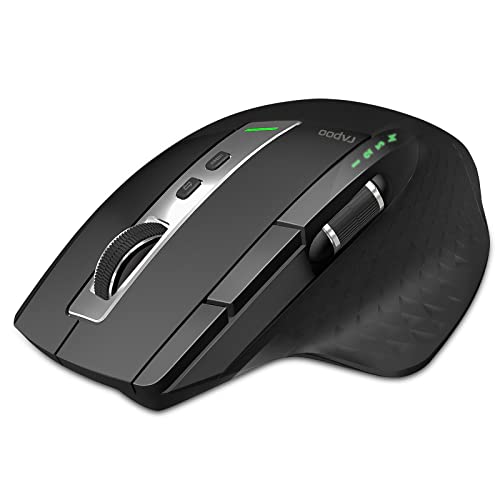
Rapoo Bluetooth Wireless Mouse 4 Adjustable DPI Rechargeable Multi-Device

Dell MS3220 Mouse

SABLUTE Wireless Mouse for Laptop Quiet Compact Portable USB-C Adapter M41

Lenovo Professional Wireless Laser Mouse

Logitech M240 Compact Silent Bluetooth Wireless Mouse Rose

WL300 Bluetooth Mouse Silent Wireless Mice Cordless Computer Mouse Grey

Logitech M510 Full Size Ambidextrous 2.4 GHz Wireless Mouse
welspo Wireless USB Handheld Finger Trackball Mouse
More Details On Our Top Picks
Rapoo leans into flexibility in a way that makes sense for a desk covered by more than one machine. Three Bluetooth pairings plus the USB connection give you room to move between a laptop, desktop, or tablet without juggling multiple mice, and the side roller adds another layer of control for long spreadsheets or horizontal timelines.
The rechargeable 800mAh battery and USB-B charging are old-school in the best sense, because they keep the routine simple once you’ve got the cable nearby. You may notice the driver-dependent programming takes a little setup, but that trade-off is fair for anyone who wants eight customizable buttons instead of a basic shell.
What We Like
- Three Bluetooth paths plus USB make switching between devices feel natural.
- Eight programmable buttons help you cut down on repetitive desk work.
- The side roller is handy for wide sheets, editing timelines, and side-to-side navigation.
- Rechargeable power keeps you from feeding it disposable cells.
- The low-battery light gives you an early heads-up before the mouse quits on you mid-task.
Things To Consider
- USB-B charging feels dated next to newer USB-C gear.
- Driver-based customization adds setup time, especially on a shared computer.
- The feature set can feel like more than casual users need.
Feature Rundown
Who It Suits Best
Desk workers who bounce between multiple screens and want a mouse with real shortcut potential will get the most from this one.
A Better Fit Elsewhere
Lenovo Professional Wireless Laser Mouse suits you better when you want a simpler full-size shape without the learning curve of programmable controls.
After Rapoo’s multi-device flexibility, Dell MS3220 feels refreshingly straightforward. That kind of plain approach works well for office desks where you want the cursor to behave and the setup to stay out of the way.
The black finish keeps it low-key, which is useful in a shared workspace or a home office that already has enough visual noise. The trade-off is obvious, because there are no flashy extras in the source details, so you’re mainly paying for a simple mouse that should fit the basic job cleanly.
Highlights
- Clean, no-frills design suits workstations that need a quiet visual profile.
- The simple format keeps daily use easy for basic office tasks.
- Its compact feature set should feel familiar to anyone replacing an older standard mouse.
Room For Improvement
- No extra controls or advanced ergonomics are called out in the source.
- The sparse feature list means it may feel plain beside Rapoo or WL300.
- You get less variety than the more flexible multi-mode picks above.
Core Details
Made For
Office users who want a straightforward mouse for routine navigation and don’t need a pile of buttons will feel right at home here.
Swap It Out When
Rapoo Bluetooth Wireless Mouse 4 Adjustable DPI Rechargeable Multi-Device suits you better when you need device switching and programmable controls for heavier multitasking.
SABLUTE shifts the focus from desk permanence to portability, and that’s exactly where it makes sense. The slim body, quiet click design, and included USB-C adapter line up well for laptop bags, campus backpacks, and coffee-shop work sessions where clutter gets old fast.
The 3-level DPI control gives you a little room to tune pointer speed, while sleep mode helps stretch battery use during stop-and-start days. The honest read is that this kind of compact shell may feel a bit small for large hands, but frequent travelers and students usually care more about packability than extra bulk.
Best Bits
- The slim build slips into a bag without hogging space.
- Quiet clicks suit libraries, shared offices, and late-night work.
- USB-C adapter support helps on newer laptops with fewer ports.
- Three DPI levels let you tune the pointer for different screen sizes.
- Sleep mode is useful for casual use that comes in bursts throughout the day.
Small Caveats
- The compact shape may feel cramped during long desktop sessions.
- Travel-friendly gear can be easier to misplace in a crowded bag.
- The source emphasizes portability more than advanced control features.
Technical Sheet
Right Fit For
Traveling professionals, students, and hybrid workers who value a small mouse they can carry every day will get the most from it.
A Better Fit Elsewhere
Logitech M510 Full Size Ambidextrous 2.4 GHz Wireless Mouse works better for longer desk sessions when hand support matters more than packing size.
Lenovo’s entry stands out because it leans into laser tracking and a professional full-size shape rather than travel-first minimalism. That combination suits a fixed desk setup well, especially for you if your hand tends to prefer a broader body during long stretches of work.
Compared with SABLUTE’s compact shell, this one looks more settled in place and less like a mouse you tuck into a pocket. The trade-off is simple, since a full-size design usually asks for a bit more desk room, but that’s often a fair exchange for comfort during all-day use.
Upsides
- Laser tracking is a good fit for a controlled desk environment.
- The full-size shape suits longer sessions better than ultra-compact travel mice.
- Professional styling blends easily into office setups.
Areas To Watch
- Full-size mice take up more storage space in a laptop bag.
- The source doesn’t list extra buttons or advanced shortcuts.
- You may prefer something smaller for frequent commuting.
Details At A Glance
Whose Shelf It Belongs On
Office-focused users who want a comfortable mouse for a dedicated workstation will appreciate this one most.
Where A Sibling Pick Shines
Rapoo Bluetooth Wireless Mouse 4 Adjustable DPI Rechargeable Multi-Device makes more sense for you when device switching and programmable controls matter more than a settled full-size shape.
The M240 keeps things lean, with Bluetooth connectivity, quiet clicks, and no USB receiver to lose in a bag. That makes it a sensible companion for commuting, library work, or a clean laptop setup where you’d rather not leave a dongle hanging off the side.
Its three buttons keep the layout straightforward, and the 18-month battery claim points toward low-maintenance ownership for routine use. The catch is obvious, since a non-customizable control set won’t suit you as well as Rapoo or WL300 if you rely on shortcuts all day.
Positives
- Bluetooth-only design keeps the setup simple and reduces dongle clutter.
- Quiet clicks suit shared desks and late-night sessions.
- The compact body slips easily into a laptop sleeve or pouch.
- Three-button layout stays easy to learn and use.
- The long battery rating supports low-maintenance everyday ownership.
Points To Note
- The three-button design leaves little room for custom shortcuts.
- Compact mice can feel less settled in larger hands.
- Bluetooth pairing depends on the device behaving well with wireless accessories.
Feature Card
The Right Fit
Commuters, frequent travelers, and minimal desk setups are the clearest match for this compact Bluetooth mouse.
Reach For A Different Pick When
WL300 Bluetooth Mouse Silent Wireless Mice Cordless Computer Mouse Grey suits you better when six buttons and a sculpted grip matter more than absolute simplicity.
WL300 sits in the middle ground nicely, with quiet clicking, six buttons, and a sculpted grip that should feel more settled than the flatter travel mice. For work and travel alike, that mix gives you a little more control without pushing the mouse into bulky territory.
The tri-mode setup is the real hook here, because wired, 2.4G wireless, and dual Bluetooth cover a lot of practical situations. You may find that breadth especially useful in a home office with multiple devices, though the extra flexibility does mean more modes to remember over time.
Bright Spots
- Tri-mode connectivity gives you wired, wireless, and Bluetooth options.
- Six buttons offer more control than simple three-button designs.
- The sculpted grip should feel steadier during longer sessions.
- Quiet clicks work well in shared spaces and evening work sessions.
- Battery-life claim supports lower-maintenance daily use.
Honest Caveats
- Multiple connection modes add a little setup and switching complexity.
- The fuller control set may feel unnecessary for minimal laptop use.
- More moving parts in the routine can mean more to keep track of.
Core Details
Best Suited To
Hybrid workers and home-office users who want multiple connection paths in a single mouse will get the most from it.
Look Elsewhere When
Logitech M240 Compact Silent Bluetooth Wireless Mouse Rose is the better fit for you when simplicity and a smaller body matter more than extra modes.
The M510 brings a full-size shape to the table, and that matters more than it sounds like it should. A broader shell usually gives your hand a calmer resting position during long office blocks, and the ambidextrous design helps it feel less picky about who uses it.
The tilt-to-scroll function is the detail that separates it from plain office mice, especially for spreadsheets or documents that stretch across the screen. Compared with Dell’s stripped-back MS3220, this one feels better suited to people who spend real time at a desk and want a few more useful tools built in.
Reasons To Buy
- Full-size construction gives the hand more room than compact travel mice.
- Ambidextrous shape works for left- and right-handed use.
- Tilt scrolling is useful for wide spreadsheets and side-to-side navigation.
- Long battery claim supports low-maintenance everyday ownership.
- USB-A receiver support keeps setup familiar on older and newer workstations.
Minor Gripes
- The receiver adds one more piece to carry or store.
- Full-size mice take up more room in a laptop bag.
- It feels more office-oriented than travel-oriented.
Quick Facts
Who Will Love This
Desk workers who prefer a roomy, familiar mouse with a useful scroll feature will feel comfortable here.
Another Choice May Suit
Lenovo Professional Wireless Laser Mouse is the better fit for you when you want laser tracking in a similar full-size category but without the same emphasis on tilt scrolling.
welspo takes the odd-one-out route with a finger trackball layout, and that can be a real advantage on cramped desks. Because the cursor moves through the ball rather than broad hand motion, it can feel more controlled in tight spaces or on setups where you don’t have much room to spare.
The ambidextrous design keeps it accessible for left- and right-handed use, while the USB interface keeps the connection straightforward. The trade-off is that trackball handling has a learning curve, so this one suits patient users better than anyone who wants an instant familiar feel.
Standout Traits
- Trackball control helps conserve desk space.
- Ambidextrous design works on either side of the desk.
- USB connection stays simple for office and home setups.
- The handheld form can feel handy in compact work areas.
Softer Spots
- Trackball control usually takes time to get used to.
- The unusual shape may not suit every hand preference.
- Cleaning around a trackball can take a little extra attention over time.
Feature Snapshot
Built With In Mind
People working at very tight desks, shared stations, or compact laptop setups will get the most benefit from this trackball design.
Where A Sibling Pick Shines
Logitech M510 Full Size Ambidextrous 2.4 GHz Wireless Mouse is the better fit for you if you want a more familiar full-size shape for daily office work.
How To Choose The Right Laser Computer Mouses
Match The Shape To Your Day
Full-size mice suit long desk sessions because your hand has room to rest, and the Logitech M510 shows that clearly with its ambidextrous shell and tilt scrolling. Compact mice make more sense for laptop bags, café tables, and smaller work surfaces, where the SABLUTE and Logitech M240 keep the footprint light.
The real question is not whether a mouse looks premium, but whether it supports the way you move through the day. A mouse that fits your routine feels almost invisible, which is exactly what good office gear should do.
Pick The Right Connection Style
Bluetooth keeps your bag cleaner and works well with modern laptops, while 2.4 GHz wireless usually relies on a tiny receiver for a steadier plug-and-play routine. Rapoo and WL300 give you multiple paths, which helps in mixed-device homes or offices where one connection style never covers every job.
Track the ports on your computer before you commit. A USB-C adapter matters on newer machines, while a USB-A Nano receiver still fits many older and shared setups with less fuss.
Look At Control Before Color
DPI, or dots per inch, is the sensitivity setting that changes how fast the pointer moves across the screen. Higher tiers often add extra buttons, side rollers, or tilt scrolling, and that can save time for spreadsheets, photo work, and web-heavy office tasks.
Basic mice stay easier to learn, though, and that simplicity can be the better choice for students or occasional users. More controls only pay off when you plan to use them often enough for the added complexity to feel natural.
Think About Noise, Maintenance, And Travel
Quiet-click designs are helpful in shared rooms, and compact bodies are easier to pack, but both can come with trade-offs. Smaller mice can feel cramped during long use, while trackball designs like welspo ask for a little more patience during the learning phase.
Battery access matters too, whether you prefer rechargeable power or a long battery claim that keeps maintenance low. For most work setups, the right answer is the one that fits your carry habits, your desk size, and the amount of control you actually use.
Things Worth Knowing First
Where Shoppers Go Wrong
A common mistake is chasing extra buttons without thinking about daily use. A mouse packed with features can feel busy in a simple email-and-browser routine, while a compact model can become tiring if your hand is larger than the shell.
Another easy miss is skipping the connection check. Bluetooth-only designs suit some laptops beautifully, but a receiver-based mouse or a tri-mode model may serve you better on older desktops, shared office machines, or setups that move between rooms.
The Upgrade Payoff
More expensive mice usually spend money on shape, switching flexibility, and control features rather than raw size alone. That is why the Rapoo and WL300 stand out, since multi-device support and extra buttons can save time in real workday use.
You usually feel the upgrade most in long sessions, not in quick pointer movement. If your mouse is a tool you touch for hours, paying for a better grip, quieter clicks, or broader connectivity often makes more sense than buying the simplest shell available.
Final Thoughts
The best choice here depends on how you work, not just how a listing reads. Rapoo suits a busy desk, the Logitech M240 keeps travel simple, and the Logitech M510 makes long office sessions easier to live with. For a tighter budget of attention rather than money, the plain Dell MS3220 may still be enough. Pick the shape and connection that match your day, and you’ll feel the difference quickly.
